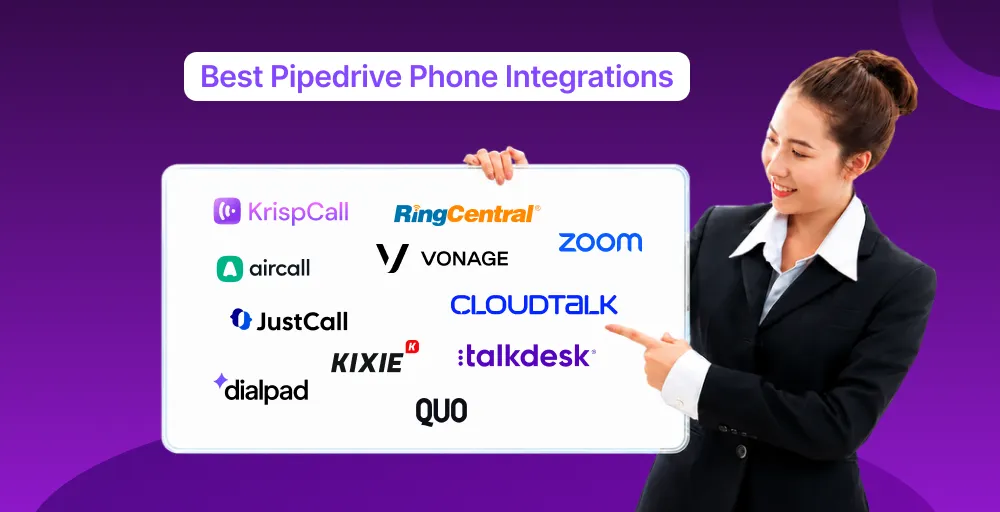
After reviewing leading Pipedrive phone integrations based on integration depth, automation, pricing, AI features, and overall value, we’ve identified the best solutions for different business needs. Whether you’re looking for a business phone system for sales teams, support teams, or enterprise call centers, these are our top recommendations.
TL;DR
- KrispCall: Best overall for small businesses and remote teams needing native Pipedrive integration, AI features, and transparent pricing.
- Aircall: Best for growing mid-sized sales teams that want powerful automation and conversation intelligence.
- CloudTalk: Best for sales process and support teams requiring deep CRM sync, AI call summaries, and international calling.
- Kixie: Best for high-volume outbound sales teams using power dialers and SMS outreach.
- Zoom Phone: Best for businesses already using the Zoom ecosystem for phone calls and video conferencing.
- RingCentral: Best for large organizations that need a unified business phone system with voice, messaging, and advanced analytics.
What Makes a Great Pipedrive Phone Integration?
A great Pipedrive phone integration instantly logs calls and texts directly into your pipeline as activities. It eliminates manual data entry by automatically syncing call recordings, transcripts, AI summaries, and contact details with the exact person or deal, freeing your team to focus entirely on selling.
The best integrations go beyond simple data logging. Consider these core capabilities when evaluating a tool:
- Click-to-call: Reps should be able to instantly dial customers with one click directly from Pipedrive deal views or contact lists.
- Automatic call logging: Every call, inbound or outbound get recorded as an activity on the right deal or contact without a rep touching a keyboard.
- Screen pop: When a call comes in, the matching Pipedrive contact and deal history pop up automatically, giving reps context before they say hello.
- Two-way contact sync: Details like call duration, outcome labels, and SMS history should sync bidirectionally in real-time.
- Automatic activity creation: Calls generate a logged activity or task in Pipedrive’s timeline, keeping the deal record complete without manual notes.
- Call recording sync: Recordings attach directly to the relevant deal or contact so managers and reps can review calls without leaving the CRM.
- AI transcription: Calls get automatically transcribed into searchable text, useful for coaching and compliance.
- AI call summaries: Beyond a raw transcript, some tools generate a short summary of what was discussed and next steps, saved straight to the deal.
- SMS sync: Text conversations tied to a contact log into Pipedrive the same way calls do.
- Workflow automation: Calls or texts can trigger Pipedrive automations, like moving a deal stage or assigning a follow-up task.
- Mobile support: Reps can make and receive Pipedrive-logged calls from a phone app, not just on a desktop.
- Analytics & reporting: Call volume, talk time, and outcomes roll up into dashboards, either in the phone tool or pushed into Pipedrive reporting.
- Power dialer: Automatically dials through a list of Pipedrive leads back-to-back, cutting downtime between calls.
- Pipeline activity updates: Completed calls can automatically mark activities as done or trigger the next step in a sales sequence.
Does Pipedrive Have a Built-in Phone System?
No, Pipedrive does not have a built-in phone system. However, its features, called Smart Caller, allow reps to click-to-dial and conduct browser-based voice calling directly from the CRM without needing extra software. However, it operates under notable functional constraints that often require you to expand your setup with third-party tools.
- Built-in Pipedrive calling: Pipedrive features a native, browser-based VoIP tool called Smart Caller for direct desktop dialing. It allows sales reps to make outbound calls instantly by clicking phone numbers inside contact profiles.
- Web-to-mobile calling: The web-to-mobile feature bridges your desktop CRM and your personal smartphone. Clicking a number on your computer triggers a mobile notification that routes the call through your cellular carrier.
- Calling credits: Smart caller operates on a pay-as-you-go model rather than a flat monthly fee. Users must pre-purchase credit packages; minutes are deducted based on the destination country.
- Marketplace integrations: For advanced features, Pipdedrive relies on its App Marketplace to connect external phone systems. Top-rated platforms like KrispCall can sync seamlessly to handle heavy call volumes.
- Strengths: The system excels at manual one-click dialing and automatically logging call durations to timelines. It also displays instant screen pop-ups to identify recognized contacts during incoming rings.
- Limitations: It lacks high-volume sales tools like power dialers, native SMS, and automated AI call transcriptions. Additionally, its inbound calls routing options are highly restrictive.
How We Chose the Best Pipedrive Phone Integrations?
We have chosen the best Pipedrive phone integrations by evaluating the depth of Pipedrive integration, pricing transparency, G2 and marketplace ratings, feature breadth, and international calling coverage, and by cross-referencing marketplace listings, G2 reviews, and vendor pricing pages.
Why Trust Our Software Reviews
Our recommendations are based on publicly available pricing pages, verified G2 and Pipedrive Marketplace reviews, and direct comparison of each provider’s documented integration capabilities. Our editorial team follows a rigorous research and review process to maintain high-quality, up-to-date context.
You can learn more about how we research, evaluate, and update our software reviews by visiting our content update methodology and software review methodology. We are also committed to editorial independence and transparency, as outlined in our content integrity statement, ensuring our reviews remain unbiased, evidence-based, and focused on helping readers make informed software decisions.
11 Best Pipedrive Phone Integrations in 2026
To streamline your sales pipeline, the best Pipedrive phone integrations eliminate manual data entry by automatically logging call records, recordings, and transcripts.
The top phone integrations for Pipedrive are highlighted below based on their primary use case, starting VoIP features, and pricing:
| Phone Systems | Best for | Staring Price (Annually) | Standout Advantage | G2 Rating |
| KrispCall | Budget-conscious small teams | $12 /user/month | Unified callbox, two-way sms marketing | 4.5/5 |
| Aircall | Growing mid-sized sales teams | $30 /user/month | AI conversation intelligence, Live activity dashboard | 4.4/5 |
| RingCentral | Larger teams needing unified comms | $20 /user/month | Voice switching, multi-level IVR | 4.1/5 |
| JustCall | Sales teams wanting AI calling/texting | $29 /user/month | Sales dialer, live call monitoring | 4.3/5 |
| Kixie | SDR/BDR outbound teams | Contact sales | One-click voicemail drop, live call coaching | 4.8/5 |
| Dialpad | AI-first support & sales teams | $15 /user/month | Dialpad AI Transcriptions, live sentiment tracking | 4.4/5 |
| Vonage | Teams wanting an established telecom brand | $13.99 /line/month | Omnichannel communication, Click-to-dial | 4.3/5 |
| Quo | Team shared numbers | $15 /user/month | Sona AI agent, Voicemail to text | 4.7/5 |
| CloudTalk | Sales & support teams | $27 /user/month | Power & Parallel Dialers, VoiceAgent | 4.4/5 |
| Zoom | Team already using Zoom | $14.16 /user/month | Zoom AI companion, One-Click meeting | 4.5/5 |
| Talkdesk | Larger contact centers | $85 /user/month | Workforce management, Taldesk Navigator | 4.4/5 |
1. KrispCall — Best for remote and distributed sales teams
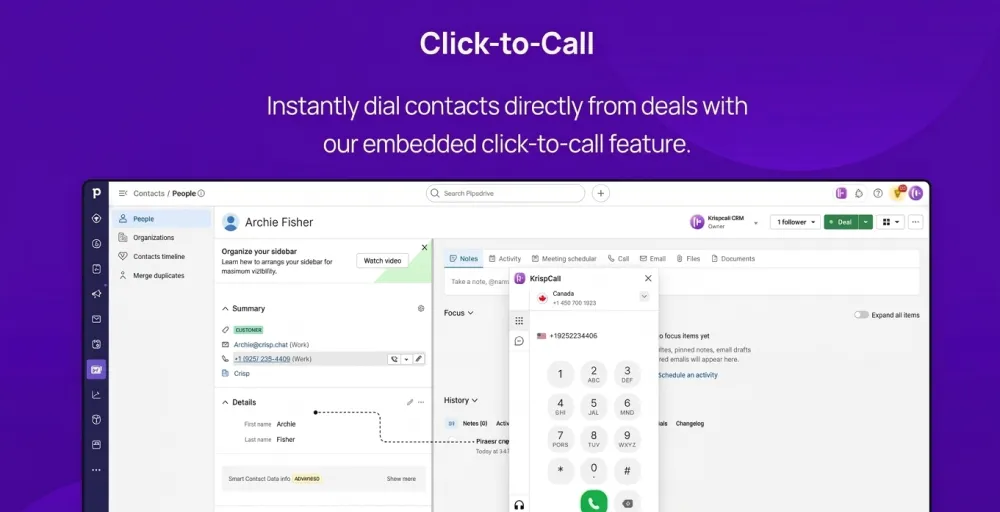
KrispCall is a cloud telephony system built for modern, geographically distributed sales teams that require global reach and shared workspaces. It offers local, mobile, and toll-free virtual phone numbers in more than 100 countries, allowing remote reps to instantly build a local presence from any web browser or mobile device.
The provider connects Pipedrive Marketplace to enable two-way data syncing and a floating dialer widget inside the CRM dashboard. It automatically logs every call, voicemail, and SMS conversation straight into the contact’s timeline.
Key Features
- Unified Callbox: Centralizes all calls, texts, voicemails, and internal team notes into a single, collaborative timeline dashboard.
- Power Dialer: Automatically chains outbound calls back-to-back from your pipeline list to maximize agent talk time.
- Live Call Monitoring & Whispering: Allows managers to listen in on active calls and coach agents in real time without the client hearing.
- Multi-Level IVR: Creates structured automated phone menus to route incoming leads directly to the appropriate regional sales team.
- Two-Way SMS Marketing: Sends personalized bulk text messages and tracks client replies directly from the software ecosystem.
Why it works well with Pipedrive
KrispCall eliminates data silos by instantly matching incoming numbers to Pipedrive’s customer records, displaying real-time context before an agent answers. Because it integrates seamlessly into Pipedrive’s interface via a custom floating window, reps do not lose momentum when switching browser tabs.
Worth Knowing
While KrispCall includes foundational features like an AI assistant and unlimited call recording across its standard tiers, these options are completely missing from its entry-level package. Additionally, because the software relies entirely on high-speed internet connectivity, remote teams must maintain excellent bandwidth stability to prevent latency or dropped calls.
KrispCall pricing
KrispCall follows the three simple pricing plans:
- Essential Plan: $15/user/month or $12 billed annually. Ideal for up to 5 users; includes basic global calling, primary IVR, and core CRM sync.
- Standard Plan: $40/user/month or $32 billed annually. Unlocks unlimited users, the automated power dialer, bulk SMS, and unlimited call recordings.
- Enterprise Plan: Custom quote tailored for large organizations that require public API access, dedicated account management, and custom CRM integrations.
2. Aircall — Best for mid-market and enterprise inside-sales teams
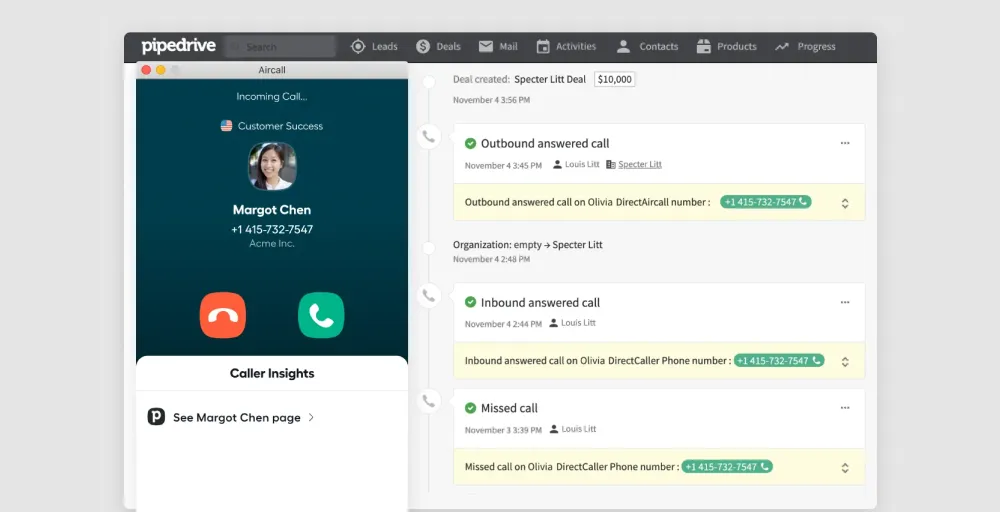
Aircall is an enterprise-grade cloud phone system engineered for rapidly scaling sales and customer success departments.
The system links seamlessly into the Pipedrive Marketplace via a 4-click setup that bridges telephone activities directly into the CRM. It manages standard data synchronization instantly, recording outbound dial records, inbound rings, unanswered call roll-overs, and text logs as pipeline activities attached to matched leads or contact deals.
Key Features
- Custom Insight Cards: Surface contextual customer fields from Pipedrive directly on the active call display frame at the very first ring.
- Aircall Power Dialer: Feeds pipeline lists directly into a background queue, letting agents auto-dial through prospective lists without leaving the screen.
- AI Conversation Intelligence: Leverages natural language processing to log automatic summaries, sentiment scores, and key discussion highlights to the CRM deal history.
- Smart Inbound Queue Callbacks: Save a caller’s queue position during peak traffic hours, allowing them to request an automated callback without dropping their place.
- Live Activity Dashboard: Grants managers real-time oversight to monitor current agent availability statuses, live service level agreements, and active call queues.
Why it works well with Pipedrive
Aircall serves as the foundational phone engine that Pipedrive’s own global internal sales teams use to hit their target daily. It maintains system hygiene by analyzing every incoming number against current database entries; if a number is not recognized, it automatically creates a new contact profile and registers a new deal activity file.
Worth Knowing
Aircall imposes a strict 3-license minimum on all retail subscriptions, making it completely unavailable to solo operators or two-person partnerships. Furthermore, many advanced optimization tools, including the outbound Power Dialer, custom integration logic, and specialized analytics components, remain restricted to higher-tier options or function exclusively as paid monthly add-ons.
Aircall pricing
Aircall pricing is structured per user per month and requires a minimum of 3 licenses.
- Essentials Plan: Starts at $40/user/month or $30 billed annually. Includes core telephony features, unlimited inbound calling, basic IVR, and native Pipedrive data sync.
- Professional Plan: Starts at $70/user/month or $50 billed annually. Extensive analytics reporting, live manager call monitoring, and full AI Assist call logging summaries.
- Custom Plan: Custom quote requiring a 25-seat baseline to access open API customization, advanced security parameters, and dedicated implementation guidance
3. RingCentral — Best for omnichannel enterprise teams and hybrid workforces
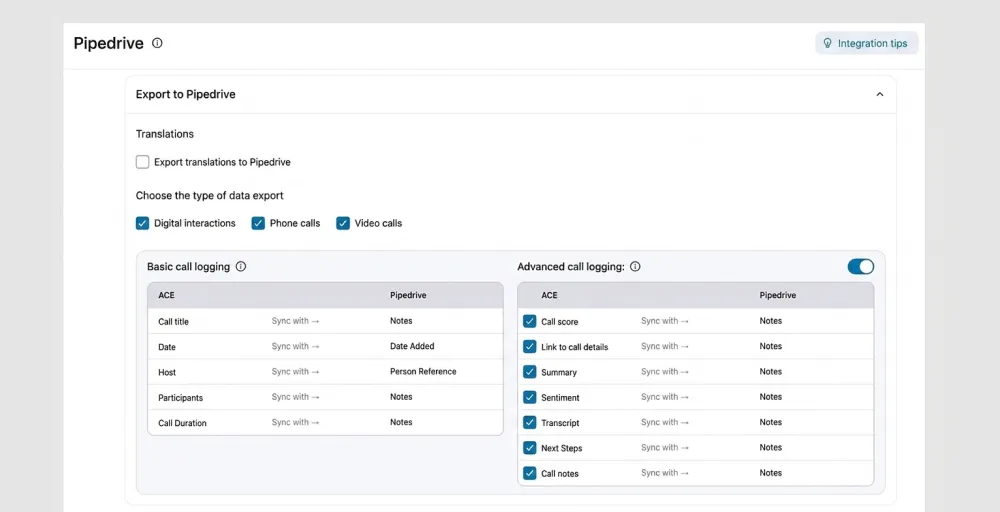
RingCentral is a robust, enterprise-grade unified communications platform designed for large, established organizations requiring a mix of voice, video, and messaging. Built on a highly reliable global infrastructure, it provides secure, compliant communications.
The platform integrates directly with Pipedrive via its official marketplace app, adding a native dialer interface to the CRM dashboard. It automates data management by capturing every call log, recording link, and digital interaction.
Key Features
- Multi-channel contact center: Merges traditional phone services, video conferencing, and team SMS messaging into a single, unified communications suite.
- Smart video/voice switching: Allows agents to seamlessly upgrade an ongoing voice call into an interactive video meeting with a single click.
- AI-Powered RingSense: Automatically transcribes entire call recordings, detects client sentiments, and isolates critical action items for sales managers.
- Advanced Multi-level IVR: Establishes complex inbound phone trees and conditional routing rules based on regional time zones or department availability.
- Omnichannel text messaging: Supports bulk SMS and multimedia MMS messaging to keep prospects engaged through their preferred channels.
Why it works well with Pipedrive
RingCentral serves as a productivity tool for large sales teams by reducing administrative tasks. When a call comes in, it retrieves client data from Pipedrive, giving reps instant context via on-screen popups. New leads automatically create deal records, and existing contacts are updated in real-time, enabling managers to access accurate performance analytics through Pipedrive’s reporting tool.
Worth Knowing
RingCentral is a complex system with many features aimed at large businesses. This makes it harder to set up and use compared to simpler sales dialers. Its layout and customization options also take longer to learn. Many useful features, such as automated SMS marketing and advanced AI transcription tools, are available only on the most expensive plans.
RingCentral pricing
RingCentral plans come in three paid options. They are:
- Core Plan: Starts at 30/user/month or $20 billed annually, includes unlimited voice calling within the US/Canada, and foundational Pipedrive integration.
- Advanced Plan: Starts at $35/user/month or $25/user/month billed annually; unlocks advanced, detailed call monitoring and deeper CRM analytics and tracking.
- Ultra Plan: Starts at $45/user/month or $35/user/month billed annually; designed for high-volume enterprise teams; includes full RingSense AI conversation intelligence.
4. JustCall — Best for sales teams wanting native calling and texting
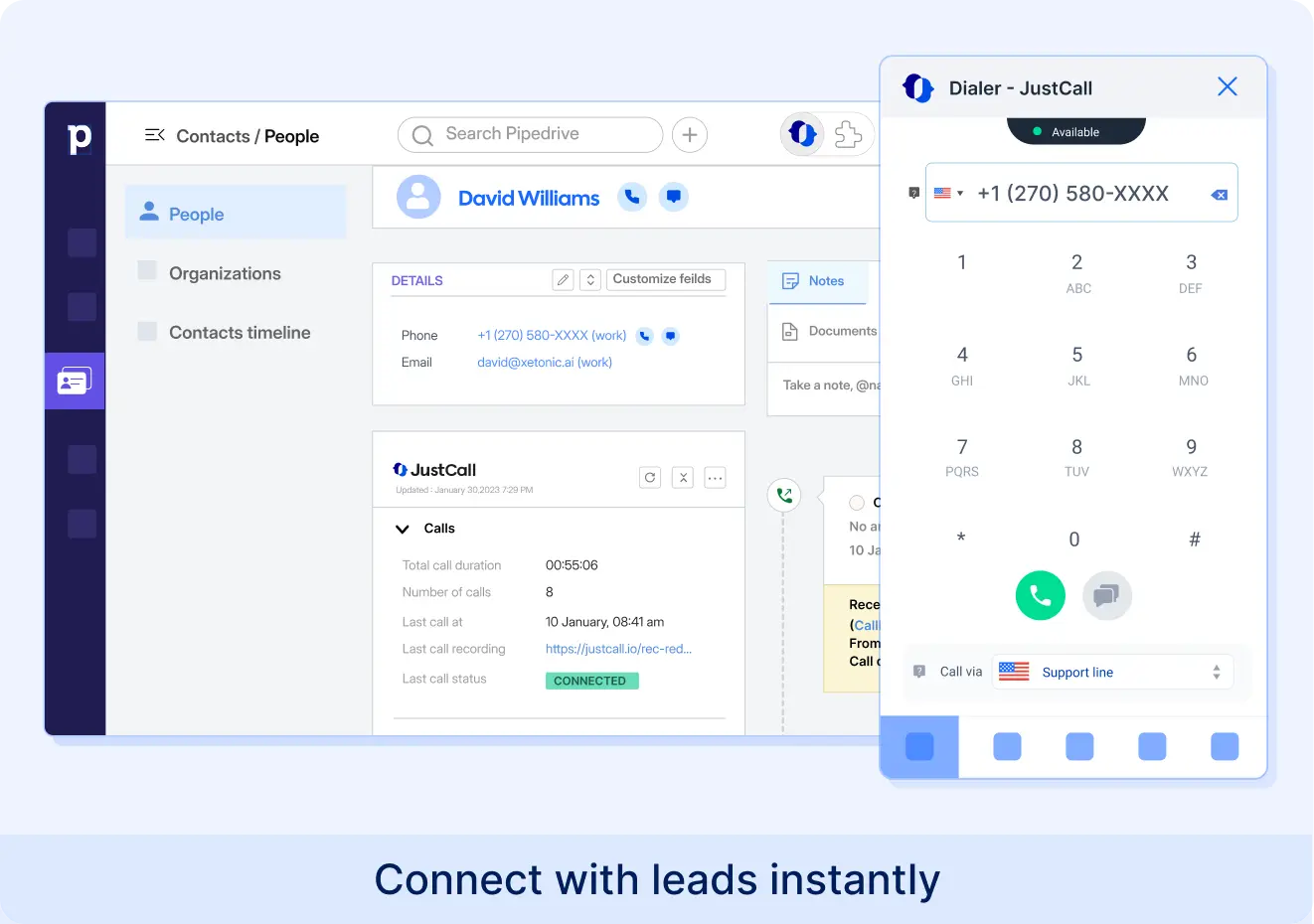
JustCall is a cloud-based communication platform designed to accelerate sales workflows through deeply integrated calling and texting. It connects with Pipedrive to eliminate manual data entry, enabling sales reps to launch text campaigns and place calls directly from their CRM dashboard.
The integration functions as a native phone system inside Pipedrive, instantly syncing all interaction history. Whenever a call or text occurs, JustCall automatically logs the activity, updates the contact timeline, and attaches call recordings to the matching Pipedrive deal.
Key Features
- Click-to-call & text: Launch calls and SMS messages directly from Pipedrive contact profiles.
- Automated activity logging: Automatically logs call details, text histories, and voicemails into CRM timelines.
- Sales dialer: Features preview, power, and predictive dialers to automate outbound sales campaigns.
- SMS & WhatsApp automation: Sends automated text messages based on Pipedrive deal-stage updates.
- Live call monitoring: Allows managers to listen, whisper, or barge into live sales calls.
Why it works well with Pipedrive
JustCall works well with Pipedrive by bridging the gap between communication and data management. It operates seamlessly as a sidebar widget, meaning reps never have to leave the Pipedrive interface to use the phone. By automating routine logging and text follow-ups based on deal stages, it drastically increases daily call volume and reduces human error.
Worth Knowing
JustCall offers local numbers in over 70 countries, making it highly scalable for international sales teams. However, advanced features such as the predictive dialer and detailed analytics are available only in their higher-tier packages.
JustCall pricing
JustCall plans come in the following pricing options:
- Team: $29 per user/month (billed annually), covers basic calling and text tracking with 2 minimum licence
- Pro: $49 per user/month (billed annually), adds call recording and core CRM integrations.
- Pro Plus: Starts at $89 per user/month (billed annually), including SMS Co-pilot, AI call scoring.
- Business: Contact sales for a minimum of 10 licenses covering unlimited calling & SMS, real-time & agent assist.
5. Kixie — Best for SDR/BDR outbound teams
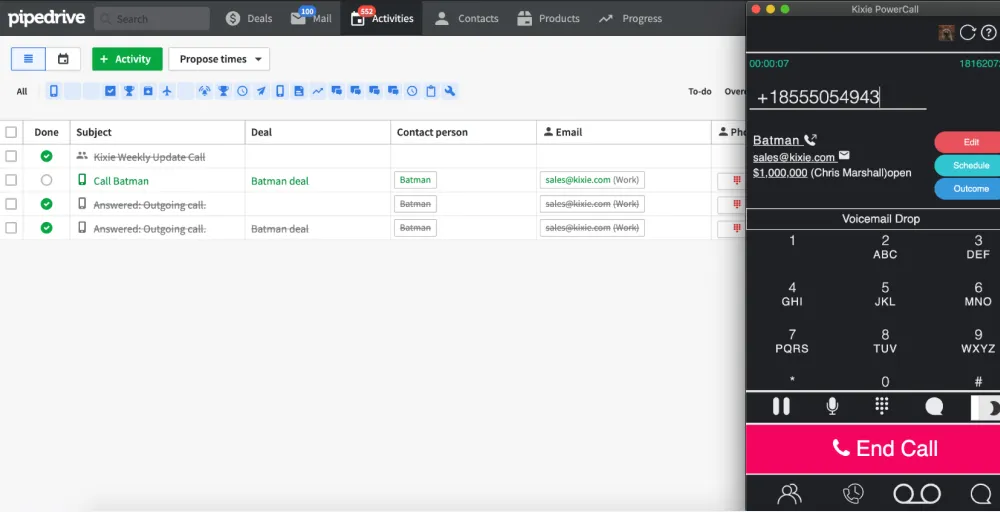
Kixie is an enterprise-grade sales engagement platform built specifically for high-volume, aggressive outbound sales environments. It integrates natively with Pipedrive via a simple API token setup, allowing SDR and BDR teams to execute multi-line speed dialing and automated texting without leaving their pipeline view.
The integration transforms the Pipedrive interface into an automated outreach hub by instantly syncing all call dispositions, text activities, and lifetime call recordings directly to corresponding deals. Its intelligent PowerCall browser extension recognizes on-screen numbers, giving reps a functional, Pipedrive-driven caller ID that triggers real-time contact data overlays during active outreach
Key Features
- ConnectionBoost local presence: Automatically displays local area codes matching the prospect’s location to increase connect rates.
- Automated activity logging: Syncs all call notes, dispositions, text history, and voicemails into Pipedrive contact timelines.
- One-click voicemail drop: Allows sales reps to instantly leave pre-recorded messages without waiting for the beep.
- Live call coaching: Enables sales managers to monitor active outbound calls, whisper advice to reps, or barge into the conversation.
- AI conversation intelligence: Leverages AI to track live phone interactions, analyze sales sentiment, and log call summaries into the CRM.
Why it works well with Pipedrive
Kixie works exceptionally well with Pipedrive because it strips away administrative friction from cold outreach workflows. Instead of bouncing between external dialers and separate tabs, SDRs can fire off automated SMS sequences or multi-line calls natively from their visual pipeline.
This deep synchronization eliminates manual data entry, ensures sales leaders have flawless activity reporting, and minimizes the risk of compliance errors or dropped leads with integrations of contact centers.
Worth Knowing
While Kixie is incredibly efficient for heavy outbound prospecting, its advanced automation and multi-line dialing features are gated behind premium tiers. It is also highly reliant on a stable internet connection; minor drops in connection stability can sometimes affect call quality during complex multi-line dialing sessions.
Kixie pricing
Kixie pricing is not publicly available; you need to contact the sales team for pricing information.
6. Dialpad — Best for AI-first sales and support teams
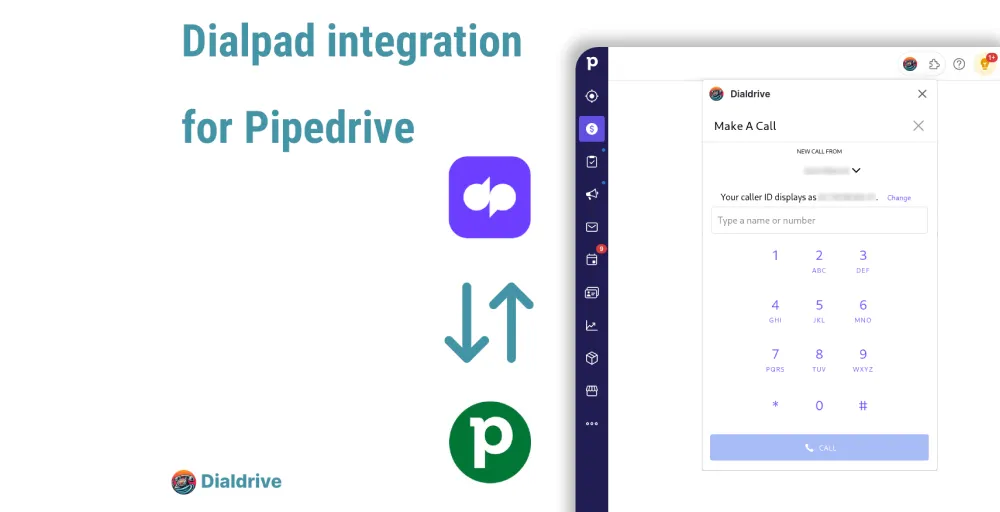
Dialpad is a unified communications platform built heavily around its proprietary “Dialpad AI” infrastructure. It allows sales organizations to manage calling, video conferencing, and messaging from a single dashboard while using real-time generative AI to analyze live calls.
The platform integrates with Pipedrive through third-party integration modules, such as the Dialdrive App on the Pipedrive Marketplace, or custom automation workflows built with Zapier’s Dialpad-Pipedrive Setup. Once linked, any incoming and outgoing calls via Dialpad launch a floating interface over the CRM, matching the contact record and writing call histories directly to the contact timeline.
Key Features
- Dialpad AI transcriptions: Automatically transcribes entire phone calls in real time and highlights action items directly inside your communication logs.
- Advanced logging sync: Syncs inbound, outbound, and missed calls into Pipedrive as custom timeline activities.
- Automatic voicemail capture: Saves audio files and text-based voicemail transcriptions cleanly beneath matching Pipedrive deals.
- Live sentiment tracking: Analyzes caller moods dynamically to notify sales managers when a rep requires live phone coaching or assistance
- Omnichannel messaging: Bundles business SMS, MMS, and team chat channels into a single platform with standard voice infrastructure.
Why it works well with Pipedrive
Dialpad integrates seamlessly with Pipedrive by automating note-taking and call data synchronization. Instead of spending time summarizing calls, sales reps benefit from Dialpad’s AI-generated summaries. This integration logs data continuously, allowing sales managers to track pipeline interactions without manual record review.
Worth Knowing
Dialpad lacks a native App Marketplace connector, and users must rely on the Dialdrive Marketplace or tools like Zapier. Advanced CRM integrations and phone support queues are available only on Pro plans and above, while the Standard plan is mainly limited to Google Workspace or Microsoft environments.
Dialpad pricing
Dialpad pricing offers the following three plans.
- Standard Plan: Approximately $15 per user/month (billed annually), providing unlimited calling, SMS, and baseline AI transcription.
- Pro Plan: Approximately $25 per user/month (billed annually), which unlocks wider third-party CRM connectivity and expanded department queues.
- Enterprise Plan: Custom quote-based pricing tailored for deployments requiring advanced single sign-on (SSO), and data export webhooks.
7. Vonage — Best for teams wanting an established telecom brand
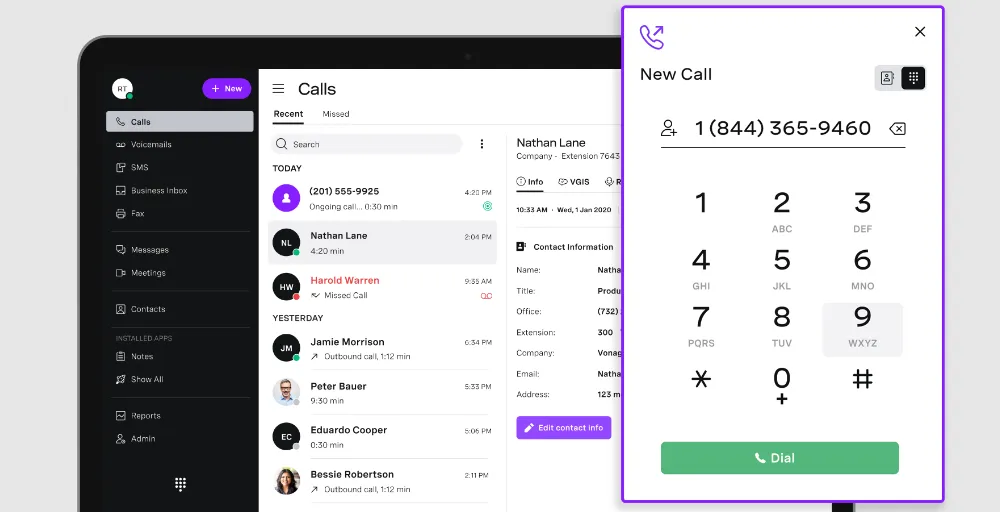
Vonage is a unified communications provider known for its robust global network and high call reliability. It offers enterprise-grade phone features, video conferencing, and team messaging designed to support large corporate sales structures.
The provider connects to Pipedrive via the official Vonage Integration for Pipedrive available in the App Marketplace. This native integration embeds a dedicated dialer panel inside the CRM, allowing users to make calls and automatically log touchpoints on contact timelines in real time
Key Features
- Click-to-dial: Place calls instantly by clicking phone numbers directly inside Pipedrive contact and deal profiles.
- Vonage integration suite: Displays a screen-pop with caller details and past Pipedrive notes before the agent answers the call.
- Call recording & sync: Records client conversations and links the audio files directly to the respective Pipedrive deal cards.
- Omnichannel communication: Routes business SMS, social media interactions, and voice calls through a single management portal.
- Advanced call routing: Configures interactive voice response (IVR) systems and multi-level auto-attendants to handle high volumes of incoming call.
Why it works well with Pipedrive
Vonage integrates smoothly with Pipedrive, reducing administrative delays in sales operations. Automatic retrieval of contact records during calls gives account executives immediate context, eliminating the need to search through CRM history. This instant data sync streamlines post-call logging and ensures data integrity across numerous accounts.
Worth Knowing
While Vonage is highly reliable, its native Pipedrive integration features are typically locked behind its upper-tier service plans rather than its entry-level package. Furthermore, advanced outbound capabilities, such as heavy-duty multi-line power dialing, require separate API add-ons or custom configurations.
Vonage pricing
Vonage plan includes their standard cloud phone and UCaaS platform, typically sold on a tiered per-user, per-month basis (Annual):
- Mobile Plan: Starts around $13.99 per line/month (plus taxes and fees), offering basic mobile/desktop calling and team messaging.
- Premium Plan: Starts around $20.99 per line/month, unlocking video meetings, the multi-level auto-attendant, and standard CRM app integrations.
- Advanced Plan: Starts at around $37.99 per line/month, adding call recording, visual voicemail-to-text, and group call routing.
8. Quo— Best for solopreneurs, startups, and small growing teams
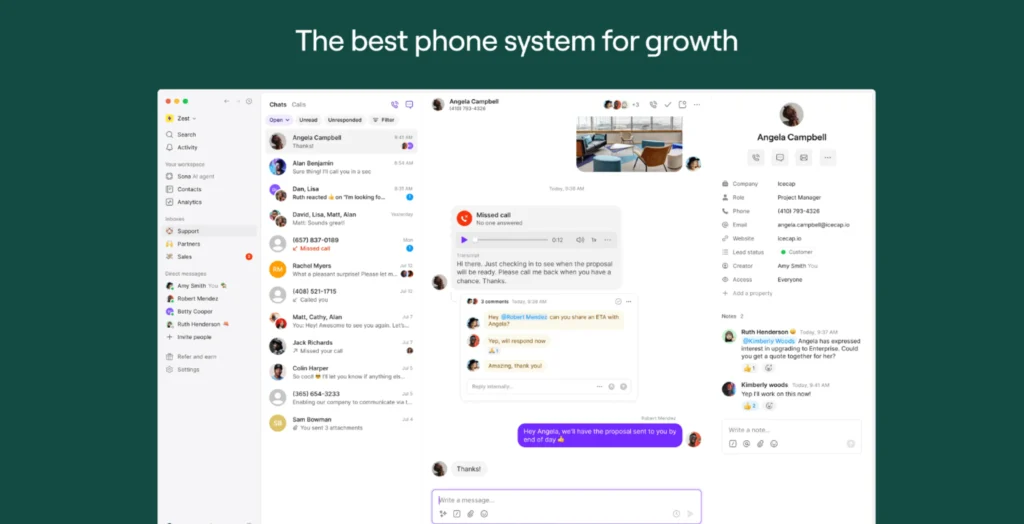
Quo (formerly known as OpenPhone) is a modern, AI-powered business phone system designed for small businesses, startups, and customer-facing teams. It consolidates voice calls, SMS/MMS texts, voicemails, and customer contact history into a single, shared workspace
The Quo integration with Pipedrive syncs your business phone and CRM to eliminate manual data entry. It automatically updates Pipedrive with call logs, texts, voicemails, and AI call summaries, letting sales and support teams see a complete communication history directly within their deals.
Key Features
- Sona AI agent: Deploy a 24/7 AI receptionist trained on your PDFs and website to triage calls and answer customer inquiries.
- AI call tags: Set up rule-based categories (e.g., “New Lead”) to automatically tag calls and simplify data reporting.
- Custom ring orders: Distribute inbound calls fairly across your team using round-robin, sequential, or simultaneous ringing.
- Visual call flow builder: Map your routing using a drag-and-drop builder that handles business hours, ring groups, and custom greetings.
- Internal threads: Chat with teammates inside specific customer call records to collaborate before responding.
Why it works well with Pipedrive
Pipedrive is heavily activity-driven, and sales momentum is often derailed by manual database updates. By automatically capturing all voice and text interactions, the integration ensures your sales pipeline always reflects the most up-to-date customer context. This gives reps full visibility into a lead’s touchpoints before picking up the phone
Worth Knowing
The Pipedrive integration requires a Quo Business or Scale plan and only syncs contact data one-way from Pipedrive to Quo. Additionally, while highly effective for automating workflows, some users report occasional syncing delays for calls and texts.
Quo pricing
The Quo pricing plan includes:
- Starter Plan: Starts at $15 per user/month (billed annually), shared phone number, auto-replies, call hold, and internal threads.
- Business Plan: Just at $23 per user/month (billed annually), group messaging, voicemail transcripts, and shared contacts.
- Scale Plan: Starts at $35 per user/month (billed annually) and unlocks AI call tags, ring order, and advanced call forwarding.
9. CloudTalk — Best for sales and support teams wanting depp native sync
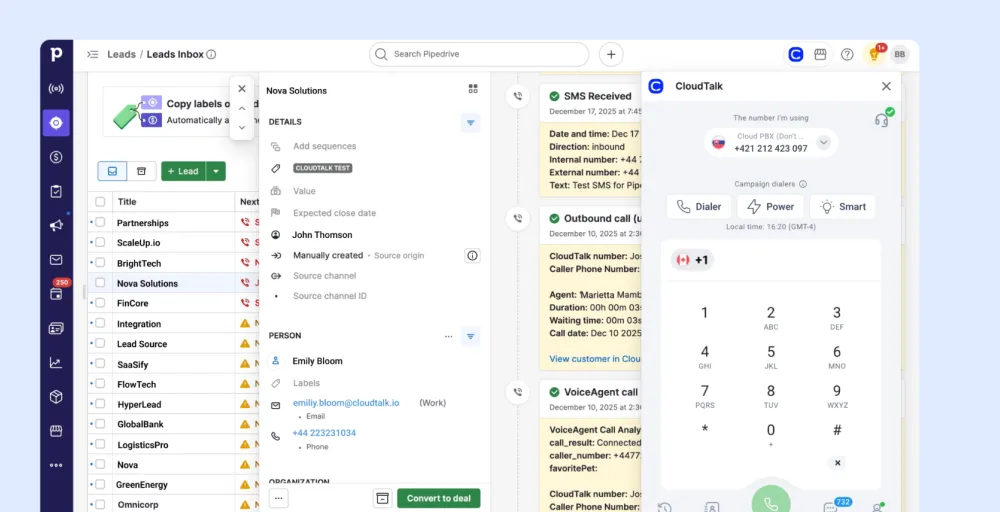
CloudTalk is a sophisticated cloud-based phone system engineered specifically for businesses that require high-performing voice channels integrated with automated software workflows. It provides customer-facing operations with smart call routing tools, automated dialers, and localized virtual numbers.
The platform couples directly with Pipedrive via a secure CloudTalk Marketplace App Connection to deploy a native Computer Telephony Integration (CTI) phone panel inside your standard pipeline interface. Once active, CloudTalk cross-references call data in real time, mirroring contact updates, tags, SMS history, and audio logs bi-directionally between both dashboards instantly
Key Features
- Native CTI dialer: Places and receives phone calls smoothly inside the main Pipedrive dashboard without switching browser tabs.
- Automated data sync: Automatically updates contact records, histories, text logs, and call notes across both platforms simultaneously.
- Power & Parallel Dialers: Build high-velocity outbound campaign queues from Pipedrive lists and dial multiple lines together.
- Smart IVR & skills routing: Generates multi-level Interactive Voice Response menus to direct customers to the exact deal owner.
- VoiceAgent & AI summaries: Extract transcriptions, log sentiment trends, and push automated call summaries straight into Pipedrive cards.
Why it works well with Pipedrive
CloudTalk offers instant data synchronization through webhooks, attaching call recordings, automated transcriptions, and outcomes to Pipedrive deals or contact timelines immediately after a call. This integration provides sales leaders with a real-time view of team activity and gives support reps the context they need to manage pipelines effectively.
Worth Knowing
You cannot access the Pipedrive integration on CloudTalk’s entry-level plan, meaning you must upgrade to at least their middle tier to connect your CRM. Furthermore, some of their most powerful outbound features, such as the Power Dialer and advanced AI speech-to-text intelligence, are gated behind their top-tier packages.
CloudTalk pricing
CloudTalk pricing offers three core plans: starter, essential, and expert.
- Starter Plan: Starts at $27 per user/month (billed annually), providing baseline calling and local numbers but excluding CRM integrations.
- Essential Plan: $29 per user/month (billed annually), unlocking the native Pipedrive integration, advanced IVR routing, and outbound SMS.
- Expert Plan: $49 per user/month (billed annually; 3-user minimum), with built-in Power Dialer, live call monitoring, and full AI call intelligence.
10. Zoom — Best for teams already living in Zoom
Zoom bridges the gap between sales communication and CRM data by allowing remote teams to launch digital interactions directly from their pipeline workspace. It consolidates phone calls, video meetings, and webinars into a single hub so reps can move deals forward without juggling multiple communication apps.
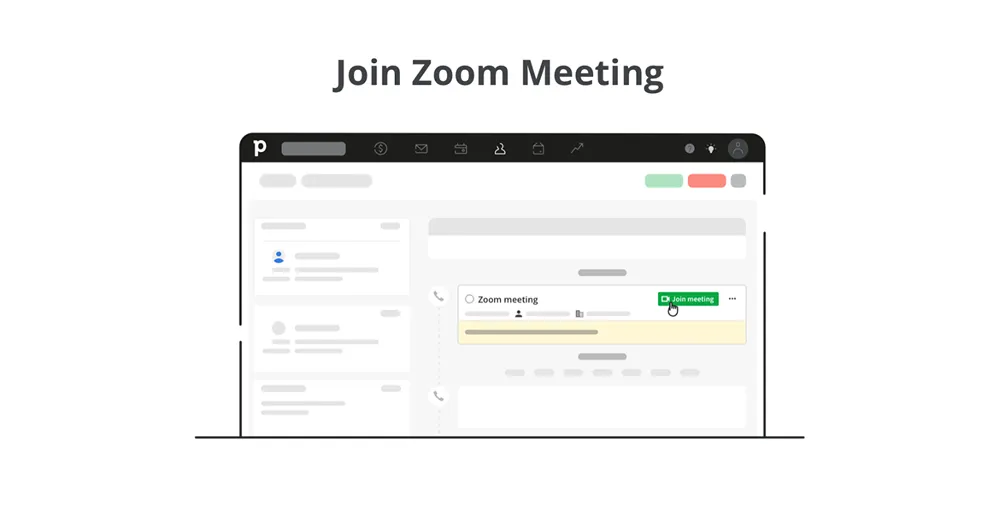
The platform connects to Pipedrive through the native Zoom Meetings App on Pipedrive Marketplace or the Zoom Phone Integration modules. Once authorized, it automatically inserts unique video links into Pipedrive activities, syncs attendee data, and logs calls and recordings directly into customer profiles.
Key Features
- One-Click Meeting Creation: Automatically generates unique Zoom video links when scheduling activities in Pipedrive.
- Click-to-Call/Join: Allows agents to launch phone calls or join video conferences directly from Pipedrive deal views.
- Automatic Activity Logging: Syncs completed call lengths, meeting logs, and text data directly to corresponding contact timelines.
- Zoom AI Companion: Transcribes customer conversations, analyzes call sentiment, and automatically pulls action items into the communication history.
- Live Context Overlays: Pull up critical Pipedrive contact records and deal details on-screen during active Zoom sessions.
Why it works well with Pipedrive
Zoom works exceptionally well with Pipedrive because it removes the administrative hassle of managing remote sales meetings. Instead of copy-pasting links or sending separate invite emails, reps can orchestrate their entire video and phone touchpoint strategy from the Pipedrive interface. It eliminates data silos, ensures calendar slots remain aligned, and cleanly preserves every conversation recording beneath matching sales pipelines.
Worth Knowing
Zoom does not offer the heavy outbound automation features such as parallel multi-line speed dialing. The baseline Pipedrive marketplace connector is heavily geared toward video meetings; a deep Zoom Phone deployment often requires syncing through the Zoom Workplace platform or configuring custom mid-layer webhooks.
Zoom pricing
Zoom pricing plans can be competitive, including Zoom Workspace and Zoom Phone.
- Basic: Free for instant messaging, VoIP calling, chat, unlimited meetings, and automated captions.
- Pro: Starts at $14.16 /user per month, includes video management, unlimited clips, toll-based dial-in, AI features, and Hub.
- Business: Starts at $18.33 /user per month, includes automated captions, complimentary access, and technical support.
- Enterprise: Custom pricing offering 500+ participant capacity, unlimited cloud storage, and translated captions.
11. Talkdesk — Best for larger contact centers
Talkdesk is an enterprise-grade Contact Center as a Service (CCaaS) platform built to handle high-volume, multi-channel interactions across large global teams. It provides enterprise architectures with deep workforce management tools, advanced security compliance, and an extensive AI suite to optimize agent productivity and customer routing.
The platform syncs with Pipedrive via a secure enterprise marketplace bridge, seamlessly uniting call workflows with lead pipelines. Once authorized, it eliminates data silos by matching customer caller IDs with Pipedrive contact histories, instantly loading full context directly onto the agent’s screen during live interactions
Key Features
- Talkdesk CTI overlay: Launches a unified, screen-pop agent workspace directly inside Pipedrive that showcases the client’s real-time interaction history.
- Talkdesk Navigator routing: Leverages conversational AI to understand caller intent and route customers to the correct Pipedrive deal owner.
- AI copilot agent assist: Transcribes live calls in real time and automatically pushes context cards and recommended next steps to the agent.
- Omnichannel communication: Integrates voice interactions, email, SMS, chat, and social messaging channels into a single management console.
- Workforce management (WFM): Optimizes staffing for large teams, automates shift scheduling, and tracks adherence metrics natively in the admin dashboard.
Why it works well with Pipedrive
Talkdesk integrates seamlessly with Pipedrive, providing enterprise contact centers CRM with tools to reduce administrative friction. By accessing real-time context from Pipedrive before a call, agents can quickly personalize conversations, enhance first-contact resolution, and align activity streams with CRM deal records.
Worth Knowing
Unlike standard business VoIP solutions, Talkdesk is built specifically for mid-market and enterprise contact centers, meaning it requires structured implementation and a minimum seat count. Additionally, many of its most powerful advanced tools, such as the Talkdesk Autopilot virtual agents or complex Workforce Management configurations, require premium-tier licensing.
Talkdesk pricing
Talkdesk plans come in four tiered pricing options.
- Digital Essentials: $85 per user per month for CXA, studio & call routing software, API access, Real-time dashboards.
- Voice Essentials: $105 per user per month includes voice engagement, voicemail transcription, and business intelligence.
- Elite: $165 per user per month for custom reporting with live and explore, workforce management, and screen recording.
- Industry Experience Clouds: $225 per user per month offers financial services, utilities, and commercial & residential services.
How Deep Is Each Pipedrive Integration?
Not every Pipedrive phone integration offers the same depth of functionality. While some providers only enable click-to-call and basic call logging, others automatically sync incoming and outgoing calls, call recordings, AI summaries, call notes, SMS, and customer activities. The deeper the Pipedrive integration, the less manual work your sales reps perform and the more accurate your CRM data becomes.
| Provider | Click-to-Call | Automatic call logging | Contact sync | Activity & Notes sync | Call recording sync | AI call insights | Power Dialer |
| KrispCall | Yes | Yes | Two-way | Yes | Yes | Yes | Yes |
| Aircall | Yes | Yes | Two-way | Yes | Yes | Yes | Yes |
| RingCentral | Yes | Yes | Two-way | Yes | Yes | Yes | Limited |
| JustCall | Yes | Yes | Two-way | Yes | Yes | Yes | Yes |
| Kixie | Yes | Yes | Two-way | Yes | Yes | Yes | Yes |
| Dialpad | Yes | Yes | Two-way | Yes | Yes | Yes | Limited |
| Vonage | Yes | Yes | Two-way | Yes | Yes | Limited | No |
| Quo | Yes | Yes | Two-way | Yes | Yes | Limited | Yes |
| CloudTalk | Yes | Yes | Two-way | Yes | Yes | Yes | Yes |
| Zoom | Yes | Yes | Two-way | Yes | Yes | AI companion | Yes (Add-on) |
| Talkdesk | Yes | Yes | Two-way | Yes | Yes | Yes | Limited |
Benefits of Using a Pipedrive Phone Integration
Integrating a business phone system with Pipedrive eliminates manual data entry by automatically logging call history, recordings, and transcripts directly to your deals and contacts. It boosts sales productivity with click-to-dial, automated follow-ups, and real-time CRM data access before answering a call.
Key benefits of connecting your phone system to Pipedrive include:
- Call outcomes, timestamps, voicemails, and recordings sync seamlessly to the contact’s timeline, freeing up reps to focus on selling.
- Reps can initiate outbound calls with a single click from the Pipedrive interface, speeding up daily outreach and removing misdials.
- When a prospect calls, integrated systems instantly pull up their Pipedrive deal stage and history, allowing agents to personalize the conversation immediately.
- Track call volumes, durations, and outcomes using Pipedrive’s calling dashboard to analyze team performance and refine your sales pipeline.
- Connect your popular VoIP apps using tools available directly on the Pipedrive Marketplace to supercharge your sales operations.
Common Pipedrive Phone Integration Problems
Common Pipedrive phone integration problems typically involve sync failures, incorrect caller ID matching, expired OAuth tokens, or missing activity resets.
- Contacts don’t match correctly: If multiple contacts share the same number or numbers are saved in custom fields instead of the standard phone field, incoming calls may not connect to the correct Pipedrive deal or existing contact.
- Calls are not automatically logged: Expired authentication tokens or disconnected integrations can prevent calls from being automatically logged, leaving your CRM incomplete and requiring manual updates.
- Duplicate contacts: Improper synchronization can create duplicate Pipedrive contacts, leading to fragmented customer relationships and inaccurate CRM data.
- Missing call recordings: Some providers require premium plans or specific permissions for call recordings to sync with Pipedrive.
- Click-to-call stops working: If your business phone system is no longer selected as the default provider, click-to-call functionality may disappear.
- Automation failures: Broken workflows may prevent automate actions, SMS, or follow-ups from triggering after completed calls.
How to Choose the Right Phone System for Pipedrive
Choosing the right business phone system designed for Pipedrive CRM depends on your team size, sales workflow, communication channels, and overall business needs.
Consider these factors before selecting a provider:
- Automatic call logging: Ensure incoming and outgoing calls, SMS messages, and call recordings are automatically logged in Pipedrive.
- Contact synchronization: Your Pipedrive data, contacts, and activities should sync both ways to keep your CRM updated.
- Click-to-call: The best integrations allow you to make calls directly from Pipedrive contacts, deals, and activities without opening another application.
- AI Features: Modern platforms now include AI voice agents, voice agents, conversation summaries, transcription, and intelligent call notes that reduce manual work.
- Omnichannel communication: Look for providers supporting phone, SMS, text messages, and video conferencing so your sales and support teams can manage every customer interaction in one place.
- Integrations: If your business already uses Google Sheets, email marketing tools, accounting software, or other popular apps, choose a provider that lets you integrate them into a unified workflow.
- Pricing: Look for transparent pricing with no hidden fees, optional add-ons, and clearly defined plans. Many providers don’t require a credit card for a trial, making evaluation easier.
Why Pipedrive Teams Choose KrispCall
For businesses seeking a complete Pipedrive phone integration, KrispCall offers one of the strongest combinations of affordability, automation, and CRM synchronization.
Unlike many providers that limit features to enterprise plans, KrispCall offers:
- Native Pipedrive integration through the Pipedrive Marketplace
- Two-way synchronization between Pipedrive CRM and your cloud phone
- Automatic call logging, SMS history, and call recordings
- Power dialer for high-volume outbound calls
- Support for international calling with virtual numbers in 100+ countries
- AI-powered summaries and intelligent call notes
- Built-in collaboration features for both sales teams and support teams
- Easy setup with your existing Pipedrive account
- Integrations with Google Sheets, marketing tools, and other popular apps
- Competitive, transparent pricing suitable for startups, SMBs, and growing businesses
For organizations wanting a modern business phone system that keeps every interaction inside Pipedrive, KrispCall minimizes administrative work while helping teams focus on customers and revenue.