If you’re using Zoho CRM for sales or support, you’re likely facing challenges like manually copying phone numbers for calls, missing call logs, and unreliable pipeline data. An integrated phone system with Zoho CRM resolves these issues by automatically logging calls, recordings, and next steps, eliminating the need for manual entry.
This guide offers a neutral comparison of the leading phone systems for Zoho CRM, including Zoho’s Voice and other top third-party solutions. It’s organized around key factors like team size, customer locations, and budget, helping you match the right provider to your needs rather than just relying on search results.
TL;DR
- Best overall value: KrispCall native Zoho PhoneBridge sync starting at $12/user/month.
- Best if you want zero setup: Zoho Voice, built by Zoho, connects to Zoho CRM with no third-party app to install.
- Best for large, multi-location teams: RingCentral enterprise-grade reliability and admin controls.
- Best for outbound sales speed: Kixie power dialing and workflow-triggered calling built into Zoho.
- Best for international support teams: CloudTalk or Aircall offers strong routing, monitoring, and global number coverage.
What Makes a Great Zoho CRM Phone Integration?
A strong Zoho CRM phone integration should do more than dial a number; it should keep every customer interaction, note, and recording associated with the right contact without anyone having to touch a keyboard.
- Click-to-call: Dial any Zoho contact or lead directly from their record with a single click, no copy-pasting numbers.
- Automatic call logging: Every inbound and outbound call is recorded in the contact’s timeline as soon as it ends.
- Screen-pop: When a call comes in, the matching Zoho record pops up automatically, giving reps context before they say hello.
- Two-way contact sync: Updates made in Zoho or the phone app reflect on both sides in near real time.
- Call recording sync: Recordings attach directly to the Zoho deal or contact for later review.
- AI transcription: Calls are converted into searchable text for coaching, QA, and compliance.
- AI call summaries: A short, auto-generated recap of what was discussed and the agreed next steps.
- SMS sync: Text conversations log into Zoho the same way calls do.
- Workflow automation: Calls or texts can trigger a Zoho workflow to move a stage, assign a follow-up task, or notify a manager.
- Mobile support: Reps can place and receive Zoho-logged calls from a phone app, not just a browser.
- Analytics: Call volume, talk time, and outcomes roll up into dashboards inside the phone tool or are pushed into Zoho’s own reporting.
Should You Just Use Zoho Voice?
Zoho Voice is a Zoho telephony product, so it’s worth asking whether you need anything else at all before shopping around. A cloud-based business phone system built by Zoho, sold as a native add-on to the rest of the Zoho suite with contact center CRM, Desk, Bigin, and Recruit. Because it comes from the same vendor, it connects without middleware, extra OAuth setup, or a separate marketplace install.
Strengths:
- Zero-configuration connection to Zoho CRM, no third-party app to authorize.
- Predictable per-user pricing tucked into the existing Zoho billing relationship.
- Works out of the box with Zoho Desk, Bigin, and Recruit, not just CRM.
- Solid for straightforward inbound/outbound calling, IVR, and basic reporting.
Limits:
- No power dialer or predictive dialing for outbound sales teams that need to move fast through lists.
- Thinner AI or VoIP features (transcription, sentiment analysis, coaching tools) compared to specialized telephony vendors.
- Entry pricing is higher than that of several third-party competitors once you factor in call intelligence features.
If your team lives entirely in Zoho and just needs reliable calling with basic logging, Zoho Voice is more than enough. If you need advanced outbound automation, deeper AI, or you’re already paying for tools outside the Zoho ecosystem, a third-party option below is likely a better fit.
How We Chose the Best Phone Systems for Zoho CRM
We evaluated each provider against five explicit criteria: whether it has a native Zoho Marketplace listing versus relying on a connector like Zapier; how deep the sync goes (click-to-call only versus full call logging, recording, and transcript sync); pricing transparency and whether the Zoho integration is gated behind a higher-tier plan; Zoho Marketplace review rating and volume; and support for the wider Zoho ecosystem, including Zoho Desk, Bigin, and Recruit.
In the interest of transparency, KrispCall is one of the providers reviewed here. Pricing and feature details for every provider were pulled from public pricing pages as of the publish date.
Why Trust Our Software Reviews
We have built it from public pricing pages, Zoho Marketplace listings and ratings, and hands-on knowledge of KrispCall’s own Zoho integration. We follow our content update methodology to ensure the information remains accurate and up to date, and our software review methodology guides how we evaluate and compare products.
We also cross-check vendor claims against G2 and Capterra reviews rather than relying solely on marketing copy. In line with our content integrity statement, we strive to provide objective, transparent, and trustworthy comparisons. Because software pricing and features can change frequently, this guide is reviewed and updated periodically. If you notice any changes, the provider’s official pricing page should always be considered the final source of truth.
10 Best Phone Systems for Zoho CRM Integration in 2026
The best phone systems for Zoho CRM in 2026 feature native PhoneBridge integration to eliminate manual logging, automate click-to-call, and provide contextual screen pops. Top-tier CRM integration with providers offers AI call summaries, auto-dialers, and sentiment analysis for advanced sales and support tracking.
| Phone Systems | Best for | Staring Price | Standout Advantage | G2 Rating |
| KrispCall | Affordable contact center | $12 /user/month | Unified callbox, Power dialer at a low entry price | 4.5/5 |
| RingCentral | Enterprise-level scaling | $20 /user/month | 99.999% uptime and deep admin controls for larger organizations | 4.1/5 |
| Zoho Voice | Native system synergy | $34 /user/month | Zero-configuration connection, no third-party setup | 4.2/5 |
| Nextiva | Customer sentiment tracking | $15 /user/month | AI call notes & summaries at the top tier | 4.5/5 |
| Vonage | Custom programmable workflows | $13.99 /month/line | Developer APIs for building custom integrations | 4.3/5 |
| Kixie | Rapid sales dialing | Contact sales | Workflow-triggered automated calls and texts | 4.8/5 |
| Aircall | Remote team collaboration | $30 /license | Live call monitoring and virtual call center tools | 4.4/5 |
| Allo | AI conversational support | $18 /month/user | AI receptionist and limited post-call workflow automation | 4.7/5 |
| JustCall | Multi-channel SMS campaigns | $29 /user/month | Native click-to-text alongside click-to-call | 4.3/5 |
| Cloudtalk | Outbound sales teams | $25 /user/month | Visual call flow designer and VIP queues | 4.4/5 |
1. KrispCall — Best for affordable contact centers
KrispCall is a modern cloud telephony system engineered specifically for agile, globally distributed teams requiring a unified communications hub. It streamlines international operations by providing virtual numbers in over 100 countries, along with advanced collaborative features such as shared phone numbers and team tagging.
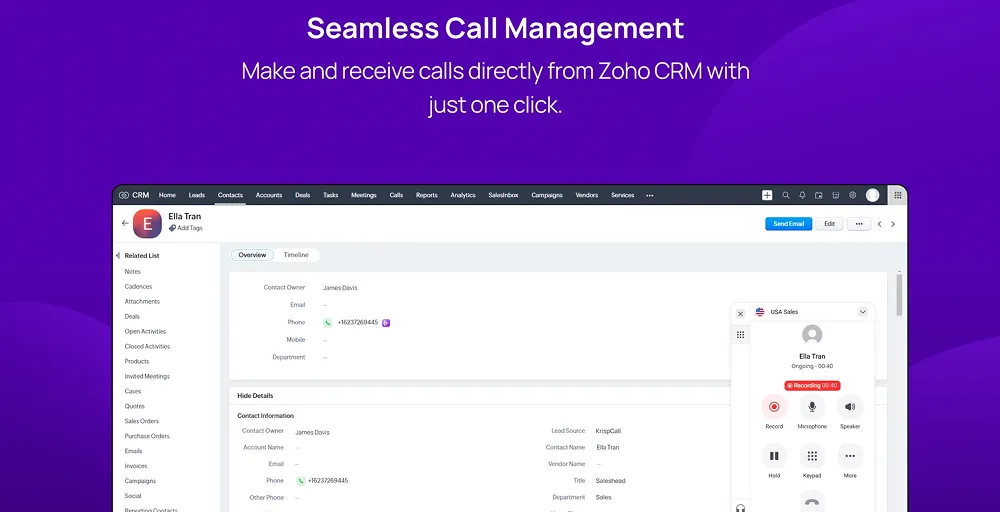
The platform integrates natively with Zoho CRM via the Zoho PhoneBridge framework to enable instant data synchronization and eliminate manual input. When a call connects, user profiles and historical interaction data instantly pop up on the screen, allowing remote agents to work with full context.
Key Features
- Unified callbox: One shared inbox for calls, SMS, and voicemails.
- Internal message thread: Private Teams notes and @mentions inside customer chats.
- Call intercept: Live monitoring for managers to listen and coach agents.
- SMS forwarding: Automatically routes text messages to another number or device.
- Voicemail greeting: Custom audio recorded or uploaded for missed calls.
Why it works with Zoho CRM
The integration automatically logs every call, text message, and voicemail directly into the respective Zoho CRM lead or contact profile. Sales and support reps can initiate calls with a single click using the native click-to-call feature, reducing administrative handling time.
Worth Knowing
While KrispCall excels at core voice and SMS capabilities for remote collaboration, it offers fewer advanced AI analytics and predictive dialing tools.
KrispCall pricing
The KrispCall offers three pricing plans, and they are:
- Essential: Starts at just $12 per user per month (annual) billing, including unlimited calls, basic IVR, and core Zoho sync.
- Standard: Costs $32 per user per month, including power dialer, bulk SMS, and unlimited recording.
- Enterprise: Custom pricing – API access, dedicated account management
2. RingCentral — Best for enterprise-level scaling
RingCentral is a market-leading communication platform designed to support heavy call volumes and multi-location business operations. It provides a robust, highly secure framework featuring AI-powered video, messaging, and enterprise-grade telephony backed by a 99.999% uptime guarantee.
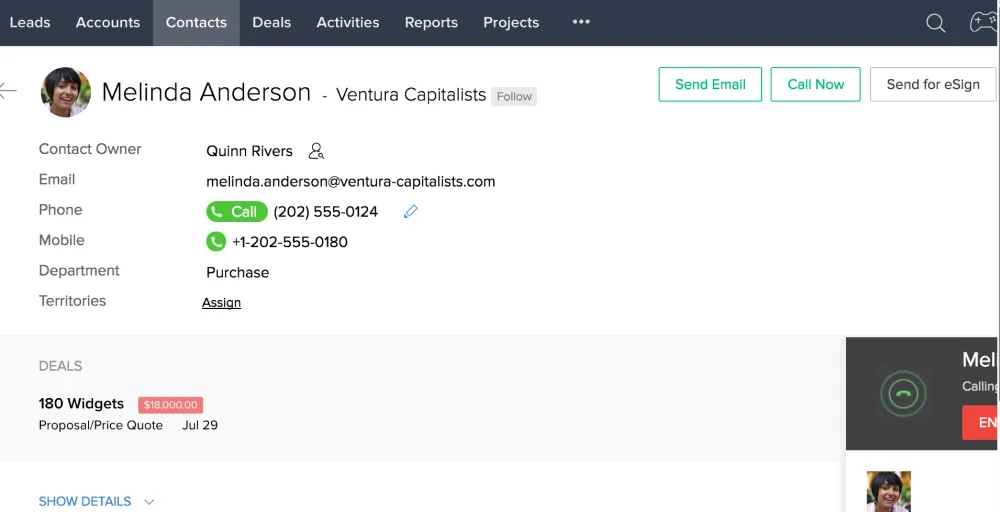
The platform integrates deeply with Zoho CRM through the Zoho PhoneBridge framework to deliver a single, consolidated communication pane. This integration instantly surfaces client records during incoming calls, allowing enterprise teams to handle complex client interactions without leaving their CRM screen.
Key Features
- IVR editor: A visual tool to build automated, drag-and-drop phone routing menus.
- Paging: A broadcast feature to send instant announcements across multiple office speakers.
- Call park: Holds a function letting anyone pick up the call from another phone.
- Hot desking: Feature that allows employees to log their extension into shared office phones.
- Call delegation: A setting letting assistants manage calls on behalf of an executive.
Why it works with Zoho CRM
The integration enables effortless click-to-call directly from Zoho lead profiles, triggering automatic call logging and attaching recordings to client records. Agents can access the full interactive RingCentral softphone directly in the Zoho tab, keeping data perfectly aligned across large departments.
Worth Knowing
It’s worth knowing because of its extensive feature set and advanced enterprise configuration options, but RingCentral can feel overly complex to set up and navigate for very small teams.
RingCentral pricing
Here’s an overview of RingCentral pricing, which comes in four primary tiers with rates based on an annual commitment.
- Core: Starts at $20 /user/month (unlimited domestic calling, whiteboards and annotations, transcribe calls, and call log reports)
- Advanced: $25 /user/month (Shared lines, unlimited audio conferencing, transcribes meetings, and shared SMS inbox)
- Ultra: $35 /user/month (cost center management, business analytics pro, unlimited internet fax, and hot desking)
- Customer Engagement Bundle: Contact sales (Call recording, multi-level auto attendant and IVR, HD voice, and summarize video recordings)
3. Zoho Voice — Best for native system synergy
Zoho Voice is a cloud-based telephony system built explicitly to provide straightforward, reliable business communication within the broader vendor ecosystem. It acts as a lightweight, user-friendly virtual phone assistant tailored for small businesses that prefer to avoid the overhead of complex, third-party carrier setups.
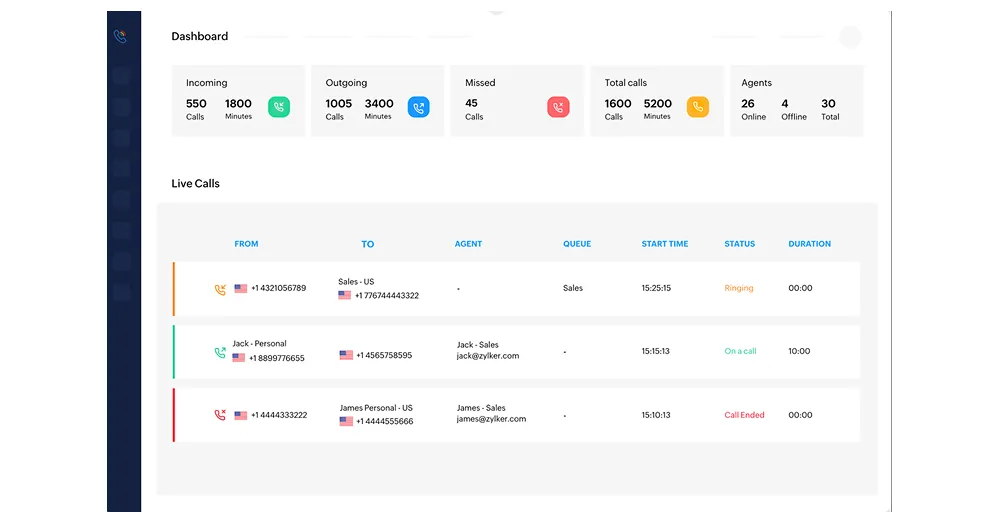
Because it is a native tool, the platform offers an immediate, zero-configuration connection with Zoho CRM right out of the box. Agents can claim local, toll-free, or international virtual phone numbers directly from their existing admin panel, completely bypassing the need for webhooks or external API setups.
Key Features
- Auto credit: Automatically recharges your call balance when it drops below a set limit to prevent service interruption.
- Voice selection: Lets you choose different text-to-speech accents and genders for your automated system greetings.
- Direct extension dialing: Allow callers to bypass menus by entering a specific team member’s short code.
- Live-call status: Shows real-time dashboard updates on active, waiting, and completed agent calls.
- Callback request: Let’s queue callers request a return call instead of waiting on hold.
Why it works with Zoho CRM
The system provides a truly frictionless click-to-call experience, saving agents from manual dialing errors and instantly automating activity logs. Because it is part of the same software family, call recording and notes attached to Zoho CRM are recorded more quickly and securely than with external integrations.
Worth Knowing
Zoho Voice lacks advanced outbound sales automation tools such as power dialers, speech-to-text transcription, and complex AI sentiment analytics found in specialized third-party telecom platforms.
Zoho Voice pricing
Zoho Voice pricing plans offer flexible cloud-based telephony with plans.
- Basic: $34 per user/month includes call intelligence, live call tracking, call action handler, and call notes & call disposition.
- Standard: $49 per user/month offers deluge integration, call intelligence, and IM services (WhatsApp and Telegram).
- Contact Center: $74 per user/month includes Bring Your Own Carrier (BYOC), call monitoring, and queue performance metrics.
4. Nextiva — Best for customer sentiment tracking
Nextiva is a highly dependable enterprise communication suite that combines unified business VoIP, video, and customer experience tools on a single, stable platform. It is widely recognized for its robust, reliable network infrastructure and top-tier security standards that meet strict regulatory requirements.
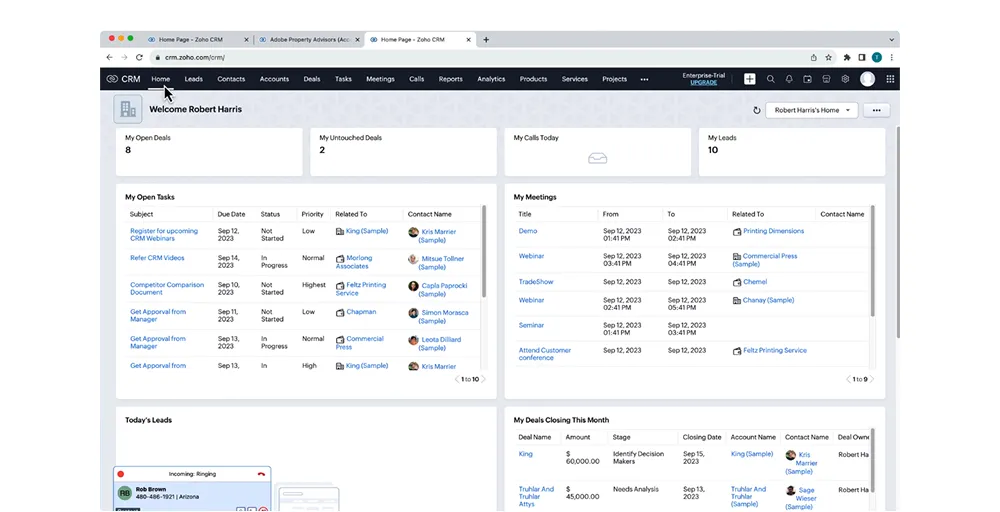
The system connects Nextiva seamlessly with Zoho CRM via the Zoho PhoneBridge framework to drive collaborative, data-driven workflows across expanding departments. When an inbound call arrives, the integration immediately fetches the caller’s Zoho profile, instantly equipping your staff with a complete history of customer interactions.
Key Features
- Three-way calling: Allows you to merge two separate callers into one conference call instantly.
- SIP trunking: A digital connection that links your existing on-premise phone system to the cloud internet.
- Advanced call routing: A system distributing incoming calls automatically based on specific rules, time, or skills.
- Call pulling: Lets you move live calls between your desktop and mobile.
- VoIP switchboard: A live dashboard allowing receptionists to manage, transfer, and monitor company-wide calls easily.
Why it works with Zoho CRM
The native PhoneBridge connection provides an intuitive click-to-call tool directly within Zoho CRM lead lists, eliminating the need to type phone numbers manually. It automates all call logging, duration tracking, and call recording storage, ensuring compliance and client history are always up to date.
Worth Knowing
Nextiva’s deep CRM integration capabilities and advanced routing tools are omitted from its entry-level plan, requiring a step up to higher-tier subscriptions for full Zoho functionality.
Nextiva pricing
Nextiva’s pricing breaks down into three primary tiers:
- Core: $15/user/month offers video calls & screen sharing, voicemail transcription, team messaging, and a mobile app.
- Engage: $25/user/month includes live chat, online fax, video meeting recording, Microsoft Teams, and reporting dashboards.
- Scale: $75/user/month provides AI call notes & summaries, smart call routing, automated repetitive tasks, and supervisor monitoring.
5. Vonage — Best for custom programmable workflows
Vonage is a flexible, highly scalable cloud communications platform built on a robust global infrastructure that easily adapts to changing business layouts. It is an ideal fit for expanding operations that prefer a modular system, allowing them to add specific communication features as their team grows.
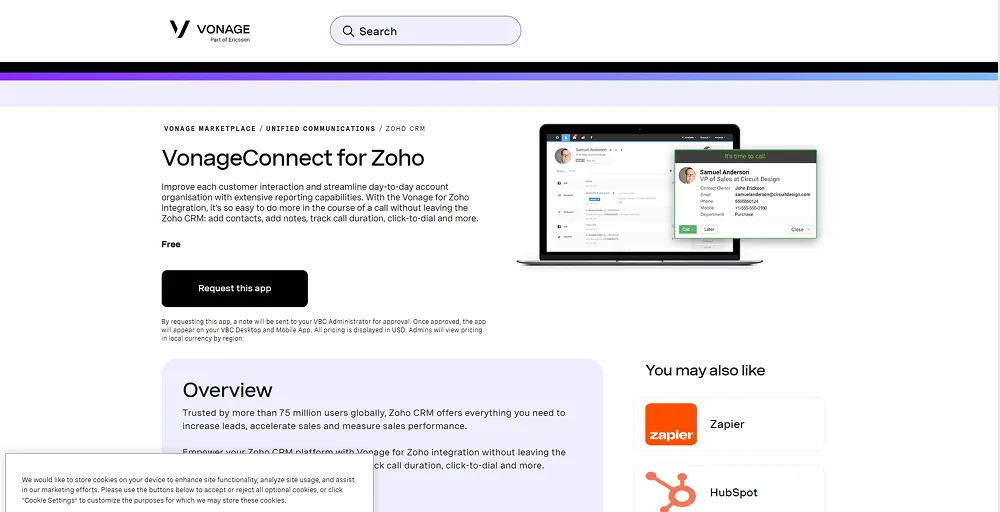
The software integrates seamlessly with Zoho CRM via the Vonage Integration Suite, merging your phone operations and customer data into a single screen. This integration deploys an interactive, real-time pop-up window within Zoho that surfaces detailed caller histories the moment an agent’s phone rings.
Key Features
- Visual voicemail: Transcribes audio messages into text and delivers them to your inbox.
- Business inbox: Unified dashboard for managing business text messages, MMS, and Facebook Messenger chats.
- Display caller ID: Sets show your customer’s company name and number on outgoing calls.
- Receptionist console: Dashboard that enables phone operators to easily manage and transfer high call volumes.
- Call flip: Lets you transfer a live call between devices without disconnecting.
Why it works with Zoho CRM
The integration provides a highly efficient click-to-dial tool that completely removes manual number entering across all Zoho lead modules. It operates in the background to automatically log call durations, store recordings, and synchronize contact notes directly to client records without manual agent intervention.
Worth Knowing
Vonage operates on an à la carte model, meaning advanced features like call recording, visual voicemail, and certain integrations require paid add-ons that can increase your total monthly cost.
Vonage pricing
Here’s an overview of Vonage pricing, which comes in three plans: Mobile, Premium, and Advanced.
- Mobile: $13.99 per month /line that provides voicemail, virtual receptionist, and phone number porting.
- Premium: $20.99 per month/line includes Vonage meetings, desk phone, single sign-on, and VBC app center.
- Advanced: $27.99 per month/line provides call groups, visual voicemail, and on-demand call recording.
6. Kixie — Best for rapid sales dialing
Kixie is a powerful, automation-heavy sales dialer built specifically for revenue teams that need to maximize outbound call volume and contact rates. It specializes in ultra-fast outreach tools that eliminate downtime for reps by automating the entire dialing and follow-up pipeline.
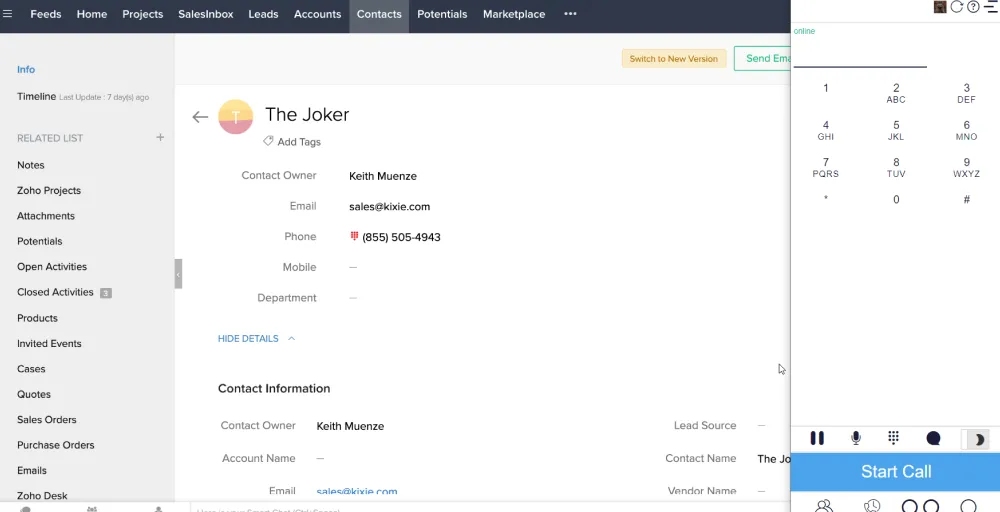
The platform integrates deeply with Zoho CRM to turn your static database into a highly active, automated sales machine. Kixie hooks directly into Zoho’s workflow rules, allowing agent activities or status changes in the CRM to instantly trigger automated calls and texts.
Key Features
- Find-me / Follow-me: Routes incoming calls to a sequential list of your devices so you never miss a client.
- Screen pop: Automatically displays relevant CRM contact data on your monitor the instant a call connects.
- Business snapshot: Provides high-level dashboard summaries of team call volumes, connection rates, and active durations.
- PowerCall: Browser extension and dialer that enables one-click dialing and automated CRM logging.
- Automated lead caller: Instantly dials new inbound leads within seconds of them submitting a web form.
Why it works with Zoho CRM
Kixie provides a seamless two-day data sync that logs calls, texts, and lifetime talk metrics directly into Zoho CRM profiles in real time. Sales reps can trigger complex multi-touch follow-up campaigns directly from their Zoho dashboard, keeping pipeline data clean without manual typing.
Worth Knowing
It is necessary to know Kixie as it is built strictly as an outbound sales accelerator; it lacks the deep omnichannel internal chat, video conferencing, and team collaboration tools found in general business phone systems.
Kixie pricing
Contact sales
7. Aircall — Best for remote team collaboration
Aircall is a highly reliable, intuitive voice platform built to help customer service and support departments handle high volumes of complex inbound calls. The system emphasizes ease of use, rapid deployment, and deep collaboration tools that allow customer support agents to resolve tickets faster.
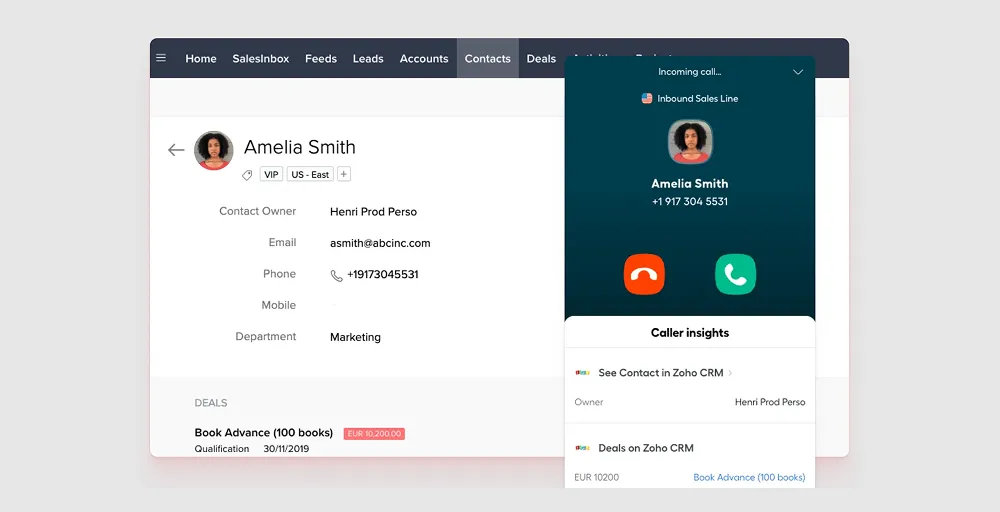
Integrating Aircall with Zoho CRM creates a unified communication workflow by instantly matching incoming phone numbers against your existing CRM database. Support agents view complete customer histories the moment the phone rings, allowing them to deliver highly personalized assistance.
Key Features
- Warm transfer: Lets agent speak privately with a teammate before routing the customer call to them.
- Click to dial: Extension that instantly initiates phone calls when clicking any online number.
- Parallel calls: Allow agents to put their current caller on hold to dial a separate number.
- Live monitoring: Enables managers to listen to live agent calls for quality assurance and training.
- Virtual call center: Digital workspace for organizing remote support teams, phone numbers, and workflows globally.
Why it works with Zoho CRM
Every inbound call automatically triggers a new activity log or support ticket within the Zoho ecosystem based on your custom routing rules. This hands-free logging keeps customer records immaculate and ensures team metrics remain accurate without manual data entry.
Worth Knowing
Aircall is best known for its billing and more advanced routing, analytics, and automatic call distribution (ACD) tools, which are available behind the Professional and Custom tiers. Smaller teams evaluating it purely on entry price should check the per-license pricing and features before committing.
Aircall pricing
Here’s an overview of Aircall pricing, based on a per-user license structure billed annually with a 3-license minimum.
- Essentials: $30 per license, offering unlimited inbound and internal calls, call queueing, email reporting, and standard analytics.
- Professional: $50 per license. Includes ring groups, queue callback, instant numbers, blocklist numbers, and parallel calls.
- Custom: Custom pricing with unlimited teams, flexible call distribution rules, availability statuses, and mandatory tagging.
8. Allo — Best for AI conversational support
Allo is an emerging, modern cloud communication platform that combines traditional VoIP call center with visual collaboration and AI-assisted workflow spaces. It is built specifically for cross-functional tech teams that want to bridge the gap between voice conversations and structured project tracking.
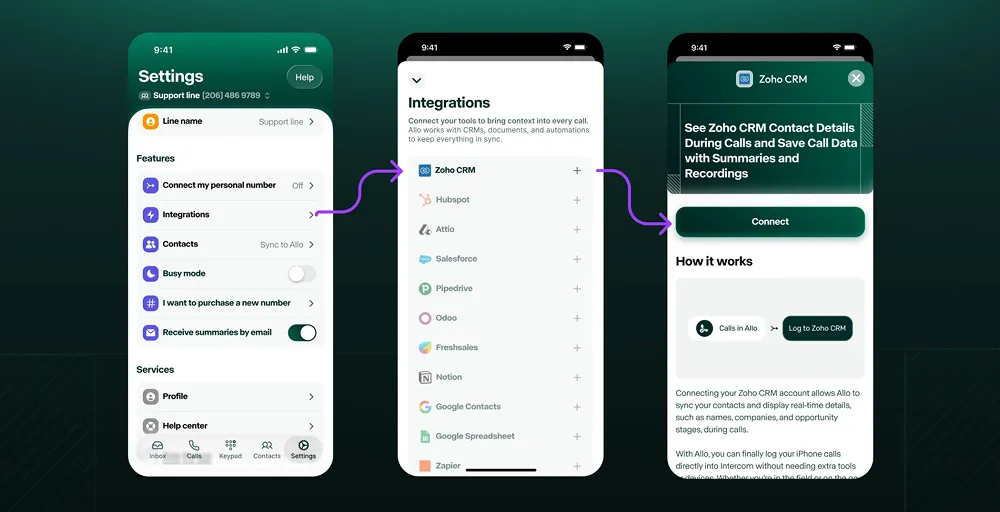
The software integrates smoothly with Zoho CRM to turn conversation data into visual, actionable pipeline context. When an agent hops on a call, Allo synchronizes contact records in real time, pulling active deals and project statuses onto a clean, unified dashboard view.
Key Features
- Post-call actions: Automated workflows that trigger specific tasks, follow-ups, or notes immediately after a call ends.
- Automatic SMS: Scheduled or event-triggered text messages sent to customers based on system actions.
- IVR / phone menu: A customizable greeting system that routes callers to departments using key presence.
- Number porting: The process of moving your existing business phone numbers over to the new platform.
- AI receptionist: An intelligent virtual agent that answers calls, answers questions, and routes inquiries naturally.
Why it works with Zoho CRM
The native integration enables instant click-to-dial functionality across all Zoho lead and account modules to streamline outreach. It automatically logs call durations, attaches visual meeting notes, and updates contact records directly within the Zoho interface, eliminating the need for manual data syncs.
Worth Knowing
Allo focuses heavily on visual collaboration and modern startup tools, meaning legacy businesses that require advanced physical desk phone hardware setups might find its software-first approach limiting.
Allo pricing
Allo, the AI-powered phone system, offers three per-user plans:
- Solo: $18 /month for 1 user for unlimited national calls, IVR menus, AI appointment booker, and contacts & saved views.
- Business: $32/month per user includes a click-to-call extension, missed-call text-back, unlimited AI receptionist, and call analytics & leaderboards.
- Ultra: $100 /month per user includes picture-in-picture call window, Custom AI summary templates, update CRM & contacts.
9. JustCall — Best for multi-channel SMS campaigns
JustCall is an all-in-one cloud phone system engineered for customer-facing teams that need to balance rapid outbound reach with highly organized inbound support. It provides a robust, easy-to-use communication stack featuring cloud telephony, SMS campaigns, and workflow automation tools across 70+ countries.
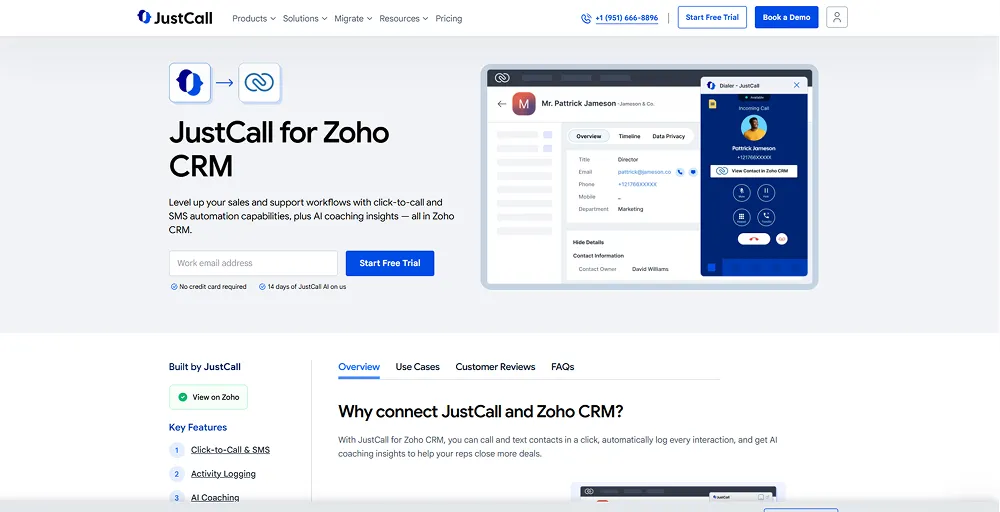
The platform integrates deeply with Zoho CRM to remove manual workflows and maintain pristine data hygiene across all customer touchpoints. It establishes a real-time, two-way data sync that instantly populates comprehensive customer profiles on-screen during live calls, allowing reps to converse with full context.
Key Features
- SMS analytics: A tracking tool that provides data on message delivery rates, response times, and campaign performance.
- AI dialer: An automated system that optimizes outbound calling speeds and detects answering machines using intelligence.
- Custom tags: Labels apply to call logs and contacts to categorize and organize conversation topics.
- Business number: Local or toll-free digits assigned to your company to mask personal phone lines.
- Call distribution: Routes incoming calls to available agents according to preset rules.
Why it works with Zoho CRM
JustCall features native click-to-call and click-to-text buttons next to every phone number in the Zoho CRM ecosystem. Every conversation, text message, and voicemail recording is automatically logged under the respective Zoho lead or contact profile, eliminating manual post-call administrative entry.
Worth Knowing
Advanced automation tools, such as the predictive dialer and comprehensive AI analytics, are locked behind higher subscription tiers, making it necessary to upgrade for heavy outbound operations.
JustCall pricing
Here’s an overview of JustCall pricing, which comes in four main tiers.
- Team: $29 per user/month including 500 SMS segments, IVR & call menus setup,
- Pro: $49 per user/month, including bulk SMS campaigns, queue callback, 1,000 SMS segments, and intelligent call routing.
- Pro Plus: $89 per user/month provides AI review assist, SMS co-pilot, AI call scoring, sentiment analysis, and coaching comments.
- Business: Request a quote includes unlimited calling & SMS, personalized onboarding, and real-time agent assist.
10. CloudTalk — Best for outbound sales teams
CloudTalk is an enterprise-grade cloud phone platform optimized for high-volume sales operations looking to maximize connect rates and efficiency. It features advanced dialing capabilities and smart routing algorithms designed to significantly reduce idle time and accelerate rep outreach.
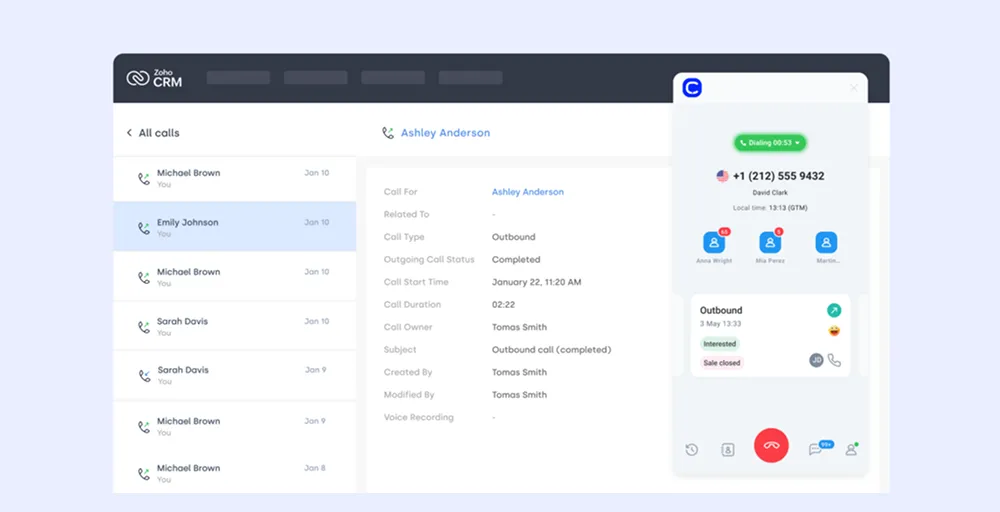
The software connects seamlessly with Zoho CRM to sync contacts, call histories, and agent notes in real time. It pulls updated CRM information instantly during live calls, ensuring reps always have the latest deal stages and data points at their fingertips.
Key Features
- VIP queues: A routing rule that automatically bumps high-priority customers to the front of the call line.
- Call flow designer: Visual, drag-and-drop tool used to map out and manage customer call journeys.
- Spam protection: An automated filtering system that blocks known telemarketers and fraudulent phone numbers from calling.
- Wallboard: Display showing live contact center metrics on monitors for team visibility.
- Agent status: A presence indicator showing if team members are active, on break, or busy calling.
Why it works with Zoho CRM
It automates post-call workflows by updating Zoho lead statuses and uploading call recordings directly to client records. Agents can access the entire CloudTalk dialer interface directly from their Zoho dashboard, eliminating the need to switch between application windows.
Worth Knowing
The platform’s highly sophisticated automation tools and power dialers carry a steeper learning curve, meaning smaller teams may require extra onboarding time to fully optimize their workflows.
CloudTalk pricing
Here’s an overview of CloudTalk pricing, based on a tiered, per-user subscription model.
- Starter: $25 per user per month for call recordings, tags & transfers, and a visual call flow builder.
- Essential: $29 per user per month for ring groups, call queues, queue callback, auto outbound number, and unlimited call history & basic dashboards.
- Expert: $49 per user per month for IVR, skill & smart condition-based routing, preview & power dialer, and VIP queues.
How Deep Is Each Zoho CRM Integration?
Not every phone system syncs with Zoho CRM to the same depth. Some VoIP CRM integrations only support click-to-call and basic logging, while others sync recordings, AI summaries, and SMS bi-directionally.
| Provider | Click-to-call | Auto logging | Recording sync | SMS | AI summary | Screen Pop | Two-way contact sync |
| KrispCall | Yes | Yes | Yes | Yes | Yes | Yes | Yes |
| RingCentral | Yes | Yes | Yes | Yes | Add-on | Yes | Yes |
| Zoho Voice | Yes | Yes | Yes | Yes | Yes | Yes | Yes |
| Nextiva | Yes | Yes | Yes | Yes | Yes | Yes | Yes |
| Vonage | Yes | Yes | Add-on | Yes | No | Yes | Yes |
| Kixie | Yes | Yes | Yes | Yes | No | Yes | Yes |
| Aircall | Yes | Yes | Yes | Yes | No | Yes | Yes |
| Allo | Yes | Yes | Yes | Yes | Yes | Yes | Partial |
| JustCall | Yes | Yes | Yes | Yes | Yes | Yes | Yes |
| CloudTalk | Yes | Yes | Yes | Yes | No | Yes | Yes |
Common Zoho CRM Phone Integration Problems
Common Zoho CRM phone integration problems involve failed call logging, misaligned caller IDs, call screen-pop failures, and integration dropouts. These issues are usually caused by incorrect number formatting, missing agent permissions, or browser/network restrictions.
Here is the list of some common Zoho CRM phone integration problems:
- Screen pop-ups fail: Inbound calls do not trigger contact profiles due to blocked browser notifications, missing country codes, or incorrect agent assignments.
- Calls log to the wrong records: Activities are attached to incorrect contacts due to duplicate phone numbers or missing API field mappings.
- Click-to-call breaks: Outbound dialing fails when the browser’s default tel: protocol handler is not linked to your VoIP provider or app.
- Missing call recordings: Audio files or transcriptions fail to sync due to corporate firewall restrictions or API daily rate limits.
- Frequent disconnections: The phone bridge randomly disconnects due to expired OAuth tokens, password changes, or revoked admin permissions.
How to Choose the Right Phone System for Your Zoho CRM Setup
Choosing the right phone system for Zoho CRM requires matching your business needs with the right integration features.
Here is how to select the best option:
- Check integration type: Look for systems built on Zoho PhoneBridge for native, seamless connectivity.
- Review core features: Ensure it supports click-to-call, automatic call logging, and instant screen pop-ups.
- Match your team size: Choose cloud VoIP for remote teams and hardware-compatible systems for traditional offices.
- Verify number formatting: Confirm the system handles international country codes to prevent dialing errors.
- Evaluate mobile support: Check if features work on both the desktop and Zoho mobile apps.
- Analyze data sync: Select a provider that automatically links call recordings and voicemails to CRM contacts
Conclusion
There’s no single “best” phone system for Zoho CRM; there’s a best fit for your team size, budget, and the extent of automation you need.
- If your team already lives fully inside Zoho and just needs dependable calling, Zoho Voice removes setup friction entirely.
- Enterprises with heavier compliance and uptime needs will lean toward RingCentral or Nextiva.
- If you’re small, cost-conscious, or scaling fast across borders, KrispCall and CloudTalk both deliver strong native sync without a steep learning curve.
- Outbound-heavy sales floors will get more mileage out of Kixie’s power dialing or JustCall’s SMS-first workflows.
Whichever you pick, confirm the depth of sync; click-to-call alone isn’t the same as full call, recording, and SMS sync before you commit to a contract.