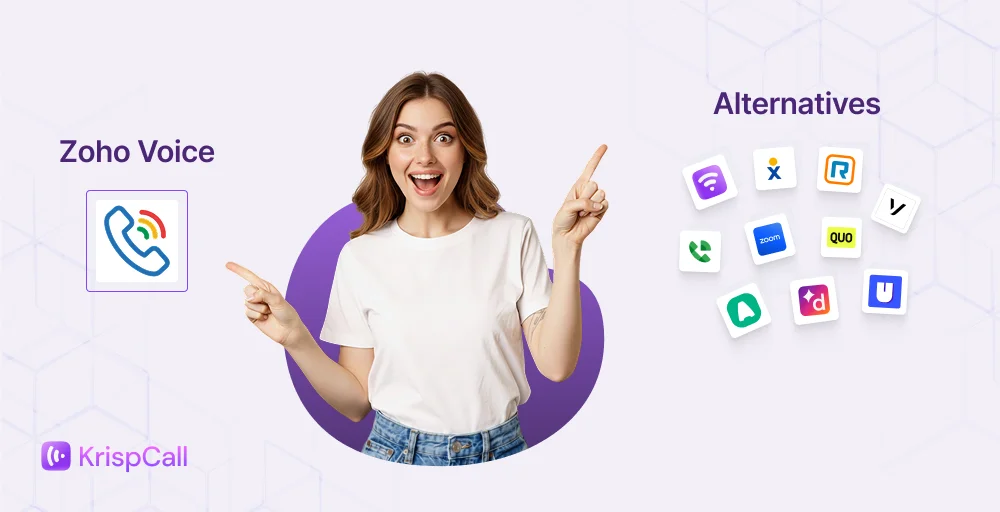
Zoho Voice is a functional business management software within its clearly defined boundaries. It works best for teams already committed to the Zoho ecosystem, including those relying on financial management tools, project management workflows, or other integrated Zoho applications. For businesses that operate outside it or have outgrown basic calling functionality, the platform presents real limitations.
Unpredictable credit-based pricing, persistent call quality complaints, lack of third-party integrations, limited SMS capabilities, and restricted regional availability are recurring issues reported in user reviews. These reflect structural gaps in the product that affect day-to-day business processes and customer service operations.
In this guide, we will cover 10 Zoho Voice alternatives and competitors worth checking out in 2026. Each provider’s overview, pros and cons, standout feature, and pricing are listed below to help you choose the right platform for your business.
✨ TLDR;
- KrispCall: Best for businesses needing a standalone VoIP solution with global virtual numbers and CRM integrations at a competitive price
- Nextiva: Best for medium-sized businesses that want voice, video, SMS, and customer experience tools consolidated into one platform.
- RingCentral: Best for enterprise businesses requiring a full UCaaS suite with deep third-party integrations and enterprise-grade reliability
- Vonage: Best for developer-led teams that need a programmable, API-driven communication platform
- Google Voice: Best for solopreneurs and small teams already operating within the Google Workspace ecosystem
- Zoom Phone: Best for remote and hybrid teams looking to add voice calling to an existing Zoom environment
- Quo (formerly OpenPhone): Best for startups that want a modern, lightweight phone system with shared number capabilities.
- Aircall: Best for sales and customer support teams that need call center workflows and deep CRM connectivity.
- Unitel Voice: Best for budget-conscious small businesses that need a professional phone presence without the complexity.
- Dialpad: Best for AI-forward teams that prioritize real-time transcription, call summaries, and conversation intelligence.
Why do businesses want to switch from Zoho Voice?
Zoho Voice works well in specific contexts. Outside of that context, the cracks start to show. Teams without expensive technical resources or dedicated Zoho administrators are often the first to feel the strain. Here’s why most teams are looking for Zoho Voice alternatives:
- Locked into the Zoho ecosystem: Zoho Voice has no third-party integrations. Businesses operating outside Zoho’s product suite have very limited options for connecting their phone system to the communication tools they already use.
- Persistent call quality and stability issues: Multiple users on G2 and Capterra report dropped calls, broken audio, missed calls not being logged, and the ZDialer app failing to ring, which directly affects timely responses to customers.
- Confusing and unpredictable pricing: Zoho Voice pricing operates on a credit-based system, where features like call recording, voicemail transcription, call monitoring, and noise cancellation each cost separate per-use charges. The true monthly cost is difficult to predict.
- Restricted availability: Zoho Voice is currently only available in the US and EU data centers. Businesses in Australia, India, and several other regions cannot fully access the platform.
- No video conferencing: Zoho Voice lacks built-in video conferencing. Teams that need voice and video under one roof have to purchase Zoho Meeting separately. This adds cost and complexity to an already fragmented set of team collaboration tools.
Why trust our reviews: Learn how we keep our content integrity, our software review methodology, and our content update methodology.
Top Zoho Voice alternatives & competitors: At a glance
The comparison table below covers key details across the leading Zoho Voice alternatives, so you can quickly find the solution that best fits your business.
| Provider | Starting price | Best for | What they stand out for | G2 Review |
| KrispCall | $12/user/month | Startups, freelancers, remote teams & growing businesses | Unified callbox, global virtual numbers, and seamless CRM integrations | 4.5/5 |
| Nextiva | $15/user/month | Mid-sized businesses needing unified communications | Combines voice, video, messaging, and CRM tools in one platform | 4.5/5 |
| RingCentral | $20/user/month | Enterprises needing a full UCaaS solution | All-in-one communication suite with deep third-party integrations | 4.1/5 |
| Vonage | $13.99/month/line | Businesses needing programmable communication | Highly flexible API-driven platform built for developers and scaling teams | 4.3/5 |
| Google Voice | $10/user/month | Solopreneurs and Google Workspace users | Simple, lightweight VoIP integrated with Google’s ecosystem | 4.1/5 |
| Zoom Phone | $15/user/month | Teams already using Zoom for meetings | Seamless voice and video experience within the Zoom environment | 4.6/5 |
| Quo (formerly OpenPhone) | $15/user/month | Startups and small business teams | Modern, clean business phone system with shared number and team features | 4.7/5 |
| Aircall | $30/license | Sales and customer support teams | Power dialer, call center workflows, and deep VoIP CRM integrations | 4.4/5 |
| Unitel Voice | $9.99/month | Budget-conscious small businesses | Affordable virtual phone system with toll-free and local number options | 4.6/5 |
| Dialpad | $15/user/month | AI-forward business communication teams | Built-in AI transcription, live coaching, and real-time call insights | 4.4/5 |
1. KrispCall
KrispCall is a cloud-based business phone system built for modern teams that need powerful telephony tools without an enterprise-grade setup. It provides a full-featured VoIP experience, covering call management, SMS, and CRM integrations, all from a single, unified platform that scales with your business.
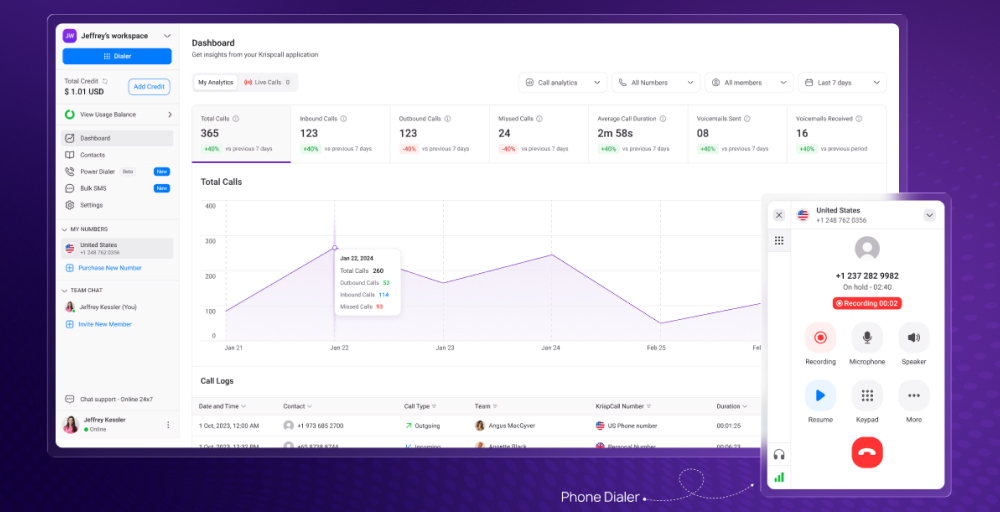
Trusted by startups, remote teams, and growing companies across the globe, KrispCall has earned strong ratings on G2 and Capterra for its clean interface, reliable call quality, and responsive customer support.
Businesses operating across multiple countries rely on KrispCall for its wide coverage of international virtual numbers, making cross-border communication easy and cost-effective.
What makes KrispCall the best alternative to Zoho Voice?
KrispCall addresses several core gaps that drive businesses to seek alternatives to Zoho Voice in the first place. While Zoho Voice ties users into the broader Zoho ecosystem, KrispCall works as a standalone solution, integrating smoothly with the tools your team already uses.
A few reasons KrispCall stands out among alternatives to Zoho:
- Manages all calls, messages, and contact activity in a single and unified workspace.
- Supports local, toll-free, mobile, and international numbers across 100+ countries.
- Transparent pricing and plans with no hidden add-on fees.
- Connects with 100+ CRM & helpdesk integrations tools, including HubSpot, Salesforce, and Pipedrive, to make it easier for deal stages and lead management.
What we like about KrispCall
- 24/7 responsive customer support with helpful guidance.
- It offers non-VoIP numbers too (US only).
- 1 free mobile/local number from the UK, US, or Canada upon signup.
What we dislike about KrispCall
- Mainly focuses on voice calling, meaning business needs a separate tool for video conferencing.
- The desktop app is not available.
- To set up a power dialer, you’ll need to submit business details, KYC, selfie verification, and social media (e.g., LinkedIn).
KrispCall’s standout features
- Global calling: Make and receive calls across 100+ countries using local, toll-free, or international virtual numbers at competitive rates.
- Multi-level IVR: Build customizable call routing menus using a drag and drop interface that directs callers to the right team or department automatically.
- Auto-reply for missed calls: Automatically sends a preset message to incoming VoIP callers whenever a call goes unanswered, supporting lead generation around the clock.
- AI text message responder: Generate and send context-aware replies using AI to incoming SMS messages instantly.
KrispCall pricing
KrispCall offers budget-friendly plans suited for teams of all sizes. Here’s a quick breakdown:
| Plan | Annual price (per user/month) | Key feature set |
| Essential | $12 | Call/SMS filter, Call analytics, Number sharing |
| Standard | $32 | Power dialer, Call recording, API & webhook access |
| Enterprise | Custom | Plan customization, Developer support, Dedicated account manager |
What users say about KrispCall
KrispCall is an excellent VoIP provider that delivers reliable and high-quality calling solutions. Their user interface is clean and easy to navigate, making it simple to manage business communications across multiple numbers and devices. The call quality is consistently clear, and their customer support is responsive and helpful. KrispCall is a great choice for businesses looking for a flexible and affordable VoIP service.
— Tkachenko E. Software Developer, Small-Business (50 or fewer employees), G2 review
2. Nextiva
Nextiva is an all-in-one marketing and business communication platform. It covers VoIP calling, video conferencing, team messaging, and SMS. The platform also extends into social media management and reputation monitoring. Both desktop and mobile apps are available, with separate dashboards for agents and administrators.
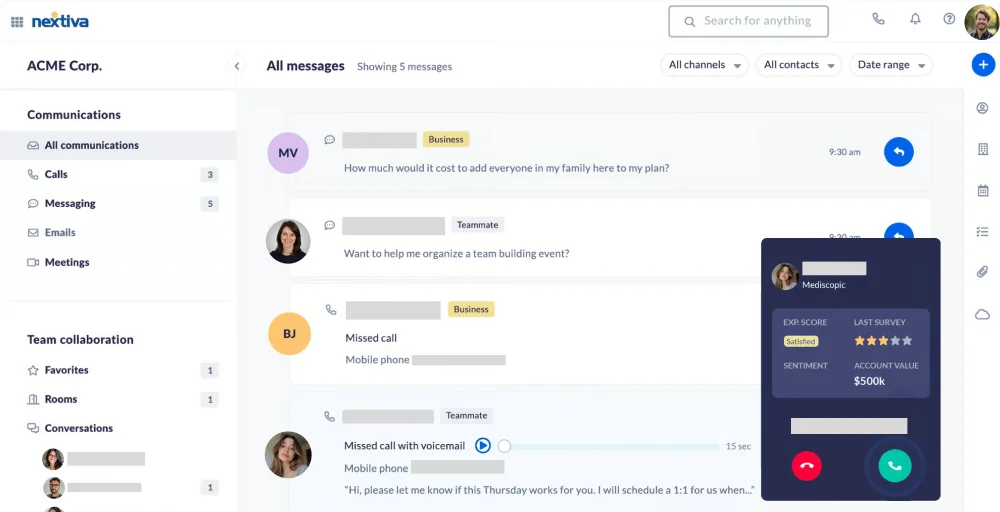
Nextiva sits at a higher price point compared to many Zoho Voice alternatives. The Core plan at $15/user/month is required to access voice calling. That said, the platform delivers features most basic VoIP tools, including unlimited video meetings, team chat, and review management. For businesses that want everything in one place, the cost is often justified.
What we like about Nextiva
- 99.999% guaranteed uptime, HD voice quality, and minimal disruptions.
- Available on both desktop and mobile for iOS and Android.
- Includes reputation management and review monitoring.
What we dislike about Nextiva
- Monthly SMS limitations are low.
- Many users report that the platform is too complex during initial setup and with third-party integrations.
- The Core plan lacks many essential features or offers them only as add-ons.
Nextiva’s standout features
- Unlimited calling in North America: Make and receive unlimited calls across the US and Canada with no per-minute charges or usage caps.
- VoIP switchboard: A built-in call management interface that lets teams handle, transfer, and monitor calls efficiently from one screen.
- Conversational AI: AI-powered tools for live transcription, segment-based marketing targeting, sentiment analysis, and intelligent call routing to improve customer interactions.
- SIP trunking: Allows businesses to connect existing PBX infrastructure to Nextiva’s cloud platform, enabling a smooth transition without replacing legacy systems.
Nextiva pricing
Nextiva offers tiered pricing plans to match different business sizes and communication needs. Here’s a quick look at what each plan covers:
| Plan | Annual price (per user/month) | Key feature set |
| Core | $15 | Video meetings, Call routing, and voicemail-to-text |
| Engage | $25 | Phone calls or video recordings, 2 Reporting dashboards, Call performance insights |
| Power Suite CX | $75 | Built-in call center, Automate repetitive tasks, Make & receive calls in a queue |
3. RingCentral
RingCentral is a cloud-based AI-powered business communication platform with a long-standing presence in the VoIP market. The system supports 330+ third-party integrations with powerful APIs across multiple communication channels. It is widely adopted by mid-sized and enterprise-level businesses across industries.
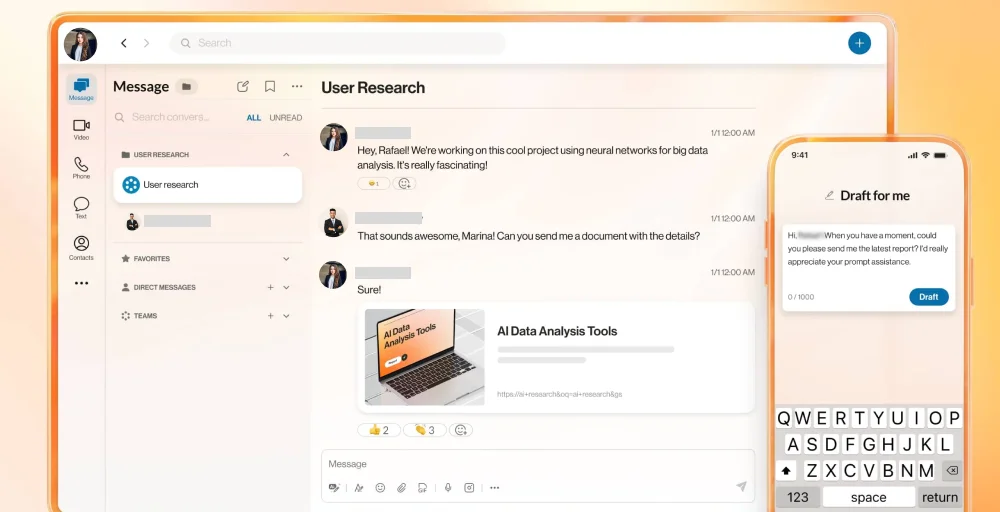
The platform carries more weight than most Zoho competitors in terms of feature depth. AI tools, live call monitoring, and analytical reports are accessible even on lower-tier plans.
The professional plan at $25/user/month unlocks CRM integrations and expanded messaging capabilities that growing teams commonly rely on. However, that depth comes at a cost, both in pricing and complexity. Teams willing to invest the time in setup will find it one of the most capable business phone solutions available.
What we like about RingCentral
- Many essential AI features are available from the entry-level plan.
- 14-day free trial to new subscribers only.
- Extensive 330+ integrations with powerful APIs for voice, SMS/MMS, video, fax, etc.
What we dislike about RingCentral
- Sending text messages with local or toll-free numbers requires lengthy SMS registration and toll-free verification.
- Many users report difficulty closing the accounts with lengthy wait times and challenging customer service interactions.
- The extensive feature set can overwhelm teams that lack specialized technical knowledge or dedicated IT support.
RingCentral’s standout features
- Multi-way conference call: Host a call with multiple participants from different teams or locations simultaneously.
- Live call queue monitoring: Monitor active call queues in real time to efficiently manage agent workloads and resource allocation, helping enterprise teams consistently uphold operational level agreements under high call volumes.
- Advanced fax spam blocking: Automatically filters and blocks unwanted fax transmissions before they reach the system.
- AI live transcription.
RingCentral pricing
RingCentral keeps its pricing simple with tiered plans. Here’s what each one offers at a glance:
| Plan | Annual price (per user/month) | Key feature set |
| Core | $20 | Appointment booking, Unlimited domestic calling, 25 SMS user/minutes |
| Advanced | $25 | AI writer, CRM integration, 100 SMS/user/month |
| Ultra | $35 | All AI virtual assistant features, 10,000 toll-free minutes, Unlimited storage |
| Customer Engagement Bundle | Custom pricing | Call back from queue, Live reports, Shared SMS inbox |
4. Vonage
Vonage is a cloud communications platform that serves both businesses and developers. It offers a unified communications suite alongside a powerful set of programmable APIs for voice, SMS, and video. The platform is flexible enough to support standard business phone needs as well as custom-built workflow automation.
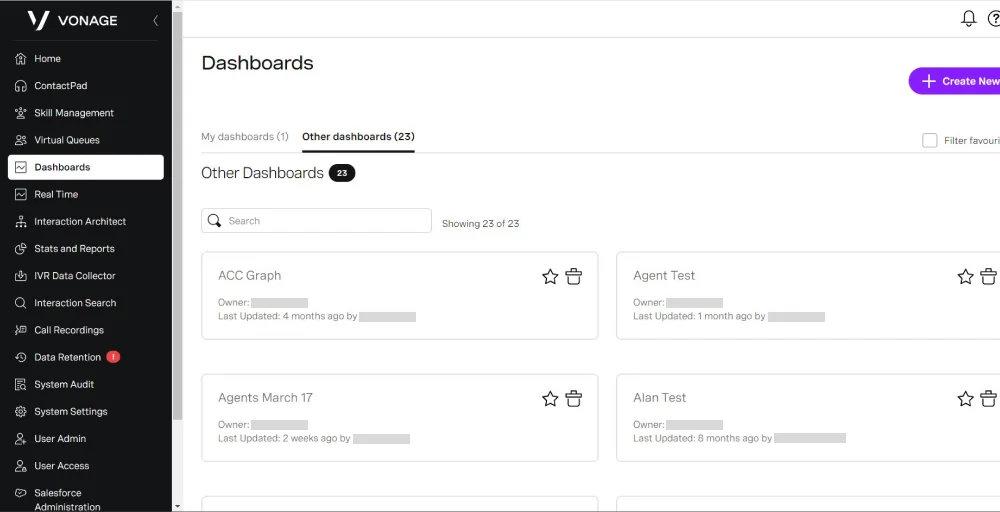
What makes Vonage distinct from other Zoho Voice alternatives is its dual identity as both a ready-to-use business phone system and a developer-friendly API platform. Smaller teams can use it straight out of the box, while technical teams can extend it through marketing automation pipelines and custom integrations.
That flexibility makes it a strong fit for businesses with evolving communication needs.
What we like about Vonage
- VBC world office offers 90+ inbound calling numbers to initiate conversations worldwide.
- Easy number porting from existing carriers with minimal disruption.
- A virtual receptionist is included in all paid plans at no extra charge.
What we dislike about Vonage
- The video conferencing feature is only available on higher-tier plans.
- Third-party integrations are very limited.
- Many users complained about hidden surcharges, add-on fees, and early termination.
Vonage’s standout features
- Block caller ID: Allows users to hide their number when making outbound calls for privacy or business purposes.
- Call rerouting: Automatically redirects incoming calls to another number or device when the primary line is unavailable.
- IP phone paging system: Broadcasts announcements across multiple IP phones simultaneously, useful for office-wide alerts.
- Multi-line business phone system: Supports multiple active lines so teams can handle several calls at once without missing incoming traffic.
Vonage pricing
Vonage structures its plans around core communication needs, with add-ons available for teams that need more advanced features:
| Plan | Annual price (per line/month) | Key feature set |
| Mobile | $13.99 | VBC mobile/desktop app, Virtual receptionist, SMS/MMS |
| Premium | $20.99 | Vonage meetings, Single sign-on, 20+ third-party integrations |
| Advanced | $27.99 | Visual voicemail, On demand call recording, Call groups |
5. Google Voice
Google Voice is a VoIP phone service built and maintained by Google. It offers call management, voicemail, SMS, and basic conferencing through a clean, minimal interface. It connects natively with Gmail, Google Calendar, and Google Meet.
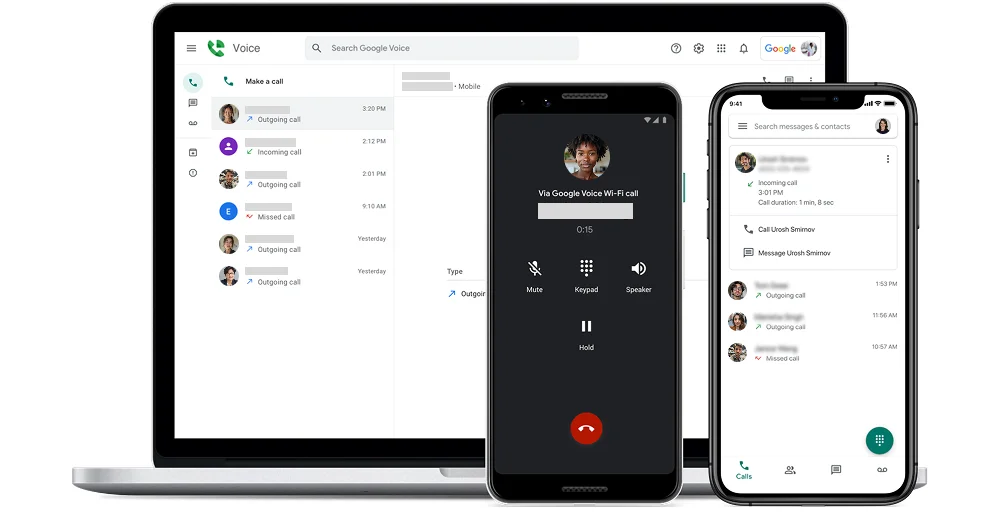
The platform works best for individuals and small teams with simple communication needs. It skips the complexity of enterprise VoIP tools in favor of simplicity and affordability. For businesses already paying for Google Workspace, it feels less like an add-on and more like a natural extension of the tools they already use daily.
What we like about Google Voice
- Affordable entry price, especially for existing Google Workspace subscribers.
- Intelligent spam filtering automatically keeps unwanted calls and messages out.
- Available across desktop and mobile with reliable sync across devices.
What we dislike about Google Voice
- Limited to US-based numbers, making it unsuitable for international business operations.
- Lacks advanced call center features like IVR, call queuing, and power dialing.
- Customer support options are limited compared to dedicated VoIP providers.
Google Voice’s standout features
- Integration with Google’s ecosystem: Works directly with Gmail, Google Calendar, and Google Meet for a fully connected communication experience.
- Intelligent spam filtering: Automatically detects and filters spam calls and messages before they reach the user.
- SIP link: Businesses can connect compatible desk phones and hardware directly to Google Voice via the SIP protocol.
- Three-way calling: Add a third participant to any active call without additional software or setup.
Google Voice pricing
Google Voice offers simple pricing tied directly to Google Workspace subscriptions:
| Plan | Annual price (per user/month) | Key feature set |
| Starter | $10 | Unlimited US texting, Call recording, Three-way calling |
| Standard | $20 | Unlimited number of users, On-demand call recording, Auto attendants |
| Premier | $30 | Automatic call recording, Advanced reporting of voice activity with BigQuery, Call queuing |
6. Zoom Phone
Most businesses already know Zoom for video meetings. Zoom Phone takes that same platform and adds a full cloud phone system on top. Voice calling, SMS, voicemail, and call management are all available in the Zoom Workplace app on mobile and desktop.
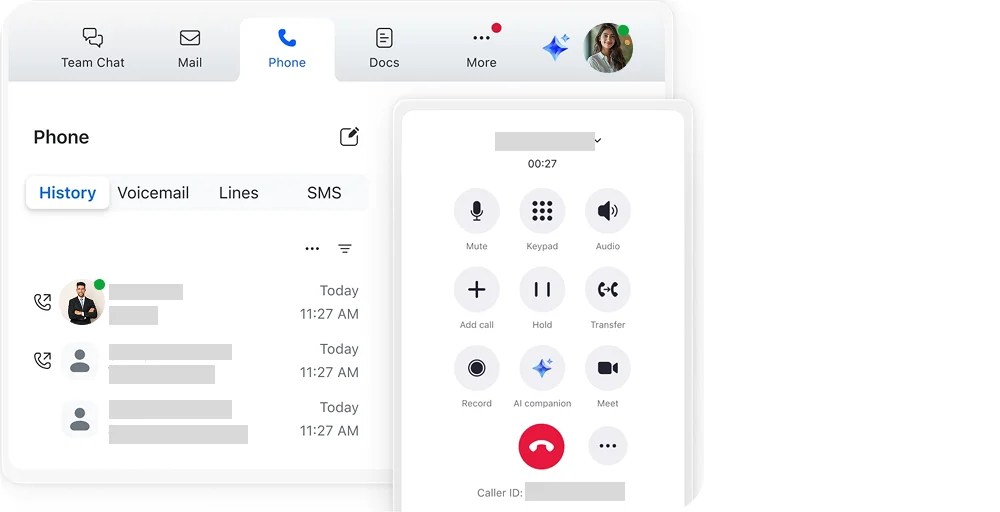
Switching to Zoom Phone requires almost zero onboarding for existing Zoom users. There are no new apps to install or interfaces to learn. That low-friction adoption is a real advantage for growing teams. But for businesses seeking a standalone VoIP solution independent of Zoom’s ecosystem, it may be somewhat limiting.
What we like about Zoom Phone
- Integrates directly with Zoom Meetings for a unified voice and video experience.
- Available in 45+ countries with global call routing capabilities.
- Intuitive interface with an affordable pricing structure.
What we dislike about Zoom Phone
- Some advanced features, like call monitoring and analytics, require the Power Pack add-on at an extra cost.
- Customer support response times can be slow on lower-tier plans.
- Unlimited calling plans are limited to specific regions and require add-ons for broader coverage.
Zoom Phone’s standout features
- Desk phone support: Compatible with a wide range of desk phones from leading manufacturers, giving teams the flexibility to use hardware they already own.
- Shared line groups: Provides a group of users shared access to a single phone number and voicemail for efficient team-based call handling.
- Advanced analytics: Monitoring dashboards and detailed call reporting enable administrators to track call quality and customer satisfaction scores, and to resolve issues proactively.
- Global call routing: Lets administrators configure business hours, after-hours rules, and follow-the-sun routing across multiple locations and time zones.
Zoom Phone pricing
Zoom Phone offers flexible plans ranging from metered to unlimited calling:
| Plan | Annual price (per user/month) | Key feature set |
| US & CA Unlimited | $15 | Workplace integrations, 3 Whiteboards, Team chat |
| Pro Plus | $18.33 | Free premium Zoom apps for 1 year, AI companion, Unlimited clips |
| Business Plus | $22.49 | Translated captions, Unlimited whiteboard, Scheduler |
7. Quo (formerly OpenPhone)
Quo is a business phone system designed for small teams and startups. It centralizes voice calling, texting, and call management into a shared interface available on both desktop and mobile. The platform rebranded from OpenPhone to Quo in 2025 while retaining its core product direction.
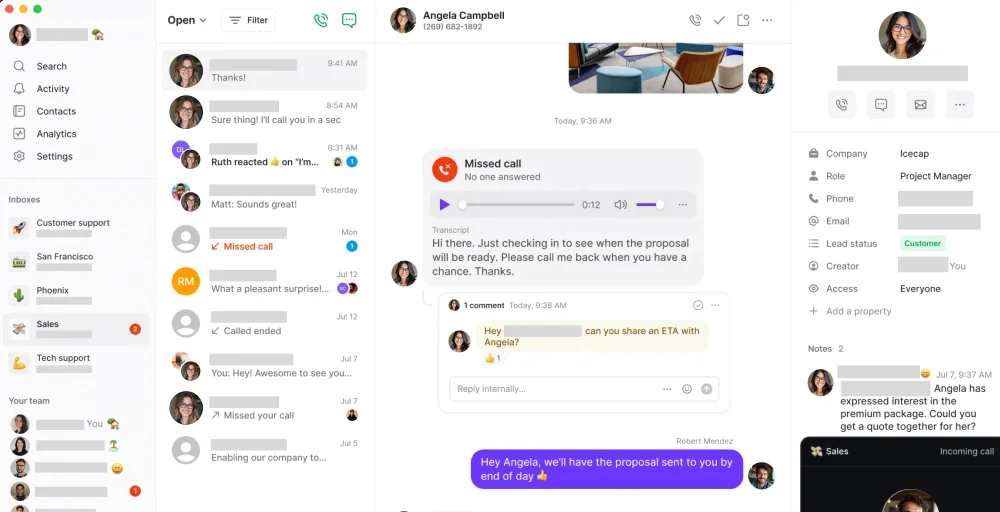
What differentiates Quo from other Zoho Voice alternatives is its shared number model. Multiple team members from sales teams to support teams can operate under a single business number, with full visibility into call and message history. It trades advanced call center functionality for ease of use, which works well for lean teams but shows limitations as communication needs scale.
What we like about Quo
- 1,000 free automation credits (10 calls) are included on every paid plan.
- Risk-free 7-day free trial.
- Every paid Quo plan includes one new or ported phone number (local or toll-free) per user.
What we dislike about Quo
- It lacks video conferencing tools.
- Reporting and analytics tools are basic and may not meet the needs of data-heavy teams.
- International calling coverage is limited compared to more established VoIP providers.
Quo’s standout features
- AI text messages: Automatically drafts and suggests text message responses based on previous conversation context.
- Business SMS & MMS: Send and receive text and multimedia messages from a dedicated business number.
- Auto attendant: Greet incoming callers with a customizable menu that automatically routes them to the right person or team.
- Simultaneous ring: Ring multiple devices or team members at the same time, so incoming calls are never missed.
Quo pricing
Quo keeps its pricing accessible for small teams, with plans that scale as communication needs grow:
| Plan | Annual price (per user/month) | Key feature set |
| Starter | $15 | Unlimited calling and messaging (US & Canada), Sona AI, Manual call recording |
| Business | $23 | AI contact suggestions, Automatic call recording, Advanced call forwarding |
| Scale | $35 | AI call tags, Priority support, Unlimited paid users |
8. Aircall
Aircall is call center software and a cloud-based voice solution built for modern sales and customer support teams. It connects calls directly to CRM and helpdesk workflows, like Salesforce, HubSpot, or Intercom. The platform is accessible via desktop and mobile apps with no hardware requirements.
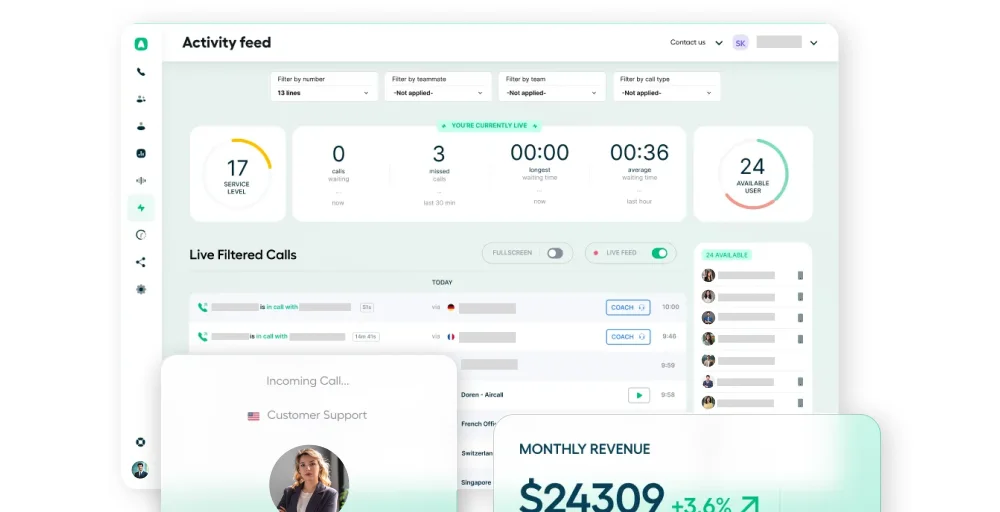
At $30 per license, it sits at the higher end among Zoho Voice alternatives. That cost comes with a call center-focused feature set including sales processes management, sales automation capabilities, and deep CRM connectivity. These features justify the investment for revenue-driven teams but may feel excessive for businesses with simpler communication needs.
What we like about Aircall
- Deep CRM and helpdesk integrations with 200+ tools like HubSpot, Salesforce, and Intercom.
- Clean dashboard with clear call analytics, advanced reporting capabilities, and team performance metrics.
- Unlimited voice calling in the US and Canada.
What we dislike about Aircall
- The starting price of $30 per license is higher than most alternatives.
- The minimum user requirement of three seats makes it unsuitable for very small teams.
- Lacks native marketing features like bulk SMS campaigns.
Aircall’s standout features
- AI-generated call summaries: Automatically generate concise summaries of completed calls, reducing manual note-taking for agents after each interaction.
- Contact synchronization: Sync contact data across connected CRM and helpdesk platforms in real time, keeping caller information accurate and up to date.
- Unlimited concurrent calls: Handle multiple simultaneous calls without any capacity restrictions, supporting operational efficiency during peak hours.
- Interactive Voice Response (IVR): Route incoming callers through a customizable menu system to reach the right team or department without agent involvement.
Aircall pricing
Aircall structures its plans around call center and sales team needs, with pricing that reflects its enterprise-leaning feature set:
| Plan | Annual price (per user/month) | Key feature set |
| Essentials | $30 | 100+integrations, Softphone, Call recording |
| Professional | $50 | Call coaching, Live monitoring, Voicemail drop |
| Custom | Call sales teams for details | Premium onboarding, Prioritized customer support, Single sign-on |
9. Unitel Voice
Unitel Voice is a virtual phone system designed for small business owners, solo entrepreneurs, and home-based businesses. It covers local, toll-free, and vanity numbers, as well as core call management features such as an auto attendant, call forwarding, and voicemail. The platform is accessible via a mobile app, a softphone, and a desk phone.
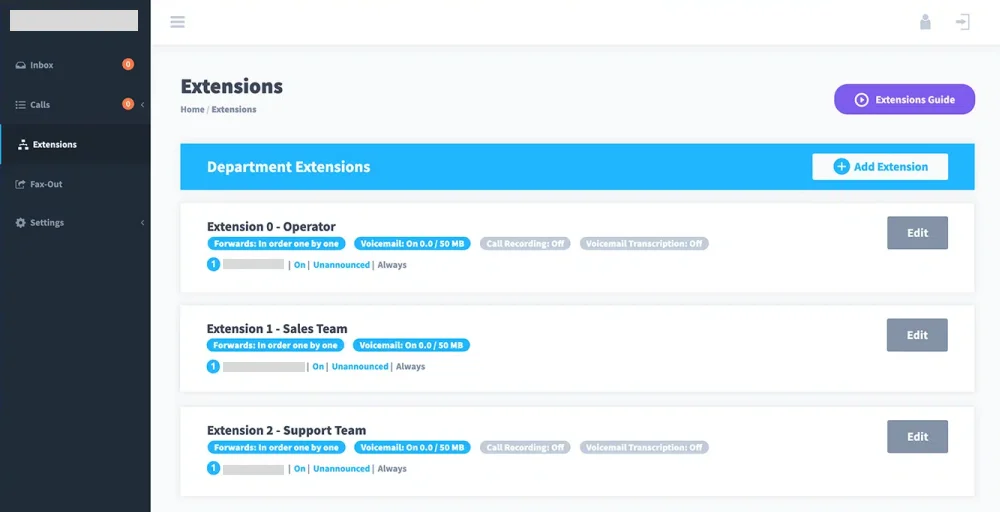
At $9.99/month, it holds the lowest entry price among the Zoho Voice alternatives on this list. For teams that need unlimited users without heavy feature requirements, the Pro Unlimited plan for small operations delivers solid value at $24.99/month.
The trade-off, however, is its scope. Unitel Voice covers the essentials well but falls short on analytics, integrations, and AI features found on pricier platforms.
What we like about Unitel Voice
- 30-day risk-free trial available for new users.
- USA-based customer support with one-on-one setup assistance included.
- Supports local, toll-free, vanity, and virtual numbers across North America.
What we dislike about Unitel Voice
- Limited integrations with third-party CRM and business tools.
- Lacks advanced features like call analytics, power dialing, and AI tools.
- Team collaboration features are only available on higher-tier Office plans.
Unitel Voice’s standout features
- Business voicemail: Capture important calls and messages directly inside custom voicemail boxes.
- 24/7 system monitoring: Continuously monitors the platform infrastructure to maintain consistent call quality and connectivity around the clock.
- Virtual PBX: Provides a cloud-hosted private branch exchange that manages call routing, extensions, and departments without any on-site hardware.
- 911 emergency calling: Supports enhanced 911 functionality, allowing location-based emergency call routing from any device connected to the system.
Unitel Voice pricing
Unitel Voice offers budget-friendly plans with optional add-ons for teams that need expanded features:
| Plan | Annual price (per month) | Key feature set |
| Start-Up | $9.99 | 1 phone number, 500 monthly minutes, 3 users included |
| Unlimited | $24.99 | Mobile app, Unlimited minutes, Unlimited users |
| Office | $29.99 | Desktop softphone, Desk phone, Presence Indicator |
| Office-Max | $69.99 | 10 users included, Team messaging |
Related article👉: Check out our detailed KrispCall vs. Unitel Voice comparison to see how the two stack up.
10. Dialpad
Dialpad is a cloud-based business communications platform with AI built into its core. Designed for modern teams, it offers communication features such as voice calling, video meetings, SMS, and contact center capabilities, all in a single app available on desktop and mobile. It’s a service automation platform that is particularly recognized for its real-time transcription and AI-driven call insights.
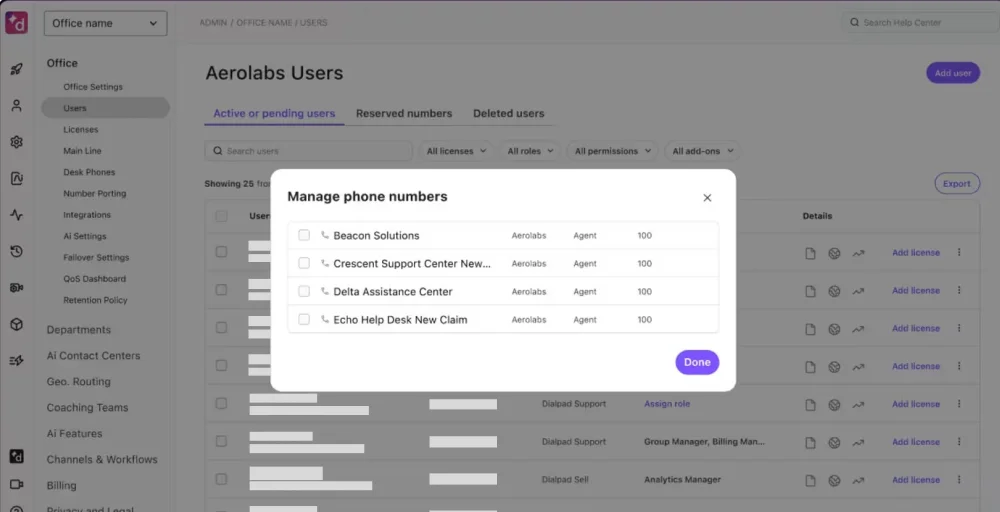
Dialpad separates itself from other Zoho competitors with its native AI layer, called Dialpad GPT. It automatically transcribes calls, enables document collaboration through shared meeting notes, generates summaries, and surfaces action items. Businesses that prioritize data and conversation intelligence over raw feature breadth tend to find it well worth the investment.
What we like about Dialpad
- Built-in AI transcription and call summaries are available across all plans.
- Clean, modern interface that works consistently across desktop and mobile.
- BYOD support means teams can use existing systems without hardware investments.
What we dislike about Dialpad
- International SMS support is restricted to select countries.
- Some advanced AI and contact center features require higher-tier plans at a significant price jump.
- Users sometimes report choppy calls or connection issues, dependent on internet stability.
Dialpad’s standout features
- Automatic call distribution (ACD): Intelligently route incoming calls to the most appropriate available agent based on pre-defined rules, skills, or availability.
- BYOD (Bring Your Own Device): Allows team members to use personal smartphones, tablets, or computers as fully functional business phone endpoints.
- Dialpad GPT: Dialpad’s proprietary AI engine that delivers real-time call transcription, post-call summaries, and automated action item detection.
- Video conferencing: Built-in video meetings accessible directly from the Dialpad app, eliminating the need for a separate conferencing tool.
Dialpad pricing
Dialpad’s plans are structured around communication needs, with AI features included from the entry level:
| Plan | Annual price (per user/month) | Key feature set |
| Standard | $15 | |
| Pro | $25 | Hold queues, Additional local or international numbers, 10 office maximums |
| Enterprise | Custom pricing | Unlimited office maximums, Unlimited departments, 100 seat minimums |
Which Zoho Voice alternative is best for your business
Not every platform on this list is built for the same purpose. Some prioritize affordability, others lead with AI, and a few are designed specifically for sales or support environments.
Here’s a quick guide to help narrow down the right fit:
| Business type | Best pick | Reason |
| Startups & growing teams | KrispCall | Affordable entry price, global virtual numbers, and CRM integrations that scale with the business |
| Small & medium businesses | Nextiva or Zoom Phone | Both offer reliable UCaaS features, solid support, and room to scale without switching platforms |
| Large enterprises | RingCentral or Dialpad | Enterprise-grade reliability, deep integrations, and AI-powered tools suited for high-volume communication |
| Sales & support teams | Aircall | Purpose-built for customer service operations with power dialing, live monitoring, and CRM integrations |
| Budget-conscious businesses | Unitel Voice | Lowest starting price with solid core features and USA-based support |
| Solopreneurs & freelancers | Google Voice or Quo | Lightweight, affordable, and straightforward, ideal for teams seeking simplicity |
| Developer-led teams | Vonage | API-driven platform that supports custom-built workflow automation and inbound marketing workflows |
Related Article 👉: Best Virtual Phone Number Provider
Why do Zoho Voice users switch to KrispCall?
Zoho Voice is a good provider, but its dependency on the broader Zoho ecosystem creates real limitations. Businesses operating outside that ecosystem or those that have outgrown it frequently find the platform falls short in integration capabilities, lead management, and operational efficiency.
KrispCall supports virtual numbers in 100+ countries, integrates with major CRMs to support sales pipelines and track leads, and consolidates calls, messages, and contact activity into a single Unified Callbox. Setup requires no hardware and minimal configuration.


Plans start at $12/user/month, making it one of the more competitively priced options without compromising on core functionality. For businesses evaluating Zoho Voice alternatives, KrispCall consistently stands out as a practical and scalable replacement.
Book a KrispCall demo today and see how it compares firsthand.