Did you know that over 75% of businesses are likely to adopt cloud-based communications by the year 2026?
UCaaS or Unified Communications as a Service is transforming the way businesses communicate with clients by integrating voice, video, and messaging into a single platform.
With the shift away from outdated on-premise systems, businesses are embracing UCaaS for its ability to support hybrid work, enable AI integration, comply with cloud-first strategies, and provide scalable, cost-efficient communication tools.
In this article, we’ll walk you through top powerful UCaaS features every business should consider, including:
- Easy calling features to handle both incoming and outgoing calls smoothly
- Team collaboration tools that help remote teams stay connected and in sync
- Live analytics and reports so you can see what’s working and make smarter decisions
- Built-in meetings and video calls for easy virtual catch-ups with your team or clients
- All-in-one communication across voice, chat, video, SMS, and even social apps
- Simple admin controls to manage users, settings, and security without the tech headache
31 powerful UCaaS features you should know
UCaaS combines voice, video, messaging, and collaboration in a cloud solution, reducing complexity and boosting productivity. It enhances remote work, customer experience, and provides analytics and real-time presence.
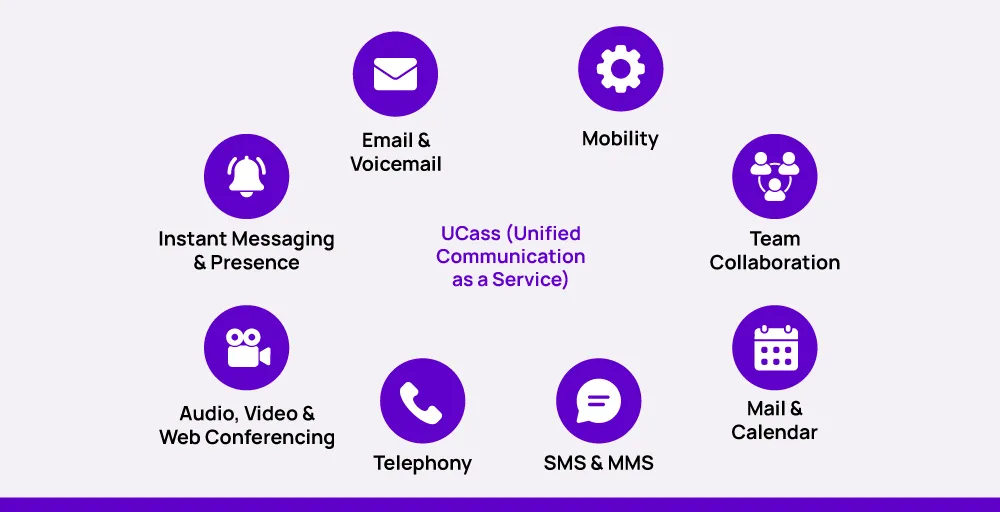
UCaaS offers flexible, scalable, and secure connections across devices, networks, and locations. Features like call recording, intelligent routing, team messaging, and integrations streamline processes and support consistent, efficient service.
| UCaaS Feature | Best For / Uses |
| PSTN Connectivity | Calls to/from global landlines and mobiles, reliable voice in low-bandwidth areas |
| Direct Inward Dialing (DID) | Direct calls to departments/employees, prioritizing sales/support/executives |
| Auto Attendant | Automated call routing, enhanced customer service 24/7 |
| Call Recording | Training, compliance, quality control, and call review |
| Call Queues | Managing high call volumes, reducing missed calls, customer support centers |
| Queue Callback | Reducing hold times, better customer experience in busy call centers |
| Team Messaging | Fast team communication, reducing email overload, project-based chat |
| Desktop App | Unified communication on desktop for productivity and instant access |
| Mobile App | Anywhere access for field workers/home-based staff, real-time communication |
| Team Presence | Real-time status updates, better call routing, reducing interruptions |
| Unified Voicemail | Centralized voicemail management across devices/lines |
| Call Analytics | Tracking call activity, improving response times and staff optimization |
| Screen Pop | Instant customer info for agents via CRM integration |
| Dashboard Reports | Real-time team metrics for performance monitoring and action |
| SLA Monitoring | Ensuring/alerting SLA compliance for high service standards |
| Video Conferencing | Face-to-face virtual meetings, screen share, better remote collaboration |
| Audio Conferencing | Group phone meetings, especially for on-the-go users |
| Webinars & Workshops | Large-scale online training, presentations, audience engagement |
| Screen Sharing | Real-time collaboration, demos, training, and walkthroughs |
| Website Chat | Instant website visitor support, lead generation |
| Email Support | Shared inbox, ticket tracking, and team collaboration on customer queries |
| Social Media Channels | Unified handling of social media inquiries and engagement |
| SMS Integration | Sending alerts, reminders, and time-sensitive notifications to mobiles |
| IVR & Call Flows | Efficient automated call routing for high-volume centers |
| Centralized Management Portal | Easy admin control, fast user/feature management |
| Cloud PBX | Internet-based telephony, location-independent calling |
| Cloud File Storage | Easy file sharing/storing within the UCaaS platform |
| Online Faxing | Send/receive faxes securely via email/app, no paper needed |
| Call on hold | Managing multiple calls, consulting teammates, or retrieving information without disconnecting the caller. |
| Third-party Integrations | Connecting UCaaS with CRM, helpdesk, and productivity tools for a unified workflow |
| Authentication & SSO | Secure, seamless single login for multiple business apps |
A. Core calling features
These core calling features form the backbone of any unified communication solution, empowering businesses with flexible, reliable, and professional voice capabilities essential for today’s cloud-first, remote-ready workflows.
1. PSTN Connectivity
Secure PSTN or Public Switched Telephone Network connectivity allows UCaaS platforms to connect to traditional phone networks. This means users can make and receive calls not just over the internet, but also to and from regular landlines and mobile numbers worldwide.
This feature ensures seamless business communication with clients, vendors, and partners worldwide by combining the flexibility of VoIP technology with the reliability of legacy networks.
It’s especially beneficial in areas with inconsistent internet connectivity, as it enables businesses to maintain high-quality voice calls even in low-bandwidth environments.
2. Direct Inward Dialing (DID)
Direct Inward Dialing (DID) enables businesses to assign unique phone numbers to specific departments, groups, or designated employees without requiring separate physical phone lines. Thus, the callers can call directly to the intended person or group, instead of needing to go through a receptionist or phone menu.
Direct-dial numbers are especially useful for priority groups, such as sales, customer support, or executive levels, where direct dialing can enhance responsiveness and customer satisfaction.
With a dedicated line for each team and member, DID enables streamlined operations, reduces call handling time, and improves customer experience.
3. Auto Attendant
An auto attendant is an automated feature that greets and directs incoming calls to the relevant department, team, or individual, with no human operator required. It offers callers a customized menu (e.g., Press 1 for Sales, 2 for Support), so every call is routed effectively and professionally.
This feature is available 24/7 and can be an excellent addition to improving customer service and internal communications across time zones.
An auto attendant is especially useful for hosted contact centers, where successful call routing is crucial to enable top service standards and efficient collaboration.
4. Call Recording
Call recording allows organizations to automatically record and save incoming and outgoing calls for future reference.
Such a feature is indispensable when it comes to training new staff, tracking performance, and ensuring adherence to industry regulatory standards. It provides a reliable mechanism for reviewing conversations and adjusting communication strategies.
By enabling secure and reliable record-keeping, call recording contributes to UCaaS security and quality control. Call analytics offer more insight into customer experiences, agents’ activities, and call outcomes, enabling better decision-making and enhanced service delivery.
5. Call Queues
Call queues help to manage large volumes of calls by placing incoming calls in a virtual line when all the available agents are engaged.
Callers hear personalized messages or music while waiting, getting updated information, and entertainment until an agent is available to assist them. This reduces frustration and ensures that no call goes unanswered.
This feature optimizes the caller experience by reducing hang-ups and managing expectations during peak periods. It’s especially beneficial for customer support and sales organizations, and with hosted contact centers, it offers smooth call distribution and enhanced service continuity.
6. Queue Callback
The queue callback allows callers to request a callback instead of waiting on hold when lines are busy. This feature allows callers to request a return call instead of waiting on hold. When an agent is free, the system automatically calls the customer back.
Queue callback substantially enhances the customer experience, as it allows callers to manage their time while still having their issues addressed. It also improves agent productivity and reduces call abandonment, making it a worthwhile addition to any high-volume support or contact center operation.
B. Collaboration & presence
Practical team collaboration tools and real-time presence signals are crucial in a remote or hybrid setup.
With UCaaS solutions, employees can connect, communicate, and collaborate seamlessly across devices, regardless of their location. This keeps teams on the same page, productive, and responsive, whether in the office or on the go.
7. Team Messaging
Team messaging enables team members to message one another immediately, exchange files, and collaborate in clean threads all within a single dashboard. The feature eliminates email noise and facilitates quicker decision-making by keeping discussions straightforward and linear.

This tool is an excellent feature for remote teams, as it consolidates all communications calls, messages, and meetings into one platform. For example, your sales and marketing team can have individual chat threads for each project, allowing them to be better informed and work more effectively, even remotely.
8. Desktop App
The Desktop app offers one-stop communication in one place on your work desktop, including messaging, voice calls, video meetings, and voicemails. It simplifies daily tasks by providing one-click access to all UCaaS features from a single location, keeping teams productive and connected.
This comes in handy with hybrid and on-premise teams who desire instant, structured access to communications.
You can, for example, start a video call directly from a desktop chat window, enabling faster and more efficient collaboration.
9. Mobile App
The mobile app connects workers and enables them to work from anywhere. It provides calling, messaging, and document sharing in the field, ideal for field-based workers, sales teams, and home-based workers who require real-time communication while on the move.
This provides you with mobility, enabling you to maintain fluid business processes outside the office with agility.
You can attend to a client’s message while commuting, for example, or get back to a conversation in between meetings without disturbing the flow of conversation.
10. Team Presence
Team presence displays the real-time availability status of all team members, indicating whether they are available, busy, in a meeting, or offline. It informs team members when and how to contact them, making it easier to schedule and communicate between departments.
By reducing missed calls and eliminating unnecessary interruptions, this feature enables teams to be more responsive.
11. Unified Voicemail
Unified Voicemail consolidates all your voicemail messages from devices and lines into a single, convenient-to-handle inbox. On desktop or mobile, you can read, sort, and respond to voicemails without switching platforms.
This is convenient and simple to follow through on. For example, you can listen to a message left on your business phone directly via your mobile app, so no important message falls on deaf ears.
C. Analytics & performance tools
Businesses need visibility into communications infrastructure performance to be customer-focused and competitive.
Modern UCaaS solutions offer advanced analytics and reporting features that support call quality, agent performance, and service level monitoring.
12. Call Analytics
Call analytics provide rich insights into call statistics, including volume, duration, missed calls, wait times, and agent performance. With access to call history and call log records, managers can identify trends, streamline workflows, and improve the customer experience.
This function helps improve response times and productivity within your teams.
For example, you can analyze high-call hours for your cloud telephony system and optimize staff to minimize waiting time.
13. Screen Pop
Screen pop presents valuable customer information, such as their name, background, and current issue, on the agent’s screen the instant a call is received. It integrates with CRM systems to provide agents with instant context, enabling them to resolve issues more efficiently and individually.
This reduces call handling time and enhances the customer support experience. For instance, a support representative can view a customer’s previous ticket at once and greet them by name, thereby smoothing the entire experience.
14. Dashboard Reports
Dashboard reports deliver a real-time graphical representation of key metrics for a contact center, including agent availability, average call handling time, call arrival rates, and queue status.
This enables managers to gain insight into team performance and assess whether service goals are being met.
Dashboard reports provide actionable, real-time insight that aids data-driven decisions. For example, with a business VoIP dashboard, managers can monitor agent activity in real-time and view the size of the queue, enabling them to make informed decisions and provide effective service.
15. SLA Monitoring
SLA monitoring tracks resolution and response times for service level agreements (SLAs), ensuring that companies consistently honor their SLA commitments. Managers are alerted when targets are likely to be missed, protecting customers from dissatisfaction and delayed service.
This utility helps to maintain the quality level of service by notifying managers of potential problems before they reach the customer.
For instance, if a premium customer’s call waiting time exceeded the SLA, the manager would be notified. They can then direct the team to provide an improved customer experience and compliance with SLA.
D. Meeting & conferencing
Seamless virtual meetings are essential, especially for businesses with remote and hybrid teams.
Top UCaaS providers offer business-grade conferencing features that enable seamless team coordination within the company, as well as effective client outreach and engagement.
From video calls to virtual workshops, these offerings enhance communication, making it more engaging, productive, and collaborative.
16. Video Conferencing
Video conferencing allows teams to connect face-to-face through high-definition video from anywhere in the world. It includes in-meeting chat, screen sharing, and host controls, making it ideal for both routine check-ins and formal business presentations.
This feature facilitates remote collaboration and trust among teams. For example, you can utilize HD video and screen sharing for weekly project meetings to ensure everyone is on the same page and engaged.
17. Audio Conferencing
Audio conferencing allows multiple people to join a single call for meetings or discussions using just their phones. It delivers clear, high-quality voice communication, making it easy to stay connected without needing video.
This is especially useful for remote teams, busy professionals, or anyone needing to join a call while on the go.
18. Webinars & Workshops
Webinars and workshops are virtual sessions that allow businesses to present, educate, or train large audiences online.
They often include features like screen sharing, Q&A, and polls to keep participants engaged and informed. These tools are ideal for product demos, employee training, or thought leadership events that reach audiences anywhere.
19. Screen Sharing
Screen sharing lets you display your screen during a video call so others can see presentations, documents, or live demos in real time. It helps ensure everyone is on the same page, improving clarity and engagement in virtual meetings.
This is especially useful for client walkthroughs, team training, or collaborative editing sessions.
E. Omnichannel communication
Customers expect fast and consistent support on every channel today, whether through chat, email, SMS, or voice.
Leading UCaaS solutions unify all these channels in one system, allowing businesses to deliver a consistent customer experience without needing to switch between tools. It boosts team productivity and keeps conversations linked from start to finish.
20. Website Chat
Website chat provides an immediate channel of communication that allows visitors to contact your staff during their visit. It’s an instant and convenient way to respond to inquiries, generate leads, and supply timely support, as well as be the first point of contact prospects will have with your company.
This improves customer satisfaction and customer offers. For example, if a visitor is interested in purchasing your product, they can ask your sales team about the price through chat and could receive an instant response, which would help the conversation along.
21. Email Support
Email support collects all customer emails into a single, open, shared inbox that is accessible and manageable by your entire team. This feature enables you to track conversations, assign tasks, and allows inter-departmental collaboration.
It also streamlines the workflow for the staff who answer emails and enables support staff to remain on the same page.
For example, a support employee can handle tickets from voice and tickets from email from the same dashboard, improving productivity and consistency.
22. Social Media Channels
Social media channels integration enables teams to engage and manage customer feedback and messages on Facebook, Twitter, and Instagram, all within their UCaaS platform. Agents don’t need to toggle between tabs or social media platforms to stay engaged with customers.
This enhances response times and your brand’s online presence.
For example, when a customer sends a DM to your Instagram page, the message is made available in your integrated dashboard at once to respond to right away.
23. SMS Integration
SMS Integration enables businesses to deliver concise, easy-to-read messages, like reminders, notifications, or special offers, directly to customers’ mobile devices. It’s an excellent feature for sending time-sensitive messages that are more likely to be read immediately. It increases response and engagement rates.
For example, after you get a customer support call, you can remind them with a reminder SMS of their appointment or ticket details to keep them informed.
24. IVR & Call Flows
IVR & call flows use an intelligent interactive voice response system that guides callers through automated menus to the correct department or agent. It is especially suited for high-volume contact centers where productivity is a top priority.
This maximizes call routing and improves the customer experience. For instance, a caller entering “1” for billing is routed directly to the proper support agent, saving time and frustration.
F. Admin & backend features
A good unified communication solution is more than just making phone calls and chatting; it’s also about how easily it can be managed, scaled, and secured in the back end.
The best UCaaS solutions provide admins with a wide range of versatile tools, enabling IT departments to manage user control, data, and devices at their fingertips, all within a secure, cloud-based platform that’s centrally monitored.
25. Centralized Management Portal
The centralized management portal provides administrators with a single point of control to manage users, monitor system activity, and configure features. It simplifies tasks like adding or removing users, reducing the time spent on troubleshooting, and setting up.
For example, if your team is growing, you can easily update user access from the portal without worrying about delays or manual processes.
26. Cloud PBX
Cloud Private Branch Exchange (PBX) routes internal and external voice communications over the internet, eliminating the need for traditional phone equipment. It modernizes business telephony to provide flexibility, scalability, and location independence.
This reduces the need for physical infrastructure, enabling remote working. For instance, your teams can transfer calls across departments even if employees work in different locations.
27. Cloud File Storage
Cloud file storage enables groups to store, share, and access key files directly within the UCaaS platform. This eliminates app-switching and keeps essential documents at their fingertips, making it easy to collaborate. For example, save and share call recordings or training guides securely in the cloud for easy team access.
28. Online Faxing
Online faxing replaces old-fashioned analog fax machines by allowing users to send and receive faxes via email or a UCaaS app. It’s faster and more secure than conventional document transfer. This simplifies sharing documents and reduces paper consumption.
You can sign and send a contract from your desktop or mobile screen, without needing a printer, for example.
29. Call on hold
Call on hold is an important UCaaS tool that allows users to pause a call and hold without abruptly disconnecting the call. It is useful to put a call on hold in case of switching between conversations, consulting a colleague, or getting information.
While the caller is being placed on hold, either music or a custom recording can be played to maintain engagement and professionalism. Furthermore, it helps to manage calls and creates a better customer experience by ensuring that customer transitions are seamless during calls.
30. Third-party Integrations
Third-party integrations enable UCaaS platforms to connect with popular solutions, such as CRMs, helpdesks, and productivity software, through APIs. This keeps your workflows unified and eliminates the need for manual data entry.
Additionally, it boosts productivity by syncing your tech stack. For example, customer calls and comments can be logged automatically in your CRM, saving your team’s time and minimizing errors.
31. Authentication & SSO
Authentication & SSO (Single Sign-On) enables users to securely sign in to multiple apps with a single login credential. It provides an enhanced user experience without compromising security. It also prevents password fatigue and protects sensitive data.
For instance, users can securely log in to their UCaaS dashboard and CRM system using a single secure login, streamlining access across multiple tools.
Why more companies are choosing UCaaS today
The reality is that an increasing number of businesses are opting for UCaaS for compelling reasons. Some companies switch to keep their teams and customers connected smoothly and effortlessly. For others, it’s the benefit of uniting several communication tools into one simple platform.
What’s clear is that UCaaS delivers far greater features and flexibility than traditional phone systems ever could.
The era of being held back by outdated communication technology is over; UCaaS isn’t just on the horizon, it’s already transforming how companies work today.
If you’re ready to upgrade your communications and boost your team’s productivity, consider exploring KrispCall’s cloud phone system. Join thousands of growing businesses that have already made the switch and are reaping the benefits.