Call Queuing
Coming Soon
Call Queue What it is, How it Works & How to Set it Up | KrispCall
When your team is busy with incoming calls, a call queue feature automatically organizes and distributes inbound calls, so every caller reaches the right agent. No busy signals. No missed calls. No lost customers. KrispCall’s call queuing software takes full control of your inbound call flow from one simple dashboard.



Get a Virtual Number
Get local, mobile, and toll-free virtual phone numbers from 100+ countries and expand your business worldwide.
Every customer that deals with business wishes to receive reliable customer support. They also expect agents to pick up their calls when they call. They don’t want to go through answered or disconnected calls.
But, in a scenario where a business experiences a high volume of calls, it can be difficult to handle all incoming calls. It will result in busy signals or missed calls. That’s where the call queuing comes in.
Call queuing helps improve call management in a business. It puts a call on hold in a virtual queue when agents are busy on another call. When agents become available, the calls are routed to them. It makes sure things run smoothly for both customers and staff.
Now, let’s take a closer look at call queuing, including how it works, how it benefits businesses, and how it can make a big difference when handling many phone calls.

What is Call Queuing?
A call queue is a feature in a business phone system that holds multiple inbound callers in a virtual line when all agents are busy, instead of playing a busy signal or disconnecting the call. The purpose of using a call queue is to reduce wait times. Callers wait in order, listen to hold music or a custom message, and get automatically connected to the next available agent. Think of it as a digital waiting room that keeps every caller in line until someone is
ready to help.
For businesses handling high call volumes in a short amount of time, whether it’s a customer support team, a sales team, or a multi-department contact center, call queuing ensures that no inbound call goes unanswered, every caller is treated fairly, and your agents never feel overwhelmed by simultaneous incoming calls.
How Does Call Queuing Work?
When all your agents are on active calls, the next inbound caller doesn’t get a busy signal — they get a queue position. The system instantly places them in a virtual line, plays a custom greeting to acknowledge their call, and keeps them engaged with on-hold music or a branded message while they wait. Behind the scenes, the system is constantly monitoring agent availability. The moment any agent wraps up a call, the next caller in line is automatically routed to them, based on your chosen distribution strategy, whether that’s round robin, linear hunt, or ring all. No manual transfers. No supervision needed.
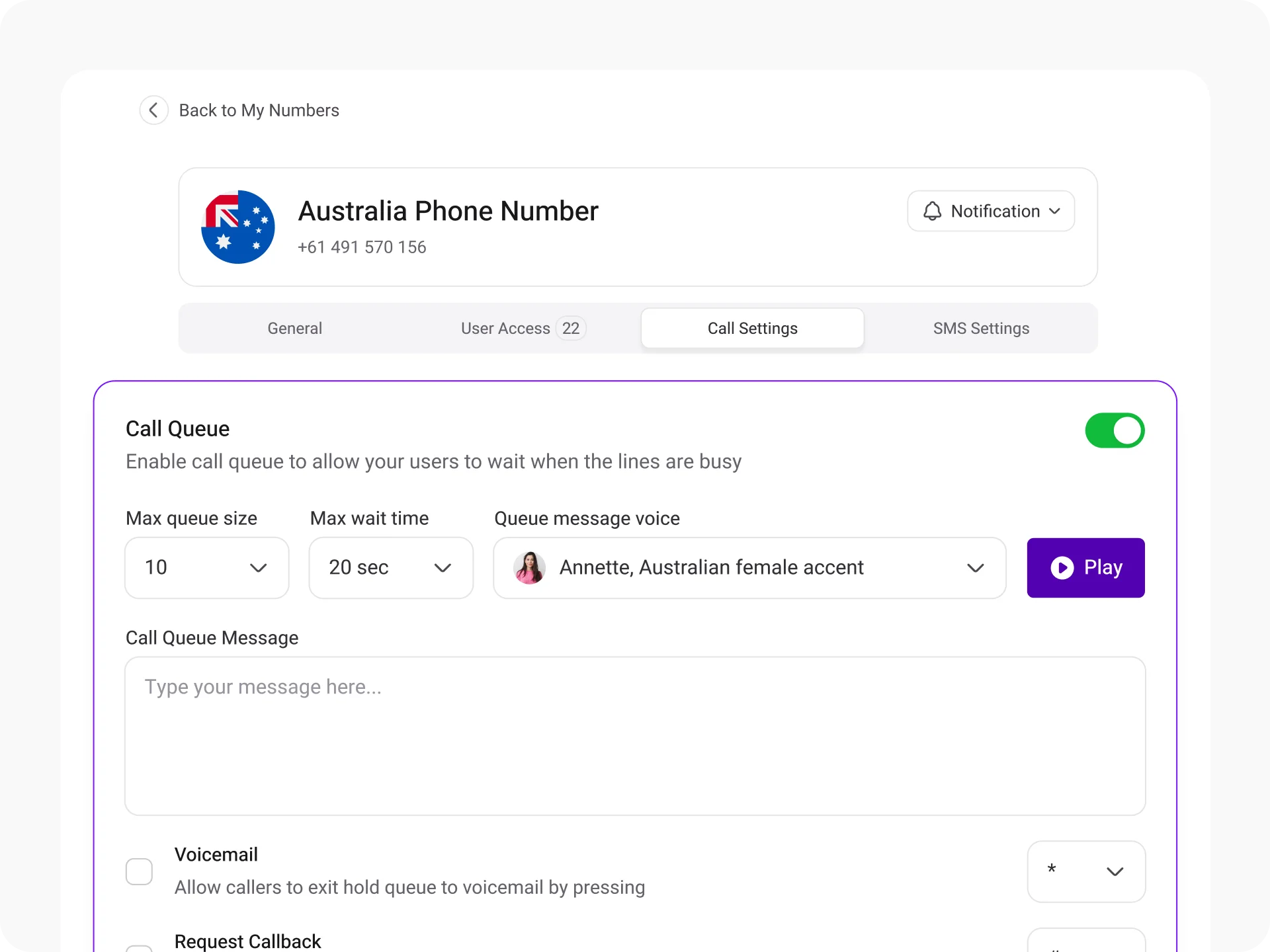
What makes this different from a basic hold system is the level of control you have. You decide the maximum queue size, how long a caller waits before being redirected, what message they hear, and how calls are distributed across your team. Every part of the experience is configurable, so your callers always feel attended to, even during your busiest hours.

Benefits of Call Queuing in Call Centers & Businesses

Reduces customer wait time
Balanced workload distribution
Increased sales
Enhanced call management
Lower call abandonment rate
Improve customer experience
Types of Call Queuing
Round Robin
In round-robin call queuing, calls are sent to agents who have been idle the longest. This ensures that no agent gets overloaded while others have nothing to do. It also distributes calls evenly among agents.
Ring All
In ring-all call queuing, when a call comes in, the call goes to all available agents simultaneously. This means all agents’ phones ring at the same time. The first agent to pick up the call handles it while the other phones stop ringing. This helps reduce wait times for callers and ensures that calls are answered promptly by any available agent.
Linear Hunt
In this method, calls are routed to available agents one by one in a predefined order until someone answers. The order can be assigned when agents mark themselves as available in the business phone system. If the first agent doesn’t pick up the call, the call moves on to the next in line. This process continues until someone picks up the incoming call.
Linear Cascade
It is similar to linear hunt. The only difference is that instead of sending calls to a single agent, it sends calls to a group of agents in a predefined order. Agents can be grouped based on their skills and performance, and the order of the group can be determined when they mark themselves as available in the phone system. If the first group doesn’t pick up the call, the call moves on to the next group, and so on.
Call Park
In this type of call queuing, the caller is put on hold until an agent answers. Calls are parked in a central location, so any agent can pick them up instead of keeping the caller on hold. Agents can use Call Park if they don’t know which colleague or department should handle a call but need to transfer it.
Types of Companies That Should Use Call Queuing
Call queuing helps companies of different sizes and types handle high call volumes efficiently. Whether it is a travel agency dealing with large booking appointments, a medical center dealing with scheduling medical appointments, or a bank handling client inquiries, call queueing can help them streamline incoming calls, reduce waiting times, and ensure customers receive timely assistance.

Financial institutions

Healthcare

Travel

E-commerce
How to Set Up Call Queuing In KrispCall?
Setting up call queuing in KrispCall is easy. Simply log in to KrispCall with the correct login details, find the “Call Queue” option in the Number Settings, define call queue requirements, and you are done.

Create a KrispCall Account and log in using the same credentials.

From the left-hand side of the dashboard, select one of the numbers you currently own.

Click on the ellipsis icon ( … ) and then on the “Number Setting” option.

You'll find the “Call Queue” section in the Number setting.

Define Maximum queue size, Maximum queue wait time, custom greeting message, etc., to set up your call queue.

Once you are done, click the “Save Changes” button. After that, you are good to go.
Using Call Queuing Feature in A Call Center : Best Practices
Create call groups
Optimize staff
Use hold music
Take advantage of IVR
More Features like Call Queuing
Call Forwarding
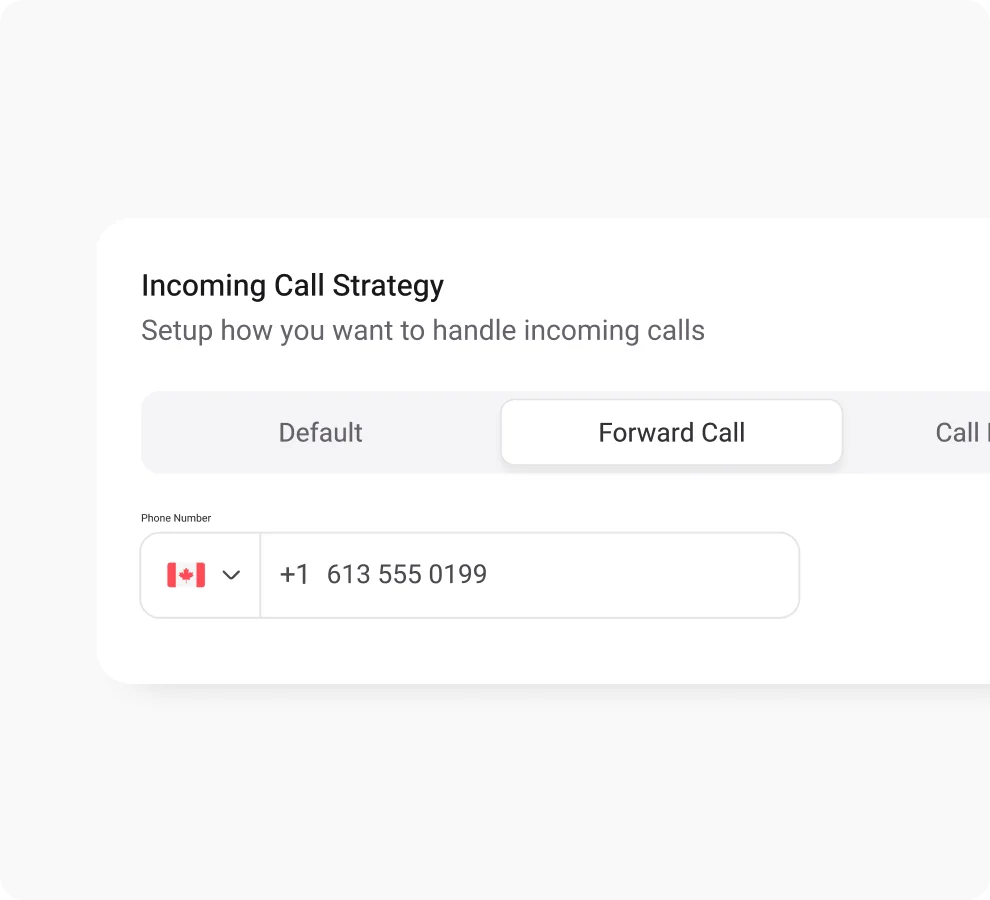
Improve call management with call forwarding - never miss vital calls, boost agents’ productivity, and customer satisfaction.
Phone Tree (IVR)
Leverage KrispCall's phone tree for efficient call routing, ensuring swift access to the right department for information.

Call Transfer
Route calls instantly to expert agents, minimizing customer wait time for swift query resolution and improved customer support.

Frequently Asked Questions
Didn’t find the Answer you were looking for? Visit our Help Center or Contact Support
A call waiting queue is a virtual queue in which a cellar waits for the agents to pick up the calls. Callers wait in a virtual queue when agents are busy on another call or when there are no agents available to answer the call.
When a phone is queued, it means that the call made from this phone is being put on hold in a virtual line or queue until an agent can attend to it. This occurs when all the agents are currently engaged with other calls; hence the incoming call awaits its turn to be answered.
The causes of long calling queues include;
- Outdated call center software
- Understaffed department
- Uneven agent allocation
- Poor management
- Peak seasons
- Unskilled agents
It is important to improve call queue management because it helps handle large volumes of phone calls without causing any calls to go unanswered. In addition, It helps minimize customer wait time, route calls to suitable agents/departments, and reduce the call abandonment rate.
Consider these tips to improve call queuing management:
- Use Interactive Voice Response (IVR) to provide a self-service option to callers.
- Upgrade to a modern business phone system.
- Give proper training and skills to agents.
- Implement time-based call routing.
IVR enables customers to interact with the business phone via phone dial pad or menu and get answers to the questions they are looking for or get directed to the right department without talking to live agents. Whereas a call queue puts caller incoming calls in a virtual line or queue when agents are busy on other calls.
You can decrease the abandonment rate in a call center by minimizing the call wait time.
A business can improve call management with a call queuing feature. Call queuing enables businesses to evenly distribute incoming calls to free agents, thereby minimizing the instances of dropped calls. In addition, by organizing calls in a virtual queue according to when they occur, call queuing shortens the waiting time. Overall, call queuing helps manage a large volume of phone calls effectively, eliminating the chances of missed calls and dropped calls.
With KrispCall, you can set up a call queuing feature for free. The call queuing feature is included in all three available pricing plans, so you don’t have to pay extra to get it.
KrispCall for Multiple Platforms
Stay connected no matter where you are. KrispCall is your constant companion, available on iOS, Android, as a WebApp, and Google Chrome Extension.


