Every time a customer calls your business and hears “Press 1 for Sales,” “Press 2 for Support”, they’re interacting with IVR. IVR systems serve as an important gateway for business communication, handling inbound calls without waiting for a live agent.
Through IVR, callers can contact the right department in no time. Without the proper IVR system, it appears to be the fastest way to lose customers.
This guide explains what IVR is, how it actually works, and what separates a frustrating experience from one that improves your team’s performance.
✨ TL;DR
- IVR (Interactive Voice Response) is an automated phone system that routes calls and provides self-service options through pre-recorded voice prompts without a live agent.
- Modern IVR uses AI and NLP to understand natural speech — not just keypad presses.
- Businesses use IVR to reduce costs, handle more calls, and improve customer satisfaction.
- Common challenges of IVR include confusing menu paths, a lack of human connection, long hold times, low team motivation, and outdated systems.
What is IVR?
IVR stands for Interactive Voice Response. It is an automated telephony system that interacts with callers through pre-recorded prompts and routes them based on keypad input or voice commands. It’s the core technology behind every automated phone menu you’ve ever navigated.
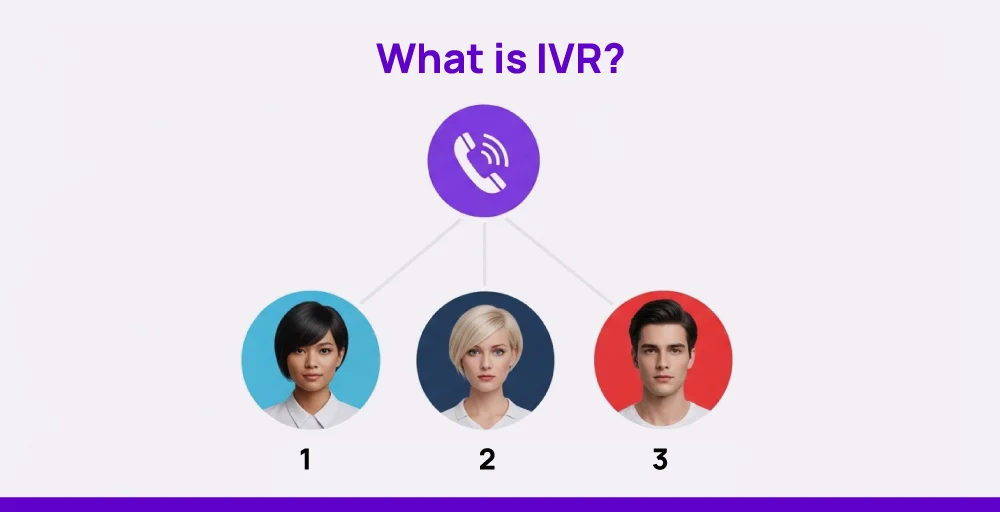
At its simplest, IVR answers incoming calls, presents a menu of options, interprets the caller’s response, and connects them to the right destination, whether for a department, an agent, or appointment confirmation.
An IVR number is a phone number or extension that connects callers directly to an automated IVR menu, rather than ringing a live agent. Businesses use IVR numbers to direct high-volume call traffic without manual intervention.
Key features of IVR
Here are some key features of an IVR system:
- Call tracking and reporting
- Call recording
- Integration with other systems
- Call transfer
- AI-powered speech recognition
- End-to-end self-service
How does IVR work?
IVR combines telephony infrastructure with voice recognition software to process calls in real time. When customers call a business, an IVR system guides them with automated menu options and routes their call.
It reduces the workload of live customer service representatives, saving time and costs. Basic IVR systems only use keypad input, while advanced system comes with voice recognition technology to understand voice commands.
Here’s how a typical IVR system operates:
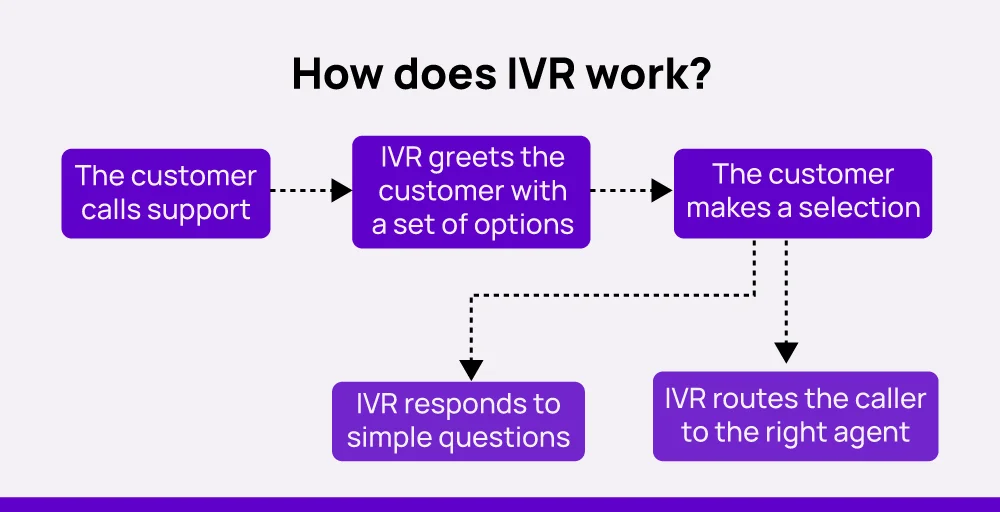
- Caller dials your business number: The call enters your IVR system automatically.
- System plays a greeting: A pre-recorded message welcomes the caller and presents options (e.g., ‘Press 1 for Sales’).
- Caller responds: Either via keypad or spoken input.
- IVR interprets the input: Speech recognition or matches the input to a routing rule.
- Call is routed: The caller reaches the right agent, department, or self-service module.
- Outcome is completed: Agent handles the call, or the caller self-serves (e.g., gets account info, makes a payment).
Modern IVR also connects to your CRM and improves call flow by helping teams to handle inquiries more effectively. They help customers find answers more quickly and enhance the overall experience without adding extra strain on staff.
Types of IVR Systems
IVR systems have evolved through time. In modern times, there are the most common types of IVR systems:
| IVR Type | How It Works | Best For |
| Touch-Tone (DTMF) | Callers press keys to navigate menus | Simple, high-volume call flows |
| Speech Recognition | Callers speak responses; the system detects keywords | Hands-free navigation, accessibility |
| Conversational / AI IVR | NLP understands natural language intent, not rigid commands | Complex queries, high-value customer interactions |
| Visual IVR | Sends a link to the caller’s phone to navigate menus visually | Mobile-first businesses, reducing hold times |
| Hosted / Cloud IVR | IVR runs on a provider’s cloud (e.g., KrispCall) without any hardware | Small to large businesses, remote teams, and fast deployment |
IVR vs Auto-Attendant vs ACD: What’s the Difference?
IVR, Auto-Attendant, and ACD are three terms that are often confused. Here’s the difference of these terms to avoid any confusion.
| Feature | IVR | Auto-Attendant | ACD |
| Primary Function | Route calls & self -service | Direct calls to departments | Distribute calls to agent queues |
| Caller Input | Keypad or voice | Only keypad | Routes automatically |
| Self-service | Yes (normal balance checks and payment info) | No | No |
| CRM Integrations | Available in modern systems | Rarely | Skill-based routing |
| Complexity | Normal | Low | High |
| Typical Use | Contact centers and customer service | Small offices and basic call routing | Large call centers and enterprise |
Quick Glance: Auto-attendant = simple menus. IVR = menus and data-driven self-service. ACD = intelligent queue distribution. Most modern systems combine all three to generate higher productivity.
How does IVR benefit both the business and the customer?
Interactive voice response systems offer a range of advantages that improve efficiency, customer satisfaction, and overall call management. The IVR benefits listed below impact both businesses and their customers in meaningful ways.
For business
IVR software enhances operational productivity and, when integrated with contact center as a service (CCaaS) platforms, it helps deliver better service at scale for businesses.
Here are some key business benefits of implementing an IVR system:
1. Improved customer service
Customers no longer have to wait on hold for simple answers. For example, they can check their order status or reset their password in under a minute by pressing a few buttons. It keeps the lines clear for urgent issues and gives each caller a smoother experience.
2. Reduced operational costs
Many standard tasks like appointment scheduling, account balance checks, and payment processing can be automated through IVR without involving a live agent. With that, fewer agents are required to manage high call volumes, which lowers payroll costs.
Upgrade to VoIP and Save More
Cut costs and enhance call quality with KrispCall’s affordable VoIP system. Sign up today and see how much you can save.
3. Faster issue resolution
Callers navigate through menu options with natural language processing to reach the appropriate department quickly. This not only reduces long wait times but also prevents unnecessary transfers.
For instance, someone needing technical support can connect to the right team within seconds, avoiding multiple handoffs and frustration.
4. Better call management
Interactive voice response, with intelligent call routing, organizes incoming and missed calls by priority, time, and topic. Like, calls about billing can go straight to the finance team, while urgent issues get pushed to the front of the queue using intelligent routing.
5. Scalability
Call center IVR systems handle growing call volumes without extra staff or equipment. Businesses can add new menu options for services like booking or refunds as customer needs expand. Scalability also supports seasonal spikes, such as holiday sales, by routing calls efficiently to available agents.
For customers
From the customer’s perspective, IVR brings greater convenience and faster access to support. Below are several ways IVR improves the caller experience:
1. 24/7 availability
Customers can call anytime, day or night, and still get help. Whether it’s checking a delivery status at 2 a.m. or updating payment info on a weekend, IVR gives fast answers without needing to wait for business hours.
2. Self-service convenience
Self-service through IVR lets customers do things like pay a bill, schedule an appointment, or check account details without talking to a person. It saves time, especially for repeat tasks like refilling a prescription or confirming a delivery.
3. Reduce wait time
IVR quickly sends callers to the right team, like billing or tech support, based on their choices. It skips the long hold times and cuts down on transfers. Someone with a payment issue, for example, can get help right away instead of waiting behind unrelated calls.
4. Faster call resolution
With IVR, a caller needing to unlock their account or reset a password gets routed straight to the right help. They don’t have to repeat the problem to multiple agents. It shortens the call, increases first-contact resolution, and gets the issue fixed in less time.
Common IVR use cases with examples
IVR systems are used in many industries to solve specific communication challenges. Each one uses it differently based on what their customers need most.
1. Banking
IVR systems in banking allow customers to manage accounts securely over the phone. They provide direct access to services like balance inquiries and fund transfers without needing to visit a branch. It supports routine financial management while keeping customer data protected.
For example, a person calling Chase Bank can enter their account number to review recent transactions or make a loan payment, all within a guided voice menu.
2. Healthcare
In healthcare, IVR systems help clinics and hospitals stay organized and accessible. Patients can use it to check appointment availability or request refills, without waiting on hold or relying on front-desk availability. It supports smoother communication between patients and providers.
For instance, someone calling a clinic can follow menu options to hear lab results or get pre-visit instructions based on their upcoming appointment.
3. E-commerce
E-commerce businesses rely on IVR systems with automatic call distribution to efficiently handle large volumes of customer calls. When shoppers reach out, IVR automatically directs them to the correct department, whether it’s sales, support, or billing. It can also provide real-time updates like order status, shipping details, or payment confirmations.
For example, a customer calling Amazon can enter their order ID to hear an estimated delivery date or request a return through the automated menu.
4. Education
IVR systems in education keep students and parents informed about admissions, exam schedules, results, and fee payments. It can also assist those who need to get a loan for tuition by directing them to the right department. All this information can be accessed remotely, so there’s no need for college visits or long phone calls.
For example, a parent calling a school can use the IVR to check if fees are due or hear their child’s exam dates.
Common IVR Challenges and How to Fix Them
IVR systems can help businesses manage calls more effectively, but they might fail when designed solely for business convenience. Here are a few common issues that can impact how well they work and how customers perceive them.
Confusing menu paths
Too many options or unclear instructions can frustrate callers. When people get lost in the system, they’re more likely to hang up or feel irritated.
How to fix it: Limit top-level options to 4-5 max; use clear and action-oriented language.
Lack of human connection
Some customers prefer talking to a real person, especially for complex or emotional issues. A robotic voice can make the experience feel cold or frustrating.
How to fix it: Offer ‘Press 0 for agent’ at every level; use natural TTS voices
Long hold times
If the system doesn’t route calls properly, callers might wait longer than needed. It often sets a negative tone before a customer service agent even joins the call.
How to fix it: Regularly audit routing paths using IVR analytics and call recordings
Lower team motivation
Agents may feel sidelined if too many calls are handled by automation. That can lead to lower job satisfaction and less engagement during live calls.
How to fix it: Use IVR to handle repetitive tasks, not replace agents entirely; involve teams in IVR improvements and customer experience reviews.
Set-up cost & regular system updates
A traditional IVR system requires on-premise hardware and has complex integrations. Also, IVR menus can go outdated if not reviewed regularly. Without small updates over time, the system may fail to meet changing customer needs.
How to fix it: Switch to a cloud-hosted IVR like KrispCall to eliminate overhead costs. Review and update call flows regularly based on customer feedback and analytics.
Best Practices for Building an Effective IVR
Follow best practices to build an effective IVR that improves customer satisfaction.
- Keep menus short: Aim for 4–5 options maximum at each level. Most of the callers cite long menu trees as their primary frustration.
- Always offer an agent fallback: Don’t limit customers to automated loops with no exit.
- Use clear, conversational language: Avoid technical jargon and write prompts as a human agent would.
- Test with real callers: Run usability tests with actual customers, not just internal teams.
- Monitor and iterate: Track abandonment and completion rates, as well as agent escalations, by menu node. Fix the worst performers first.
- Update your scripts regularly: Seasonal changes, product launches, and team restructures all require IVR updates.
How KrispCall’s Multi-level IVR Works
KrispCall’s cloud-based IVR system is trusted by 9,000+ businesses across 100+ countries. It’s built for teams that need flexibility without complexity.
What sets KrispCall’s IVR apart:
- Multiple IVR menus: Run separate menus for English and Spanish callers, or for different product lines, from a single dashboard.
- Multilingual support: Serve international callers with localized prompts without additional infrastructure.
- Customizable call routing: Route calls based on time, caller location, department, or agent skill level.
- CRM integrations: Pull caller data in real time so agents always have customer context during conversations.
- Call analytics: Track IVR completion rates, abandonment rates, and agent handle time from a centralized dashboard.
Still routing calls manually or relying on a basic auto-attendant? KrispCall’s IVR lets you build intelligent, multi-level menus in minutes with no hardware or IT team required.
See how KrispCall Multi Level IVR works