Are you considering Google Voice for your business communication needs? Before making a decision, it’s essential to understand the pricing plans and what each tier offers.
Google Voice can be a convenient solution for basic calling and texting, but costs can add up with extra features. Knowing the details of each plan will help you choose the option that fits your business size, budget, and communication requirements.
In this blog, we will explore the pricing plans for Google Voice, hidden and extra costs, what is missing in Google Voice, including its Pros and Cons.
✨ Key Takeaways
- Google Voice has three pricing plans: Starter ($10 per user per month), Standard ($20 per user per month), and Premier ($30 per user per month).
- Google Voice charges additional porting and international fees, as well as subscription fees for Google Workspace.
- Google Voice does not offer many advanced business features, such as call forwarding, call routing, or other tools typically needed for larger businesses.
How much does Google Voice cost?
Google Voice offers three-tiered plans, making it suitable for both small teams and large businesses. It also provides a free version for personal use, allowing users to make basic calls and send texts without a subscription.
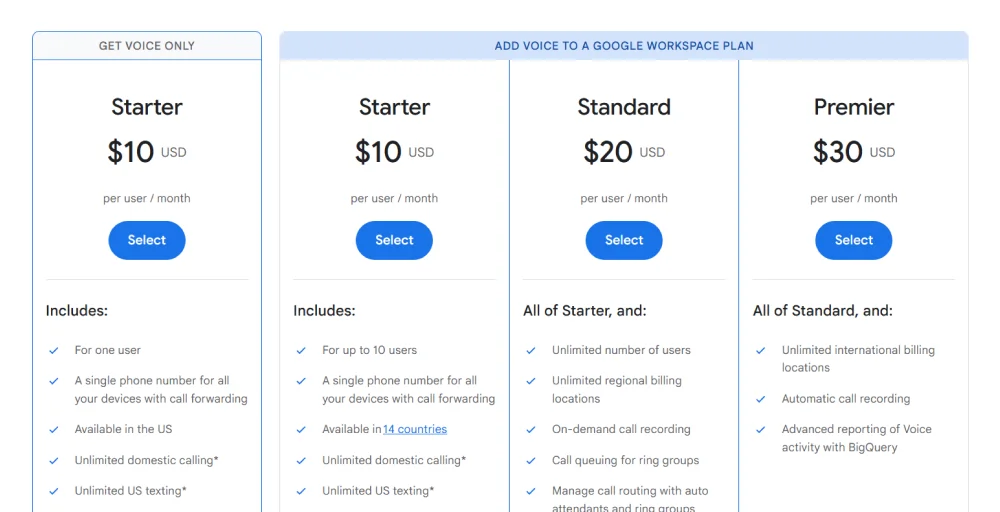
Below is a table outlining the Google Voice business plans and their features.
| Feature | Starter | Standard | Premier |
| Starting price | $10 per user per month | $20 per user per month | $30 per user per month |
| Unlimited domestic calling | Yes | Yes | Yes |
| Unlimited US texting | Yes | Yes | Yes |
| Voicemail transcription | Yes | Yes | Yes |
| Call queuing for ring groups | No | Yes | Yes |
| Manage call routing with auto attendants | No | Yes | Yes |
| Unlimited international billing locations | No | No | Yes |
| Automatic call recording | No | No | Yes |
Google Voice Starter Plan
Google Voice Starter plan costs $10 per user per month. This plan offers features like unlimited US texting, a desk phone, ATA, and voicemail transcription, making it best for call center teams or individuals who need a simple, low-cost business calling and texting solution.
Features
- Unlimited US texting
- Voicemail transcriptions
- 24/7 access to Google Voice Support
- Desk phone and ATA support
Limitations
- No call forwarding or advanced call routing.
- Limited integrations with third-party apps or CRMs.
- No shared team inbox or collaboration features.
Best for
Ideal for small teams or individual users who need basic calling and texting features within the US and do not require advanced call management or integrations.
Google Voice Standard Plan
Google Voice Standard plan starts at $20 per user per month. It includes features such as unlimited users, unlimited regional billing locations, and helps teams manage incoming calls more effectively than the Starter plan. However, the plan still lacks deep CRM integrations, shared team inboxes, and detailed analytics, which can limit visibility and collaboration as your business grows.
Features
- Unlimited number of users
- Call queuing for ring groups
- Manage call routing with auto attendants and ring groups
- on-demand call recording
Limitations
- Limited international calling options.
- No advanced analytics or reporting beyond basic logs.
- Integrations are still mostly limited to Google Workspace.
Best for
This plan is suitable for mid-sized businesses that run call center campaigns and need basic management features, ring groups, and call recording, but do not require global coverage or advanced reporting.
Google Voice Premier Plan
Google Voice Premier plan costs $30 per user per month. This plan includes valuable features such as unlimited international billing locations, automatic call recording, and advanced voice. reporting through BigQuery. It also lets you connect existing phone numbers, making it easier to keep your business contacts unchanged when switching services.
Features
- Unlimited international billing locations
- Automatic call recording
- Advanced reporting of Voice activity with BigQuery
- Connect existing phone numbers
Limitations
- It can be expensive for small businesses.
- Integrations outside Google Workspace are limited.
- Lacks modern VoIP features like AI-powered call handling or multi-channel communication.
Best for
It is best for larger organizations or teams with international operations that need advanced reporting, call recording, and the ability to connect existing phone numbers, but still rely on Google Workspace tools.
Extra Costs and Hidden Fees in Google Voice Plans
Even though Google Voice pricing looks simple at first, there are several additional costs that businesses often overlook:
Google Workspace
To get the most out of Google Voice, many teams bundle it with Google Workspace. While this can save money in some cases, it also means paying for Workspace seats for every user, even if not everyone uses the extra tools, which increases your overall monthly bill.
Porting Fees
If you want to keep your existing phone numbers, Google Voice may charge porting fees to transfer them into the service. These one-time fees can add up, especially for teams with multiple lines or business numbers.
International Calls
Google Voice may include international calling only in higher-tier plans, and when it’s available, rates can still be higher than those of dedicated virtual phone number providers. If your business makes frequent international calls, these charges can quickly increase your monthly costs.
Related Article 👉: Best Google Voice Alternatives for Businesses (Free & Paid)
What’s Missing in Each Google Voice Plan
Google Voice is a cost-effective and simple solution, but each plan has notable limitations that businesses should consider.
The Starter plan is ideal for individuals or very small teams, offering basic calling, US texting, and voicemail transcription. However, it lacks essential features like call forwarding, advanced call routing, message templates, and CRM integrations, making it difficult for teams to manage customer interactions efficiently.
“Is seems like there are opportunities for improvement in the available features (in comparison to the features through my phone carrier). This said, those disparities are not enough to keep me from using it”.
– Chawn S. via G2
The Standard plan adds features such as call queuing, auto attendants, and on-demand call recording, which help mid-sized teams handle more calls. Still, it doesn’t cover areas like detailed analytics, shared team inboxes, contact management, and automation tools. Without these, teams often need to rely on manual processes or additional software, which can slow down workflows and reduce productivity.


The Premier plan offers international billing, automatic call recording, and advanced reporting with BigQuery, but it still lacks several modern business communication features. Essential capabilities such as native CRM integrations, AI-powered call handling, and unified conversation threads are either limited or unavailable.
Pros and cons of Google Voice pricing plans
Here, we have illustrated the pros and cons of Google Voice:
| Feature | Pros | Cons |
| Cloud Phone Number | Can get a dedicated number for calls and texts without an extra SIM; works across devices. | Personal number only for US/Canada; business needs Workspace account. |
| Calls (Voice) | Clear VoIP calling; works on mobile, web, or desktop apps. | Internet-dependent; call quality can drop on weak networks. |
| SMS & MMS | Texting syncs across all devices; easy to manage. | Limited international texting; no advanced messaging features. |
| Voicemail | Built-in voicemail; includes transcription to text. | Transcriptions may have errors; no advanced voicemail management in the free plan. |
| Spam Call Blocking | Automatically blocks known spam numbers. | Sometimes a real call may be blocked. |
| Call Forwarding | Business plans allow multiple devices to ring. | Free/personal plans have limited or no forwarding. |
| Auto-Attendant (IVR) | Routes calls efficiently in business plans. | Not available in free/personal plan; setup may be complex. |
| Ring Groups / Hunt Groups | Let multiple team members receive calls. | Only in business plans; not included in the basic plan. |
How to Save Money on Google Voice
Here’s a more detailed explanation of each way to save money on Google Voice:
Annual billing discount
Choosing annual billing over monthly payments often comes with a discounted rate per user. This is especially beneficial for businesses with multiple employees, as the savings multiply across the team. It also reduces the hassle of monthly invoices and helps with predictable budgeting for the year.
Bundling with Workspace
Many businesses already rely on Google Workspace for email, documents, and collaboration tools. By bundling Google Voice with Workspace, you can take advantage of combined plan discounts and streamline management. This approach ensures your communication tools integrate smoothly with your existing workflow, reducing extra setup or integration costs.
Recycling existing numbers
Using your current phone numbers instead of purchasing new ones can save on setup and porting fees. It also maintains continuity for customers and partners who already have your contact information, avoiding the hidden cost of re-establishing contacts or updating marketing materials.
Exploring cost-effective alternatives
Google Voice may seem affordable initially, but missing features or hidden fees can increase costs over time. Alternatives like KrispCall provide a more transparent pricing structure. It includes essential features like business SMS, call management, and CRM integrations, and often costs less in the long run while offering scalability and reliability.
Related article 👉: KrispCall vs. Google Voice: Which is the Best Virtual Phone System?
Comparing Google Voice’s Pricing to Competitors.
We will compare the price differences between Google Voice and KrispCall.
“As someone new to these cloud phone system, I’ve got to say my experience with Krispcall has been surprisingly smooth. Setting up my voicemail gave me a tiny bit of trouble, but a support person jumped on chat and got me sorted in literally minutes. That kind of quick help makes a huge difference.”
-Piper H. via G2
Starter vs Essential Plan
KrispCall offers an Essential plan for $12 per user per month (billed annually). This plan includes calling, business SMS, call management tools, and key integrations, small or growing businesses are looking for.
Google Voice is slightly cheaper at $10 per user per month, but only offers basic features like US texting, voice transcription, and desk phone super with limited call management and no advanced integrations.
Winner: KrispCall, for a small additional cost, you get a far more complete and scalable solution, making it a better choice for growing teams.
Standard vs Standard Plan
KrispCall’s Standard plan is at $32 per user per month, billed annually. It includes advanced features like power dialer, bulk SMS, call transfer, call reporting, and queue management.
Google Voice’s Standard plan is cheaper at $20 per user per month, but it offers only basic call management features, limited international calling, and minimal reporting capabilities.
Winner: KrispCall is the winner, although slightly higher in price, KrispCall delivers a more feature-rich solution that supports growing teams and complex business needs.
Premier vs Enterprise Plan
KrispCall’s Enterprise plan is customized for large businesses, with pricing available through the sales team. It offers advanced features such as AI tools, detailed analytics, customizable workflows, priority support, and full CRM integrations, making it ideal for enterprises.
Google Voice’s Premier plan costs $30 per user per month. It provides international billing, automatic call recording, and basic advanced reporting, but it still lacks many modern VoIP features and deep integrations.
Winner: KrispCal is the winner. While Google Voice Premier is more affordable, KrispCall’s Enterprise plan delivers far greater functionality and flexibility, making it the better choice for large or growing organizations.
Final Verdict: KrispCall Offers Better Value for Money
KrispCall is a stronger choice than Google Voice for businesses because it combines powerful features with clear pricing. Companies can scale without worrying about the hidden costs. While Google Voice can be affordable for basic use, unlocking advanced business tools often requires a Google Workspace subscription and higher-tier plans.
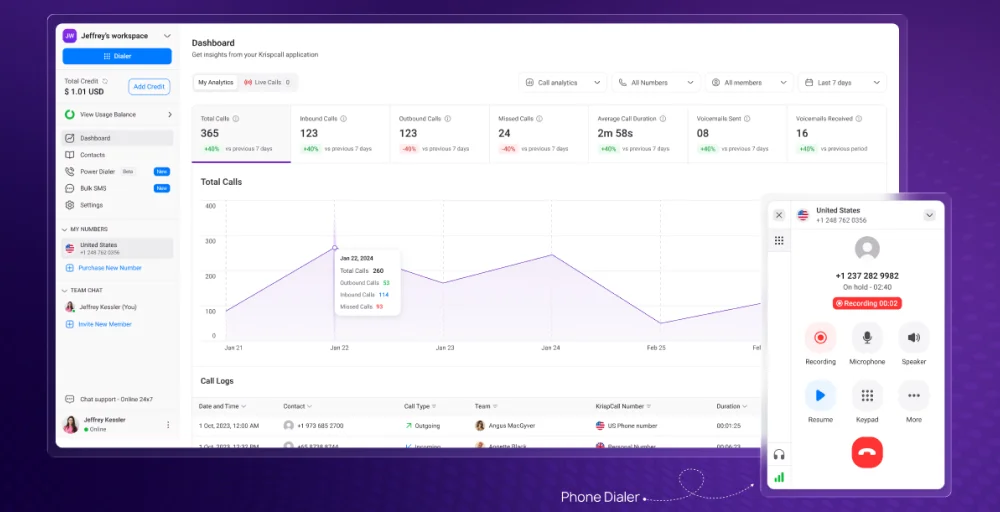
KrispCall offers advanced call management, toll-free and international numbers, bulk SMS, call recording, and detailed analytics, all tools that Google Voice either limits or doesn’t include. Additionally, KrispCall integrates with popular CRMs, making it easier for sales and support teams to track interactions.
Google Voice, by comparison, is simpler but better suited for small teams with basic needs. For businesses that need a scalable, flexible, and feature-rich phone system, KrispCall delivers more value for money. It’s designed to handle real business interaction, not just simple calls.
Upgrade to KrispCall today and give your team a system that grows with your business.