Genesys is widely recognized as a market leader in the contact center industry, powering customer experience for over 8,000 companies globally.
While it offers a comprehensive suite of tools, many businesses find that the enterprise complexity, high costs, lengthy implementations, and unclear billing structures of Genesys deployments don’t suit their needs. This has led organizations, particularly small and mid-sized ones, to seek alternatives.
In 2026, the contact center software market will offer viable options that are faster to deploy and provide transparent pricing tailored to modern, customizable workflows.
This guide highlights the 10 best alternatives to Genesys, providing an overview of features, pros and cons, pricing details, and recommendations for which businesses would benefit most.
✨ TL;DR
- KrispCall: Best budget-friendly alternative for SMBs and remote-first teams.
- Talkdesk: Best AI-native contact center for mid-market and enterprise teams with Journey orchestration.
- Aircall: Best for sales and support teams that need predictive dialing and CRM integrations.
- Nextiva: Best for businesses seeking UCaaS and CCaaS on a unified platform.
- Five9: Best for large outbound contact centers with enterprise-grade needs.
- Nice CXone: Best for enterprises that prioritize compliance, WEM, and AI-powered quality management.
- 8×8: Best for teams needing UCaaS, contact center, and international calling in one platform
- RingCentral: Best for businesses already on RingCentral seeking to add a contact center technology.
- Freshdesk: Best for SMBs that want a help desk and voice combined at an affordable price.
- Dialpad: Best for AI-powered communications with agent assistance at the lowest starting price.
Why Companies Look for Genesys Alternatives?
Genesys Cloud CX is a powerful platform, it is primarily built for legacy contact centers with large IT teams. For many businesses, this may not be suitable, so businesses look for its alternatives.
Teams often look for alternatives to Genesys for several key reasons:
1. High and unpredictable costs
Genesys pricing starts at $75 per user per month for the basic voice-only CX1 plan, rising to $240 per user per month for the AI-focused CX4 tier. Additional charges for AI features are usage-based, and businesses may also incur costs for professional services, CRM connectors, and ongoing support.
2. Complex implementation and administration
Setting up Genesys can take months, not days. The system is built for large enterprises, so configuring it for call routing and tool management requires certified administrators or outside consultants. Smaller and mid-sized businesses want a contact center they can manage on their own, not one that requires a specialist just to make simple changes.
3. Integration limitations
Genesys mainly functions as a standalone contact center as a service (CCaaS) platform. To connect it to CRM systems like Salesforce or HubSpot, or to back-office tools, companies often need custom API projects and costly consulting support. Newer cloud-based alternatives provide ready-to-use connectors and easy integrations that save time and money.
4. Limited flexibility for smaller teams
Genesys is designed for contact centers with many agents. Businesses with 5 to 50 agents often pay for features they don’t need and deal with a complicated interface meant for larger operations. Simpler platforms offer the essential functions that these smaller teams actually require at a lower cost.
5. AI Features hidden behind premium tiers
Although Genesys has made significant investments in AI, many advanced features, such as predictive engagement and native bots, are available only in the more expensive CX3 and CX4 tiers. In 2026, competitors like Dialpad, Talkdesk, and NICE CXone will provide AI features at lower prices or include them in their basic offerings.
6. No native UCaaS
Genesys Cloud CX is purely a CCaaS platform. If your organization needs a phone system, team messaging, or video conferencing, you will need to buy and manage a separate unified communications as a service (UCaaS) solution.
How We Evaluated These Alternatives
Selecting the best Genesys alternatives required a structured, multi-criteria evaluation process. We researched each platform using our software review methodology, content integrity statement, and content update methodology. Our evaluation focused on the following criteria:
- Transparent pricing: We prioritized platforms with clearly published pricing and minimal hidden fees. We noted where pricing requires custom quotes and flagged platforms with complex add-on structures.
- Feature depth: We assessed each platform’s core capabilities across key CCaaS dimensions: omnichannel routing, AI and automation, workforce management, deep analytics and reporting, and CRM integrations.
- Ease of deployment: We evaluated how quickly teams can get up and running, including self-serve setup options, the availability of onboarding support, and realistic time-to-value estimates.
- Scalability: We considered whether each platform can support growth from small teams to enterprise-scale operations without requiring a platform migration.
- AI features: Given the central role of AI in modern contact centers, we assessed the quality and accessibility of each platform’s AI features, including whether they are available on premium tiers or are standard across tiers.
- User experience: We incorporated aggregated user review data from major software review platforms to surface real-world experiences with reliability, support quality, and usability.
Quick Comparison: Top Genesys Alternatives at a Glance
To help you evaluate the best Genesys alternatives across key attributes like pricing, AI capabilities, and ideal use cases, here’s a quick comparison of the leading platforms
| Provider | Best for | Starting Price (annually) | Standout Features | G2 Rating |
| KrispCall | SMBs & remote teams | $12/user/month | Unified callbox, global virtual numbers, simple VoIP setup | 4.5/5 |
| Talkdesk | AI-driven mid-market & enterprise | $85/user/month | AI Copilot & Autopilot, Studio workflow builder, omnichannel routing | 4.4/5 |
| Aircall | Sales & support teams | $30/user/month | 250+ integrations, power dialer, fast setup | 4.4/5 |
| Nextiva | UCaaS + CCaaS unified platform | $15/user/month | Voice, video, social + AI analytics, reputation management | 4.5/5 |
| Five9 | Enterprise outbound contact centers | $119/user/month | Predictive dialer, Genius AI, workforce management | 4.1/5 |
| Nice CXone | Regulated enterprise industries | $110/agent/month | Enlighten AI, compliance tools, and advanced WEM | 4.3/5 |
| 8×8 | Global teams & unified communications | Custom pricing | UCaaS + CCaaS, global calling, omnichannel workspace | 4.2/5 |
| RingCentral | Existing RingCentral users | $20/user/month | Seamless UCaaS + CCaaS integration, 20+ channels | 4.1/5 |
| Freshdesk | SMB support teams | $19/agent/month | Ticketing + voice bots, knowledge base, omnichannel support | 4.4/5 |
| Dialpad | Budget AI-powered communications | $15/user/month | Built-in AI (transcription, sentiment), real-time coaching | 4.4/5 |
1. KrispCall
KrispCall is a cloud-based business phone system and contact center solution designed for startups, SMBs, and globally distributed teams. It offers solid VoIP functionalities, including virtual numbers in 100+ countries, IVR, call recording, and CRM integrations.
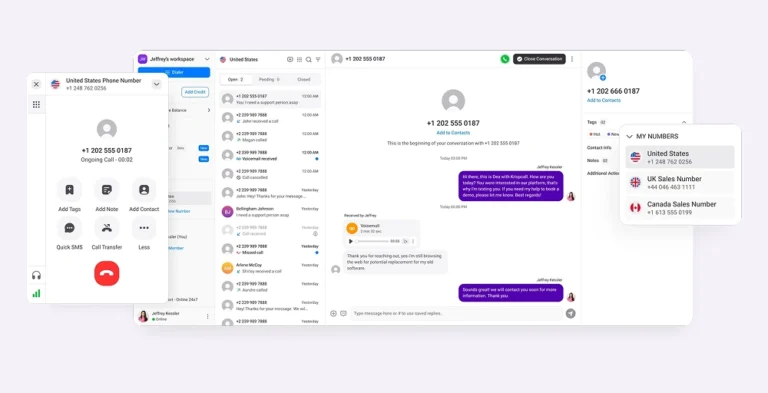
KrispCall stands out for its unified callbox interface, which consolidates calls, SMS, voicemails, and recorded customer conversations into a single workspace. The platform runs entirely in the cloud, with web, iOS, and Android apps, making it ideal for remote teams that don’t want to deal with hardware complexity.
Feature
- Phone Tree (IVR): A system that allows callers to navigate through a series of automated options to reach the desired department or information.
- Cold Transfer: The process of transferring a call to another agent without introducing the caller or providing any context.
- Multiple Phone Numbers: The ability to manage and operate with several phone numbers for different departments or services.
- Call Analytics: The analysis of call data to gain insights into call patterns, customer behavior, and overall performance.
- Web Phone: A phone application that allows users to make and receive calls using an internet connection through a web browser.
Pros and cons
| Pros | Cons |
| Its pricing is competitive, starting at just $12 /user/month. | There are occasional dropped calls. |
| Unified callbox simplifies call management. | AI features are limited. |
| 24/7 customer support, even on entry plans. | Monthly billing can be expensive. |
Pricing
KrispCall offers three pricing tiers billed annually. Here, calling and SMS charges are billed separately on a pay-per-minute basis in additional to the monthly subscription fee.
| Plans | Price (Per user per month, annually) | Key features |
| Essential | $12 | Unlimited user limit, Pin Contact, Voicemail Filter |
| Standard | $32 | Lightweight CRM, Answer calls in browser, Call History |
| Enterprise | Custom | Power Dialer, Call Recording, SMS forwarding |
Best for
KrispCall is best suited for startups, small businesses, and globally distributed remote teams that need reliable VoIP calling, international virtual numbers, and basic contact center capabilities without enterprise-level pricing.
Why does it beat Genesys?
KrispCall is often preferred over Genesys for small-to-medium-sized businesses due to its simplicity, affordability, and ease of use, whereas Genesys is typically geared toward large enterprises.
2. Talkdesk
Talkdesk is a cloud contact center platform that can be accessed without requiring IT specialists.
It is favored by mid-market to enterprise teams seeking a more agile, user-friendly platform that doesn’t require extensive technical certification to manage.
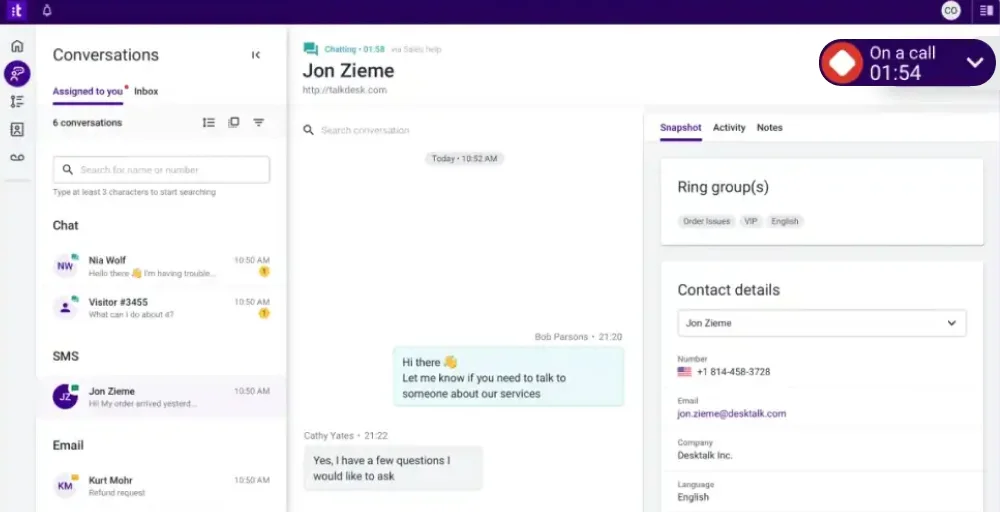
Its standout feature is Talkdesk Studio, a visual builder and low-code workflow builder. That lets contact center managers create and modify intelligent routing logic, customer journeys, and automation flows without writing a single line of code.
Feature
- Call Barging: The ability to join an ongoing call for monitoring or coaching purposes without disconnecting the original participants.
- Automated Workflows: Pre-defined sequences of tasks or processes that are automatically executed to enhance efficiency.
- Real-time Dashboards: Interactive displays that provide up-to-date information and conversation analytics for monitoring performance and metrics.
- Local Caller ID: A feature that displays the caller’s local phone number to enhance recognition and authenticity.
- Automatic Call Distributor (ACD): A system that efficiently routes incoming calls to the appropriate agents based on predefined criteria.
Pros and cons
| Pros | Cons |
| Provides an AI-native platform with Copilot, Autopilot, and Navigator. | WFM is only available on add-on on some plans. |
| It has excellent real-time analytics and dashboards. | Advanced features are hidden behind higher-tier plans. |
| Strong omnichannel coverage across all plans, | The response time is variable. |
Pricing
Talkdesk offers four main pricing tiers. All plans are billed annually. The company also offers usage-based add-ons for AI features beyond included allocations.
| Plans | Price (Per user per month, annually) | Key features |
| Digital Essentials | $85 | Quality Management, Studio Functions, API Access |
| Voice Essentials | $105 | Studio & Routing, Voice Engagement, Customer Feedback |
| Elite | $165 | Screen Recording, Automation Designer, Real-time Dashboard |
| Industry Experience Clouds | $225 | Performance Management, Automated Notifications |
Best for
Talkdesk is ideal for mid-market and enterprise contact centers that want AI-driven automation and routing.
3. Aircall
Aircall is a cloud-based phone system popular with sales and customer support teams for its quick setup and ease of use. It stands out in key areas for growing teams, offering over 250 one-click CRM integrations.
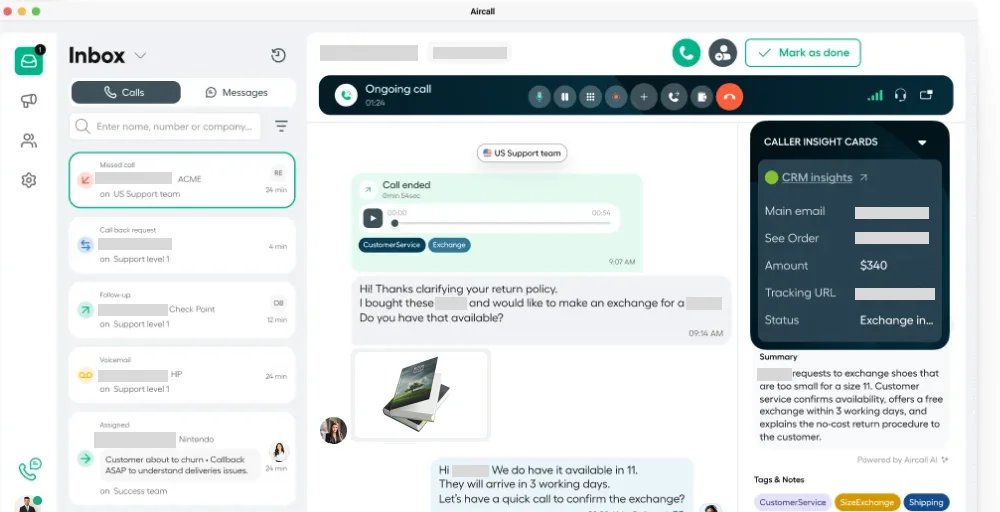
It has a simple, clear interface that agents can learn in just a few hours, provides robust call queue management, supports power dialing for outbound teams, and offers global phone number coverage. The platform works especially well for companies that use Salesforce, HubSpot, or Zendesk; the integrations are reliable and effective.
Feature
- Call Tags and Disposition Codes: Effective organization and tracking of interactions can enhance overall performance.
- Virtual Call Center: Embrace the efficiency of a virtual call center to maximize your team’s potential and effortlessly reach customers.
- After-Call Work: Streamline after-call work to ensure accurate follow-up and elevate customer satisfaction.
- Queue Callback: Implement a queue callback system to reduce wait times and improve the customer experience analytics.
- Webhooks and API: Leverage webhooks and APIs for seamless integration and real-time data sharing across platforms.
Pros and cons
| Pros | Cons |
| Clean, intuitive UI with minimal training required. | It does not have a native video conferencing tool. |
| Provides a strong power dialer for outbound sales teams. | No free plan; 3-plan user minimum on all plans. |
| Reliable call quality with 99.99% uptimse SLA. | Limited enterprise workforce management tools. |
Pricing
Aircall offers three plans with annual billing. Monthly flexible pricing is approximately 25–30% higher. A 3- user minimum applies to all plans
| Plans | Price (Per user per month, annually) | Key features |
| Essentials | $30 | Minimum 3 users, 1 local or toll-free number, Availability statuses |
| Professional | $50 | Standard and Advanced Analytics, Parallel calls, Messaging API |
| Custom | Call for details | Custom music and messages, Email reporting, Talk-to-listen ratios |
Best for
Aircall is the go-to choice for sales-driven organizations and customer support teams with 5–200 agents who want a phone system that integrates seamlessly with their existing CRM stack.
4. Nextiva
Nextiva has evolved from a business phone system into a comprehensive customer experience platform that combines Unified Communications as a Service (UCaaS) and Contact Center as a Service (CCaaS) in a single solution.
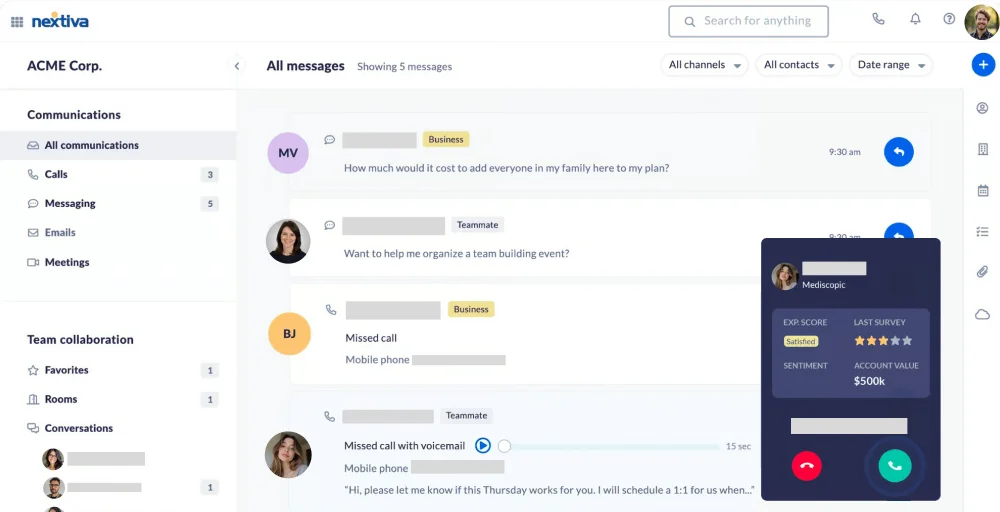
The platform offers AI-powered bots, interaction analytics, workforce optimization, and omnichannel support across voice, email, chat, SMS, and social media. Nextiva also includes reputation management features and review sites, a capability that’s genuinely rare in the CCaaS market.
Feature
- Priority Alerts: Stay informed with real-time notifications to prioritize your communications.
- Three-Way Calling: Effortlessly connect and converse with multiple parties on a single call to enhance team collaboration.
- SIP Trunking: Achieve cost-efficient and effective voice communication by leveraging Internet Protocol technology.
- Conference Bridge: Create a virtual meeting space for seamless discussions and collaboration among large groups.
- VoIP Caller ID: Gain clarity on incoming calls with advanced caller identification features to enhance your call management.
Pros and cons
| Pros | Cons |
| AI transcription, summaries, and bots are available. | SMB plans lack phone channel features. |
| This offers unlimited calling within the US and Canada. | Users encounter several issues, such as delays in displaying call information. |
| Provides social media and review site management. | Mastering all the advanced features has a learning curve. |
Pricing
Nextiva has separate pricing tiers for SMB communications and contact center plans. SMB plans (Core, Engage, Power Suite) start at $15/user/month for basic communications.
| Plans | Price (Per user per month, annually) | Key features |
| Core | $15 | Auto-attendant & call menus, Team messaging, Voicemail-to-text |
| Engage | $25 | Online fax, Unlimited calls & video meetings, Call performance insights |
| Power Suite CX | $75 | Shared team directory, 1-800 number included, Automate repetitive tasks |
Best for
Nextiva is ideal for businesses that want to eliminate the cost and complexity of managing separate UCaaS and CCaaS vendors.
5. Five9
Five9 is one of the large legacy contact centers that need robust workforce engagement management, omnichannel routing, and serious outbound capabilities. Five9’s platform shines brightest in outbound operations.
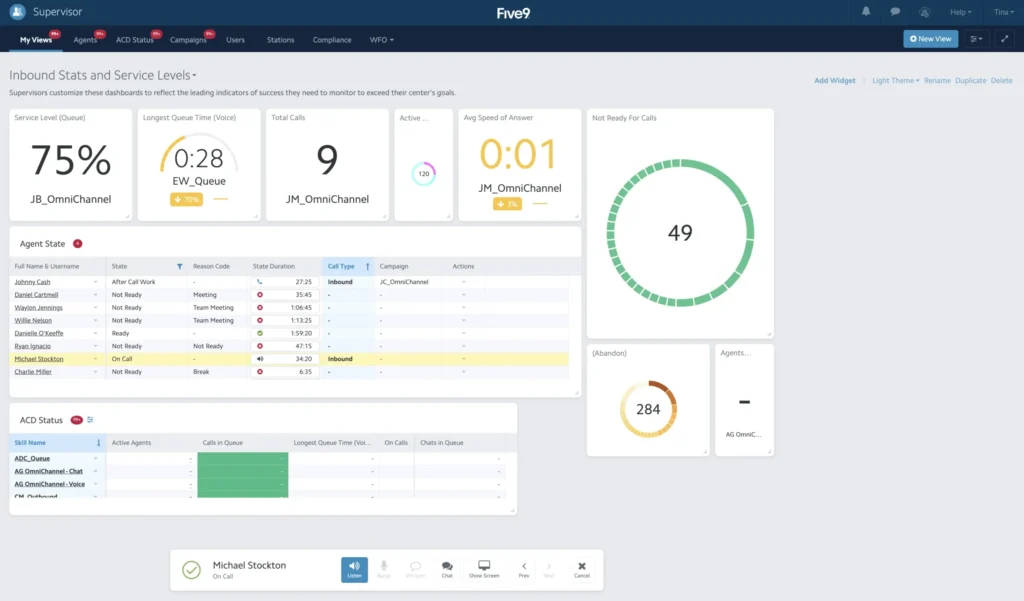
Its predictive dialer is industry-leading, using algorithms that optimize connect rates while maintaining compliance with telemarketing regulations. The Five9 Genius AI suite includes agent assist, post-call summaries, live transcription, and intelligent virtual agents.
Feature
- Speech Recognition Software: Enhance your IVR self-service applications by allowing callers to use speech input alongside DTMF.
- Agent Call Scripting: Equip agents with a web-based script designed for the contact center to ensure they convey a uniform message tailored to each call’s objective.
- Toll-Free Numbers: Set up new toll-free, international toll-free, and DID numbers, or transfer existing numbers to your inbound contact center.
- Do Not Call Compliance: Adhere to relevant calling regulations by managing do-not-call (DNC) requests in both your outbound and inbound operations.
- Call Center Data Importing: Effortlessly import outbound calling lists and contacts using a user-friendly wizard or automate the process via FTP.
Pros and cons
| Pros | Advanced AI features cost extra beyond the included allocation. |
| This is the best-in-class predictive dialer for outbound operations. | There is no free trial option. |
| It offers live call transcriptions and reports for agents. | This has hidden fees for SMS limits, data export, and storage. |
| You can manage the workforce and performance. | Advanced AI features cost extra beyond the included allocation. |
Pricing
Five9 offers five pricing tiers. The Digital and Core plans have published pricing; Plus, Pro, and Enterprise require custom quotes.
| Plans | Price (Per user per month, annually) | Key features |
| Digital | $119 | Social Messaging, Blended Inbound/Outbound, Email |
| Core | $159 | AI Summaries, Agent Desktop, Live Transcription |
| Plus | Contact sales | SMS/MMS, AI Insights, Dialer |
| Pro | Contact sales | Geo Redundancy, CRM, Full platform |
| Enterprise | Contact sales | Analytics, AI Agent Assist, WFM |
Best for
Five9 is built for large enterprise contact centers, typically 50+ agents, that run high-volume inbound and outbound operations and need robust workforce management, compliance-grade outbound dialing, and serious AI capabilities.
6. Nice CXone
NICE CXone is a leading platform for regulated businesses that need efficient management tools. It has a strong global presence and offers powerful workforce engagement management tools. Its integrated AI engine, named Enlighten, helps users achieve both large-scale operations and better control.
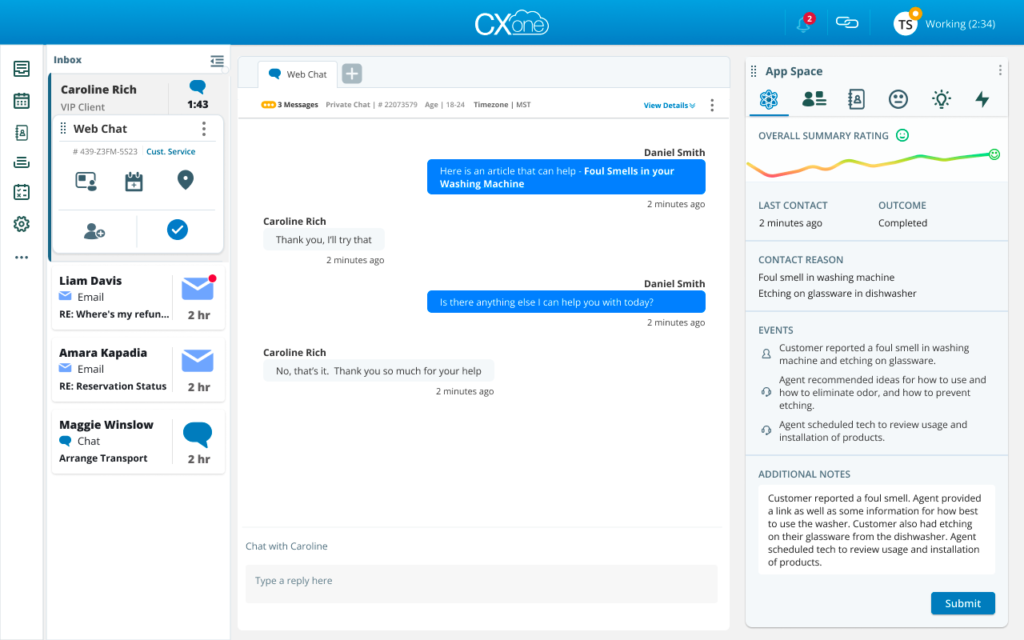
CXone’s Enlighten AI engine offers more than just basic transcription. It provides real-time analysis of customer sentiment, scores agent performance, automates quality checks, and delivers AI-powered coaching.
Feature
- Omnichannel Routing: A system that allows customer interactions to be managed seamlessly across various communication channels, ensuring a cohesive experience.
- Copilot for Agents: A supportive tool designed to assist agents during customer interactions, helping them access information and resources efficiently.
- Interaction Analytics: The process of analyzing customer interactions to gain insights and improve service quality, helping organizations make data-driven decisions.
- Knowledge Management: A system that organizes and distributes knowledge resources, enabling employees to access information easily and improve overall efficiency.
- Interactive Voice Response (IVR): A technology that allows customers to interact with a phone system using voice or keypad inputs, providing automated responses and options for directing calls.
Pros and cons
| Pros | Cons |
| This is an industry-leading WEM and quality management tool. | AI usage fees apply even on top-tier plans. |
| It allows for monitoring quality assurance calls. | It shows slow document downloading and limited format conversion options. |
| The technical support for NICE CXone is outstanding. | You cannot view the inbound call history. |
Pricing
NICE CXone pricing ranges from $110 to $249 per user per month, depending on the plan and AI capabilities. Additional per-session AI charges apply for Autopilot and Copilot usage beyond the included allocation.
| Plans | Price (Per agent per month, annually) | Key features |
| CXone Mpower Omnichannel Suite | $110 | Agent workspace, Bring your own transcription, Proactive engagement |
| CXone Mpower Essential Suite | $135 | Voice and Digital Channels, Recording and compliance, Quality Management |
| CX Mpower Core Suite | $169 | Workspace Management, Supervisor Workspace, Screen Recording |
| CXone Mpower Complete Suite | $209 | Voice of the Customer, Proactive engagement, Interaction Analytics |
| CXone Mpower Ultimate Suite | $249 /$0.25 per session | AI routing, Copilot for Agents, AutoSummary |
Best for
NICE CXone is designed for large enterprises (100+ agents) in regulated industries like financial services, healthcare, government, and insurance.
7. 8×8
8×8 is a cloud native communications company that offers both UCaaS and CCaaS capabilities in a single, integrated platform. It stands out by offering a single platform for business phone systems, team messaging, video meetings, and contact centers, simplifying communication and reducing costs.
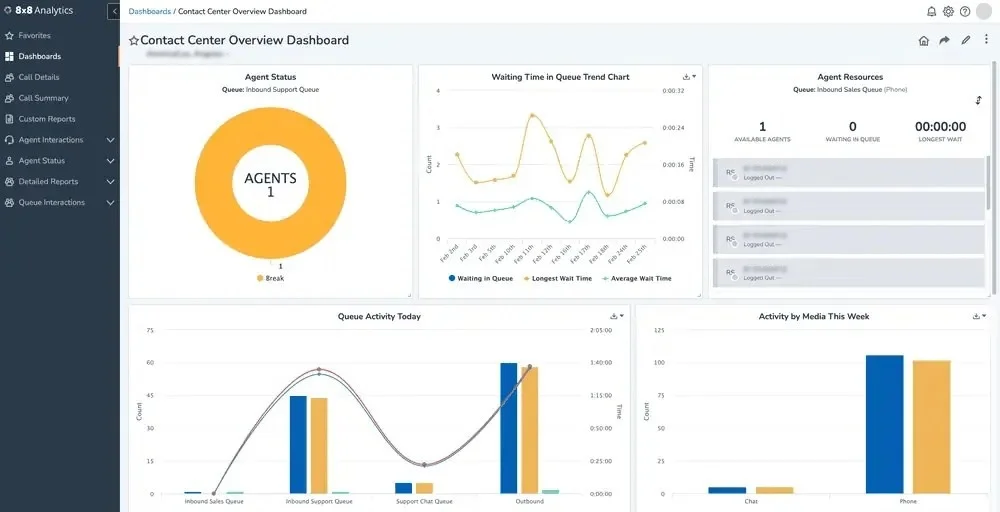
The 8×8 Agent Workspace unifies voice, conversational AI, webchat, email, video, and messaging apps in a single unified interface. giving agents a comprehensive view of every customer interaction without switching between tools.
Feature
- Threaded messages: A messaging format that keeps all related messages grouped together, showing the full context of a conversation.
- Unlimited Internet Fax: This secure digital service lets you send and receive faxes via email, a desktop application, or a web portal.
- Admin analytics: A centralized dashboard that gives administrators access to real-time and historical data on phone system usage, call quality, and user performance.
- Flip Calls: Allows users to seamlessly move an active call from one device to another, such as from a desk phone to a mobile app or softphone, without disconnecting.
- Phone Paging: A communication tool that enables a user to make an announcement over the speakerphones of deskphones across all office locations.
Pros and cons
| Pros | Cons |
| It provides a shortcut to initiate calls. | Pricing is transparent; you need to connect with their sales team. |
| With this, you get chat rooms and messaging capabilities. | To use some of its features, you need technical knowledge. |
| It supports up to 500 active participants for video and audio conferencing. | Its mobile app has limited functionality. |
Pricing
8×8 offers separate UCaaS (X Series) and Contact Center plans. UCaaS plans are priced more transparently; CCaaS plans typically require a custom quote.
| Plans | Price (Per user per month, annually) | Key features |
| Contact Center | Chat with Sales | Supervisor Workspace, AI-Enabled Self-Service, Secure Payment Processing, |
| CX Beyond the Contact Center | Chat with Sales | Team Lead Analytics, Advanced Queue Management, Global Coverage |
| Communications APIs | Chat with Sales | High-Volume SMS, Authentication and Fraud, Messaging, |
| Unified Communications | Chat with Sales | Receptionist Console, Custom Integrations, System Analytics |
Best for
8×8 is an excellent choice for mid-market to enterprise organizations with significant international calling needs, or for businesses that want a single vendor for both internal collaboration (UCaaS) and customer-facing contact center operations (CCaaS).
8. RingCentral
RingCentral is one of the largest UCaaS providers and has significantly expanded its contact center capabilities with RingCentral Contact Center (RingCX). This is an AI-powered omnichannel contact center that integrates seamlessly with the existing RingCentral ecosystem.
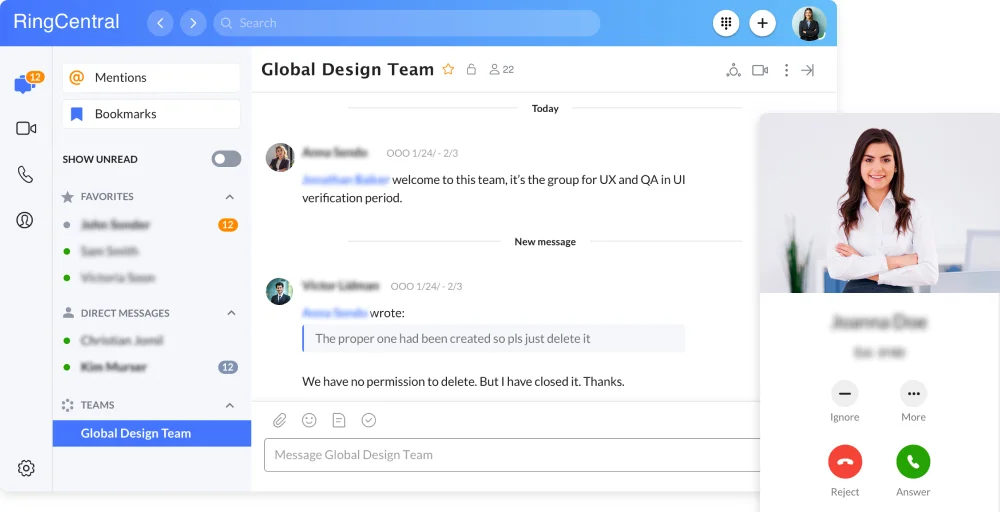
Businesses that use RingCentral for internal communications can add full contact center capabilities without switching platforms, managing another vendor, or training agents on a new tool.
RingCX supports 20+ communication channels and includes AI-powered transcription, intelligent virtual agents, agent coaching, and custom surveys, all within the RingCentral platform that agents may already know.
Feature
- Automatic Call Recording: Automatically captures and stores phone calls for quality assurance, training, and compliance.
- RingOut: Allows users to make calls from their computer or mobile device using their business phone number, enabling seamless communication.
- Shared Lines: Enables multiple users to share a single phone line, enhancing collaboration and responsiveness within teams.
- Extensions: Additional phone numbers linked to a main line, facilitating direct connections to individuals or departments
- Answering Rules: Customizable settings for managing incoming calls based on time, caller ID, or specific circumstances to ensure proper routing.
Pros and cons
| Pros | Cons |
| RingCentral users can easily integrate UCaaS and CCaaS. | CCaaS pricing is not publicly listed; you need to request a custom quote. |
| It supports multiple channels with omnichannel routing. | The AI features for the contact center are less advanced. |
| The platform offers strong global coverage and reliable services for enterprises. | It is less specialized than vendors that focus only on large contact centers. |
Pricing
RingCentral RingEX (UCaaS) plans are publicly priced. RingCentral Contact Center (RingCX) requires a custom quote.
| Plans | Price (Per user per month, annually) | Key features |
| Core | $20 | Incoming caller ID, Breakout rooms, Shared lines |
| Advanced | $25 | High-definition (HD) voice focused, Transcribe meetings, Call log reports |
| Ultra | $35 | Summarizes video recordings, Unlimited audio conferencing, Hot desking |
| Customer Engagement Bundle | Contact sales | Unlimited internet fax, Company reply templates, Call back from queue |
Best for
RingCentral for their business phone system and want to add contact center capabilities within the same ecosystem.
9. Freshdesk
Freshdesk is primarily known as a ticketing and help desk platform, but it has evolved into a capable omnichannel customer support solution that includes voice capabilities through Freshdesk Contact Center. For SMBs that want unified ticketing, email, chat, social media, and phone support in a single platform.
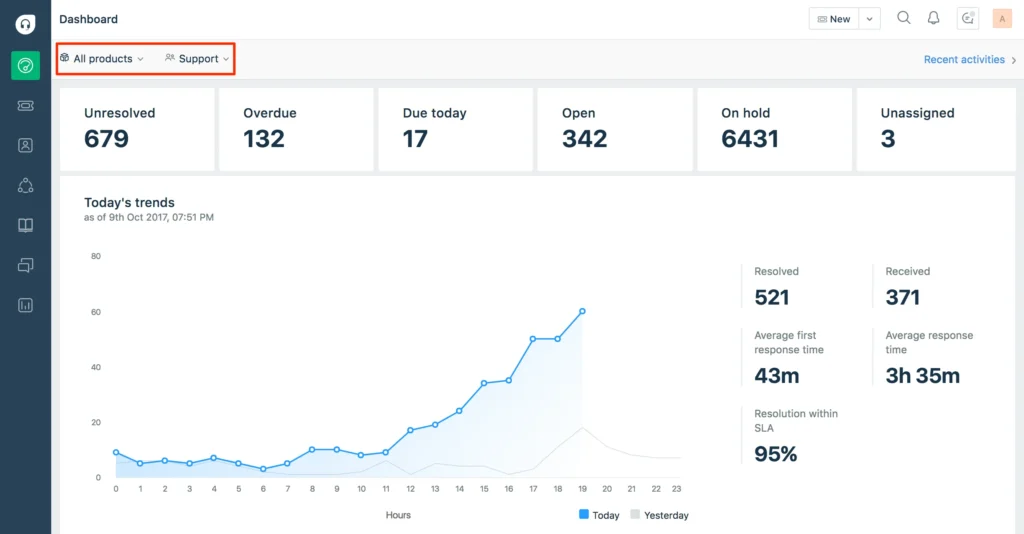
Freshdesk’s key strength is the combination of robust ticket management and multi-channel communication, which is unmatched by pure-play CCaaS platforms. For support-focused organizations that don’t need enterprise-scale outbound dialing, Freshdesk delivers a well-rounded solution at an accessible price point
Feature
- Customer Portal: Enhance your user experience with a streamlined interface that provides easy access to essential services.
- Knowledge Base: Empower your team with a comprehensive resource library, offering answers at their fingertips.
- Ticket Dispatch: Optimize support efficiency with a system that ensures quick and effective ticket management.
- Single Sign-On: Simplify access with a secure, unified login process that saves time and enhances security.
- Portal Customization: Tailor the portal to your unique needs, ensuring it reflects your brand and meets user requirements.
Pros and cons
| Pros | Cons |
| Its omnichannel ticketing includes email, chat, phone, and email support. | There are limited options for customizing the reporting dashboard. |
| You don’t need to pay any cancellation fees. | Its mobile app does not access all of its desktop features. |
| It allows you to share clients’ communication history with other team members. | Most of its AI features are hidden behind higher-tier business plans. |
Pricing
Freshdesk offers three paid plans billed per agent per month. Freshdesk Contact Center (voice) is priced separately and requires purchasing call minutes in addition to the base plan fee.
| Plans | Price (Per agent per month, annually) | Key features |
| Growth | $19 | Thread and tasks, Knowledge base, Ticket dispatch |
| Pro | $55 | Role-based access control, Email AI Agent, Live translation |
| Enterprise | $89 | Approval workflow, Skill-based ticket assignment, Sandbox |
Best for
Freshdesk is best for small- to mid-sized businesses that want a unified customer support platform that combines ticketing, a knowledge base, and voice in a single tool.
10. Dialpad
Dialpad is an AI-powered cloud communications platform that has made a compelling bet: include AI features on every plan, not just the expensive ones. This offers its Voice Intelligence (Vi) technology, real-time transcription, sentiment analysis, automated call summaries, and coaching prompts.
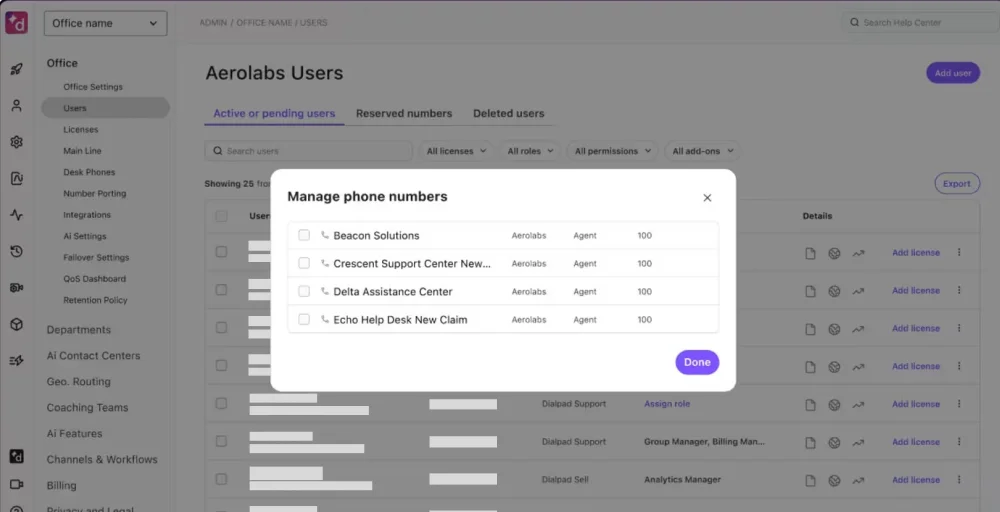
This approach makes Dialpad particularly attractive to budget-conscious teams seeking AI-driven insights. The platform covers four product lines: Dialpad Connect (UCaaS), Dialpad Meetings, Dialpad Support (contact center), and Dialpad Sell (sales).
Feature
- QA Scorecard: The Dialpad scorecard template evaluates agent performance and system functionality to ensure quality interactions and technical compliance.
- Screen sharing: Allows users to share their entire screen, a specific secondary monitor, a single application window, or an individual browser tab during video meetings
- Visual Voicemail: Automatically converts audio messages into text in real-time using Dialpad AI.
- Dialpad web portal: Accessible via a web browser, providing nearly identical functionality to the desktop app, including making calls, sending messages, and hosting meetings.
- Call pop: Also referred to as Screen Pop or Real-Time Assist (RTA) cards, these are automated windows that appear on an agent’s screen during a call.
Pros and cons
| Pros | Cons |
| It’s usually reliable and integrates well with other platforms for patient calls and documentation. | Occasionally, it’s slow to dial or fails to initiate calls for unknown reasons. |
| Dialpad’s integration with HubSpot enhances call routing for sales and support teams. | The support team is often unresponsive, and the integration has limitations that affect call logging and association. |
| It is easy to manage, and the AI meeting capture tool is useful. | It requires us to send an automatic opt-out message after texting someone, even if they have already given consent. |
Pricing
Dialpad offers a per-user, per-month pricing model with monthly and annual billing cycles, designed to scale with your business’s needs.
| Plans | Price (Per user per month, annually) | Key features |
| Standard | $15 | Multi-level auto-attendant, Google Workspace, Exec-assistant pairings |
| Pro | $25 | Number forwarding, Message data export, Virtual backgrounds |
| Enterprise | Talk to sales | Locked meeting rooms, Audio chat rooms, Real-time call transcriptions |
Best for
Dialpad is ideal for SMBs and growth-stage companies that want AI-powered call intelligence and coaching without enterprise pricing.


Which Genesys Alternative Should You Choose?
The right Genesys alternative depends on your team size, budget, channel requirements, and the level of technical complexity you’re willing to manage.
Here’s a practical decision framework:
- You’re a startup or small business: Start with KrispCall or Dialpad, both of which offer essential VoIP and contact center capabilities without enterprise overhead.
- You’re a growing mid-market team: Consider Aircall (best for CRM-heavy sales teams), Nextiva (best for UCaaS + CCaaS), or Talkdesk (best for AI automation).
- You need UCaaS and CCaaS from a single vendor: Choose Nextiva for omnichannel + reputation management, RingCentral if you’re already in the RingCentral ecosystem, and 8×8 if international calling volumes are high.
- You’re a large enterprise: Five9, or NICE CXone, your serious contenders. Five9 leads for outbound operations and workforce management. NICE CXone leads for compliance, quality management, and AI maturity.
- Your team is primarily support-focused: Freshdesk is a strong, affordable choice if you need a help desk and voice in one platform. Its ticketing system, knowledge base, and AI automation make it purpose-built for support organizations.
- AI is your top priority: Talkdesk and Dialpad lead here for most teams. NICE CXone leads for enterprises that need the most mature AI quality management. Five9’s Genius AI is the best for enterprise-scale virtual agents.