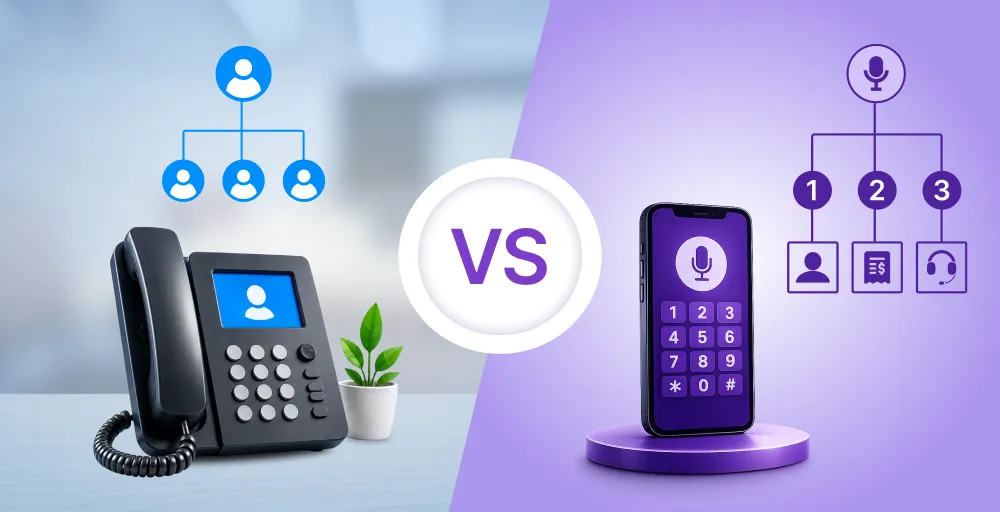
Your call center plays a vital role in helping customers and gathering useful insights. But if you’re still using an old, traditional phone system, your small team may struggle to keep up with today’s fast-moving customer demands.
That’s why many startups and lean support teams are now switching to cloud solutions like cloud call center services for better flexibility and performance without the IT headache. But what is a cloud call center, and how does it actually work? In this blog, we will explore what a cloud-based contact center is, how it functions, and why it matters for both growing companies and their agents.
✨ Key Takeaways
- A cloud call center is a virtual solution that manages customer calls using internet-based technology hosted by third-party providers. It’s your fastest path to a professional phone presence.
- It uses VoIP to route voice data over the internet, which enables calls through connected devices without traditional, expensive call center equipment..
- Virtual call centers improve customer satisfaction with 24/7 access, faster responses, connected channels, and flexible customer communications options. (We’ll show you how to mitigate these risks with a simple provider.)
What is a cloud call center?
A cloud call center is a virtual customer service solution that runs over the internet. It enables small businesses to handle both inbound and outbound calls and customer engagement online, giving agents the flexibility to work from any location, critical for modern, remote-first teams.
The core components of call center technology in cloud environments include an automatic call distributor (ACD) and an interactive voice response (IVR) system. A cloud-based call center can also offer additional modules like workforce management and advanced analytics.
How does a cloud call center work?
A cloud contact center works by using the internet to manage calls instead of traditional contact centers. It runs on VoIP technology, which turns voice and other communication into small digital packets.
The packets travel through the internet and are reassembled on the other side, so the call sounds clear and natural.
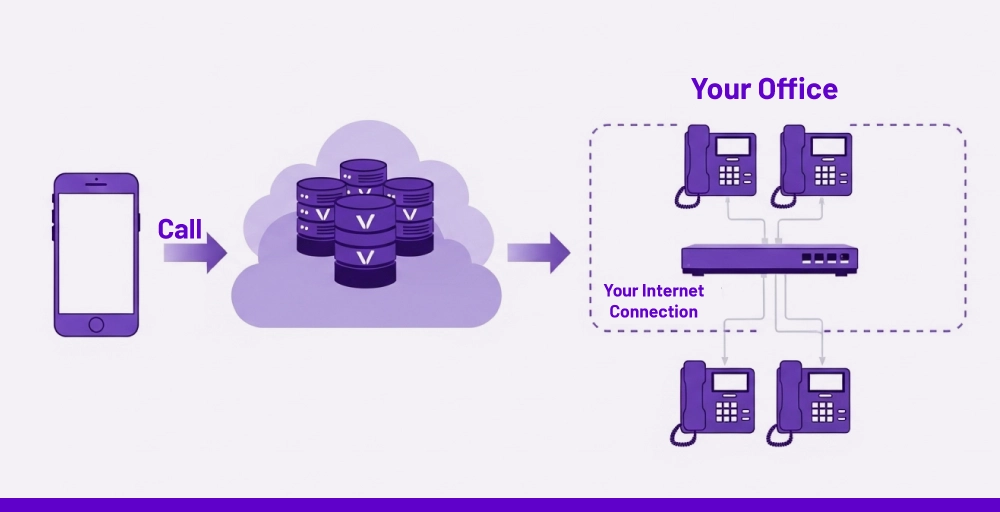
Because it’s cloud-based, there’s no need for bulky hardware or traditional desk phones. Contact center agents can make and receive calls through software on computers, tablets, or smartphones. All that’s needed is an internet connection, a headset, and a device. (Setup is often completed in minutes, not days.)
Cloud contact centers also offer extra key features like call forwarding, call routing, click to call, virtual assistants, call queueing, and call groups. Many platforms go beyond voice calls, supporting video, messaging, and CRM integrations as part of a unified communications strategy.
Top benefits of using a cloud call center
Cloud-based call centers or CCaaS solutions offer many advantages over traditional PBX systems. From cost savings to better flexibility, the right solution can improve both customer journey and team performance.
- Hassle-free maintenance: Traditional call centers often require constant maintenance, software patches, and hardware upgrades. A cloud call center removes the need for in-house IT teams to manage technical issues, supporting better business continuity. All updates and system improvements are handled by the provider through managed cloud services and rolled out automatically.
- Affordable and flexible costs(Low Risk for Startups): A cloud-based setup helps reduce operational costs by eliminating expensive hardware and licensing fees. Payment is usually subscription-based, so small teams only pay for what they need. Scaling the system up or down during busy or slow periods becomes easy and affordable.
- Quick setup, user-friendly design: There is no need for complex installations or lengthy setup procedures. Most platforms are ready to use after a simple sign-up, often accessible through a browser or a lightweight software solution. The interface of most cloud contact center platforms is usually intuitive, so agents can begin using the system with very little training.
- Grows with your team: A cloud call center can easily expand as contact center operations grow, which supports both inbound support and outbound customer communications. Adding new users or removing unused seats can be done in minutes. Additional tools and integrations can also be included when needed without restarting the system.
- Safe and dependable system: Many cloud solutions store data across multiple secure servers, protected by modern encryption, robust security measures, and compliance standards. Regular audits and monitoring help prevent data breaches. Unlike aging legacy systems, cloud platforms are built for stability, high uptime, and better business continuity planning.
- All channels in one place: A cloud call center makes it easier to manage voice calls, emails, chat, and other customer communications channels from a single dashboard. Lean teams can respond to customers across different unified platforms without switching between multiple tools. When everything is in one place, agents can provide faster, more consistent support.
Common challenges and limitations of cloud call centers
The challenges mentioned below highlight the need for strategic planning when adopting cloud call center solutions. Choosing a provider designed for simplicity and stability minimizes these risks.
| Challenge | Impact on Small Teams | Solution |
| Unstable Voice Quality | Leads to customer frustration and lost sales. | Prioritize providers with dedicated global data centers and built-in features like noise suppression technology. |
| Integration with Legacy Systems | Requires complex, expensive developer work. | Choose platforms with out-of-the-box, no-code integrations for common SMB CRMs (HubSpot, Salesforce Essentials). |
| Vendor Lock-in Risks | Makes switching painful and costly. | Look for transparent contracts and easy data export features. Avoid complex, proprietary hardware. |
| Cross-border Compliance Issues | Creates legal exposure for global remote teams. | Select providers that clearly outline GDPR/international number compliance support from day one. |
| Delayed Real-Time Insights | Slows down critical coaching and performance tracking. | Use providers whose dashboards are built for instant monitoring without reliance on heavy batch processing. |
Cloud call center vs. Traditional systems: The ROI for startups
For startups and SMBs, the decision often comes down to cost and immediate value. Here is a simple comparison showing why the cloud model offers superior ROI for growing teams:
| Feature | On-Premise (Traditional) | Cloud Call Center (CCaaS) | ROI Implication for SMBs |
| Upfront Cost | High (Hardware, Servers, Licenses) | Low (Subscription-based, no hardware) | Immediate positive cash flow. Minimal capital expenditure. |
| Setup Time | Weeks/Months (IT installation, wiring) | Hours/Days (Browser-based setup) | Faster time-to-value. Support revenue generation quicker. |
| Scalability | Complex, costly to add/remove seats. | Instant (Add/remove licenses online) | Perfect for fluctuating call volumes. Pay only for what you use. |
| Maintenance | Dedicated in-house IT team required. | Handled by the provider (Zero IT overhead) | Focus your lean team on core business, not system maintenance. |


How cloud call centers are redefining customer experience in 2026
Omnichannel cloud center solutions are making customer service better by helping people get support more quickly and easily. They give customers more ways to reach out and make sure help is always available. This level of professionalism is now accessible to every size of team.
1. Always available support
Cloud call centers make it easy for small teams to stay connected with customers at any time. With remote access and global teams, companies can leverage a remote contact center workforce to provide round-the-clock support without depending on a physical office.
Features like virtual agents, call center automation, virtual receptionists, and voice menus allow customers to get help even outside regular business hours. Many platforms also guarantee high uptime, which means customers always have a way to reach someone when they need assistance.
2. Shorter wait times
Long wait times often lead to unhappy customers. Cloud call centers reduce delays by using smart features like automatic call distribution and callback options. Calls are sent to the right agent faster, which helps avoid unnecessary hold times.
Even during busy periods, advanced routing systems help manage large volumes of calls efficiently. Customers spend less time waiting and get connected with someone who can solve their issue right away.
3. Quick problem solving
Cloud call centers help agents find answers quickly by connecting all tools in one place. Unified customer profiles containing data, previous conversations, and product information are available instantly during a call. Similarly, calls can be directed based on an agent’s skill set.
When the right person handles the problem from the start, customers avoid repeating information or being transferred multiple times. That leads to quicker solutions and a better overall experience.
4. Connected conversations
Support teams can manage all customer interactions from one system, even when conversations happen across different channels. A message started on chat can be continued over a phone call without losing any information.
When everything is tracked in one place, customers don’t have to repeat themselves. Agents can see the full history and respond with a better understanding. A smooth and connected experience builds confidence, improves customer satisfaction, and makes people feel valued.
5. Flexible contact options
Cloud call centers support many ways to communicate, not just phone calls. People can reach out through chat, email, video, or social media. More options mean better chances of meeting customer needs.
Some people prefer to send a quick message while working or commuting. Others may want to speak directly with an agent. When you offer multiple channels to each person, it gives them the freedom to choose what works best for them.
Essential features to look for in a cloud call center provider
A suitable cloud call center software or cloud contact center software can improve customer service and boost team productivity. Each of the cloud contact center features listed below helps build a smoother and more efficient calling experience. For small teams, prioritize features that automate or simplify your workflow.
1. Virtual assistant and IVR
Virtual assistant and IVR tools handle simple tasks like checking balances or confirming appointments without needing a live agent. Natural language processing helps understand caller intent and directs calls to the right place or offers a callback option.
2. Automatic call distributor (ACD)
An automatic call distributor helps route incoming calls to the appropriate department or agent. Calls can be directed based on agent skills, availability, or past customer interactions. Smart routing reduces wait times and improves customer satisfaction.
3. Call forwarding
Call forwarding allows incoming calls to be redirected to another extension, mobile phone, or call group. It ensures calls are answered even when an agent is unavailable or a department is closed. Settings can include how many times a phone rings before the call is sent elsewhere.
4. Call recording
Call recording helps monitor agent productivity and performance, ensure compliance, and improve customer service. Supervisors can listen to past calls or view screen activity to support training and resolve issues.
5. Auto dialer
An auto dialer speeds up outbound calling by automatically dialing numbers from a list. Agents can spend more time talking to customers instead of manually entering numbers. A good system updates dial lists in real time so the newest leads are contacted first.
6. Voicemail management
Voicemail tools help agents stay on top of missed calls during busy times. Alerts can notify agents when a voicemail is received, which allows for faster follow-up. Visual voicemail can also convert messages into text for easier review.
7. Real-time analytics
Real-time call center analytics provide valuable insights into key performance metrics like average wait time, response time, call volume, and more. Supervisors can monitor calls live to support agents when needed. After calls, analytics help identify training needs, measure customer success, and spot trends in customer behavior.
8. Integrations
Cloud call centers should work smoothly with other tools like customer relationship management systems, productivity apps, and workforce management software. Integration allows agents to access customer information quickly and perform tasks like click-to-dial without switching platforms.
9. Security and uptime
Strong data security features like call encryption and permission controls help protect customer data. A reliable provider with a proven track record also uses multiple data centers to reduce the risk of downtime. Consistent call quality and dependable support are essential for smooth daily operations.
Check Out 👉: 10 best practices for effective call center monitoring
How to get started with a cloud call center solution
Before choosing a provider, first list the cloud contact center features your small business needs. For example, if your team handles a high number of calls, look for auto dialers and advanced call routing. If agents work remotely, check for browser-based access, mobile apps, and real-time monitoring tools.
Next, check how well the system integrates with your current tools. Your CRM, helpdesk, and email platform should sync smoothly. Also, review if the provider offers call recording, IVR setup, call queue management, and analytics dashboards out of the box, not hidden behind extra fees.
Once you’re clear on what you need, you can explore cloud providers like KrispCall. It offers a cloud contact center solution that includes auto dialers, call forwarding, multi-device support, and CRM integrations. The setup is simple, and you don’t need to install heavy software.
KrispCall is built for teams that want something easy to manage, flexible to scale, and powerful enough for daily business use.
Run your professional call center from anywhere with KrispCall
Eliminate the IT complexity and high cost of traditional systems. Upgrade your customer support with powerful VoIP features built for modern, remote teams. Whether you’re a startup or a mid-sized company, KrispCall helps you stay connected, productive, and in control no matter where you are.
Book a Demo with KrispCall and run your call center seamlessly from anywhere.