If you’ve been using MightyCall for a while, you know the frustration: calls drop at the worst times, the setup process is complicated, and often requires you to call support just to set up basic features.
You must pay for at least three users, even if you don’t need that many, and international texting is limited as your customer base expands outside the US. You are not alone. Many businesses are looking for a better, more flexible VoIP solution, and there are great options available.
This guide breaks down the 10 best MightyCall alternatives, covering pricing, standout features, and what real users are saying, so you can find the right fit without wasting weeks on trial accounts.
✨TLDR;
- MightyCall requires a minimum of 3 users and limits the free trial to 100 minutes. This makes it unsuitable for solo operators and small teams who want to assess the platform before committing.
- Businesses often switch to other options because of ongoing call quality issues, unclear notifications, and limited international texting.
- Alternatives like KrispCall, Nextiva, and Dialpad offer more flexible pricing, better AI features, and wider global coverage, usually at a lower cost per user.
- The best choice depends on your team size and needs: KrispCall works well for global and sales-focused teams, Zoom Phone is ideal for organizations that use Zoom, and Google Voice fits lean teams already using Google Workspace.
How do we evaluate MightyCall alternatives?
Our recommendations are based on a structured, independent review process, not vendor sponsorships or promotional placements. To assess each MightyCall alternative, we analyzed publicly available pricing, feature sets, user reviews from platforms like G2, Capterra, and Software Advice, and real-world use cases across team sizes and industries.
We apply a consistent software review methodology to score platforms on key criteria, including call quality, pricing transparency, integration depth, AI capabilities, and global coverage. Our content integrity statement outlines the editorial standards we follow to ensure our comparisons remain objective and unbiased.
Since pricing and features in the VoIP space change frequently, we also follow a defined content update methodology to keep this guide accurate and up to date.
Why do businesses want to switch from MightyCall?
MightyCall has positioned itself as a small-business-friendly VoIP platform, and it does a decent job at the basics. But once your team starts growing, or your needs go beyond basic US calling, the cracks start to show.
- Limitations on the number of users: If you are a solo operator or part of a two-person team, you’ll end up paying for an unused user just to access the service. For the basic plan, that amounts to at least $45 per month before you make any calls.
- Call quality issues: User complaints about dropped calls and one-way audio appear consistently across Capterra, G2, and Software Advice. During high-volume periods, the reliability dips noticeably.
- Limited international features: MightyCall doesn’t support texting to international phone numbers. If your customer base is global or growing that way, this is a serious constraint.
- Lack of clarity for notifications: As noted by a long-time user in a review, the platform fails to differentiate between text messages, voicemails, and missed calls in its activity alerts, making it easy to overlook something crucial.
- Restricted free trial: MightyCall’s free trial caps at 100 minutes, which is not nearly enough time to properly evaluate the platform for a real business workflow.
One review that shows why users dislike Mightycall:
As a very small company, it’s challenging to be required to support more lines than we actually need. It would be much more convenient if we could pay a lower price for fewer lines. The overall cost is within our means, but that particular aspect is challenging.- G2 review
– Jessica B. Managing Member Small-Business (50 or fewer emp.)
Related Article 👉: MightyCall Pricing and Plans: Are They Affordable in 2026?
Top MightyCall alternatives & competitors: At a glance
Choosing the right MightyCall alternative depends on whether you prioritize the lowest monthly cost or a feature-rich platform, such as call reliability, SMS/A2P registration friction, and scaling costs due to seat minimums. that grows with your business.
| Provider | Starting Price | Best For | What It Stands Out For | G2 Review |
| KrispCall | $12/user/month | Global teams & sales-focused businesses | Unified Callbox, global numbers (100+ countries), strong CRM integrations, and AI features | 4.5/5 |
| Nextiva | $15/user/month | Businesses wanting an all-in-one communication hub | Unified inbox (voice, video, chat), scalable UCaaS platform | 4.5/5 |
| RingCentral | $20/user/month | Enterprises needing full-feature UCaaS | 300+ integrations, high uptime (99.999%), enterprise-grade features | 4.1/5 |
| Dialpad | $15/user/month | AI-driven teams | Real-time transcription, AI coaching, sentiment analysis | 4.4/5 |
| Vonage | $13.99/user/month | Businesses transitioning from legacy systems | Flexible setup, supports desk phones, strong API ecosystem | 4.3/5 |
| Aircall | $30/user/month | Sales & support teams using CRMs | Deep CRM integrations, PowerDialer, and live coaching | 4.4/5 |
| Quo | $15/user/month | Small collaborative teams | Shared inbox, AI receptionist, internal threads | 4.7/5 |
| Zoom Phone | $10/user/month | Teams already using Zoom | Seamless Zoom integration, video + voice in one platform | 4.6/5 |
| Google Voice | $10/user/month | Solopreneurs & Google Workspace users | Simple setup, Gmail/Calendar integration, low cost | 4.1/5 |
| Unitel Voice | $9.99/month | Traditional small businesses | No user minimums, vanity numbers, 24/7 support | 4.6/5 |
1. KrispCall
KrispCall is a cloud-based phone system designed for sales and support teams. It offers flexibility, global reach, and smart automation. Trusted by businesses in over 150 countries, it provides virtual phone number coverage in more than 100 nations.
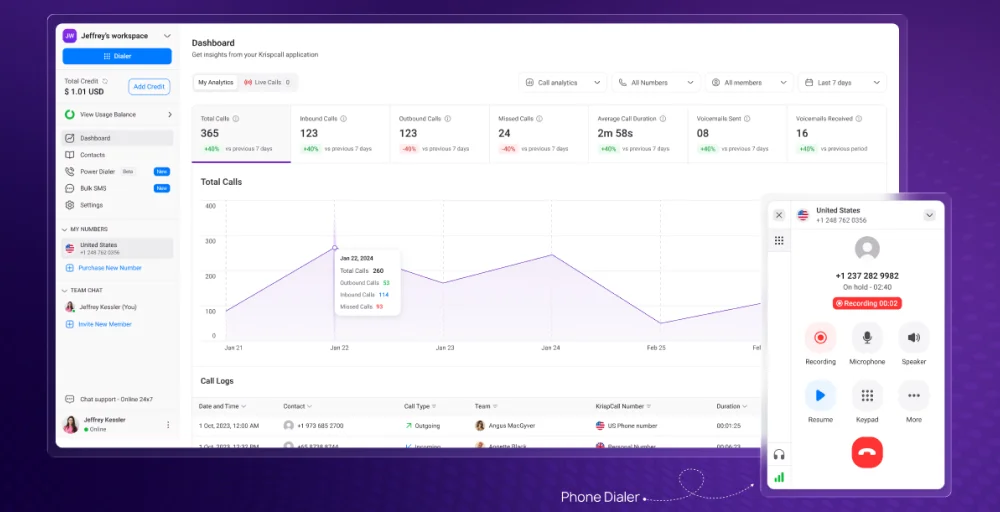
What makes KrispCall different from MightyCall is not just the pricing, but the system’s design. The Unified Callbox combines calls, SMS, voicemails, and team collaboration in a single, easy-to-use interface.
It also integrates with popular tools like HubSpot, Salesforce, Pipedrive, Zendesk, Freshsales, and over 100 other applications, ensuring your call data is right where you need it.
What makes KrispCall the best alternative to MightyCall?
KrispCall is positioned as a superior alternative to MightyCall primarily due to its significantly lower entry-level pricing ($12/user/month), broader ecosystem integration, and extensive global telephony coverage across 100+ countries. Additionally, it distinguishes itself with a modern, intuitive user interface, advanced unified communication features such as live call monitoring, robust 24/7 customer support, and strong team performance in ease of setup and administration.
What we like about KrispCall
- Ideal for businesses with international customers or remote teams spread across multiple time zones
- Including call summaries, transcriptions, and quick reply suggestions that save significant time for high-volume teams
- Automates outbound campaigns with voicemail drops and connect-rate tracking, something MightyCall simply doesn’t offer at this quality level.
What we dislike about KrispCall
- The mobile app has received mixed feedback, with some users reporting that it lags behind the desktop version in features.
- A minority of users have noted occasional call quality issues during peak hours, though this is improving with infrastructure upgrades.
- Enterprise-level compliance needs (such as strict HIPAA configurations or on-premises PBX systems) may be better served by larger platforms.
KrispCall’s standout features
- Voicemail: Effortlessly access and manage voice messages across all your devices to maximize your opportunities.
- Call & Contact Tagging: Label customers to enable easier organization, smoother navigation, and improved efficiency in customer support.
- Phone Tree (IVR): Utilize KrispCall’s phone tree to route calls effectively, ensuring quick access to the appropriate department for information.
- Custom Caller ID: Use an external caller ID to disguise your phone number and safeguard your privacy.
- Call Queuing: Manage call flow during peak times to prevent missed calls amid high call volumes.
KrispCall pricing
KrispCall’s pricing is transparent and scalable, with no hidden minimums forcing you to buy seats you don’t use.
| Plan | Annual price (per user/month) | Key feature set |
| Essential | $12 | Voicemail Filter, DND For Caller, Call Analytics |
| Standard | $32 | Bulk SMS, Call Transfer, Power Dialer |
| Enterprise | Custom | Dedicated Account Manager, Unlimited Call Recording, Developer Support |
What users say about KrispCall
Users generally praise KrispCall as a user-friendly, reliable, and cost-effective cloud telephony solution, often highlighting its excellent customer support and seamless integration with CRM platforms like HubSpot.
G2 review
G2 review: KrispCall is a reliable and easy-to-use communication tool. The call quality is excellent, the interface is intuitive, and it has significantly improved our team’s efficiency—a solid solution for modern business communication.
– Yoichi H. L& D Specialit Small-Business (50 or fewer emp.)
2. Nextiva
Nextiva is a Unified Communications as a Service (UCaaS) platform that goes beyond standard VoIP calling to include messaging, video conferencing, and an omnichannel. It’s a compelling option for businesses that want a single communication hub rather than a patchwork of tools.
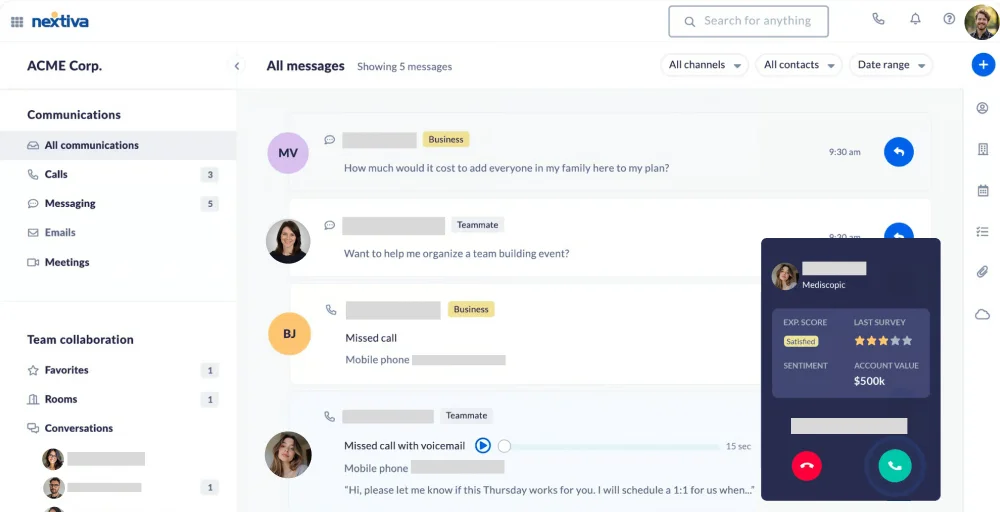
That said, Nextiva’s value proposition comes with some trade-offs. The base Core plan is fairly stripped-down, and meaningful features like live chat and on-demand call recording are locked behind higher tiers.
What we like about Nextiva
- Genuinely unified inbox combining voice, video, messaging, or other multiple communication channels.
- Clean, professional interface that doesn’t require extensive training.
- Auto-attendant and call menus are available even on the entry-level plan.
What we dislike about Nextiva
- The base plan is limited enough that most teams will need to upgrade quickly.
- Power Suite CX plan at $75/user/month is expensive for SMBs.
- Can feel complex for teams that just need simple calling and texting.
Nextiva’s standout features
- Auto-attendant: This offers an automated greeting that allows callers to select the individual or department they wish to contact.
- VoIP Desk Phones: These manage voice and messaging applications necessary to communicate with your customers in various ways.
- Unlimited Online Faxing: You can send faxes through the vFAX Portal, an email address of your choice, or even a conventional fax machine.
- Three-Way Calling: When you need to collaborate with a colleague or partner, three-way calling is an ideal feature.
- Anonymous Call Rejection: This feature stops callers from reaching you if their caller ID is hidden or displayed as a private number.
Nextiva pricing
Nextiva offers three pricing plans based on plan type, user count, and contact duration.
| Plan | Annual price (per user/month) | Key feature set |
| Core | $15 | Auto-attendant & call menus, Team messaging, Email |
| Engage | $25 | Live Chat, Online fax, Record phone calls |
| Power Suite CX | $75 | Built-in call center solution, Automate repetitive tasks, Shared team directory |
3. RingCentral
RingCentral is one of the most established names in the cloud communications space, offering a comprehensive UCaaS suite that covers calling, messaging, video, and contact center solutions. For enterprise teams that want a single vendor for all customer communications needs, it’s hard to beat.
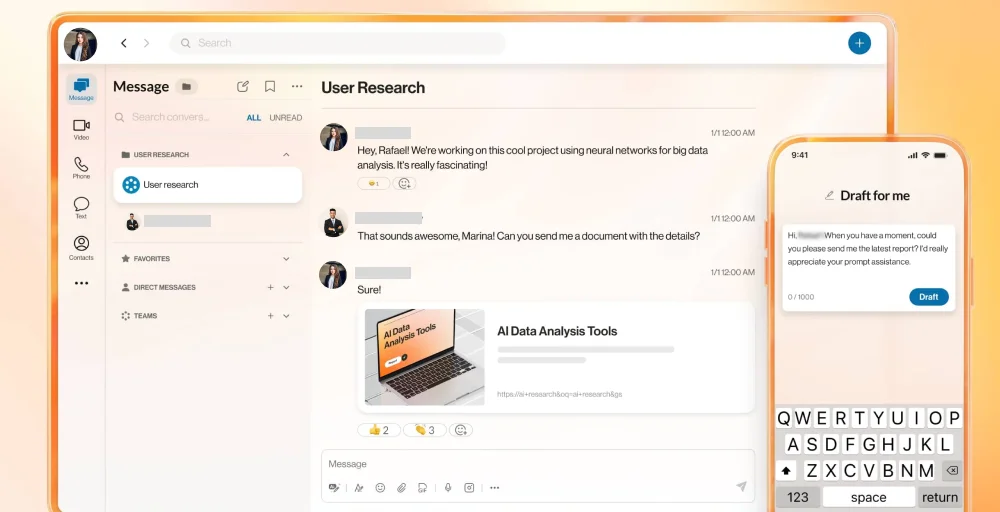
The trade-off is complexity and cost. RingCentral’s feature depth is overkill for smaller teams, and its pricing structure, while competitive at the mid-tier, can escalate quickly as you add advanced modules.
What we like about RingCentral
- Industry-leading reliability and uptime (99.999% SLA on higher-tier plans).
- Deep ecosystem of integrations with over 300 business apps.
- The SMS translation feature is a standout for teams serving multilingual customers.
What we dislike about RingCentral
- Setup and administration can be genuinely complex for non-technical users.
- Customer support quality has been inconsistent.
- Pricing escalates fast when you factor in add-ons and per-user fees.
RingCentral’s standout features
- Business SMS: Log in and send SMS and MMS messages in seconds, and seamlessly switch between desktop and mobile to continue conversations.
- Hot desking: Enables employees to access their personal extensions, profiles, voicemail, and other features of the cloud-based phone system while working remotely.
- Shared lines: Allow calls and lines to be shared across the phone system, enabling you to answer incoming calls on any device.
- Multi-way conference call: Easily set up audio collaboration for three or more participants without needing bridges, special equipment, or minute limitations.
- Call flip: Effortlessly transfer calls between one device (mobile) and another (desktop).
RingCentral pricing
RingCentral pricing generally ranges from three paid plans and one custom plan.
| Plan | Annual price (per user/month) | Key feature set |
| Core | $20 | Shared lines, Incoming Caller ID, Unlimited audio conferencing |
| Advanced | $25 | Call queues, Hot desking, Translate SMS texts |
| Ultra | $35 | Cost center management, Adoption analytics, Single sign-on |
| Customer Engagement Bundle | Contact sales | Custom roles and permissions, Advanced analytics, Breakout rooms |
4. Dialpad
Dialpad is built for AI-first organizations, using built-in artificial intelligence to transcribe calls in real time, automatically surface action items, and coach sales reps during live calls. For teams willing to embrace AI as a core part of the communication workflow, Dialpad delivers impressive value.
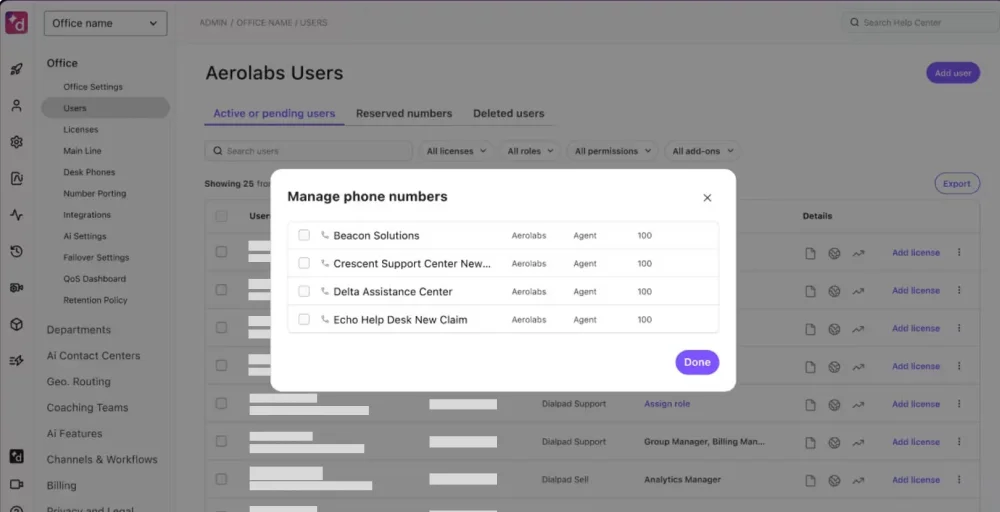
Its modern, clean interface feels current rather than enterprise-legacy, and its voice intelligence capabilities, including real-time sentiment analysis and AI scorecards, are genuinely best-in-class.
What we like about Dialpad
- Real-time AI transcription and call summaries are best-in-class.
- Clean, modern interface that feels current rather than enterprise-legacy.
- Exec-assistant pairings and audio chat rooms support a variety of team structures.
What we dislike about Dialpad
- Video conferencing is more limited compared to dedicated platforms like Zoom or Teams.
- Hold queues and quality-of-service reports are gated behind the Pro plan.
- International calling coverage isn’t as broad.
Dialpad’s standout features
- DialpadGPT: Leverages AI technology to enhance communication experiences, providing smart suggestions and insights during calls.
- Voice Transcription: Offers real-time transcription, converting spoken dialogue into text instantly so you never miss important details.
- Call Pop: Displays relevant caller information on your screen as soon as the call comes in.
- AI Scorecards: Uses artificial intelligence to evaluate call performance against predefined criteria.
- Enterprise VoIP Solutions: Provides scalable VoIP solutions with high-quality voice and video calls and seamless system integration.
Dialpad pricing
Dialpad offers three paid plans along with a 14-day free trial.
| Plan | Annual price (per user/month) | Key feature set |
| Standard | $15 | Exec-assistant pairings, Audio chat rooms, Virtual backgrounds |
| Pro | $25 | Hold queues, Contact syncing, Quality-of-service reports, |
| Enterprise | Talk to Sales | Extensions, Advanced call analytics, Number forwarding |
Readers also search for 👉: Top 10 Talkroute Alternatives & Competitors for 2026
5. Vonage
Vonage is a well-established VoIP provider with a flexible architecture that supports both software-only deployments and traditional VoIP desk phones. The VBC App Center offers a wide range of add-ons and integrations, and unlimited domestic calling is available on all plans.

Vonage is best suited for businesses transitioning from legacy hardware that want to retain their existing phone infrastructure while gradually moving to the cloud.
What we like about Vonage
- Supports VoIP desk phones alongside desktop and mobile apps, useful for office environments that aren’t fully going softphone.
- VBC App Center offers a wide range of add-ons and integrations.
- Unlimited domestic calling across all plans.
What we dislike about Vonage
- Call recording is only available on the Advanced plan.
- The early termination fees are high, and you need a contract to enable automatic renewal of features.
- Some users report that the admin portal is less intuitive.
Vonage’s standout features
- Vonage Meetings: Experience virtual group environments and keep large audiences engaged with video conferencing and collaboration tools.
- Business Phone App: Carry your business phone system wherever you go and never miss a work call with an easy-to-use mobile app.
- IP Phone Paging System: Send announcements or messages to up to 500 recipients by paging their phones.
- Virtual Voicemail Service: Personalize greetings and securely access your voicemail from anywhere through a virtual mailbox.
- Conference Bridge: Organize virtual conferences easily and create a secure space for participants to connect.
Vonage pricing
Vonage pricing offers a usage-based pricing structure for its communications APIs.
| Plan | Annual price (per user/month) | Key feature set |
| Mobile | $13.99 | Supports desktop and mobile apps, Voicemail, Unlimited domestic calling, |
| Premium | $20.99 | Supports VoIP desk phones, Unlimited Video meetings, VBC App Center |
| Advanced | $27.99 | On-demand call recording, Visual voicemail, Call groups |
6. Aircall
Aircall is a cloud-based, AI-powered voice and SMS communications platform designed for sales and support teams, enabling, managing, and analyzing customer calls without traditional hardware.
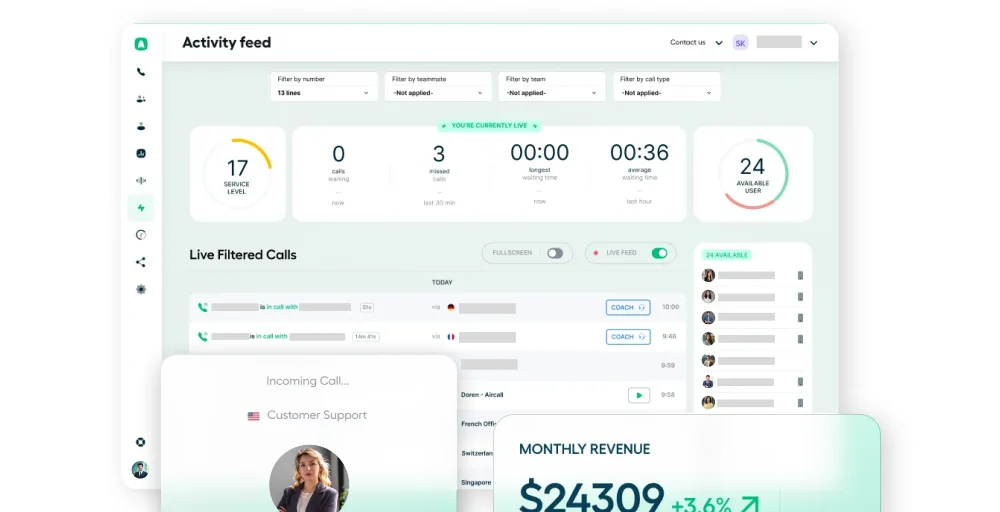
Its tight integration with CRMs like Salesforce, HubSpot, and Zendesk makes it a favorite among teams that live in those business tools, since call activity syncs automatically without manual data entry.
What we like about Aircall
- Best-in-class CRM integrations, if your team is in HubSpot or Salesforce all day, this pays for itself.
- PowerDialer on the Professional plan is excellent for high-volume outbound.
- This offers live monitoring for real-time coaching.
What we dislike about Aircall
- You need to incur extra fees for SMS/Toll-Free numbers.
- 11-user minimum on Professional plans is restrictive for small teams
- AI features like call summaries require an add-on rather than being included
Aircall’s standout features
- Contact Synchronization: Create a network of shared contacts by importing them from Google Apps, a CRM, or PieSync.
- Interactive Voice Response (IVR): Establish an intelligent IVR system that directs callers to the appropriate team on their first attempt.
- Warm Transfers: Allow team members to converse quickly before passing a live call to one another.
- Parallel Calls: Place your ongoing conversation on hold while simultaneously initiating a call with a third party.
- Voicemail Drop: Effortlessly leave pre-recorded sales messages with a single click, potentially saving each sales team or AI voice agent up to 5 hours per week.
Aircall pricing
Aircall offers three pricing plans: Essentials, Professional, and Custom.
| Plan | Annual price (per user/month) | Key feature set |
| Essentials | $30 | Click-to-dial, Conversation Center, Role-based permissions |
| Professional | $50 | Standard onboarding (11 users minimum), PowerDialer, Live Monitoring |
| Custom | Get a quote | Mandatory tagging, After-call work, Messaging API |
7. Quo (formerly OpenPhone)
Quo emerges as a leading modern alternative to MightyCall, particularly for small and growing businesses. It distinguishes itself through superior team collaboration tools, AI-powered capabilities, including an “AI receptionist” named Sona, and a more intuitive, CRM-integrated interface with native support for HubSpot and Salesforce.

While MightyCall remains a solid VoIP solution, Quo’s emphasis on workflow efficiency, scalability, and intelligent automation features positions it as the top-rated competitor across multiple independent review platforms and comparison analyses.
What we like about Quo
- Everyone on the team can see and respond to messages from a single shared number.
- Team members can discuss customer conversations privately without the customer knowing.
- Each user gets a free local or toll-free number with no extra $5 fee per number.
What we dislike about Quo
- Limited call center features compared to KrispCall, Aircall, or RingCentral
- Advanced call forwarding and inbound phone support are locked behind the Scale plan.
- Less suited to high-volume outbound calling workflows.
Quo’s standout features
- Small business VoIP: Easily streamline your operations and establish Quo’s virtual phone service designed for expanding teams.
- Ring groups: Enhance your response times and prevent missed calls. Quo’s ring groups allow you to tailor who answers incoming calls and when they receive them.
- AI text messages: Save time with Quo’s AI-driven text message response generator.
- On-demand call recording: Capture calls from any device. Enhance your team’s call quality and ensure you never miss a single customer detail.
- Simultaneous ring: Ensure no caller is left waiting by ringing your team members simultaneously.
Quo pricing
Quo (formerly OpenPhone) offers three primary pricing tiers with significant discounts for annual billing:
| Plan | Annual price (per user/month) | Key feature set |
| Starter | $15 | Shared contacts, Group messaging, Internal threads |
| Business | $23 | Auto-replies, Call transfers, and live chat support |
| Scale | $35 | Advanced call routing, Inbound phone support, Ring order |
8. Zoom Phone
Zoom Phone is an enterprise-grade VoIP solution that shines brightest for organizations already embedded in the Zoom ecosystem. It’s well-suited to mid-to-large enterprises that prioritize stability, security, and cloud communications over highly customized voice-only workflows.
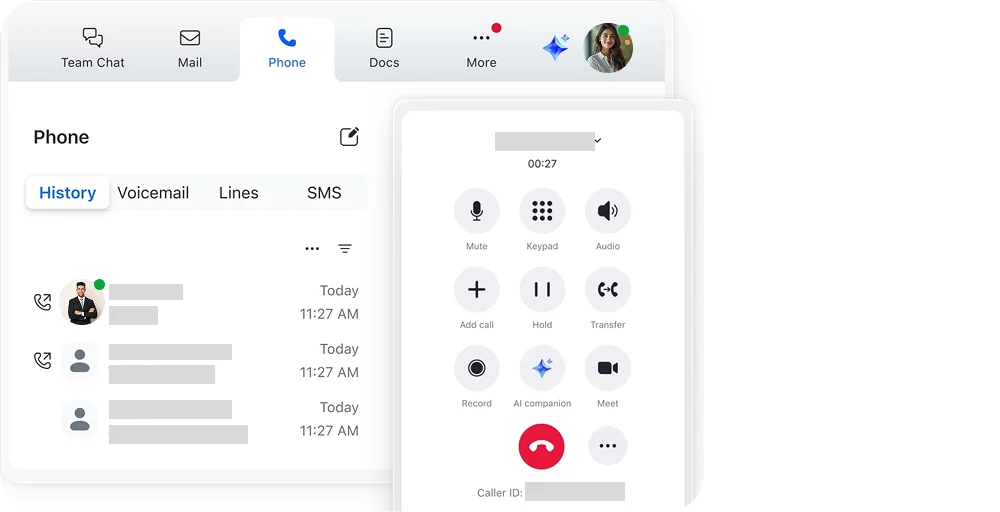
That said, calling features aren’t as advanced as dedicated VoIP platforms, and it can be more expensive than purpose-built alternatives if your team doesn’t already rely on Zoom Meetings.
What we like about Zoom Phone
- Seamless integration with Zoom Meetings, one platform for calls and video.
- Post-call AI summaries included in base plans.
- A dial-by-name directory is useful for larger organizations.
- Familiar Zoom interface reduces training time.
What we dislike about Zoom phone
- Calling features aren’t as advanced as dedicated VoIP platforms.
- More expensive than purpose-built VoIP tools when you don’t already need Zoom Meetings
- Some advanced features, like PBX, require additional configuration.
Zoom Phone’s standout features
- Call Handling Panel: An always-active awareness tool that helps front office and support staff manage call volumes with a full contact presence directory.
- Elevate to Meeting: Effortlessly transition a phone call into a fully equipped Zoom Meeting without requiring participants to join manually.
- Device Management: Allocate, set up, and oversee standard deskphone devices directly from the Zoom Admin portal.
- Call Blocking: Users can create personal call blocklists to block unwanted calls automatically.
- Takeover: A supervising monitor can enter the call and take over the discussion.
Zoom Phone pricing
Zoom Phone offers three primary standalone plans, with pricing that typically begins at $10 per user/month for the basic tier.
| Plan | Annual price (per user/month) | Key feature set |
| US & CA Unlimited | $16 | VoIP calling, Dial by name directory, Access post-call summaries |
| Pro Plus | $17.43 | Unlimited meetings, Personal Meeting ID, 30 hours of meeting duration |
| Business Plus | $20.83 | Translated Captions, Custom Mail Domain, Unlimited Whileboard |
9. Google Voice
Google Voice is a streamlined, cost-effective alternative to MightyCall for solopreneurs and small teams already embedded in the Google Workspace ecosystem. The setup is fast and intuitive, and three-way calling is available even on the entry-level Starter plan.

It focuses on basic calling and texting, with seamless integration with Gmail, Google Calendar, and Google Meet, and includes international billing options at every pricing tier.
What we like about Google Voice
- This has tight native integration with Google Calendar, Gmail, and Meet.
- You get voicemail transcription included at every tier
- The feature three-way calling is available on the Starter plan.
What we dislike about Google Voice
- This only integrates with Google apps; it has no third-party CRM integrations.
- There are no international texting plans on base.
- You can’t connect this to a landline; only connect with a mobile or VoIP.
Google Voice standout features
- Voicemail Transcription: Effortlessly convert your voicemails into text, making them accessible in the app or via email for your convenience.
- Call Forwarding: Ensure you never miss an important call by seamlessly forwarding incoming calls to your preferred numbers.
- Text Messaging: Enjoy free texting (SMS) throughout the U.S. and Canada, connecting effortlessly with friends and family.
- Spam Filtering: Rely on our intelligent system to automatically block unwanted spam calls, giving you peace of mind.
- Call Queuing: Allows businesses to automatically place incoming calls on hold when all team members in a ring group are busy, rather than sending callers to voicemail.
Google Voice pricing
Google Voice costs $10–$30 monthly plus required Google Workspace subscription fees.
| Plan | Annual price (per user/month) | Key feature set |
| Starter | $10 | Three-way calling, Unlimited US texting, Voicemail transcription |
| Standard | $20 | eDiscovery for calls, Unlimited number of users, On-demand call recording |
| Premier | $30 | Advanced reporting of Voice activity with BigQuery, Unlimited international billing locations |
10. Unitel Voice
Unitel Voice is a business phone system designed for traditional businesses that want the reliability and professionalism of a dedicated business number without the complexity of enterprise platforms.

It stands out for its flexible plans without rigid user minimums, strong focus on toll-free and vanity numbers, and a reputation for responsive customer support.
What we like about Unitel Voice
- This offers 24/7 US-based support.
- Users can own their virtual or local phone numbers.
- No-cancellation fees are flexible.
What we dislike about Unitel Voice
- The integration options for third-party CRM and ERP systems are limited, which may not be well-suited to complex businesses.
- The call analytics and reporting features are basic and do not provide detailed performance insights.
- Additionally, there is no support for video calling or conferencing.
Unitel Voice standout features
- Second Phone Line: Make business calls from your smartphone using a dedicated business phone number shown on all outbound calls.
- Virtual PBX: Automatically greets callers and routes them to the appropriate extensions, phones, or voicemail.
- Custom Vanity Numbers: Choose local or toll-free numbers that are easier to remember, or that spell out your business name.
- Softphone: A smartphone or desktop app that lets employees make and receive calls from anywhere via the internet.
- Call Transferring: Transfer calls to other team members. Place the caller on hold, see who can take calls, then use blind or assisted transfer options.
Unitel Voice pricing
Unitel Voice offers four primary tiers with prices starting at $9.99/month.
| Plan | Annual price (per user/month) | Key feature set |
| Start-Up | $9.99 | 1 Virtual Phone Number, 3 users included |
| Unlimited | $24.99 | Unlimited user/ minutes, Mobile app |
| Office | $29.99 | Desktop softphone, call scheduling |
| Office-Max | $69.99 | Team messaging, Presence Indicator, Desk phones |
Must-have features in MightyCall alternative
Not every VoIP platform is built in the same way. When evaluating alternatives, here are the core features to prioritize:
- International texting and calling: As customer bases become increasingly global, the ability to reach contacts abroad without a separate add-on or provider is essential.
- Unlimited calling and texting: Avoid platforms that charge per-minute or cap your usage. Look for unlimited domestic calling and messaging features bundled into the base plan to keep costs predictable.
- Phone Number Sharing: Look for a system that lets multiple team members answer calls and texts on a single business number. This helps everyone stay accountable and provides a better experience for customers. MightyCall does not handle this well.
- AI-powered features: Call transcription, summaries, smart auto-replies, and voicemail drops are essential features for teams that need to work quickly without sacrificing quality.
- Transparent pricing: Choose a platform that lets you start with 1 or 2 seats and scale as needed. Forced minimums are a tax on small teams, and they signal a pricing model that doesn’t respect how lean businesses actually operate.
- Call management features: Robust call routing, auto-attendants, call queues, and forwarding rules ensure customers reach the right person quickly, without waiting on hold or navigating a frustrating maze of options.
- CRM and app integrations: Your phone system should connect directly to your CRM, helpdesk, and communication tools. Native integrations with HubSpot, Salesforce, or Zendesk eliminate manual data entry and give your team full context on every customer interaction.
- Excellent call quality: A rich feature set is meaningless if your customers can’t hear you clearly. Look for platforms with documented uptime commitments and consistent reviews praising audio clarity.
Which MightyCall alternative is best for your business?
The right alternative depends on what’s actually broken for your team right now:
For international reach and a strong CRM foundation, choose KrispCall as the most flexible all-rounder. Its global number coverage, deep integrations, and power dialer make it a natural upgrade from MightyCall for sales-focused or globally distributed teams, at a lower starting price per seat.
If you want a fully unified communications platform, Nextiva or RingCentral is the strongest option. Nextiva suits growing SMBs looking to consolidate voice, video, messaging, and social into a single platform. RingCentral is better for larger enterprises that need enterprise-grade reliability and a massive integration ecosystem.
If your team is AI-driven: Dialpad delivers the most sophisticated real-time AI features, including live transcription, sentiment analysis, and AI scorecards, all built natively into the platform rather than added on.
If you’re a small team focused on collaboration, Quo offers the most intuitive shared inbox experience for teams handling a high volume of inbound messages and wanting internal discussion threads alongside customer conversations.
If you’re a solopreneur or Google Workspace user: Google Voice is the simplest, most affordable option. It won’t impress anyone with feature depth, but if you just need a professional number that plays nicely with Gmail and Calendar, it gets the job done.
Why MightyCall users switch to KrispCall?
For many teams, KrispCall is a better choice than MightyCall. It offers more advantages in key areas. MightyCall requires you to pay for at least 3 users, while KrispCall lets you start with 1 user for $12 a month and scale as needed. MightyCall limits texting to US numbers, but KrispCall supports international texting in over 100 countries. MightyCall combines texts, voicemails, and missed calls into one confusing feed.
In contrast, KrispCall’s Unified Callbox shows your team clear information about all interactions, calls, messages, and voicemails, in one place. KrispCall also includes a power dialer for making calls, real-time call transcription and summaries, and over 100 built-in integrations. That’s why more sales and support teams are choosing KrispCall after leaving MightyCall.
Ready to make the switch? Start your free KrispCall trial today and experience the difference for yourself, with no user minimums, no hidden fees, and global coverage from day one.