Five9 is a well-established cloud contact center platform, but it isn’t the right fit for every business. Whether you’re looking for more affordable pricing, a simpler interface, stronger AI features, or better integrations, there are excellent alternatives on the market in 2026. This guide compares the top 10 Five9 competitors to help you find the best fit for your team’s needs.
Best Five9 alternatives shortlist
- KrispCall: Best Five9 Alternative for SMBs & Remote Teams
- Talkdesk: Best for Enterprise Contact Centers
- Aircall: Best for Sales & Support Teams
- NICE CXone: Best for Large Enterprise CX
- 8×8: Best for Omnichannel Contact Centers
- Dialpad: Best for AI-Powered Business Communications
- RingCentral: Best for UCaaS + Contact Center Combination
- Quo: Best for Small Business Phone Systems
- Nextiva: Best for Unified Communications
- Genesys Cloud CX: Best for Enterprise Omnichannel CX
Why businesses look for a Five9 alternative?
Five9 is a capable platform, but its pricing, complexity, and feature set don’t suit every organization. Here are the most common reasons businesses start exploring alternatives:
1. High cost of ownership
Five9’s plans can be expensive, especially for small and mid-sized businesses. With per-agent pricing and add-on costs for advanced features like AI and analytics, total costs quickly escalate. Many businesses find better value in alternatives that bundle more features at lower price points.
2. Implementation complexity
Deploying Five9 often requires significant technical resources and onboarding time. Smaller teams or companies without dedicated IT departments may struggle with setup and maintenance, prompting them to seek simpler, more intuitive solutions.
3. Limited flexibility for remote or hybrid teams
As hybrid and remote work become the norm, teams need solutions that are lightweight, mobile-friendly, and accessible from anywhere. Some businesses find Five9 better suited to traditional call centers and turn to cloud-native alternatives designed for distributed workforces.
4. Gaps in AI and automation features
The rapid evolution of AI-driven customer service has raised the bar. Businesses expecting conversational AI, real-time agent coaching, and smart call summaries out of the box may find that some competitors now outpace Five9 in this area.
How did we select the best Five9 alternatives?
Selecting the best Five9 alternatives required evaluating each platform across several critical factors.
To ensure fairness and accuracy, we follow a consistent software review methodology, uphold our content integrity statement, and keep everything up to date through our content update methodology. Here’s what we looked at:
- Pricing & Value: We compared starting prices, plan tiers, and what’s included at each tier to assess overall value for money.
- Core Features: We evaluated essential contact center capabilities, call routing, IVR, omnichannel support, and reporting tools.
- AI & Automation: We looked at how each platform leverages AI for call summaries, agent coaching, chatbots, and workflow automation.
- Ease of Use: User interface quality, onboarding experience, and learning curve all factored into our assessment.
- Integrations: We considered native integrations with popular CRMs, helpdesks, and productivity tools.
- Customer Reviews: We incorporated G2, Capterra, and Trustpilot ratings to reflect real-world user satisfaction.
- Scalability: We assessed how well each platform serves both small teams and large enterprises as needs evolve.
Best Alternatives to Five9 in 2026
With so many capable platforms available, knowing where to start can be half the battle. We’ve summarized the most important factors across all ten Five9 alternatives in the table below, giving you a clear starting point before we explore each option in depth:
| Provider | Starting price | Best for | What stands out for | G2 Review |
| KrispCall | $12 /user/month | SMBs & remote teams | Unified Callbox, Phone Tree (IVR), Voicemail Greeting | 4.5/5 |
| Talkdesk | $85 /user/month | Enterprise contact centers | Forward-to-Phone, Local Caller ID, Automated Workflows | 4.4/5 |
| Aircall | $30 /user/month | Sales & support teams | Warm Transfer, Ring Groups, Desktop Notifications | 4.4/5 |
| NICE CXone | $110 /user/month | Large enterprise CX | Omnichannel Routing, Voice Services, Copilot for Agents | 4.3/5 |
| 8×8 | Chat for sales | Omnichannel contact centers | Agent workspace, High-Volume SMS, Receptionist Console | 4.1/5 |
| Dialpad | $15 /user/month | AI-powered communications | Dialpad GPT, QA Scorecard, Virtual Fax | 4.4/5 |
| RingCentral | $20 /user/month | UCaaS + contact center | Call Filip, Paging, Call Delegation | 4/5 |
| Quo | $15 /user/month | Small business phone systems | Simultaneous ring, AI text message, Auto-attendant | 4.7/5 |
| Nextiva | $15 /user/month | Unified communications | Conference bridge, Nextiva Softphone, VoIP Switchboard | 4.5/5 |
| Genesys Cloud CX | $75 /user/month | Enterprise omnichannel CX | Agent Copilot, Predictive Engagement, Virtual Agent | 4.4/5 |
1. KrispCall – Best Five9 alternative for SMBs & Remote Teams
KrispCall is a cloud-based phone system built for modern businesses that need a professional, feature-rich communication platform without the enterprise price. It offers a unified workspace for calls, SMS, MMS, and voicemail, all in one intuitive interface.
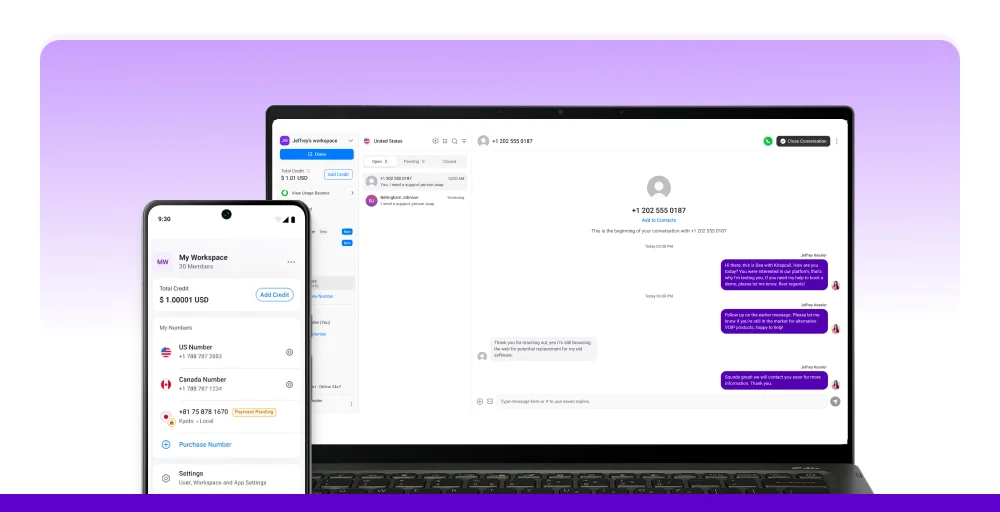
For small and medium-sized businesses, remote teams, and startups seeking a cost-effective Five9 alternative, KrispCall stands out for its competitive pricing.
What makes KrispCall the best alternative to Five9?
KrispCall removes the complexity and high cost typically associated with contact center software. Its clean, unified interface gives teams everything they need to manage customer communications without juggling multiple apps. The shared phone number feature is particularly valuable for small teams that need to stay responsive without missing calls.
KrispCall’s standout features
- Unified Callbox: Access all details of calls, SMS, MMS, and voicemails in one interface, allowing you to view all conversations without needing to switch between applications.
- Shared Phone Number: Enhance customer engagement by sharing your phone number with team members, reducing missed calls.
- Call & Contact Tagging: Use tags to organize calls and contacts easily, simplify navigation, and improve customer support efficiency.
- Phone Tree (IVR): Use KrispCall’s phone tree to route call effectively, enabling quick access to the appropriate department for inquiries.
- Voicemail Greeting: Create personalized, professional, and imaginative voicemail greetings to welcome callers with automated messages.
KrispCall pricing
KrispCall keeps pricing transparent and predictable, with three plans designed to suit teams from solo operators to growing enterprises:
| Plan | Annual price (per user/month) | Key feature set |
| Essential | $12 | Unified Callbox, SMS Filter, Voicemail |
| Standard | $32 | Unlimited users, Number Porting, Call Filters |
| Enterprise | Custom | SMS Forwarding, Bulk SMS, Dashboard |
KrispCall Pros
- It has a clean, unified interface for calls, SMS & voicemail.
- The shared phone numbers reduce missed calls.
- Good for obtaining local numbers in multiple countries and for competitive international calling rates.
KrispCall Cons
- It has fewer enterprise-grade features.
- Limited advanced reporting tools.
- May need to upgrade for larger teams.
What users say about KrispCall
G2review: The support before and the live support has been brilliant! The ease of using an Australian number to call Australian businesses is a game-changer for me as i live in Spain…OZ Folks don’t pick up European numbers often. Thanks for this amazing set up. My pick up call rates have jumped from 3.45% to 35% on cold outreach alone.
- Craig M., Co-Founder Small-Business (50 or fewer emp.)
2. Talkdesk- Best for Enterprise Contact Center
Talkdesk is a cloud-native contact center solution designed for enterprise-scale operations. With a strong emphasis on AI-powered automation, omnichannel routing, and robust analytics, it competes directly with Five9 in the upper mid-market and enterprise segment.
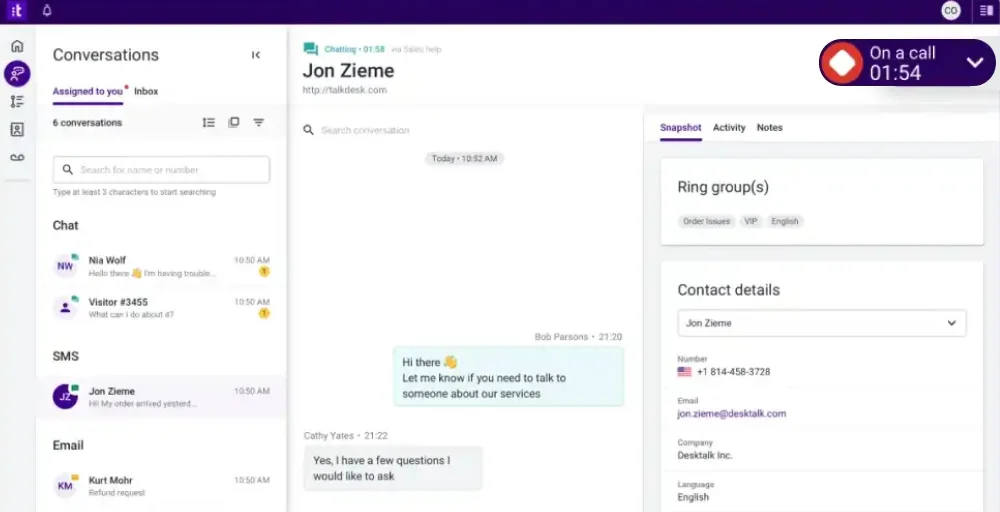
Its CX Cloud is purpose-built to improve agent efficiency and customer satisfaction across complex support environments.
Talkdesk standout features
- Forward-to-phone: Ensure your team stays connected by forwarding calls to mobile devices, SIP phones, or landlines.
- Automated workflows: Create easy workflows to automate various tasks. After a call concludes, update your CRM with the recording and relevant information.
- Real-time Dashboards: Get a snapshot of your contact center’s activities anytime to help you improve your KPIs.
- Local Caller ID: Talkdesk selects the most appropriate phone number and area code to display on your outbound caller ID.
- No-answer call forwarding: Redirect calls to an alternate phone number when all agents are occupied, ensuring customer needs are addressed.
Talkdesk pricing
Talkdesk offers four plan tiers ranging from digital-only to full enterprise voice and workforce engagement, structured as follows:
| Plan | Annual price (per user/month) | Key feature set |
| Digital Essentials | $85 | CXA, Studio & Routing, Connections, API Access |
| Voice Essentials | $105 | Voice Engagement, Business Intelligence, Speech Recognition |
| Elite | $165 | Screen Recording, Automated Notifications, Workforce Engagement |
| Industry Experience Clouds | $225 | Financial Services, Custom Reporting with Live and Explore |
Talkdesk pros
- AI-powered automation and self-service tools are built into core plans.
- Strong omnichannel routing with real-time dashboards for supervisor visibility.
- Deep integrations with Salesforce, ServiceNow, and other enterprise tools.
Talkdesk cons
- Premium pricing starts at $85/user/month, making it costly for smaller teams.
- Some advanced AI features are locked behind higher-tier plans.
- Implementation and onboarding can require significant technical support.
3. Aircall- Best for Sales and Support Teams
Aircall is a cloud-based phone system built with sales and customer support teams in mind. Its intuitive interface, powerful integrations with CRMs such as Salesforce and HubSpot, and collaborative features make it a go-to choice for growing businesses.
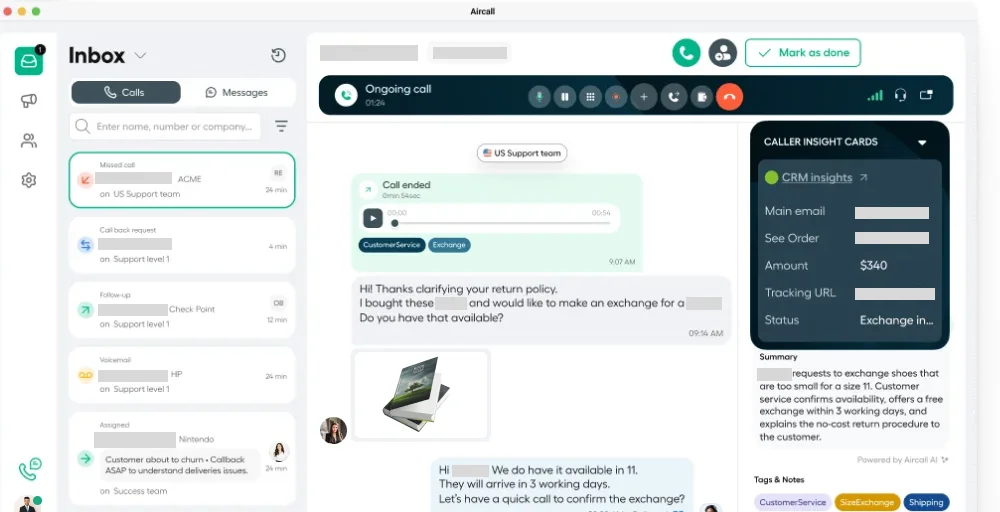
With plans starting at $30/user/month, it offers a compelling middle ground between basic VoIP tools and full-scale contact center platforms.
Aircall standout features
- Unlimited Concurrent Calls: Make or receive as many calls as you desire at the same time on a single phone number.
- Warm Transfer: Give your teammates a chance to briefly communicate before transferring an active call.
- Ring Groups: Direct calls to teams categorized by location, language, skill, or any other characteristic you prefer.
- Desktop Notifications: Receive alerts for incoming calls on your screen, and start the conversation by clicking the notification.
- AI-Generated Call Summaries: Quickly understand the main points of a discussion by reading a summary, enabling you to review calls twice as efficiently.
Aircall pricing
Aircall’s pricing is designed to grow with your team, offering three tiers that balance simplicity with increasing feature depth:
| Plan | Annual price (per user/month) | Key feature set |
| Essentials | $30 | Custom music and messages, Call queuing, IVR (local server) |
| Professional | $50 | Smart routing, Extensions, Call whispering |
| Custom | Call for details | Queue callback, Mandatory tagging, Live Monitoring |
Aircall pros
- Intuitive, easy-to-set-up interface with minimal onboarding friction.
- Excellent native integrations with HubSpot, Salesforce, and Intercom.
- Collaborative features such as call commenting and warm transfers enhance team workflows.
Aircall cons
- Limited features on the base Essential plan.
- No built-in video conferencing.
- Per-minute pricing can increase costs.
4. NICE CXone- Best for Large Eenterprise CX
NICE CXone (now branded as CXone Mpower) is one of the most established enterprise contact center platforms on the market. Backed by NICE’s decades of experience in workforce management and interaction analytics, it delivers a comprehensive AI-first CX suite designed for large organizations managing high volumes of customer interactions across multiple channels.
NICE CXone standout features
- AI Agents for Self-Service: Quickly develop no-code AI agents that utilize your data. Create once, implement everywhere.
- Omnichannel Routing: Minimize wait times and enhance conversations by intelligently matching customers and agents.
- Interaction Analytics: Obtain AI-driven insights from all interactions to promote ongoing improvement.
- Voice Services: Integrate front and back office teams by uniting data, conversations, and workflows in a single location.
- Copilot for Agents: Equip customer service representatives with an AI partner to enhance productivity and engagement.
NICE CXone pricing
NICE CXone structures its pricing around suite tiers, with each level adding progressively more AI, analytics, and workforce management capabilities:
| Plan | Annual price (per user/month) | Key feature set |
| CXone Mpower Omnichannel Suite | $110 | Voice and Digital Channels, Recording and compliance, Proactive engagement |
| CXone Mpower Essential Suite | $135 | Quality management, Agent Workspace, Screen Recording |
| CXone Mpower Core Suite | $169 | Omnichannel Routing and Orchestration, Workforce Management |
| CXone Mpower Complete Suite | $209 | Vice of the Customer, Bring your own transcription, |
| CXone Mpower Ultimate Suite | $249 | AI routing, Interaction Analytics, Customer-facing Intelligent virtual agent |
NICE CXone pros
- Industry-leading AI capabilities, including Copilot, analytics, and virtual agents.
- Highly scalable for large enterprise operations across complex environments.
- Comprehensive workforce management and quality monitoring tools.
NICE CXone cons
- Among the most expensive options on this list, starting at $110/user/month.
- Steep learning curve; may require dedicated admin resources to manage effectively.
- Smaller businesses are unlikely to utilize the full breadth of features.
5. 8×8- Best for Omnichannel Contact Centers
8×8 offers a unified communications and contact center platform that blends UCaaS and CCaaS capabilities. It’s particularly well-suited for businesses that want to consolidate their phone, video, chat, and contact center tools into a single platform. Its competitive pricing and flexible licensing make it accessible to a wide range of businesses.
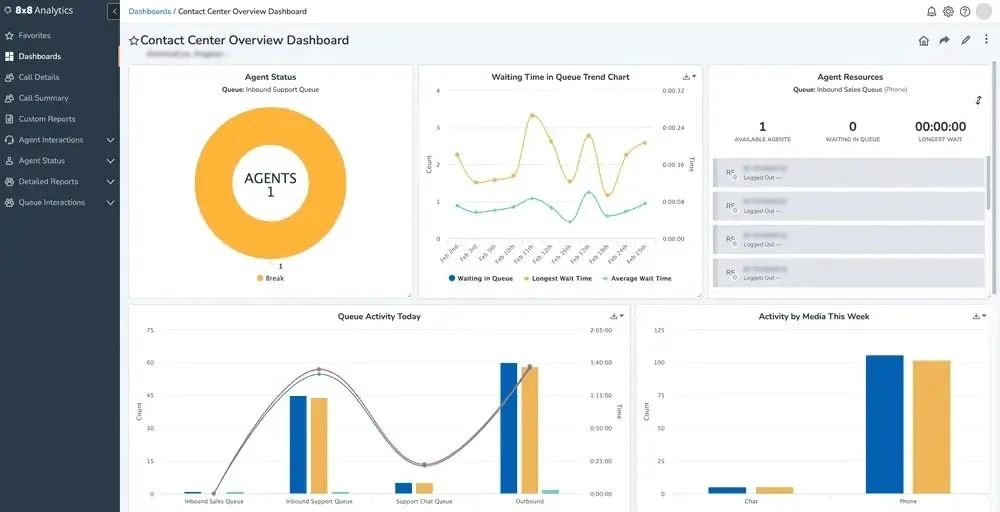
8×8 standout features
- Agent Workspace: Streamline your operations with an intuitive interface that enhances productivity and collaboration among agents.
- Conversation Intelligence: Unlock valuable insights from customer interactions, driving smarter decisions and elevating service quality.
- High-Volume SMS: Effortlessly engage large audiences with rapid, efficient SMS messaging to ensure effective communication at scale.
- Receptionist Console: Simplify call management with a powerful tool that helps receptionists direct calls and manage communications.
- Advanced Queue Management: Optimize customer experience with sophisticated queue management capabilities, reducing wait times and improving satisfaction.
8×8 pricing
Rather than fixed public tiers, 8×8 structures its pricing around use case bundles, with most plans requiring a direct conversation with their sales team:
| Plan | Annual price (per user/month) | Key feature set |
| Contact Center | Chat with Sales | AI-Enabled Self-Service, Secure Payment Processing, Agent Workspace |
| CX Beyond the Contact Center | Request a Quote | Advanced Queue Management, Message, Team Lead Analytics |
| Communications APIs | Chat with Sales | High-Volume SMS, Voice/Video, Authentication and Fraud |
| Unified Communications | Request a Quote | Call, System Analytics, Receptionist Console |
8×8 pros
- Unified UCaaS and CCaaS on a single platform reduces vendor complexity.
- Competitive pricing for businesses wanting both communications and contact center features.
- Strong global calling coverage and reliable call quality across regions.
8×8 cons
- Pricing lacks full transparency; many plans require contacting sales for quotes.
- Reporting and analytics tools can feel less polished than dedicated CCaaS competitors.
- Customer support responsiveness has received mixed reviews on G2 and Capterra.
6. Dialpad- Best for AI-Powered Business Communications
Dialpad is a cloud-based communications platform that has positioned itself as one of the most AI-forward options on this list. Built on its proprietary DialpadGPT large language model, it offers real-time call transcription, live agent coaching, automated post-call summaries, and sentiment analysis, all included across its core plans rather than locked behind expensive add-ons.
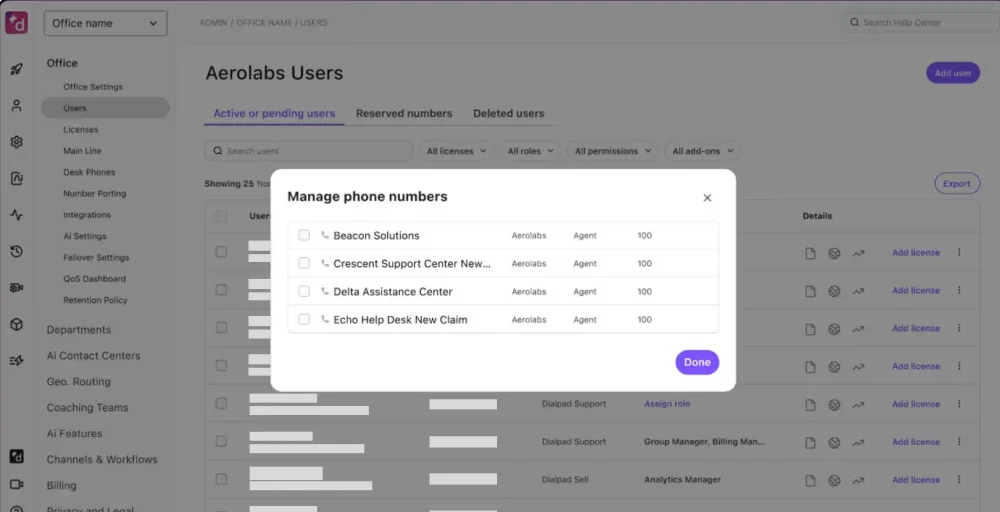
Dialpad standout features
- Dialpad GPT: Experience enhanced accessibility, scalability, and accuracy with DialpadGPT, the tailored Large Language Model (LLM) that understands your business language.
- HD Conference Calls: Conduct conference calls, engage in video conferencing, and send instant and SMS messages, all from a single user-friendly platform.
- QA Scorecard: Assess customer interactions, identify crucial information, and offer grades based on your defined scorecard standards, all in real-time.
- Screen Sharing: Share your screen during conference calls and video meetings on both desktop and mobile devices, even with external clients who don’t have the app installed.
- Virtual Fax: Send and receive faxes digitally with Dialpad’s communication platform, using either the desktop or mobile application.
Dialpad pricing
Dialpad keeps its pricing simple and accessible, with three straightforward tiers suited to teams of all sizes:
| Plan | Annual price (per user/month) | Key feature set |
| Standard | $15 | High-definition (HD) voice, Call recording, File sharing |
| Pro | $25 | Hold queues, Quality-of-service reports, Message threading |
| Enterprise | Talk to Sales | Unlimited department/ring groups, Personal meeting ID, Virtual backgrounds |
Dialpad pros
- Best-in-class AI features, including real-time transcription, live coaching, and call summaries.
- Affordable entry-level pricing at $15/user/month with AI included.
- Clean, modern interface that works seamlessly across desktop and mobile.
Dialpad cons
- Advanced contact center features require a separate Dialpad Contact Center subscription.
- Limited native integrations compared to some competitors on this list.
- The depth of analytics may fall short of large enterprise reporting requirements.
7. RingCentral- Best for UCaaS + Contact Center Combination
RingCentral is one of the most recognized names in business communications, offering a mature, enterprise-grade platform that combines unified communications (UCaaS) with contact center capabilities (CCaaS).
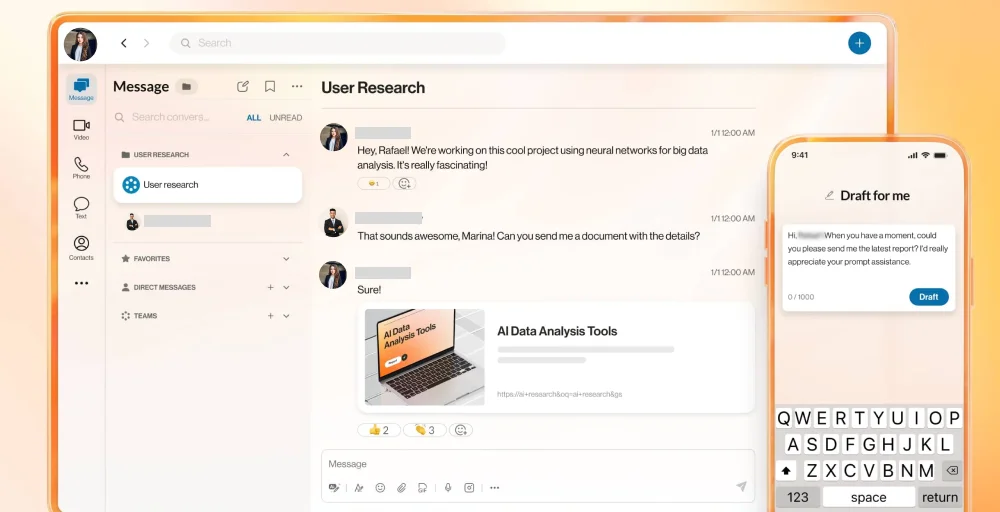
Its RingEX platform covers voice, video, messaging, and fax, while RingCentral Contact Center adds advanced routing, analytics, and workforce management on top of that.
RingCentral standout features
- Call flip: Seamlessly transfer calls between devices, such as from a mobile phone to a desktop.
- Answering rules: Direct calls to your local numbers globally using reliable answering protocols.
- Paging: Broadcast messages from your desk phone, computer, or mobile device.
- Call delegation: Appoint up to 10 assistants per executive, or assign up to 110 executives to one assistant.
- Background noise reduction: Automatically filter out unwanted background noise during your business calls.
RingCentral pricing
RingCentral offers four plan tiers for its core RingEX platform, with contact center capabilities available as an add-on bundle:
| Plan | Annual price (per user/month) | Key feature set |
| Core | $20 | Shared lines, Call log reports, Generate video highlights |
| Advanced | $25 | Cost center management, Summarize unread messages, Provide closed captioning |
| Ultra | $35 | Single Sign-on, Multi-site admin and management, Business Analytics Pro |
| Customer Engagement Bundle | Contact sales | Shared SMS Inbox, Device analytics and alerts, Custom roles and permissions, |
RingCentral pros
- One of the most mature and reliable UCaaS platforms on the market.
- An extensive ecosystem of 300+ native integrations and an open API.
- Strong global infrastructure with enterprise-grade reliability and compliance certifications.
RingCentral cons
- The interface can feel cluttered and complex for new users navigating multiple features.
- Full contact center capabilities require bundling additional products, increasing costs.
- Some users report that the mobile app experience lags behind the desktop version.
8. Quo- Best for Small Business Phone Systems
Quo is a modern business phone system designed specifically for small businesses and lean teams. It strips away the unnecessary complexity of enterprise contact center platforms and focuses on delivering the features small teams actually use day-to-day.

Including AI-assisted texting, voicemail transcription, auto-attendants, and straightforward call routing, all at a price point that won’t strain a small business budget.
Quo’s standout features
- Simultaneous ring: Ensure no caller is left waiting by having your team’s phones ring simultaneously.
- AI text message: Save time with Quo’s AI-powered text response generator.
- Voicemail-to-text: Access voicemail transcriptions from work contacts anytime, anywhere.
- Salesforce call tracking: Automatically record all calls and texts made by your team using Quo’s Salesforce integration.
- Auto attendant: Recover time spent on call routing and reduce spam calls with Quo’s auto-attendant feature.
Quo pricing
Quo’s pricing is among the most competitive on this list, with three clearly defined plans designed to scale with your team:
| Plan | Annual price (per user/month) | Key feature set |
| Starter | $15 | Internal Threads, Email support, Basic call forwarding |
| Business | $23 | Automatic call recording, Live Chat support, Ring order |
| Scale | $35 | Group calling, AI call tags, Inbound phone support |
Quo pros
- Extremely affordable pricing starting at $15/user/month, ideal for small businesses.
- AI-powered texting and voicemail-to-text make it surprisingly capable at its price point.
- Salesforce integration is seamless and requires minimal configuration.
Quo cons
- Relatively limited brand recognition and ecosystem compared to established competitors.
- Fewer advanced routing and omnichannel features for complex support operations.
- May not scale well for businesses expecting rapid growth beyond SMB size.
9. Nextiva- Best for Unified Communications
Nextiva is a cloud-based unified communications platform that has built a loyal following among small and mid-sized businesses by combining reliability, ease of use, and consistently strong customer support.
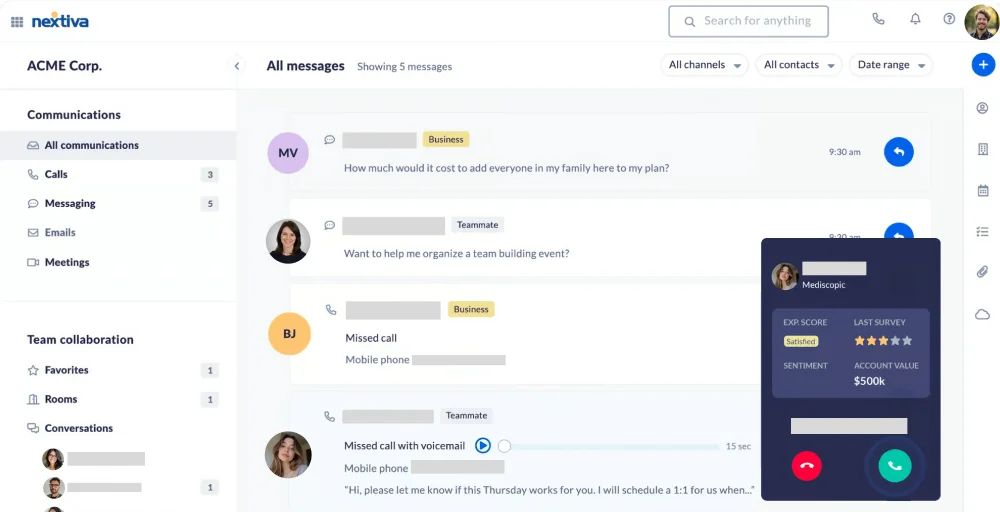
Its platform covers voice, video, SMS, and team messaging, while its higher-tier plans also include contact center capabilities such as AI transcription, web chat, and process automation.
Nextiva standout features
- Conference Bridge: Seamlessly connect with multiple participants, enhancing collaboration and communication in real-time.
- SIP Trunking: Streamline your business communications with robust SIP trunking solutions that offer scalability, flexibility, and cost savings.
- Call Analytics: Gain invaluable insights into your calling patterns and performance metrics, enabling you to make informed decisions to enhance your operations.
- VoIP Switchboard: Experience unparalleled control over your calls with our intuitive VoIP switchboard, designed to simplify call management and improve customer engagement.
- Nextiva Softphone: Empower your team to communicate from anywhere using our user-friendly softphone app, ensuring connectivity and productivity on the go.
Nextiva pricing
Nextiva structures its plans to accommodate businesses at different stages of growth, from basic voice needs to full omnichannel customer engagement.
| Plan | Annual price (per user/month) | Key feature set |
| Core | $15 | Call routing, Inbound and Outbound Voice, Business SMS |
| Engage | $25 | Advanced reporting, Customer-to-team SMS messaging, Web chat: Live & bot |
| Power Suite CX | $75 | Process automation, Web Call back, AI transcription & summarization |
Nextiva pros
- Simple, reliable platform with a reputation for excellent customer support.
- Affordable plans make it accessible for small businesses and growing teams.
- Solid suite of unified communications features, including conferencing and softphone.
Nextiva cons
- AI and automation capabilities lag behind more specialized platforms like Dialpad or Talkdesk.
- Advanced contact center features are available only with the highest-tier Power Suite CX plan.
- Some users report that the interface feels dated compared to newer cloud-native competitors.
10. Genesys Cloud CX- Best for Enterprise Omnichannel CX
Genesys Cloud CX is a powerhouse enterprise contact center platform with industry-leading AI, workforce management, and omnichannel engagement capabilities.

It’s one of the most direct Five9 competitors in the upper-enterprise tier, offering a broader feature set and more advanced AI than most alternatives. For large organizations with complex CX needs, it’s a compelling choice.
Genesys Cloud CX standout features
- Agent Copilot: Equip customer service representatives with on-the-spot AI support to enhance the efficiency and quality of their interactions with customers.
- Customer journey analytics: Assess, track, and refine customer experiences along with your key business performance indicators.
- Predictive engagement: Leverage AI to engage online customers proactively at critical moments with the most appropriate offer or resource.
- Workforce forecasting and scheduling: Generate precise, adaptable schedules in minutes, ensuring the necessary support is available, even during peak demand.
- Virtual agent: Enhance self-service capabilities with AI-driven bots that comprehend context and behave like human agents to provide an exceptional experience, regardless of the time.
Genesys Cloud CX pricing
Genesys Cloud CX uses a tiered pricing model based on channel complexity and AI capability, with each tier unlocking progressively more powerful tools:
| Plan | Annual price (per user/month) | Key feature set |
| Genesys Cloud CX1 | $75 | Voice channel, Speech-enabled IVR, Historical reporting |
| Genesys Cloud CX2 | $115 | Agentless API, Real-time monitoring, Digital User Tracking |
| Genesys Cloud CX3 | $155 | Voice of the customer, Third-party messaging, Speech and text analytics |
| Genesys Cloud CX4 | $240 | Co-browse, Dictionary management, Inbound/outbound blending |
Genesys Cloud CX pros
- Among the most comprehensive enterprise contact center platforms available.
- Industry-leading AI, including predictive engagement, agent copilot, and virtual agents.
- Powerful workforce management and forecasting tools built natively into the platform.
Genesys Cloud CX cons
- Pricing starts at $75/user/month and climbs steeply, putting it out of reach for most SMBs.
- Significant implementation effort and professional services are often required at deployment.
- The breadth of features creates a steep learning curve for new administrators and agents.
Guidelines for Picking Five9 Alternatives
With so many options available, choosing the right alternative depends on your specific business needs, team size, and budget. Here are the key considerations to guide your decision:
1. Define your budget early
Contact center software pricing varies enormously, from $12/user/month (KrispCall) to $249/user/month (NICE CXone Ultimate). Set a clear budget range before evaluating platforms, and remember to account for implementation, training, and any add-on costs beyond the base subscription.
2. Match features to your use case
An outbound sales team has very different needs from an inbound customer support center or a blended omnichannel operation. Identify the 3–5 features most critical to your workflow (e.g., IVR, CRM integration, AI summaries, SMS) and filter your shortlist accordingly.
3. Evaluate integration requirements
Most businesses rely on CRMs, helpdesks, and other tools. Ensure your chosen platform integrates natively with your existing tech stack, particularly Salesforce, HubSpot, or Zendesk, whichever you rely on daily.
4. Consider scalability
Your needs today won’t be the same in two years. Choose a platform that can grow with you, one that doesn’t require a complete migration when you add 50 more agents or expand to new channels.
5. Test before you commit
Most platforms offer free trials or demo calls. Use these to evaluate ease of use, call quality, and the support team’s responsiveness before signing a long-term contract.
Which Five9 alternative is best for you?
The right Five9 alternative depends entirely on your team size, budget, and the features that matter most to your business. Here’s a quick breakdown to help you find your best match:
| If you are | Best Alternative | Why |
| A startup or SMB with a tight budget | KrispCall | Best price-to-feature ratio at $12/user/month |
| A mid-market enterprise needing AI | Dialpad or Talkdesk | Strong AI features at scalable pricing |
| A large enterprise with complex CX | NICE CXone or Genesys Cloud CX | Enterprise-grade AI, routing, and WFM |
| A sales team using Salesforce/HubSpot | Aircall or Quo | Deep CRM integrations and warm transfer features |
| A business wanting UCaaS + CCaaS | RingCentral or 8×8 | Unified comms + contact center in one |
| Transitioning from legacy phones | Nextiva | Smooth migration, great support, affordable pricing |
The best Five9 alternative: KrispCall
Looking for a powerful contact center solution without the complexity and cost of Five9? KrispCall delivers the perfect combination of affordability, simplicity, and essential features that make switching worthwhile.
For small and mid-sized businesses, remote teams, and startups, KrispCall consistently outperforms Five9 in what matters most: value, ease of use, and accessibility.
| Feature | KrispCall | Five9 | The difference |
| Starting price | $12 /user/month | $119 /month/seat | KrispCall is significantly more affordable, making it ideal for budget-conscious teams |
| Best for | SMBs & Remote teams | Large enterprise | KrispCall is purpose-built for smaller, distributed teams, while Five9 targets enterprise-scale operations. |
| Setup Complexity | Minimal | High | KrispCall requires no dedicated IT resources; Five9 often demands significant onboarding support. |
| Voicemail | Included | Included | Both support voicemail, but KrispCall adds voicemail greetings and unified access across its base plan. |
| Shared Phone Number | Included | Not included | KrispCall allows teams to share numbers to reduce missed calls, a feature Five9 doesn’t offer natively. |
Better value
Get a professional, feature-rich communication platform without the enterprise price tag. KrispCall’s plans start at just $12/user/month, a fraction of Five9’s cost, making it the most accessible Five9 alternative on this list without sacrificing the features growing teams actually need.
Effortless setup
Unlike Five9, which often requires dedicated IT resources and extended onboarding timelines, KrispCall is designed to get your team up and running in hours. Its clean, intuitive interface means even non-technical users can configure call routing, IVR, and voicemail without outside help.
Unified workspace
KrispCall’s Unified Callbox brings calls, SMS, MMS, and voicemail into a single, organized interface. There’s no need to juggle multiple apps or platforms; everything your team needs to stay responsive is in one place, making it especially powerful for remote and hybrid teams.
Built for modern teams
As hybrid and remote work become the standard, KrispCall’s cloud-native architecture ensures your team can communicate professionally from anywhere. Shared phone numbers, call tagging, and smart IVR routing give distributed teams enterprise-style capabilities without the enterprise overhead.
Transparent, predictable pricing
Five9’s per-agent pricing and add-on costs for AI and analytics can quickly drive total costs to spiral. KrispCall keeps pricing straightforward and transparent across all three of its plans, so you always know exactly what you’re paying and what you’re getting, with no surprise fees.