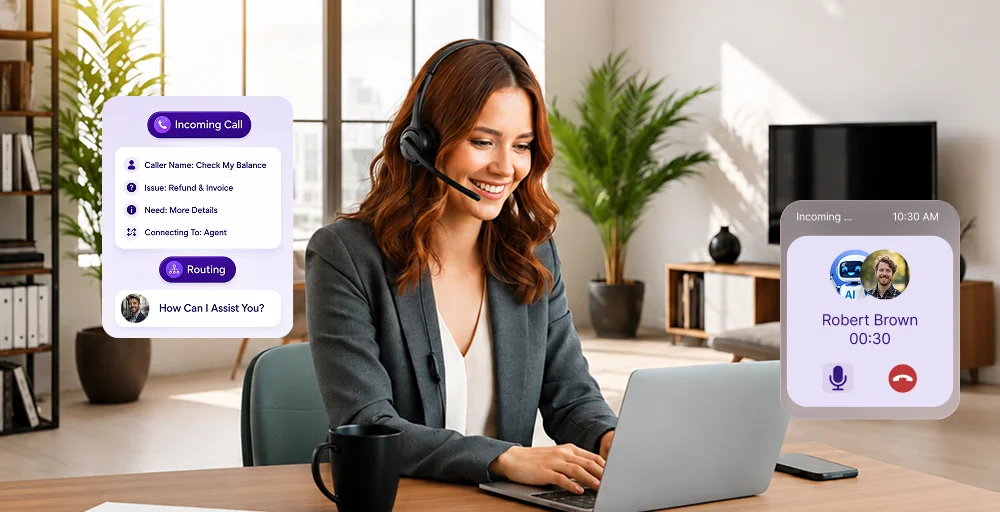
Unified Communications as a Service (UCaaS) has quickly become the standard for modern business communications. With teams becoming more mobile, relying on landlines or disconnected messaging apps is no longer sufficient for productivity or competitiveness.
UCaaS combines business calling, video meetings, messaging, and collaboration tools into a single cloud-based solution, enabling businesses to streamline seamless communication across devices and locations.
Organizations using UCaaS gain agility for remote employees, enhance collaboration and customer engagement, and replace outdated desk phone systems with a reliable, cost-effective model. With many competitors already adopting unified communications, UCaaS is now essential rather than optional.
In this guide, we’ll cover what UCaaS is, how it works, and what to look for when choosing the right UCaaS provider for your business.
✨ Key Takeaways
- UCaaS is a cloud-delivered model that integrates enterprise communication tools, phone calls, video conferencing, messaging, and file sharing into a single unified platform accessible from any device.
- UCaaS works by hosting all business communication tools, including voice, video, and messaging, on a single, provider-managed cloud platform that users can access from any device via the internet for a predictable subscription fee.
- To choose the right UCaaS vendor, evaluate their ability to offer guaranteed uptime and robust security compliance, along with a scalable, transparently priced subscription model that integrates seamlessly with your existing software workflows.
What is UCaaS?
Unified Communications as a Service (UCaaS) is a cloud-based communication solution that brings together core business communication tools into a single platform. Instead of relying on multiple systems or devices, UCaaS enables organizations to manage voice calling, video and audio conferencing, team messaging, SMS, live chat, and file sharing through one interface.
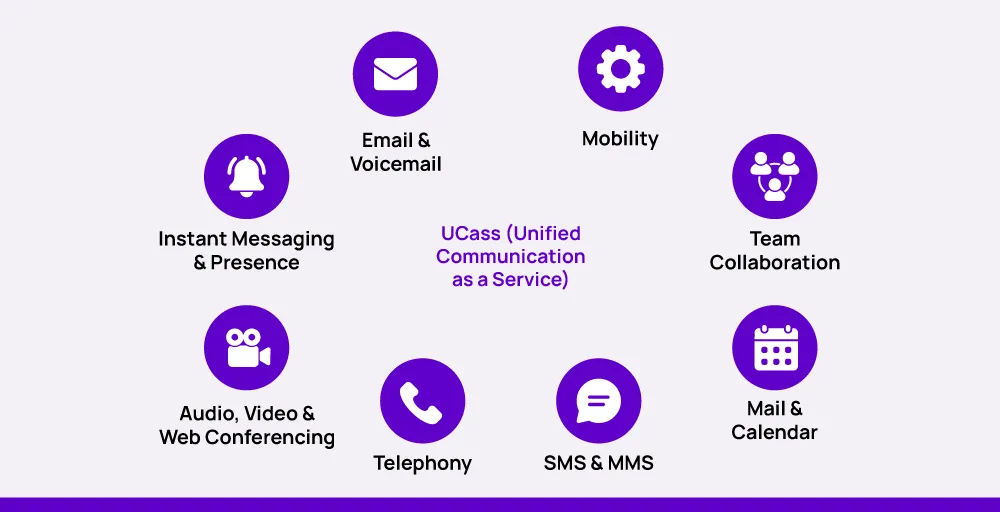
At its core, UCaaS simplifies how teams connect, internally and externally, while improving collaboration, mobility, and operational efficiency. These unified communications platforms are designed to support modern work environments where employees may be remote, hybrid, or spread across multiple locations.
What key functions does UCaaS provide?
UCaaS solutions centralize all communication tools into a single cloud platform. Key functions include:
- Cloud-based platform: Hosts all communication tools in the cloud, providing automatic updates, disaster recovery, and access from any reliable internet connection.
- Voice: VoIP-powered voice calls, conference calls, call forwarding, call routing, and call recording.
- Messaging: Real-time chat, group messaging, file sharing, and message history integrated with calendars and video calls.
- Video: Video conferencing, screen sharing, in-meeting chat, closed captions, and meeting transcripts to support collaboration.
- Collaboration tools: File sharing, project management tools, and shared calendars for a seamless communication experience across locations.
How does UCaaS operate across devices and teams?
Unified Communications as a Service (UCaaS) is a cloud-based platform that centralizes all your different communication channels, including voice, video, messaging, and collaboration. By unifying these cloud-based communication tools into a single platform, UCaaS helps teams communicate more efficiently, reduce operational costs, and scale seamlessly.
Here’s how UCaaS works:
1. Internet-based communication: UCaaS platforms rely on Internet Protocol (IP) technology to transmit voice, video, and messaging data. Rather than using traditional phone lines, communication travels over the internet using technologies such as VoIP and WebRTC. This reduces physical infrastructure costs, improves call quality, and allows businesses to scale communication systems quickly without physical hardware.
2. Unified platform for all communication channels: All communication happens in one app, which means you don’t have to switch between different tools. The main features include instant messaging for real-time communication, voice and video calls for meetings and presentations, and file sharing, along with collaborative document editing, all within the same platform.
3. Cross-device compatibility: Since UCaaS is cloud-based, employees can connect from any device with internet access, like laptops, mobile devices, or desktops, using desktop and mobile apps. This enables smooth collaboration for remote workers and teams spread across locations, providing a consistent experience whether they are at home, in the office, or traveling.
4. Pay per-user pricing: Most UCaaS services offer a flexible subscription model, allowing businesses to pay only for active users and services. Add or remove users as team sizes fluctuate. Avoid large upfront investments in hardware and cost savings.
5. Provider-managed infrastructure: UCaaS providers maintain cloud infrastructure, data centers, security, and system updates. Benefits include reduced IT workload and maintenance costs, automatic software updates and security patches, and guaranteed uptime and reliability, often with a 99.99% SLA.
6. Third-party app integrations: Most UCaaS systems integrate with popular business applications like customer relationship management (CRM) systems, ticketing software, and productivity apps. These integrations embed communication tools into existing workflows, reduce manual data entry, and improve team efficiency. Enable automated workflows, e.g., logging calls directly into a CRM.
What business benefits does UCaaS deliver?
UCaaS improves collaboration, efficiency, and customer satisfaction through unified communication:
1. Cost efficiency
UCaaS helps businesses eliminate communication costs by consolidating cloud business phone systems, video conferencing, and messaging tools into a single cloud-based communications platform.
Instead of investing in expensive hardware and juggling multiple vendor contracts, companies pay a predictable monthly fee per user.
2. Flexibility
Modern workplaces require enterprise communications tools that support remote, hybrid, and mobile teams. UCaaS provides that flexibility by enabling users to make calls, host meetings, and send messages from any device, anywhere.
This adaptability is especially valuable in industries such as real estate and retail, where staff are frequently on the move.
For example, a regional manufacturing company overcame communication delays and production errors by adopting UCaaS, enabling instant collaboration across locations. This improved real-time coordination reduced downtime and boosted the customer service team’s productivity and profitability.
3. Enhanced customer experience
Customers expect fast and seamless support. UCaaS communication solutions enhance customer service by integrating with help desks and other business tools.
This enables fast response times, an omnichannel contact center, and personalized customer interactions, reduces customer wait times, and improves issue resolution through omnichannel routing and automation.
4. Improved collaboration
Teams can be more effective when communication is instant, integrated, and easy to access in one place.
UCaaS combines team collaboration, video meetings, chat, file sharing, and project management in one place, reducing the friction of switching between disconnected tools.
For example, a product development team using a UCaaS provider (like RingCentral) could brainstorm in real-time over video, share mockups instantly, and keep all project discussions within a single platform.
5. Simplified management
Managing a traditional business phone system across multiple locations is a significant burden for IT teams. UCaaS simplifies administration with a centralized, cloud-based dashboard that allows easy user management, security control, and performance monitoring from any location.
For example, Fred Loya Insurance simplified management by switching to a UCaaS platform. They reduced their phone admin team from five to three and could make changes to their contact center agents within 30 minutes, without disrupting calls. This centralized system improved efficiency and compliance across 700 offices.
What are the advantages and limitations of UCaaS?
Unified Communication as a Service (UCaaS) provides comprehensive cloud communication platforms for businesses looking to streamline their communication and collaboration tools.
However, like any other technology, it also comes with its own benefits and drawbacks:

Advantages:
1. Streamlined operations and time savings
Using unified communication services can simplify routine tasks that often take up too much work time. You can easily manage simple tasks such as setting up call forwarding for employees on vacation, updating phone menus, or changing communication settings.
With UCaaS, you can do these tasks quickly and efficiently without needing IT support or technical skills.
2. Unified platform efficiency
Instead of using different systems for tasks, you can use UCaaS to bring all your business communication tools together in one platform. This unified system simplifies things, reduces the need for training, and helps you consistently manage voice, video, messaging, and collaboration tools.
For providers in competitive markets such as Europe, offering such an all-in-one solution is essential to better meet customer needs and build lasting trust.
3. Self-service management
Teams can make real-time updates across all communication channels with a single, easy-to-use app. This self-service method allows staff to avoid relying on help desk support, reducing wait times.
As a result, employees can focus on more critical tasks that add value rather than spend time on administrative work.
4. Reduced IT burden
UCaaS significantly reduces the workload on IT departments and empowers end users to handle routine communication tasks independently. Redirecting IT teams to focus on more complex, strategic initiatives while maintaining system security and performance.
5. Enhanced productivity
The combination of simplified processes, reduced wait times, intuitive management tools, and intelligent features powered by AI in UCaaS directly translates to increased productivity across the organization. Teams can adapt quickly to changing needs without workflow disruptions or administrative bottlenecks.
Disadvantages
1. Dependence on Internet connectivity
UCaaS requires a stable and high-speed internet connection to function effectively. If your internet goes down or bandwidth is insufficient, especially during peak usage times, your communication tools (calls, video meetings, messaging) can become unreliable or inaccessible, disrupting business operations.
2. Security and compliance risks
Because UCaaS operates in the cloud, sensitive communications and data are transmitted over the Internet.
Without strong encryption, a secure data center, and compliance with regulations like HIPAA or GDPR, organizations may face data breaches or non-compliance penalties, particularly in regulated industries.
3. Vendor experience
Switching from one UCaaS provider to another can be complex and costly. Once a business has invested time, training, and workflows into a specific platform, migrating to a different provider may involve technical challenges, downtime, and additional expenses, making it hard to leave even if service quality declines.
4. Potential latency and quality issues
Despite modern advancements, users can still experience call lag, dropped audio, or jitter, especially if the network infrastructure isn’t optimized or users are in remote locations. This can impact the professionalism and efficiency of customer or internal communications.
5. Hidden or rising costs
Although unified communication companies are marketed as cost-effective, many providers charge extra for premium features such as conversation analytics, call recording, international calling, or increased storage. These add-ons can significantly raise monthly costs, especially as business needs grow.
What should you look for when comparing UCaaS providers?
Choosing or switching UCaaS providers is a major business decision that affects daily operations, customer experience, and long-term costs. While many platforms appear similar at first glance, the right choice depends on how well a provider supports scalability, reliability, security, and real-world business workflows.
Scalability and flexibility
A modern Unified Communications as a Service (UCaaS) platform should scale as fast as your business needs. Look for providers that allow self-service user management, fast onboarding for new hires, and the ability to scale across teams, departments, or locations. This is especially important for growing businesses, seasonal staffing, and remote or hybrid workforces.
Reliability and uptime guarantee
Reliable communication is critical for business continuity. Even short outages can impact sales, customer support, and teamwork. Look for UCaaS providers that maintain high uptime standards (99.99% or higher) and use data centers in different locations for backup.
They should also provide clear service level agreements (SLAs) about uptime and allow you to monitor the status in real-time. High reliability ensures good call quality, stable video meetings, and uninterrupted access to messaging tools.
Security, privacy, and compliance
UCaaS platforms handle a lot of sensitive business and customer data, like call recordings, messages, and contact information. When choosing a provider, check for strong encryption for voice, video, and messaging, as well as secure VoIP and authentication protocols.
Also, ensure they comply with standards such as GDPR, SOC 2, ISO 27001, HIPAA, and PCI DSS as required. For regulated industries such as healthcare, finance, and legal services, built-in compliance controls are a must, not an option.
Support quality and service availability
When communication problems arise, having quick, knowledgeable support can really help. The best UCaaS providers offer 24/7 global technical support, not just for one region. They also provide various support channels, such as phone, email, chat, and help centers.
Additionally, they offer onboarding help, documentation, and training resources. Enterprise users may find it useful to have dedicated account managers or priority support options.
Transparent pricing
The lowest-priced option isn’t always the best choice, but clear pricing is very important. When comparing prices, look at per-user monthly costs and what UCaaS features are included.
Consider extra fees for SMS, call recording, analytics, or integrations, as well as international calling rates and phone number charges. Focus on the total cost of ownership (TCO) over the contract term, not just the initial subscription price.
Contract terms
When choosing a service provider, flexible contracts matter just as much as features. Ask whether the provider requires long-term contracts or offers month-to-month plans.
Find out if you can change or downgrade your plan without penalties, and if you have options to exit if the service quality or your business needs change. Flexible contracts help reduce risk, especially for fast-growing or changing organizations.
Integrations, APIs, and workflow automation
Your UCaaS platform should easily connect with the tools your teams already use. Look for direct links to CRM systems, helpdesk software, and productivity tools.
Ensure it supports automation platforms or open APIs. It should allow you to include calling, messaging, or meeting data in your existing workflows. Strong integrations help reduce manual tasks, improve data accuracy, and boost overall team efficiency.
UCaaS vs Other Communication Platforms
UCaaS is often mentioned alongside other cloud communication platforms, but each serves a different purpose depending on how communication tools are used within a business.
- UCaaS vs CPaaS: UCaaS is designed for businesses that need a ready-to-use communication system for teams, while CPaaS focuses on developers who want to build communication features such as messaging or calling directly into their applications.
- UCaaS vs CCaaS: UCaaS supports internal collaboration through calls, messaging, and video, whereas CCaaS is built for customer-facing teams that manage support and service interactions across multiple channels.
- UCaaS vs VoIP: VoIP enables voice calls over the internet, but UCaaS extends beyond calling by combining voice with messaging, video, and collaboration tools in a single platform.
- UCaaS vs PBX: Traditional PBX systems rely on on-premise hardware for voice communication, while UCaaS uses cloud infrastructure to offer greater flexibility, remote access, and easier scalability.
Frequently Asked Questions
What does UCaaS stand for?
UCaaS stands for Unified Communications as a Service. It is a cloud-based platform that combines calling, video, messaging, and collaboration tools in one place.