Managing business calls without a structured system often leads to missed opportunities, delayed responses, and a poor customer experience.
As businesses grow, handling calls manually or through basic phone setups becomes inefficient. Teams struggle with routing calls, tracking conversations, and maintaining consistency across customer interactions.
That’s where a PBX system (Private Branch Exchange) becomes essential.A modern PBX phone system doesn’t just connect calls. It helps businesses manage, analyze, and optimize every interaction, whether it’s a sales call, support query, or internal discussion.
✨ Key Takeaways
- A PBX system is a centralized business phone system that manages internal and external communication
- It allows teams to use extensions instead of separate phone lines
- Modern PBX systems operate over the internet (cloud-based or IP PBX)
- They include features like IVR, call routing, voicemail, analytics, and integrations
- Cloud PBX systems are now the preferred choice due to flexibility, scalability, and lower costs
What is PBX?
A PBX (Private Branch Exchange) is a business telephone system that acts as the central hub for all voice communication within an organization.
Think of a PBX like your office Wi-Fi router. Inside your office, everyone can connect and communicate easily. But when reaching the outside world, all devices share the same connection.
A PBX works in a similar way. Your team connects internally through extensions, while external calls are handled through a shared set of business lines.
Instead of giving each employee a separate phone line, a PBX allows multiple users to share a limited number of external lines while keeping internal communication seamless.
This means:
- Employees can call each other internally without using external networks
- Businesses can handle incoming and outgoing calls more efficiently
- All communication runs through one centralized system
In the past, PBX systems relied on physical hardware and landlines. Today, they run digitally over the internet, making them far more flexible and easier to scale.
In simple terms, a PBX is the system that keeps your business communication organized and running smoothly.
How Does a PBX Phone System Work?
A PBX system functions as an intelligent call-routing engine that ensures every call reaches the right destination.
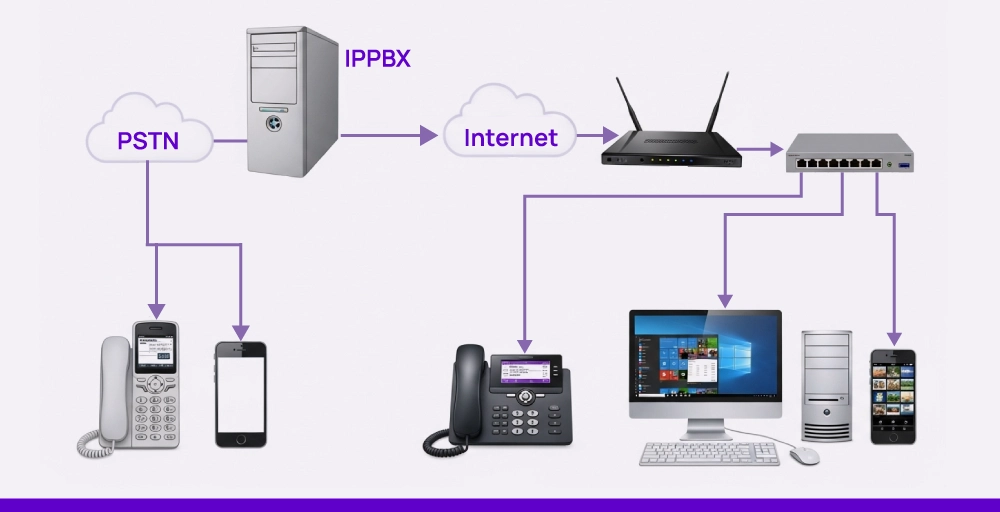
Here’s a step-by-step breakdown:
- Incoming Call Reception: A customer dials your business number, and the call is received by the PBX system.
- Call Processing: The system identifies rules such as business hours, IVR menus, or routing conditions.
- Call Routing: The PBX directs the call to:
- A specific department (Sales, Support)
- A particular agent
- A queue or voicemail
- Call Handling: The recipient answers the call, transfers it, or places it on hold.
- Fallback Actions: If the call isn’t answered:
- It is forwarded to another agent
- Sent to voicemail
- Routed based on predefined rules
This structured flow helps your team respond faster, reduces missed calls, and creates a smoother, more reliable experience for your customers.
Types of PBX phone systems
PBX comes in a few main types. Each one works differently and fits different business needs. Some are built for flexibility. Others give you more control. Let’s break them down.
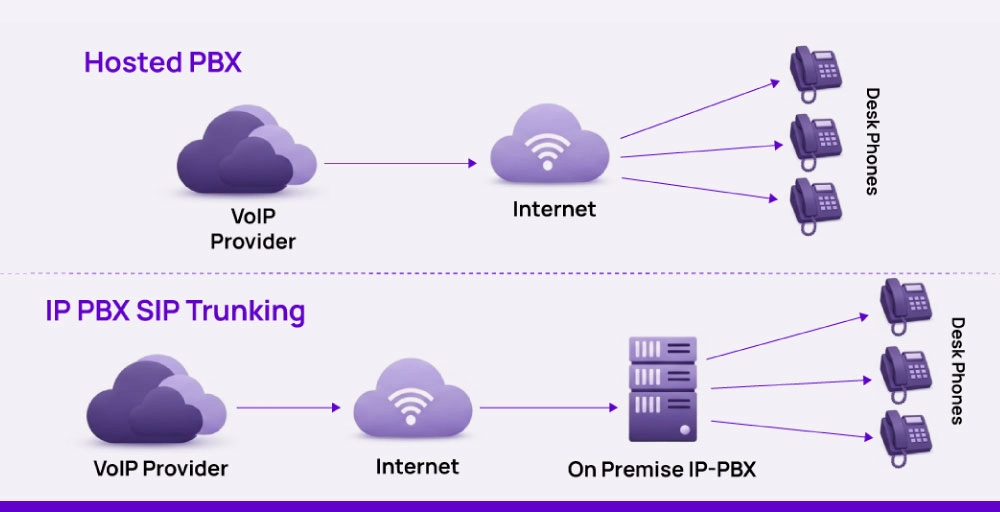
1. Hosted PBX (Cloud-Based PBX)
A hosted PBX, also known as a cloud PBX, is a phone system that runs entirely over the internet and is managed by a service provider instead of being installed at your office.
Instead of buying hardware or setting up complex infrastructure, your entire phone system lives in the cloud. Your team simply logs in and starts using it through apps, browsers, or IP phones.
How it actually works in real life
- A customer calls your business number
- The call is received by your provider’s cloud servers
- The system routes the call based on your settings (IVR, routing rules, etc.)
- Your team answers from anywhere (laptop, phone, browser)
No physical setup. No maintenance.
Why businesses prefer Hosted PBX
- Fast and simple setup: You can go live in hours instead of weeks. No wiring, no installation, no telecom setup.
- Works from anywhere: Your team can take calls from home, use the same number while traveling and stay connected across devices This is critical for remote and distributed teams.
- Lower upfront cost: You don’t need PBX hardware, dedicated servers, and maintenance contracts. Instead, you pay a predictable monthly fee.
- Easy scalability: Adding a new team member is as simple as: creating a user and assigning a number. No rewriting. No downtime.
Best fit for: Startups & SMBs, remote/hybrid teams, sales & support teams, fast-growing businesses.
2. On-Premise PBX
An on-premise PBX is the traditional setup where all the equipment (servers, switches, wiring) is installed and maintained inside your office. You own the system, control everything, and manage it internally.
How it works in real life
- Calls come through physical phone lines (PSTN/ISDN)
- They are routed through a physical PBX box in your office
- Desk phones are connected via wiring
- Your IT team manages the system
Why some businesses still use it?
- Full control: You have complete ownership of infrastructure, security, and configuration. This is important for organizations with strict internal policies.
- Compliance requirements: Industries like banking, government and healthcare may require systems to be hosted internally for regulatory reasons.
Limitations:
- High upfront cost: You need to invest in hardware, installation, wiring, and ongoing maintenance.
- Requires IT expertise: You need a dedicated team to maintain servers, fix issues, and handle upgrades.
- Hard to scale: Adding users or expanding require Physical setup changes, New hardware, Downtime.
Best fit for: Large enterprises with IT teams, Organizations with strict compliance needs, and businesses that require full infrastructure control
3. Hybrid PBX
A hybrid PBX is a combination of traditional (on-premise) and modern (cloud/VoIP) systems. It allows businesses to keep their existing hardware while adding cloud-based features gradually.
How it works in real life
- Some calls go through traditional phone lines
- Others are routed via the internet (VoIP)
- The system integrates both setups
This means you don’t have to replace everything at once.
Why businesses choose Hybrid PBX
1. Smooth transition from legacy systems : If a company already invested heavily in PBX hardware, switching fully to cloud can be expensive. Hybrid lets them keep existing setup and slowly adopt modern features
2. Cost optimization: Instead of replacing everything, businesses can add VoIP for international calls and reduce telecom costs gradually
3. Flexibility during migration Teams can use traditional desk phones and start using softphones or cloud apps
Limitations
- Still requires hardware maintenance
- Not as flexible as fully cloud-based systems
- Can become complex to manage (two systems at once)
Best fit for: Businesses upgrading from legacy PBX, companies with existing infrastructure investments, organizations transitioning to cloud gradually
PBX vs VoIP vs Cloud Phone System
Understanding the difference between these three helps you choose the right system based on cost, flexibility, and long-term scalability.
| Feature | Traditional PBX | VoIP (Standalone) | Cloud PBX (Hosted PBX) |
| Core Technology | Uses analog/digital landlines (PSTN/ISDN) | Uses internet to transmit voice (VoIP protocol) | Uses VoIP + cloud infrastructure |
| System Type | Hardware-based phone system | Calling technology (not a full system) | Complete business phone system |
| Setup & Installation | Complex (wiring, hardware, installation required) | Moderate (requires VoIP setup + apps/devices) | Simple (sign up and start using) |
| Hardware Requirement | Required (PBX box, desk phones, wiring) | Optional (IP phones or softphones) | Not required (works via apps or browser) |
| Upfront Cost | High (hardware + installation) | Low to medium | Very low (subscription-based) |
| Ongoing Cost | Maintenance + telecom bills | Internet + service cost | Predictable monthly subscription |
| Flexibility | Low (fixed to office location) | Medium (depends on setup) | High (work from anywhere, any device) |
| Scalability | Limited (needs hardware upgrades) | Moderate (depends on provider) | High (add users instantly) |
| Maintenance | Fully manual (in-house IT required) | Partial (depends on setup) | Fully managed by provider |
| Remote Work Support | Not supported (office-dependent) | Possible but limited | Fully supported (built for remote teams) |
| Call Quality | Stable but depends on physical lines | Depends on internet quality | Optimized with modern infrastructure |
| Advanced Features | Limited (basic calling features) | Depends on provider/tools | Advanced (IVR, analytics, AI, integrations) |
| CRM & Tool Integration | Very limited or manual | Possible with configuration | Native integrations (CRM, helpdesk, etc.) |
| Analytics & Reporting | Minimal | Basic (depends on tools) | Advanced dashboards and insights |
| Global Accessibility | Limited to local setup | Possible but complex | Easy (global numbers & access) |
| Best For | Legacy enterprises | Small setups experimenting with VoIP | Modern, growing, global businesses |
Key Features of Cloud PBX Phone Systems
Cloud PBX phone systems come with everything businesses need to manage calls without the complexity of traditional setups. Since everything runs over the internet, you get the flexibility to handle communication from anywhere while keeping things organized and efficient.
- Multiple Phone Lines: Cloud PBX lets you manage multiple numbers for different teams, locations, or purposes, all within one system. It can handle several calls at once, so your team isn’t limited during busy hours.
- Auto-Attendant / IVR (Interactive Voice Response): Incoming calls are answered automatically with a menu that guides callers to the right department. It reduces manual work and gives your business a more structured, professional feel.
- Call Routing & Management: Calls are directed based on rules you set, like business hours, team availability, or priority. This helps ensure calls reach the right person without delays.
- Call Queues: When your team is busy, callers are placed in a queue instead of being disconnected. They can wait with updates or music until the next available agent is ready.
- Call Transfers: Calls can be passed between team members or departments without interruption, making the experience smooth for both your team and the caller.
- Voicemail & Notifications: Missed calls are recorded, and messages can be accessed through apps or email. Many systems also send instant alerts so your team can follow up quickly.
- Conference Calling: Multiple people can join the same call, making it easier to collaborate internally or speak with clients without switching tools.
- Multi-Device Access: Your team can use the system from desktops, mobile devices, or IP phones. This makes it easy to stay connected whether they’re in the office or working remotely.
- Local & International Numbers: You can set up local, toll-free, or international numbers to connect with customers in different regions and build trust.
- Integrations with Business Tools: Cloud PBX systems can connect with CRMs and other tools, keeping customer data and conversations in sync without manual updates.
- Analytics & Reporting: You get visibility into call activity, including call volume, missed calls, and team performance. This helps you understand what’s working and where to improve.
Benefits of setting up a PBX system for your business
A PBX telephone system helps businesses handle communication in a more organized, efficient, and scalable way. Instead of dealing with scattered calls and manual processes, everything runs through one structured system.
- Better Call Handling: Calls are routed to the right person or team automatically, reducing missed calls and long wait times. It keeps conversations smooth and professional.
- Cost Savings: By sharing phone lines and using internet-based calling (in modern systems), businesses can significantly reduce setup and calling costs, especially for international communication.
- Easy Scalability: As your team grows, you can add new users, numbers, or departments without needing major setup changes or new hardware.
- Improved Team Productivity: Features like call routing, extensions, and integrations reduce manual work, helping teams focus more on conversations and less on managing calls.
- Flexible Work Setup: With cloud-based PBX systems, employees can take calls from anywhere using mobile or desktop devices, making remote and hybrid work easier.
- Professional Business Image: Features like IVR, call queues, and custom greetings give your business a more structured and professional feel, even if your team is small.
- Centralized Communication: All calls, messages, and interactions are managed in one place, making it easier to track conversations and avoid miscommunication.
- Better Customer Experience: Faster response times, proper call routing, and fewer dropped calls lead to a smoother and more reliable experience for customers.
- Data & Insights: Modern PBX systems provide call logs and analytics, helping you understand performance, track missed calls, and improve decision-making.
- Global Reach: Businesses can use local or international numbers to connect with customers in different regions, helping build trust and improve call pickup rates.
How to choose the right PBX for your business?
The best PBX setup depends on your business size, budget, and growth plans. You need a system that fits today’s needs but also supports where you’re headed.
- Your current setup: If you already use a basic PBX telephone system, switching to a hybrid can save time and effort. For new setups, a cloud based phone system works better. It’s easier to manage and requires no physical hardware.
- Budget and costs: PBX solutions vary in pricing. Hosted options have lower upfront costs and simple monthly fees. On-premises PBX systems require significant initial investments for setup, hardware, and maintenance.
- Company size and growth: Smaller teams benefit from virtual PBX platforms. Larger teams need something scalable. Business PBX systems make it easier to add new users without rewiring or downtime.
- Support and maintenance: If you don’t have a full IT team, go with a hosted system. Your provider will handle updates, support, and outages. This helps save both time and internal resources.
- Security and uptime: A reliable system keeps your calls safe and your service live. Most PBX phone systems today offer built-in encryption, call logs, and strong uptime guarantees.
- Feature flexibility: Modern PBX systems support features like Interactive voice response and mobile apps. These tools help your team stay productive and accessible.
How to set up your telephone network with a PBX?
Start by choosing the type of PBX system that fits your business, on-premise or cloud. Each setup has its own steps, but the goal is the same: to manage internal and external calls efficiently.
For traditional PBX (On-premise):
- Pick a PBX vendor: Choose a trusted provider who offers installation, configuration, and ongoing support.
- Install the PBX unit: Set up the physical PBX box in a secure area, usually near your existing telecom and network hardware.
- Connect to the phone lines: Link the PBX system to the PSTN or ISDN lines using proper wiring and ports.
- Add extensions: Set up user extensions by assigning lines to each phone or department.
- Ensure power backup: Connect the PBX to a stable power source or UPS to avoid disruptions.
- Run a system check: Test inbound and outbound calls, voicemail, and internal transfers to confirm everything works as expected.
For cloud PBX (Hosted)
- Choose a cloud PBX provider: Sign up with a provider offering the features and pricing that suit your business size and needs.
- Get virtual numbers: Purchase local phone number, toll-free number, or international numbers directly from your provider.
- Add team members: Create user profiles and assign roles or numbers to departments like Sales or Support.
- Configure call handling rules: Set up call routing, auto-attendants, voicemail, and business hours from your online dashboard.
- Use softphones or IP phones: Connect through internet-based apps or IP desk phones.
- Verify call quality: Make test calls and monitor quality using your provider’s dashboard or analytics.
Wrapping Up!
A PBX phone system gives your business the flexibility, control, and tools needed to handle calls better.
Whether you’re using an on-premises setup or switching to a cloud-based PBX, it helps you manage internal extensions, forward calls, route customers to the right people, and cut down on costs tied to external phone lines.
As long as you pick the right type for your needs, based on your team size, budget, and future plan, you’re setting your business up for smoother, more reliable calling.
If your business relies on calls to generate revenue, support customers, or close deals, your phone system should work as hard as your team does.
Modern cloud PBX systems don’t just manage calls, they turn every conversation into a trackable, actionable business outcome.