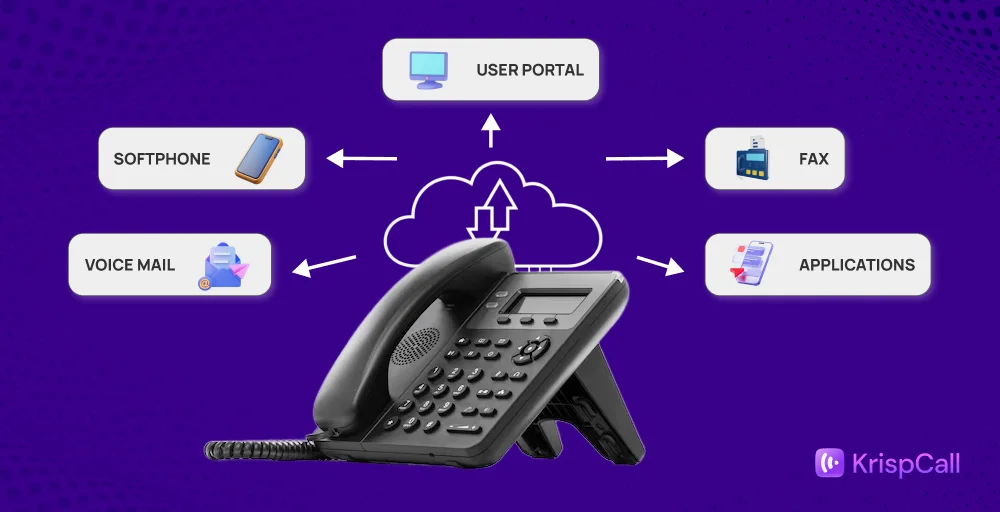
A cloud PBX (Private Branch Exchange) is a business phone system hosted on the cloud rather than on physical, on-premise hardware. Businesses can manage calls, voicemail, call routing, and other telephony features via the internet through a PBX.
Free cloud PBX solutions offer flexibility, scalability, cost savings on hardware, remote working capabilities, and ease of management without technical expertise. Modern companies seeking a reliable communication solution can opt for a cloud PBX that grows with them.
The paid ones are expensive and not accessible to small businesses.
In this guide, we explore the best free cloud PBX providers that offer reliable cloud calling and hosted PBX systems.
Overview of the top 10 free cloud PBX providers
We have selected the top free cloud PBX phone system, evaluating their features and online reviews. These solutions offer reliable free cloud calling and hosted PBX systems.
Let’s look at their features and see why they are the best free cloud PBX options for small businesses.
| Provider | Top Features | Best for | Free plan limitations |
| 3CX | Free Softphone, Call reporting, Virtual PBX | Small teams up to 10 users | Limited to 10 users, trial features |
| Bitrix24 | Task tracking, Online workspace, Analytics & Reporting | Businesses needing CRM + communication tools | 100% free up to 5GB; paid plans for more features |
| Freshdesk Contact Center | Cloud management, Email integration, Chat campaigns | Customer support and sales teams | Limited US/Canada calling; paid plans for advanced features |
| FreePBX | SIP trunking, VoIP gateways, FreePBX modules | IT teams needing on-premises PBX | Free to use; paid modules/hardware extra |
| OnSIP | HD video conferencing, Auto-attendants, Interoffice Paging | Distributed offices need flexibility | Free SIP-to-SIP calls; external calls require a paid plan |
| VoipTiger | Voicemail boxes, IVR auto-attendants, and International dialing | Startups needing a simple hosted PBX | Free PBX; charges for external calls |
| Anveo | Web calls, Online fax, Visual call flow | Small offices of hybrid setups | Free plan limited to 2 users |
| Call Centric | DID forwarding, 4-way calling, Spam call filter | Individuals and small businesses | Free plans for in-network or pay-per-call; external calls extra |
| Yeastar | Paging systems, Omnichannel messaging, identity management | Mid-sized companies with diverse communication needs | 30-day free trial; paid plans require contacting sales |
| Google Voice | Voicemail transcription, Ring groups, BigQuery reporting | Individuals and Google Workspace users | Free US/Canada calls; paid plans for business features |
1. 3CX
3CX is a free VoIP phone system that offers free cloud based PBX solutions during its trial period. It supports both mobile and desktop apps and provides a free, reliable cloud-based phone system. It is perfect for small teams with up to 10 users and includes free hosting.

It offers features like video conferencing, live chat, and call queue management, making it a versatile communication solution. Its easy setup and intuitive interface allow small businesses to get up and running quickly without complex configurations.
Features
- Free softphone
- Call reporting
- Virtual PBX
- Web integration
- SIP trunks
Pros
- 3CX service is available for both on-premise and in a hosted environment.
- Users can make and receive calls in the app on their mobile devices, maintaining privacy with a single phone.
- The intuitive interface is user-friendly, and it integrates with existing systems, such as CRM tools.
Cons
- 3CX’s limited features are restrictive, especially regarding conference calls and mobile app functionality.
- Users experience call issues due to interference and poor quality.
- It’s tricky to set up, especially if the company requires multiple ring groups and a digital receptionist.
3cx Pricing Plan Details
3CX has a free plan and three paid options, beginning at $195 per month for up to 20 users. For the Professional and Enterprise plans, the price rises with the number of concurrent calls. Companies can support up to 1,024 calls simultaneously.
Best for
Small teams seeking a free, feature-rich cloud PBX with voice, video, and chat capabilities.
2. Bitrix24
Bitrix24 offers a free cloud PBX on its free plan, with features such as extensions, voicemail, call recording, and call queues for unlimited users. It features a dedicated “Kanban view” that lets you customize stages and statuses for CRM records

This free virtual PBX system works with a computer, headset, and an internet connection and can be used by distributed teams. It also includes a built-in SIP connector, enabling your team to connect and use an existing third-party phone system.
Features
- Call queues
- Hold functionality
- Call transfer
- Voicemail boxes
Pros
- This single tool can be used for CRM, task management, and internal chat.
- It allows setting granular permissions and fully customized project workflows.
- Bitrix24 easily connects with almost all social media channels and our website builder for messaging.
Cons
- Automations won’t pull updated names/numbers from old cards, causing incorrect messages.
- The platform can be difficult to learn, with some users finding it overwhelming and outdated.
- A lot of manual iterations and more automation to streamline the customer flow.
Free plan details
Bitrix 24 offers 100% free for unlimited users up to 5GB. For upgrading, it offers three pricing plans: basic, standard, and professional, ranging from $49 to $199 per organization per month.
Best For
Teams that want a unified business platform, combining CRM, tasks, chat, and optional PBX integrations all in one place.
3. Freshdesk Contact Center
Freshdesk Contact Center offers a free cloud PBX plan. This plan includes tools for tracking past calls and monitoring key metrics, such as dropped calls, call duration, and detailed call logs. It offers a cloud-based phone system (IP PBX) designed for sales and support teams.

Free users can create both internal and customer-facing knowledge base articles to enable self-service and enhance agent support. Freshdesk is a standalone platform, but it integrates smoothly with the Freshcaller VoIP system.
Features
- Cloud management
- Email integration
- Chat campaigns
- Service catalog
- Customer segments
Pros
- You can easily connect it with other Freshworks products.
- The Freshdesk marketplace offers many integrations, including Salesforce and Slack.
- It also includes advanced tools for automating workflows.
Cons
- It does not offer free, unlimited calling in the US and Canada.
- Users encounter ticketing issues with child tickets and duplicate tickets.
- It lacks an asset call management feature.
Free plan details
Freshdesk offers a complimentary plan, along with three paid options that cost between $15 and $69 per agent, per month. Users on the Pro and Enterprise plans can add Freshdesk’s AI assistant, “Freddy.” Businesses can also purchase a “day pass” starting at $2 per pass.
Best For
Freshdesk is best for Healthcare Businesses due to HIPAA/HITECH security and scalability, and for growing SMBs and startups due to its ease of use and value.
4. FreePBX
FreePBX is a free, web-based, open-source PBX software that provides a graphical user interface (GUI) for managing and controlling Asterisk, an open-source communication server. This allows businesses to handle tasks like setting up extensions, trunks, and call routes without deep telephony knowledge, thus minimizing technical issues.

The platform’s modular design lets companies install only the features they need, such as voicemail, call recording, or IVR, offering flexibility to scale as their communication needs grow.
Features
- SIP Trunking
- VoIP Gateways
- FreePBX Modules
- PBXact Cloud
- IP Phones
Pros
- You can change the forwarding phone number from anywhere.
- Easy to use, administer, and configurations setting push automatically to all phones.
- It has strong security measures, including IP blacklisting, fail2ban, and extension password protection.
Cons
- The custom programming and configuration options are limitless.
- You cannot set your voicemail messages.
- It depends on crowdsourced information.
Free plan details
- FreePBX is free to download and use for both iOS and Android devices, but commercial modules, bundles, hardware appliances, and support plans cost money.
Best For
IT teams need flexible, scalable on-premise PBX solutions.
5. OnSIP
OnSIP offers a free cloud PBX service that enables SIP-to-SIP calling. This allows businesses to route voice calls between SIP endpoints using a free virtual PBX. The service includes a free forever plan that supports up to 100 users and unlimited extensions.

It includes dashboards that provide call recording data and detailed reports to reveal call patterns and trends. This setup enables cost-effective communication for businesses that need a hosted phone system.
Features
- HD video conferencing
- International dialing
- Auto attendants
- Dial-by-name directory
- Interoffice paging
Pros
- Easy to move extensions or use the web app across various devices.
- With one ONSIP account, you can create up to 100 SIP addresses.
- Its free plan offers integrations with HubSpot, Zendesk, and Odoo.
Cons
- It does not have a voicemail-to-text solution.
- Wi-Fi calling has issues with landlines, which may be due to poor network connectivity.
- If you switch to the regular phone service, it may not work.
Free plan details
OnSIP offers three plans: a free Plan for up to 100 users with SIP-to-SIP calls; a Basic Plan at $49.95/month for external calls; and an Unlimited Plan at $18.95/user/month (minimum 5 users) with unlimited calling.
Best For
Best for businesses seeking free, secure web-based collaboration with voice, video, and presence features.
6. VoipTiger
VoipTiger is the VOIP provider that offers a free cloud PBX. You can configure its system and start using its services immediately after setup. The platform has two data centers and offers a reliable uptime.

It’s designed for broad usability and is fully self-manageable. This makes it a viable option for individuals or businesses seeking a cost-effective VoIP solution. Setting up the service likely involves configuring SIP account details, which are available in the virtual PBX settings.
Features
- Free advanced cloud PBX
- Voicemail boxes
- Personal ring strategy
- International dialing
- IVR auto attendants
Pros
- The service offers phone numbers in over 50 countries and features competitive, no-roaming rates for international calls, regardless of the caller’s location.
- The service uses premium “gold quality” voice termination routes from leading carriers to provide high-quality VoIP calls.
- VoipTiger operates on a redundant network infrastructure hosted in two data centers.
Cons
- Some clients say the website and the “extranet” admin portal are less user-friendly than those of other modern platforms.
- The system operates on a prepaid, credit-based model. You must have credit on your account to make outgoing calls.
- To make and receive incoming calls, you need to add credit and buy a number. This service is not free.
Free Plan Details
Free PBX, but charges for external calls. The platform also supports features like call forwarding, voicemail, and conferencing, making it suitable for small to medium-sized teams
Best For
Startups need a cost-effective, to access global reach with VoIP solutions.
7. Anveo
Anveo offers a free cloud PBX solution. It provides VoIP features such as call recording and IVR and uses a visual call-flow technology (Voice 2.0) to configure communications. You can integrate your phone, voicemail, instant messages, and web services.

Calls can be routed via Anveo SIP Trunk, allowing for flexible configuration from basic office PBX setups to more advanced communication systems.
Features
- Web calls
- Online fax
- Visual call flow
- Click 2 call buttons
- Business control panel
Pros
- The Anveo platform provides all the information about the calls, fax, and voice emails in one place.
- You can send and receive faxes online without installing any software.
- Offers local and international phone numbers for more than 48 countries.
Cons
- Its free plan is limited to 2 users only.
- There is no option for a vanity or toll-free number, and it does not support porting.
- It does not support configuration with third-party apps.
Free Plan Details
Anveo offers three paid plans, costing between $6.55 and $40.55 per month, for 2 to 6 users. Free plan users can access some features, like Google Contacts and attended transfers, as add-ons.
Best For
Small offices or hybrid setups need a simple PBX with visual call management.
8. CallCentric
CallCentric offers free cloud telephony plans, including two free forever plans. These plans offer unlimited in-network calling and charge per-minute for other calls. It’s a VoIP service suitable for home or office use, offering both pay-per-call and unlimited rate plans, along with phone numbers worldwide.

You can sign up for a free account. Other free cloud PBX options exist, and exploring various providers can enhance your business communication.
Features
- DID forwarding
- Anonymous call rejection
- 4-way calling
- Fax reception
- Spam call filter
Pros
- The system allows you to configure an auto-attendant with call queuing for a team.
- It uses two-factor authentication for your account.
- Offers unlimited international calling for more than 35+ countries.
Cons
- Higher volumes of unwanted spam calls have been observed.
- It faces frequents service outages due to storms.
- Unwanted call rejection permits charges for incoming calls.
Free Plan Details
Callcentric offers two free plans: IP Freedom for unlimited in-network calls and Pay Per Call with low per-minute rates. Paid North America plans from $1.95–$29.95, and residential unlimited plans from $19.95–$29.95.
Best For
Large organizations that need a barebones, easy-to-install VoIP solution and make a few outbound calls.
9. Yeastar
Yeaster Cloud PBX is a unified communications solution that helps businesses manage VoIP gateways and VoIP PBX systems. It offers the Yeaster Management Plane (YMP) module, which creates PBX systems for your business’s customers.

The Yeaster Cloud PBX system includes an API that enables easy integrations with third-party apps such as Zoho, Salesforce, Microsoft Dynamics 365, SugarCRM, and more. It also allows the team to communicate with employees, manage conference calls, and transfer calls to corresponding extensions.
Features
- Business phone
- Omnichannel messaging
- CRM integrations
- Paging systems
- Identity management
Pros
- It has multi instances for easy backup and restore.
- Yeaster eliminates the need for on-premises hardware.
- Integrates easily with popular CRM and helpdesk platforms.
Cons
- It has frequent updates, which disrupt 24/7 operations.
- Some of the documents have translation errors.
- No auto provisioning for non-Snom or Yealink phones.
Free Plan Details
- Yeastar offers a 30-day free trial; for paid plans, contact sales@yeastar.com.
Best For
Mid-sized companies with diverse communication needs.
10. Google Voice
Google Voice is one of the best free cloud pbx software that lets users make calls, send texts, and manage voicemails. It provides online phone numbers and systems, suitable for businesses of all sizes, to stay connected.

Google Voice offers flexible communication options and can help save time with its unified platform. Several free cloud PBX providers exist, including Google Voice, with pricing, features, and user suitability details readily available.
Features
- Google Calendar Integration
- Voicemail transcription
- Service Level Agreement (SLA)
- Ring groups
- Advanced reporting (BigQuery)
Pros
- You get all of the features of regular phone numbers in Google Voice’s virtual numbers.
- You can manage your phone and add a second phone number.
- If you have logged in from the same Google account, you can answer calls from any device.
Cons
- Limited availability and slow responses from customer support.
- It cannot make calls over WI-FI or when the carrier isn’t available.
- You cannot create a new number on your own; you need customer support’s help.
Free Plan Details
Google Voice offers free U.S. and Canada calls, with business plans: Starter ($10/user, up to 10 users), Standard ($20/user), and Premier ($30/user).
Best For
Individuals and Google Workspace users need simple cloud calling.
How to choose the best free cloud PBX providers?
While choosing a free cloud PBX solution provider, consider its functionality, uptime, and many other factors.
- Features: Identify the key features your business needs, such as call recording, call forwarding, voicemail, conference calling, and call analytics. Make sure the provider you choose can meet your current and future phone requirements.
- Reliability: Check the provider’s service level agreement to make sure you get the quality and uptime you expect. Also, look at the provider’s customer support options, technical skills, and response times before making your decision.
- Integration: Ensure that your selected PBX system integrates with your existing communication system and CRM tools.
- Referrals: You can utilize social media platforms to gather feedback and reviews from actual users regarding the providers. Additionally, you can ask your colleagues for suggestions or recommendations if they are familiar with any PBX systems.
- Security: Verify the provider’s security measures, including encryption, two-factor authentication, and protection against spam and unauthorized access. A secure PBX protects sensitive business communications and data.
Paid Cloud PBX Alternatives
Free cloud PBX is an excellent choice for small and startup businesses, but as your business grows, a free PBX may not meet all your needs. There
| Provider | Features | Price | Best for |
| KrispCall | Live call transfer, Number sharing, Bulk SMS, Speech analytics | Starts from $12 per user per month, Custom | Solopreneurs and small teams with basic needs and a limited budget. |
| RingCentral | Interactive Voice Response, AI meeting transcripts, Auto call recording | Price ranges from $20 – $35 per user per month | Best telephony and collaboration system. |
| Vonage | VBC Mobile App, Customized Phone Numbers, Conference Bridge | Contact sales | Mobility and unlimited texting in the U.S. |
| Dialpad | AI-powered transcription, Unified collaboration, Smart call routing | Standard $15 user/month | AI cloud calling features and pricing |
| Nextiva | Screen sharing, Audio & video conferencing, Local business phone numbers | Starts $15 per user per month | Price for the most features and support |
Conclusion
Free cloud PBX solutions are a great option for small businesses seeking reliable communication without significant upfront costs. As your team grows, transitioning to a paid PBX system provides improved reliability, scalability, analytics, and security.
When considering your options, it’s crucial to choose a system that aligns with your business size, your team’s technical capabilities, and your long-term growth ambitions, ensuring your communication infrastructure supports your journey toward success.