When making a call, you might have heard the message: “The number you have dialed has calling restrictions.” You might wonder what the reasons behind this could be. Is there something wrong with your phone, your network, or if there might be some issues on the recipient’s side?
It can be frustrating, especially if you don’t know what exactly went wrong. Calling restrictions can occur for various reasons, such as a poor network connection, account issues, or incorrect phone settings.
In this blog, we will learn what the calling restrictions message really means, why they occur, steps to fix them, and practical tips to prevent them.
✨ Key Takeaways
- Call restriction is a feature that limits your ability to make or receive certain phone calls based on specific rules or settings.
- Call restriction message can occur on both your device and the recipient’s phone
- You can fix call restriction issues by checking your phone settings, reviewing your account status, or contacting your service provider’s support team.
- Call restrictions can be avoided by keeping your device software and account information up to date.
What Does “The Number You Have Called Has Calling Restrictions” Actually Mean?
If you hear “the number you have called has calling restrictions,” this means your call cannot reach the recipient’s phone. It’s because certain limits are enabled on the phone line. The person or their carrier may have applied these settings to control who can call them.
This usually occurs when the number has blocked unknown or specific callers, restricted international or long-distance calls, or enabled Do Not Disturb.
Calling Restriction Types
Before getting to know what causes the calling restrictions, here are some of the call restriction types:
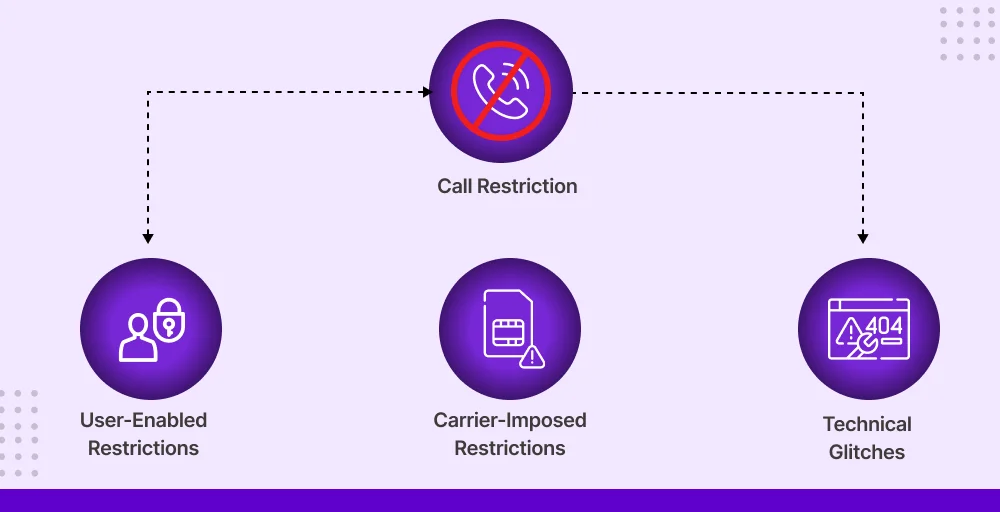
- User-enabled restrictions: These restrictions are set by the receiver to block calls from unknown numbers during Do Not Disturb hours.
- Technical problems: Sometimes, you may experience call restrictions due to network issues or device problems.
- Carrier-imposed restrictions: These settings are imposed by the carrier service provider, resulting in calling restrictions on the number you dial.
What Causes the “Calling Restriction” Error?
When you experienced “ calling restrictions”, you might have wondered what the reasons behind it were. There are various reasons for calling restrictions while you are calling.
1. Call Block Settings Enabled
Call blocking is a feature on your mobile phone that prevents you from receiving inbound or outbound calls. Many smartphones let you block individual numbers, unknown callers, or specific types of calls. If the number you are trying to call is on this blocked list, your phone may not let the call go through, and you might see the “calling restriction” message.
2. Do not Disturb Mode
The Do Not Disturb feature silences notifications and calls during certain hours or conditions. Users mainly use this feature to avoid interruptions. If you try to make a call while DND is on, it may be blocked.
Ensure Do Not Disturb is off to allow calls from everyone or specific contacts.
3. Carrier-level Restrictions
Carriers sometimes impose restrictions directly on your account or plan. These network-level restrictions may be due to unpaid bills, international call limits, or features not included in your subscription.
When your carrier restricts a call, the network prevents it from connecting.
4. SIM or Network Issues
A damaged SIM card, weak signal, or temporary network outage can prevent calls from connecting properly. Even if nothing is deliberately blocked, these issues can trigger the calling restriction message.
To minimize such issues, you can restart your phone, reinsert the SIM card, or move to an area with better coverage.
5 . Business or PBX Call Rules
Businesses often set rules to manage call flow, such as blocking international calls and limiting outgoing calls during certain hours. If your call is blocked because of these rules, you’ll see a calling restriction message.
Contacting your service provider can clarify whether system rules are causing the issue. Additionally, they will guide you to solutions if the system is the cause of the problem.
Related Article 👉: Your Call Has Been Forwarded: What Does It Mean?
Actionable Steps to Fix Calling Restriction Issue
After understanding what are the reasons behind the call restrictions, there are solutions that you should follow to resolve these.
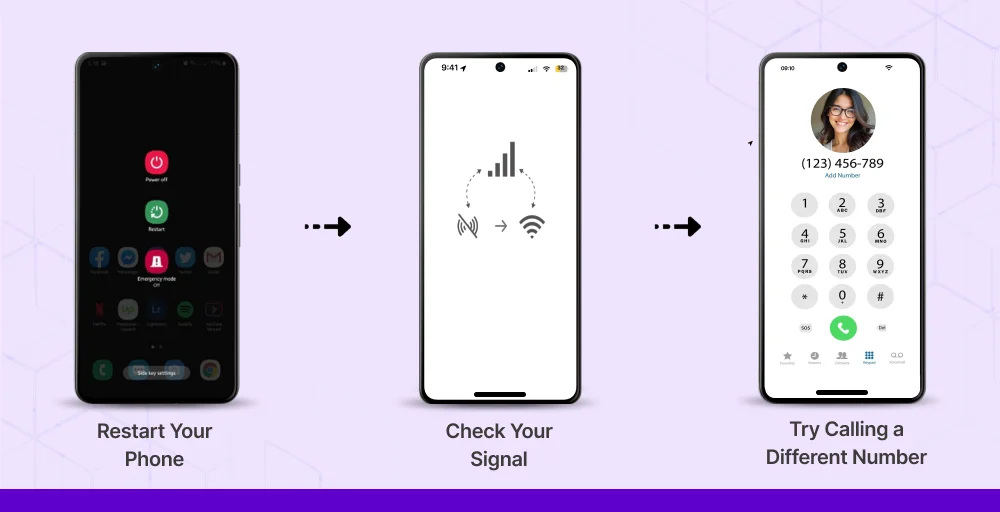
You can easily fix calling restrictions issue. Here are the steps you need to follow for both your device and your recipients.
Basic steps to fix the problem:
- Restart your phone: Turning your phone off and on again can resolve minor software glitches or network issues that may be causing the restriction. Restarting refreshes your device’s network connection, which can often fix call-related problems.
- Make a call from another number: Using a different phone or SIM card helps determine whether the issue is with your line or the recipient’s number. If the call goes through from another number, it indicates the problem is likely with your device or network settings.
- Verify your network connection: A weak or unstable mobile signal or Wi-Fi connection can prevent calls from connecting properly. Make sure you have a strong signal, or switch to a different network, such as moving from Wi-Fi to mobile data, to see if the issue resolves.
Check Your Phone Settings
Sometimes, your phone’s settings may block calls accidentally. Even if you didn’t change anything, features like Do Not Disturb, call barring, or Airplane Mode can prevent calls from connecting.
Here’s what to verify in detail:
- Do Not Disturb: This feature silences calls, messages, and notifications. If active, your phone may reject incoming calls or stop ringing. Make sure it’s turned off or adjust exceptions to allow calls from certain contacts.
- Call barring: Call barring can block outgoing or incoming calls based on type, such as international calls or calls from unknown numbers. Check your phone settings or carrier options to ensure no barring is enabled that could be affecting your calls.
- Airplane mode: Disables all wireless connections, including mobile networks and Wi-Fi. If it’s accidentally turned on, calls cannot go through. Make sure this mode is off to restore normal call functionality.
Related Article 👉: How to Call Someone on DND? Tips & Tricks
Potential Issues on the Recipient’s Side
After checking your phone settings, if you cannot find any issues in your mobile phone. Then, it might be a problem with your recipient’s phone.
Here are the major possibilities in detail:
- The recipient’s phone is off or unreachable: When your caller’s phone is switched off, in airplane mode, or has poor network coverage, your call cannot go through. In such cases, you might hear calling restrictions message even though there’s no issue on your side.
- Blocked your phone number: If the recipient has blocked your number, calls will be automatically rejected. Blocking can happen intentionally or, in some cases, accidentally, and it prevents your phone from connecting.
- Call barring or network restrictions on their line: Some recipients may have set limits through their carrier to block certain types of calls, such as international calls or calls from unknown numbers. This can trigger the “calling restriction” message when you try to reach them.
Check Status of Your Account ( Bills, Limits, Plan)
Review your mobile or VoIP account to ensure everything is in order and there are no issues preventing calls.
Verify these key points to address the call restriction:
- Check unpaid bills: Outstanding payments can lead your carrier to temporarily block calls until the balance is cleared.
- Review your plan limits: Some plans restrict international, long-distance, or high-volume calls. If you exceed these limits, your calls may not go through.
- Check data or call balance: Prepaid plans may restrict calls if your credit or minutes run out. Recharging your balance can solve the issue.
Contact Your Service Provider
If you’ve already tried all the basic fixes like restarting your phone, checking your network, and verifying phone settings, but calls are still being restricted. Then, contacting your service provider is the next essential step. They can help as some issues can’t be fixed on your device alone.
They can assist you by:
- Checking your account status: Ensuring your plan is active, bills are paid, and there are no restrictions on your line.
- Investing in network issues: Identifying outages, coverage problems, or technical glitches that might be affecting your calls.
- Checking for call restriction or blocks: Ensuring your number hasn’t been accidentally blocked or restricted for outgoing or incoming calls.
Run Basic Checks: Number, Network, and Software
Sometimes we assume that call issues are caused by complex problems, but often the cause is much simpler. It’s always a good idea to start with some basic checks.
Here are some basic ways to identify call restrictions:
- Verify the dialed number: Before making a call, always double-check the number you’re dialing. Entering an incorrect number can lead to call restrictions. So verifying is one of the simplest ways to avoid issues.
- Check network coverage: An unstable or weak network can prevent calls from connecting properly, so always ensure you have a strong signal before dialing.
- Update your software: Keeping your device software up to date ensures smoother performance and better call quality. Updates often fix bugs and improve network compatibility.
Preventing Tips to Avoid Future Calling Issues
You might not understand how to fix the calling restrictions issue, but it’s equally important to know how to prevent them from happening in the first place. Taking proactive steps can save you time and frustration in the future.
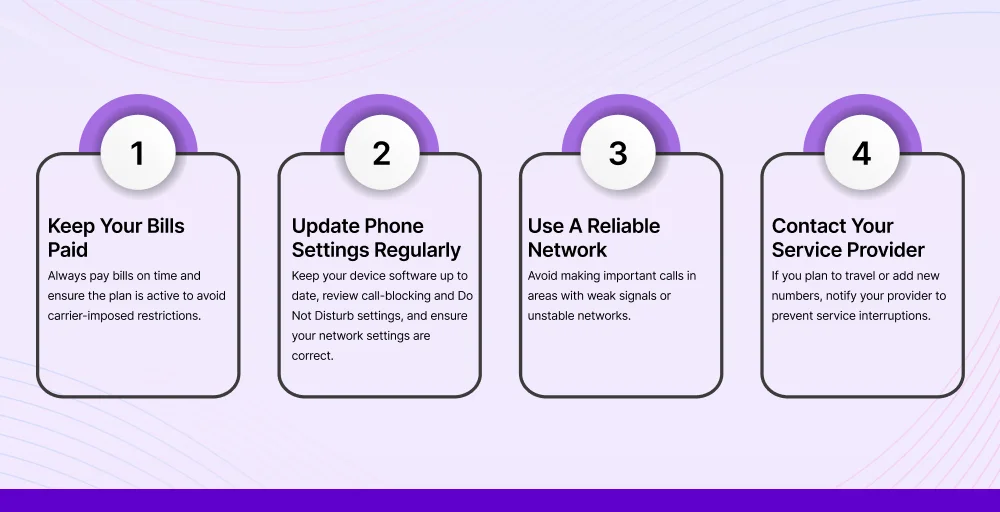
Some ways to prevent calling issues include:
- Keep your bills paid: Always pay bills on time and ensure the plan is active to avoid carrier-imposed restrictions.
- Update phone settings regularly: Keep your device software up to date, review call-blocking and Do Not Disturb settings, and ensure your network settings are correct.
- Use a reliable network: Avoid making important calls in areas with weak signals or unstable networks.
- Contact your service provider: If you plan to travel or add new numbers, notify your provider to prevent service interruptions.
Conclusion
Calling restrictions can be caused by various factors, including phone settings, network issues, or account-related issues. Restrictions may occur on your mobile device, your service provider’s network, or even on the recipient’s phone. You can identify them by checking your network connection, reviewing your account status, and ensuring that no call blocks or Do Not Disturb settings are active.
To prevent calling restrictions, it is essential to keep your device software up to date, pay your bills on time, and regularly review your phone settings. Additionally, maintaining a strong network connection, verifying the numbers you dial, and understanding your carrier’s plan limitations can help ensure smooth calling.