⚡ Quick Answer
A restricted call is a phone call where the caller has deliberately hidden their number, so your caller ID displays ‘Restricted,’ ‘No Caller ID,’ ‘Private Number,’ or ‘Unknown’ instead of a real phone number. Callers hide their number by dialing *67 before the number, or by adjusting their phone settings. You can block restricted calls on any device in your call settings.
Have you ever received a phone call where your caller ID information says “Unknown”, “Private Number”, or “No Caller ID”? Well, you’ve likely encountered a restricted call or phone number- commonly used by individuals, businesses, and sometimes by scammers who like to hide their phone numbers.
While many restricted calls are harmless, others can be malicious. Knowing the difference is the key to staying safe.
Here, we’ll guide you through everything about what restricted calls are, how to avoid them, and how to block restricted numbers, so that you can stay safe.
What is a restricted call?
A restricted call is a phone call where the caller hides their number or identity, so the recipient cannot see who is calling. On the receiver’s caller ID, it may appear as “Restricted”, “Unknown”, or “No Caller ID”. It is commonly used for privacy reasons, but most official businesses and contact centers do not make calls from restricted numbers.
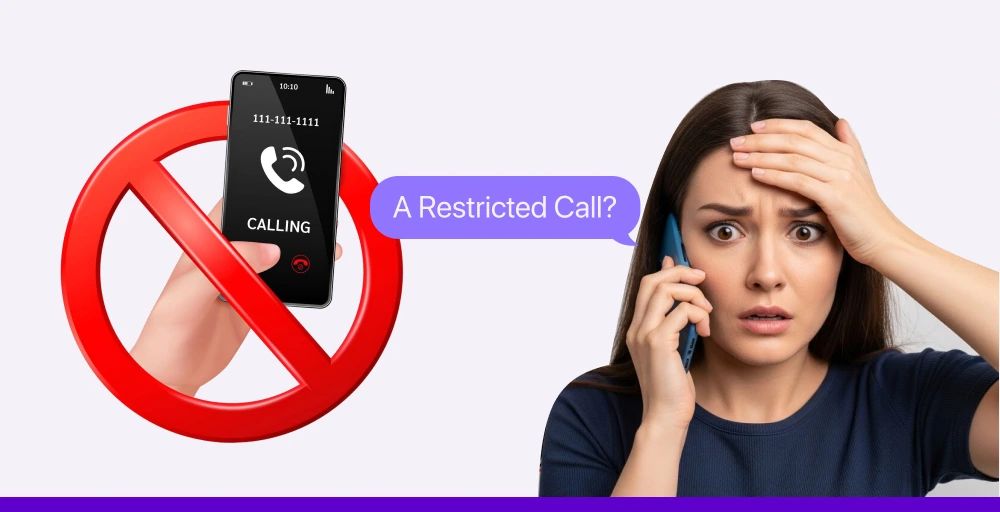
For this type of number, you cannot call them directly, and it can’t be traced without the involvement of law enforcement. This type of call is commonly used when the caller wants to maintain privacy or anonymity. It can serve legitimate purposes, such as calls from telemarketers, debt collection agencies, market researchers, or private individuals who prefer not to reveal their numbers.
What is a restricted number?
A restricted number is a phone number that has been deliberately hidden from showing on the recipient’s caller ID during an outgoing call. Restricted phone numbers are commonly used to maintain caller anonymity. Individuals, businesses, and organizations may choose to restrict their number for privacy, security, or professional reasons.
Restricted vs. Unknown vs. Private vs. Blocked — What’s the Difference?
Many people confuse the different labels that appear when someone hides their number. Each label can mean something slightly different depending on the caller’s method and your carrier. Here is a clear breakdown:
| Label Displayed | What It Means | How It Happens | Common Users |
| Restricted | Caller has blocked number — carrier-level restriction | *67 or carrier blocking | Individuals wanting one-call privacy |
| No Caller ID | No caller ID data transmitted at all | Phone set to ‘Hide Number’ permanently | Privacy-focused users, some businesses |
| Private Number | Caller has set number to private | Settings-based (iOS/Android Hide Number) | Businesses, medical offices, legal firms |
| Unknown | Number exists but couldn’t be identified | International call, VoIP, network issue | International callers, VoIP users |
| Blocked | Caller ID specifically blocked by caller | *67 or carrier feature | Similar to ‘Restricted’ — often same cause |
✅ On most US phones, ‘Restricted’ and ‘Blocked’ mean the same thing: the caller used *67 or a phone setting to hide their number. ‘Unknown’ usually means the number exists but simply wasn’t passed through — common with international calls.
Why people makes restricted calls?
Restricted calls can be made for various reasons, including personal privacy and strategic business purposes, as well as in some cases, malicious or deceptive intent.
- Individuals seeking personal privacy: Some people use restricted calls for one-time use, or to make a single interaction with an unknown person, preventing unsolicited follow-up calls or data collection.
- Organizations and businesses: Companies often use restricted numbers for specific operational needs. For instance, customer service departments used to handle huge call volumes while avoiding direct callbacks.
- Individuals for malicious or fraudulent activities: Scammers often use the restricted number while making a call to stay anonymous. They make a call to carry out a phishing attempt, and other illegal activities such as deceiving individuals into revealing personal information or sending money.
Related Article 👉: The Number You Have Dialed Has Calling Restrictions: Meaning, Causes, and Fixes
How to make restricted calls?
The most common way to make a restricted call is by dialing *67 before the phone number. For example, entering *67 123-456-7890 will hide your number from the recipient, who will see something like “Private” or “No Caller ID.”
Note: This method typically works in the U.S. and Canada but may not function with toll-free numbers, emergency services, or on some VoIP platforms.
For Android devices
To configure your Android device settings to make restricted calls, follow these simple steps:
- Open the Phone app on your Android device.
- Tap on the three-dot menu icon (often resides in the top right corner).
- Choose “Settings” or “Call settings” from the dropdown menu.
- Then, navigate to Caller ID or additional call settings. It lies under a sub-menu like “Advanced settings” or “Supplementary services”.
- Click on the “Caller ID”.
- Use the toggle to choose “Hide number”.
- Now, every call you make through your Android device will be masked as a restricted call.
For iOS (iPhone) devices
You can follow this straightforward process to make restricted calls on your iOS device:
- Open the “Settings” app on your iPhone.
- Scroll down and tap on “Phone”.
- Navigate to Phone settings, and click on “Show My Caller ID”.
- Afterwards, toggle the switch to the “off” position to hide your caller ID on the recipient’s screen.
- Now, all your outgoing calls are configured as restricted calls by default.
Note: Remember to revert these settings; otherwise, your every call will be masked as a restricted number.
Should you answer restricted calls?
It’s usually best to avoid answering restricted calls unless you are expecting one from a trusted source.
While some may be legitimate, these calls are commonly used by scammers, telemarketers, or spammers to conceal their identity. If the call is necessary, the caller will most likely leave a voicemail or follow up through other means.
Even though you answered the restricted call, don’t provide any sensitive information such as your personal details. If you suspect you’ve already shared sensitive information during a suspicious call, identity theft protection services like Aura can alert you if your personal data is used to open fraudulent accounts or make unauthorized transactions.
How do you call back a restricted number?
Calling back a restricted number presents multiple challenges as the caller’s identity is hidden. However, there are a few solutions you can try:
- Using a call return feature (*69): The “*69” dialing code offers a “Last Call Return” service to the user. This code allows you to dial back the last number, even if it was restricted.
- Checking your phone carrier’s call logs: Some carrier service providers offer detailed call records that can be accessed using your online account. However, this service is not guaranteed, as some carriers prioritize privacy for restricted numbers.
- Employing third-party call unmasking apps: There are third-party tools, particularly designed for number “unmasking” or to identify restricted numbers. Tools like Truecaller, TrapCall, or Hiya help you reveal the hidden Caller ID and sometimes provide more details, such as the caller’s name or a spam risk score.
- Contacting your phone carrier for assistance: If you have tried all possible methods and still cannot make a call, contact your phone carrier directly for guidance. They will assist you through the process of calling the restricted number.
How to block restricted calls?
You cannot block a specific “restricted number” directly, because the caller ID is deliberately hidden. That means the number isn’t visible or traceable. However, you can block all incoming calls that hide their caller ID (i.e., show up as “Restricted,” “No Caller ID,” “Unknown,” or “Private”).
Here’s how you can stop or block the restricted calls on various devices through various methods:
1. Blocking restricted calls on landline
Landline service allows you to dial a particular code to activate an anonymous call rejection feature. The code *60 or *77 works in most countries, especially in the US. After entering this code, follow the provided guide to block the restricted calls. Alternatively, you can contact a landline service provider for guidance if the code fails to work.
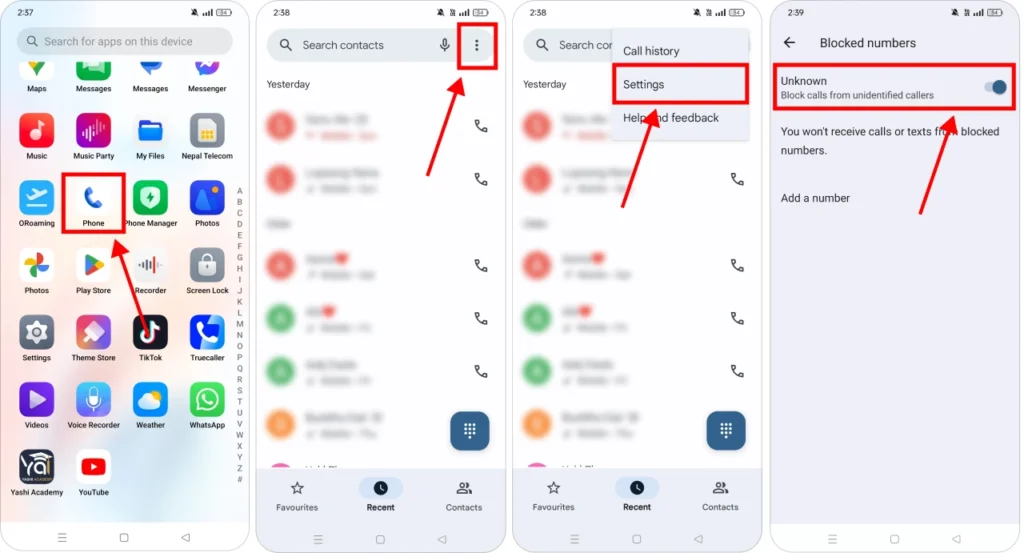
2. Blocking restricted calls on Android
Here’s how to block restricted calls on Android in simple steps:
Step 1: Open the Phone app on your device.
Step 2: Click on the three-dot menu to access the “Call settings” or simply “Settings”.
Step 3: Now, search for “Blocked numbers”, “Spam and call screen”, “Call blocking”, or “Caller ID and spam protection” and click on it.
Step 4: Afterwards, look for “Block calls from unknown numbers,” “Block unknown callers,” or “Filter spam calls” and toggle it on.
Step 5: You will now stop receiving the restricted calls.
3. Blocking restricted calls on iPhone
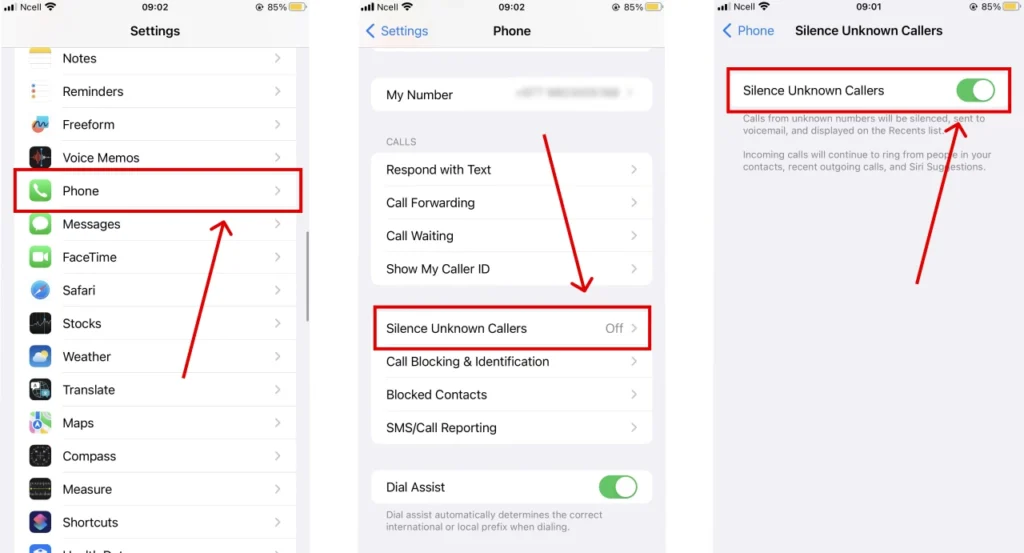
Here’s how to block restricted calls on iPhone (iOS) in simple steps:
Step 1: Open the “Settings” app on iPhone.
Step 2: Scroll down and click on the “Phone” option.
Step 3: Afterwards, tap on the “Silence Unknown Callers”.
Step 4: Turn the toggle on to block all the incoming restricted calls.
Step 5: Now, all the incoming calls will be silenced and sent straight to the voicemail.
4. Using your phone carrier’s services
Most mobile carriers’ service providers include AT&T ActiveArmor, T-Mobile Scam Shield, and Verizon Call Filter, which offer call blocking services as either a free or paid add-on. These services work by identifying and blocking the number if the number’s caller ID is hidden.
5. National Do Not Call Registry
Another way to reduce unwanted or restricted calls is by registering your phone number with the National Do Not Call Registry (such as the one maintained by the FTC in the United States). This service helps block telemarketing calls from legitimate businesses that are required to honor the list.
However, it’s important to note:
- This registry does not stop all calls; it primarily affects legitimate telemarketers.
- It won’t block scammers, robocalls, or callers who ignore the rules.
- The registry is country-specific and doesn’t protect numbers outside its jurisdiction.
👉 In the U.S., you can register at www.donotcall.gov for free.
How to unblock restricted calls?
The reason for unblocking restricted calls may be multifaceted, such as a change in your mood, anticipation of essential calls from someone who prefers to use restricted numbers, or realization that your blocking settings are too restrictive.
1. Unblock restricted calls on landline
One reliable way to unblock a restricted landline is to contact your service provider directly. You can ask the customer service representative to disable anonymous call rejection or remove the call blocking feature for restricted numbers.
2. Unblock restricted Calls on Android
To unblock the restricted calls on Android, you can follow these simple steps:
Step 1: Open the Phone app on your device.
Step 2: Click on the three-dot menu to access the “Call Settings” or simply “Settings”.
Step 3: Search for “Blocked numbers”, “Spam and Call Screen”, “Call blocking”, or “Caller ID and Spam Protection” and click on it.
Step 4: Afterwards, look for “Block unknown callers” or “Filter spam calls” and turn it off.
Step 5: Now, all the restricted calls will be unblocked.
3. Unblock restricted phone calls on iPhone
You can follow this straightforward process to unblock the restricted calls on iPhone:
Step 1: Open the “Settings” app, which usually lies on the home screen.
Step 2: Scroll down and click on the “Phone” option.
Step 3: Afterwards, tap on the “Silence Unknown Callers”.
Step 4: Now, you will see the switch to toggle. Turn off the toggle to unblock it.
What to do if you receive restricted calls frequently?
Receiving a large volume of restricted calls frequently can be more than just annoying. It can distract you from your work or even impact your overall personal life. If you find yourself in this situation, consider these proactive steps to regain control and protect yourself.
- Utilize advanced blocking features: Try to explore more advanced call blocking options that carrier providers and some reputable third-party apps often provide. Most of these service providers use a vast database to identify and block the suspicious calls even before they reach you.
- Be cautious about interaction: When having a conversation with a restricted number, ensure you enter any number or press any input to route your call. It is advisable to be less active in such discussions unless you are familiar with the person or entity you are contacting.
- Report persistent harassment: If someone threatens or harasses you using the restricted number, you can report to your phone carrier or contact law enforcement, including local police, or report a scam to the government agencies.
- Buying the new number: Consider switching to a new number in case any of the preventive measures fails to work. Purchasing another number can be the best solution to overcome this situation.
Pros and Cons of Call Restrictions
Pros:
- Protection of private life: It enables the caller to keep their private phone number confidential, offering better privacy.
- Own Safety: People who are at risk of harassment can use it to protect their identity and physical location from dangerous people.
- Simple to Use: Call restrictions can be enabled by simply using phone settings or by dialing codes like *67.
Cons:
- Lack of trust: Many individuals may avoid answering calls from unknown numbers because they are often associated with spam.
- Not suitable for businesses: It may look unprofessional for businesses using restricted calls to reach out to people.
- Limited callback options: Recipients won’t be able to return the call since the number is hidden.
Final thoughts
Restricted calls often arouse curiosity and even disturbance when you receive them frequently. These anonymous calls can have multifarious purposes, from legitimate telemarketing calls to malicious activities.
So, understanding what a restricted call means and how to block restricted phone calls is a crucial aspect of digital self-defense.
To avoid such types of calls, an individual can use the phone’s built-in features, subscribe to the carrier service providers, or adopt third-party applications that use advanced AI and a vast dataset to detect restricted calls.
Frequently Asked Questions
What does it mean when a call says 'Restricted'?
A 'Restricted' display on your caller ID means the person calling has deliberately hidden their phone number using either the *67 code or their phone's caller ID blocking settings. Their number is not transmitted to your phone, so your carrier substitutes the label 'Restricted' or a similar term.