✨ Key Takeaways
We’ve analyzed 50+ business phone solutions to help teams improve collaboration, reduce communication costs, and scale efficiently in 2026.
If you’re short on time, here’s what we recommend:
- 1. KrispCall: Bets for sales and support teams need AI tools and global numbers.
- 2. RingCentral: Best enterprise-grade UCaaS platforms with robust integrations.
- 3. Aircall: Best for CRM-focuses sales and support teams.
- 4. Ooma Office: Best affordable solution for small businesses.
- 5. JustCall: Best for outbound sales automation with AI-powered tools.
- 6. Cloudtalk: Best for data-driven call centers.
- 7. Google Voice: Best for Google Workspace users who want seamless integration.
- 8. 8×8: Best for global enterprises requiring international coverage.
- 9. Vonage: Best for flexible VoIP deployments for remote and hybrid teams.
- 10. GoTo Connect: Best for unified phone and video communication in one platform.
We’ve found that businesses using modern VoIP systems report higher productivity, faster problem-solving, and improved team collaboration.
Explore these Zoom Phone alternatives to streamline communication, simplify workflows, and support business growth, no matter where your team works.
Why Businesses Look for Alternatives to Zoom Phone
We’ve seen across growing teams and customer-facing businesses that many organizations look for alternatives to Zoom Phone primarily for better cost efficiency and enhanced functionality. While Zoom’s freemium model is appealing at first, we often find that scaling becomes expensive as additional features are added.
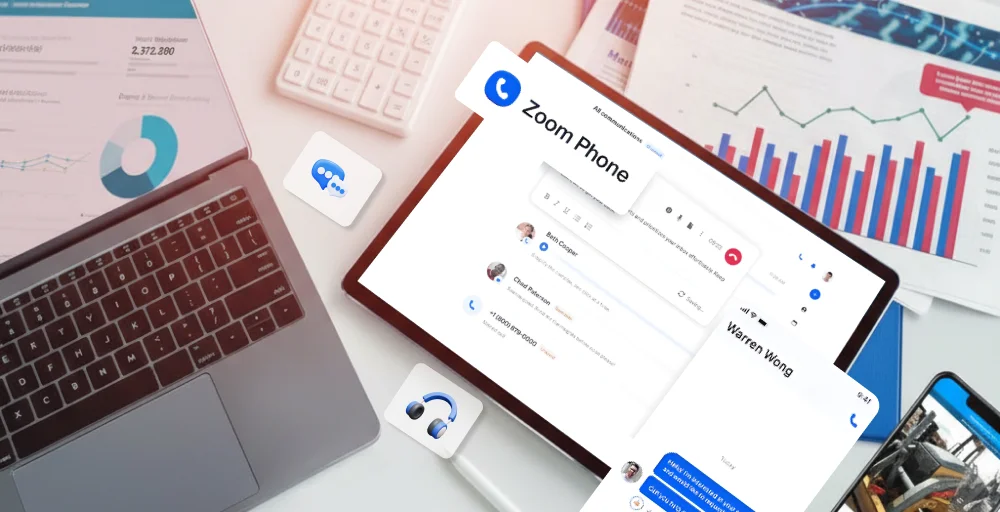
Some of the common reasons why companies look for alternatives to Zoom Phone:
- Lacks Features: Although Zoom Phone offers basic SMS, it lacks more sophisticated features, including team-oriented SMS messaging, auto-replies, call forwarding, SMS on shared lines, and collaboration tools.
- High Costs and Hidden Fees: Zoom Phone price may seem budget-friendly at first glance, but many crucial features, including call analytics (ZOOM Sessions) and call queue dashboards, are only available through higher-tier plans or require additional purchases.
- Need for Better Integrations: While Zoom has connections with Salesforce and HubSpot, it has overall limited integration capabilities with other platforms.
- Hard to Use: Some users indicate that navigating Zoom Phone’s settings can be challenging, and accessing live support can be tough when problems arise.
- Scalability Limitations: Zoom Phone struggles with advanced call routing and shared-number restrictions, making it difficult to scale for expanding teams or busy call centers.
10 Best Zoom Phone Competitors
We have identified several strong competitors to Zoom Phone, including KrispCall, RingCentral, Dialpad, Nextiva, and 8×8. These solutions provide comprehensive VoIP, UCaaS (Unified Communications as a Service), and contact center features suitable for small to enterprise-level businesses.
| Provider | Key Features | Pricing (Per user per month) | Best for | G2 Review |
| KrispCall | Unified Callbox, Power Dialer. Call Analytics | Starts at $12 | Sales and support teams | 4.5/5 |
| RingCentral | AI analytics, Contact center tools | Starts at $20 | Enterprises businesses | 4/5 |
| Aircall | CRM integrations, Queue callback | Starts at $30 | CRM-driven teams | 4.4/5 |
| Ooma Office | Virtual receptionist, Ring groups, Desk phone support | Starts at $19.95 | Small businesses | 4.6/5 |
| JustCall | Power dialer, AI scoring | Starts at $29 | Outbound sales teams | 4.3/5 |
| CloudTalk | Skill-based routing, wallboards | Starts at $19 | Call centers | 4.4/5 |
| Google Voice | Google Workspace, Voicemail transcription | Starts at $10 | Startups & SMBs | 4.1/5 |
| 8×8 | Omnichannel routing, Global coverage | Custom pricing | Global enterprises | 4.1/5 |
| Vonage | Desk & mobile apps, Admin portal | Starts at $13.99 | Hybrid teams | 4.3/5 |
| GoTo Connect | AI summaries, MS Teams integrations | Custom pricing | Unified communications | 4.4/5 |
1. KrispCall
KrispCall stands out as a leading alternative, particularly for call center operations. It offers modern cloud-based features focused on efficient customer management, scalability, and integration capabilities.
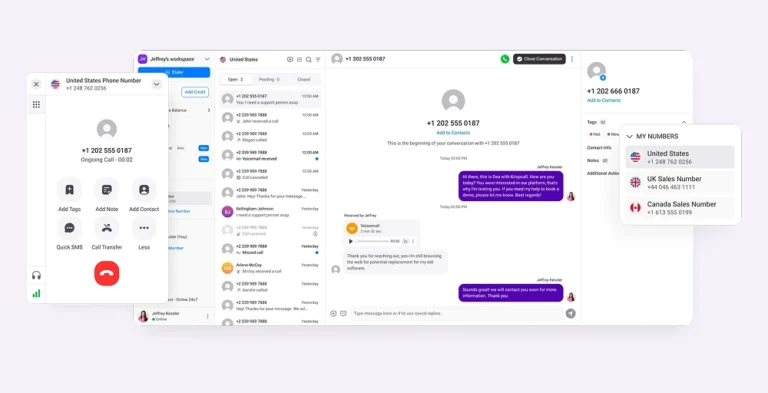
Compared to Zoom Phone, KrispCall emphasizes AI-driven tools and agent performance analytics, making it ideal for high-volume customer interactions.
It is often highlighted as a better alternative for small to mid-sized teams needing a “Unified Callbox” that combines voice, SMS, and messaging in one view, often at a more transparent price.
Feature
- Call Analytics: Collects and analyzes call data to support data-driven decision-making, helping organizations boost efficiency and service quality.
- Phone Tree (IVR): An automated menu that answers your calls and lets people choose where to go by pressing a button (like “Press 1 for Sales”).
- Custom Caller ID: It is also known as number masking, which lets you choose what phone number people see on their screen when you call them.
- AI Text Message Responder: Create customized message replies seamlessly in various tones or styles to provide consistent, high-quality customer support.
- Computer Telephony Integration (CTI): A feature that connects your computer to your phone system so they can work together as one.
Pricing
| Plans | Annual Pricing- per user per month | Key feature set |
| Essential | $12 | Unified Callbox, Call Filters, Voicemail |
| Standard | $32 | Unlimited users, Call recording, Advance reporting |
| Enterprise | Custom | Number sharing, Unlimited storage, Call whisper |
Why KrispCall is a good alternative?
KrispCall is a strong alternative to Zoom Phone, offering cost-effective, flexible plans for startups and remote teams. It features a Power Dialer for sales and real-time Call Coaching for managers to boost productivity. With seamless CRM integration, advanced call analytics, and automation, it’s perfect for customer-facing teams. Its scalable pricing and robust features offer better value across all subscription tiers.
KrispCall Pros
- It provides local, international, and toll-free numbers across many countries.
- Excellent for sales teams needing real-time call coaching.
- Provides seamless SMS and voice integration without complex onboarding.
KrispCall Cons
- Some reports indicate call analytics data may only be available for a limited time.
- There are issues in porting numbers.
- Its mobile app may experience lag or a lack of payment features.
2. RingCentral
RingCentral is a comprehensive UCaaS (Unified Communications as a Service) platform that goes beyond basic phone functionality.
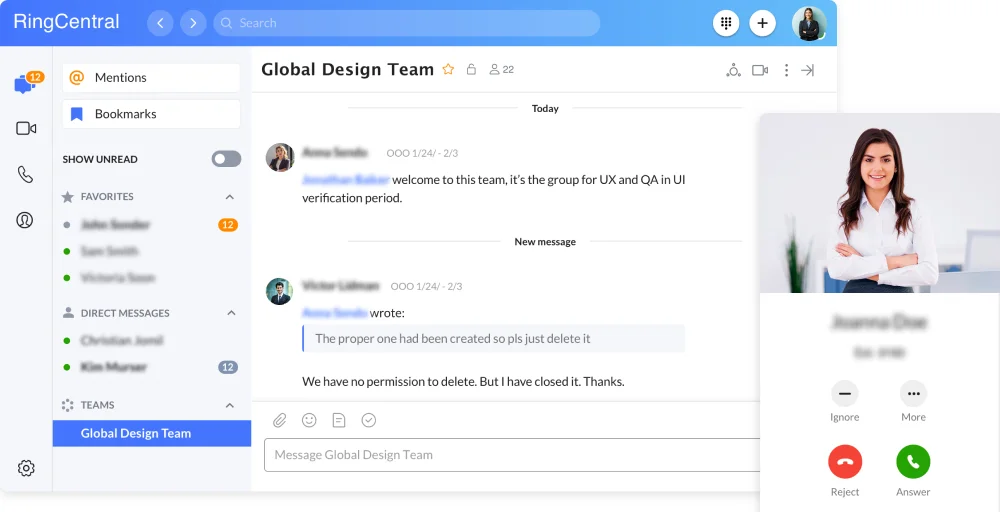
As we have tested, it excels in enterprise environments where integration with existing business tools is critical. The platform combines desk phone support, video conferencing, team messaging, and contact center capabilities into one ecosystem.
RingCentral’s strength lies in its scalability and robust feature set, making it suitable for businesses ranging from small teams to large corporations with complex communication needs.
Feature
- Intelligent Virtual Agent: Provides your customers with both voice and digital self-service options through AI agents.
- Customize call routing: Quickly establish and manage call paths based on business hours, team availability, or custom criteria, without IT support.
- AI Workforce Engagement: Create seamless customer experiences using AI-driven quality management, automated scorecards, and conversation analysis.
- Shared Team Inboxes: Work together on texts using a single number, with features like claiming, assigning, and private notes.
- RingCX: Easily oversee agents, mentor performance, and enhance customer satisfaction with every interaction.
Pricing
| Plans | Annual Pricing-per user per month | Key feature set |
| Core | $20 | Unlimited domestic calling, 100 toll-free minutes, HD meetings |
| Advanced | $25 | CRM integrations, Connect multiple lines, 100 SMS |
| Ultra | $35 | 10,000 toll-free minutes, RingCentral Webinar, Unlimited storage |
| Customer Engagement Bundle | Contact sales | Business SMS Booster, Shared SMS inbox, Live Reports |
Why RingCentral is a good alternative?
RingCentral is an excellent alternative for businesses seeking a fully unified communications platform. It combines phone, video, team messaging, and contact center tools into one ecosystem. Its strength lies in enterprise scalability, 300+ integrations, advanced analytics, and a 99.999% uptime SLA.
RingCentral Pros
- It connects seamlessly with more than 300 business tools, including Salesforce, HubSpot, and Zendesk.
- The uptime SLA reliability is 99.999% ensures consistent service availability.
- This combines phone, video messaging, and contact center in one platform.
RingCentral Cons
- Its basic Core plan starts at $20/user/month, which is expensive.
- Implementing enterprise features requires professional or dedicated IT support.
- It has inconsistent audio quality that depends on the network conditions and location.
3. Aircall
Aircall is a cloud-based phone system designed specifically for sales and support teams who rely heavily on customer conversations. It stands out for its simplicity and focus on call quality rather than trying to be an all-in-one communication suite.
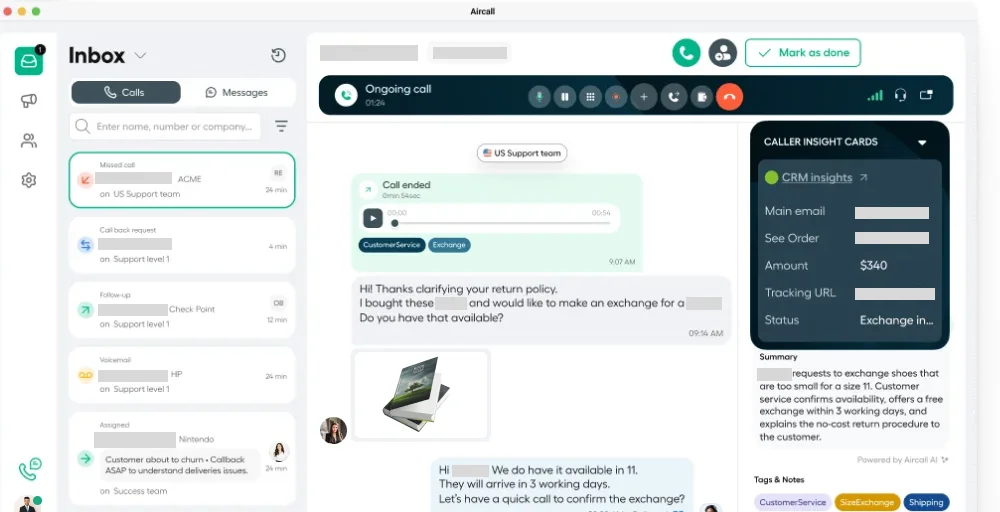
The platform integrates deeply with popular CRM and helpdesk tools, allowing teams to make and receive calls directly within their existing workflows. Aircall’s user interface is intuitive and modern, making it easy for teams to adopt without extensive training or technical support.
Feature
- Warm Transfer: Give your teammates a quick chance to talk with each other before transferring a live call.
- Real-Time Notifications: Adjust your system settings anytime, including adding new customers or users with a single click.
- Queue Callback: Give callers the option to skip the queue and receive a callback from you later.
- After-Call work: After a call concludes, give your team the time they need to tag, assign, and prepare for the next discussion.
- AI-Generated Call Summaries: Quickly understand the main points of a conversation by reading a summary, enabling you to review calls at double the speed.
Pricing
| Plans | Annual Pricing- per license | Key feature set |
| Essentials | $30 | 100+ integrations, IVR, Click-to-dial |
| Professional | $50 | Salesforce CTI integration, Mandatory call tagging |
| Custom | Call for details | Custom onboarding, Single sign-on. Unlimited calls worldwide |
Why Aircall is a good alternative?
Aircall is ideal for sales and support teams that rely heavily on CRM-driven workflows. Its AI-generated call summaries, queue callback, warm transfers, and seamless integration with 100+ tools make it a more specialized solution for support and sales environments.
Aircall Pros
- The native integrations with 100+ tools allow agents to work without leaving their CRM interface.
- Its setup takes minutes rather than hours, with no hardware requirements or technical expertise.
- This automatically generates summaries of conversations, saving time on manual note-taking.
Aircall Cons
- Its text messaging features are basic.
- You need third-party integration for video calls.
- The mandatory call tagging upgrade is a must.
4. Ooma Office
Ooma Office targets small to medium-sized businesses looking for a straightforward, reliable phone system without unnecessary complexity. This strikes a balance between affordability and functionality, offering essential business phone features at competitive prices.
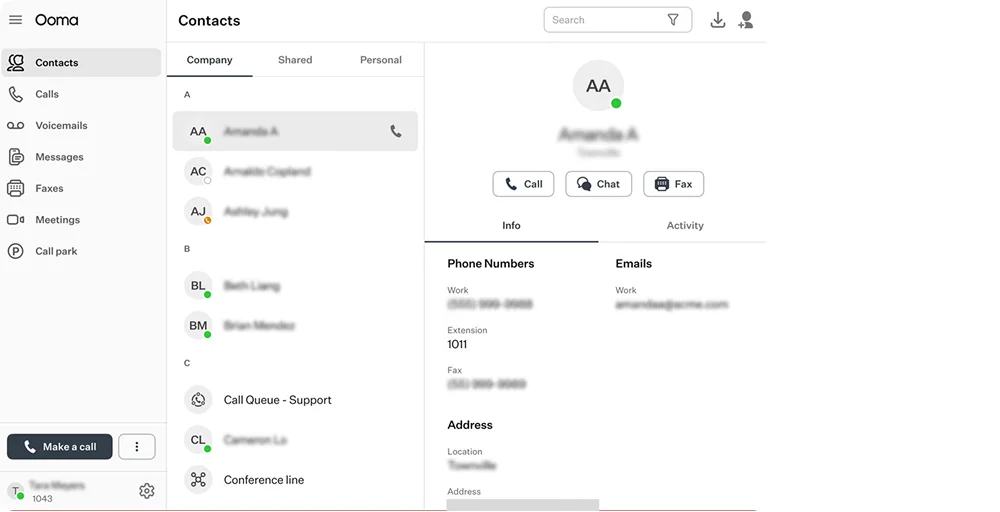
The platform emphasizes ease of use and includes a virtual receptionist, ring groups, and mobile app access. Ooma also stands out by supporting traditional desk phones alongside softphone options, giving businesses flexibility in how they deploy the system across different work environments.
Feature
- Auto Dialer: Manual outbound dialing streamlines outbound calling to enhance productivity, boost efficiency, and drive sales success.
- Call Parking: Offers the ease of a call transfer along with added flexibility, call place callers in designated “parking spots” to switch devices or locations.
- Virtual Fax: Despite the significant shift toward digitized communications in businesses, dependable faxing remains essential for many companies.
- Ring Groups: Ring Groups are a versatile feature in the Ooma Office suite, allowing teams like customer support or accounting to ensure no calls go unanswered.
- Music on Hold: keeps your customers engaged instead of waiting in silence while they are on hold. This feature includes various options and settings you can explore.
Pricing
| Plans | Annual Pricing- per user per month | Key feature set |
| Essentials | $19.95 | Virtual Receptionist, Digital Fax, Mobile App |
| Pro | $24.95 | Text Messaging, Call Recording, Video conferencing |
| Pro Plus | $29.95 | CRM integration, Hot desking, Call queuing |
| Enterprise | Custom Pricing | SIP Trunking, Teams Direct Routing, Advanced Analytics |
Why Ooma is a good alternative?
Ooma Office is a strong choice for small to medium-sized businesses seeking an affordable, easy-to-use phone system. It offers straightforward pricing, reliable desk phone support, and user-friendly features like ring groups and virtual receptionists.
Ooma Pros
- Its virtual receptionist features are easy to work with and program.
- Features free nationwide calling after purchasing the Telo device.
- Features a full desktop app, mobile app, and “Call Flip,” allowing seamless transfers between devices.
Ooma Cons
- It takes longer to reach customer service.
- Sometimes it’s hard to navigate the software to change users and other features.
- When the internet goes down, your phone will also go down.
5. JustCall
JustCall is a cloud phone system built for sales and support teams that need to make high volumes of outbound calls. The platform excels in automation and AI-powered features that help teams work more efficiently.
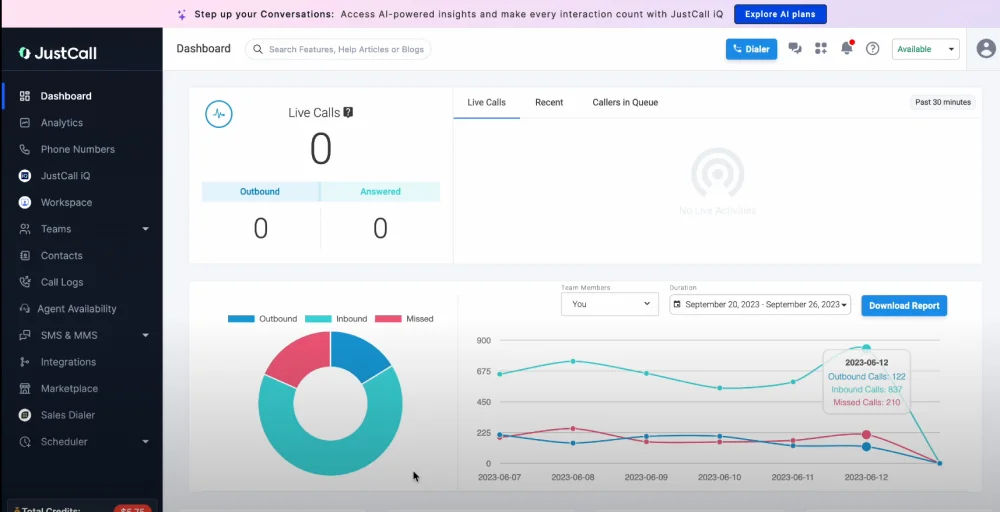
JustCall combines traditional calling with SMS, WhatsApp, and email in a single workspace, making it easier for agents to manage multi-channel conversations.
The platform’s strength lies in its sales-focused tools, such as power dialers, SMS campaigns, and AI coaching, which help teams close more deals and improve customer service.
Feature
- AI Voice Agent: Capture leads and book meetings around the clock to recover lost revenue.
- Conferencing calling: Allow multiple participants from various locations to take part in a single phone call.
- Automated Insights: Get automated insights through the chat, providing a detailed overview of your team’s performance.
- Moment analysis: Use custom moments to pinpoint essential discussion topics and understand customer needs and issues.
- Schedule & tag: Schedule calls with your contacts and tag your colleagues to continue the conversation. Provide context for these calls by adding notes.
Pricing
| Plans | Annual Pricing- per user per month | Key feature set |
| Team | $29 | IVR & call menus setup, Messaging suite, API access & workflows |
| Pro | $49 | Power dialer, Queue callback, Bulk SMS campaigns |
| Pro Plus | $89 | SMS Co-pilor, AI call scoring Sentiment analysis |
| Business | Request a Quote | Unlimited calling & SMS, Real-time agent assist, Personalized onboarding |
Why JustCall is a good alternative?
JustCall stands out for businesses that focus on outbound sales and multi-channel communication. Its automation tools, including power dialers, AI call scoring, and sentiment analysis, help teams boost productivity and performance. Sales-driven teams seeking deeper automation and performance insights often prefer JustCall to Zoom Phone.
JustCall Pros
- Combines voice, SMS, WhatsApp, and email into a single interface for seamless customer engagement.
- Automated dialing significantly increases outbound call efficiency for sales teams
- AI voice agents, call scoring, and sentiment analysis help teams improve performance automatically
JustCall Cons
- The user interface of JustCall looks quite outdated.
- The extensive feature set can be overwhelming for new users.
- Some users report delays in CRM data synchronization.
6. CloudTalk
CloudTalk is a call center software designed for customer-facing teams that prioritize efficiency and data-driven decision-making. CloudTalk excels at providing real-time analytics and performance monitoring through features such as wallboards and custom dashboards.
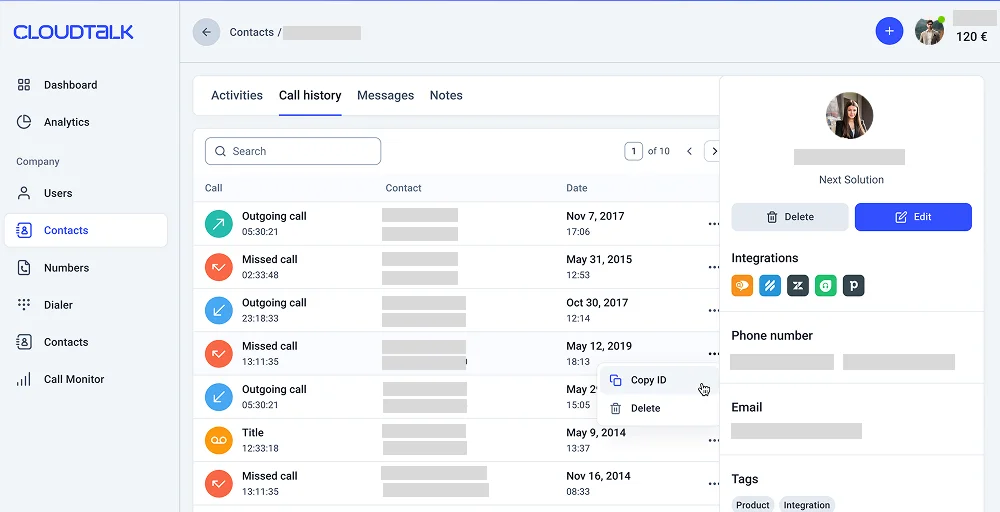
The platform is particularly strong in routing, offering skill-based routing and VIP queues that ensure customers reach the right agent quickly.
CloudTalk’s interface is modern and responsive, with a focus on helping managers monitor team performance and make informed decisions based on comprehensive call center metrics.
Feature
- 3 Way Calling: You can quickly include additional participants in any phone call to assist your agents in resolving issues more efficiently and closing the most challenging deals.
- Voicemail Drop: Streamlines your sales agents’ time by allowing them to leave pre-recorded voicemail messages for prospects easily.
- Skill-Based Routing: Customize skills for your agents or teams and automatically direct customer calls based on their experience.
- Wallboard: Display real-time performance metrics and call center stats to your entire team, live and in various formats.
- Virtual Caller ID: Create caller IDs that feature appropriate local area codes or numbers that your customers are already familiar with.
Pricing
| Plans | Annual Pricing- per user per month | Key feature set |
| Starter | $19 | Number porting, 1 ring group, Click-to-call |
| Essential | $29 | VIP queues, Auto outbound number, APIs & data sync |
| Expert | $49 | VIP queues, Smart dialer, Custom dashboards |
Why CloudTalk is a good alternative?
CloudTalk is particularly well-suited for call centers and customer support teams that require advanced routing and analytics. It offers skill-based routing, VIP queues, real-time wallboards, and custom dashboards. These features allow managers to monitor performance closely and improve efficiency.
CloudTalk Pros
- You won’t have to wait long on the phone lines.
- The app helps you make international calls by providing local numbers, which makes it easier to connect with customers worldwide.
- Agents can receive calls remotely, which simplifies communication.
CloudTalk Cons
- Upgrading is required for unlimited call recording storage.
- API access also requires an upgrade.
- Additionally, MMS messages necessitate an upgrade.
7. Google Voice
Google Voice is Google’s business phone solution that integrates seamlessly with Google Workspace. It’s the most straightforward option for businesses already using Gmail, Google Calendar, and other Google tools.
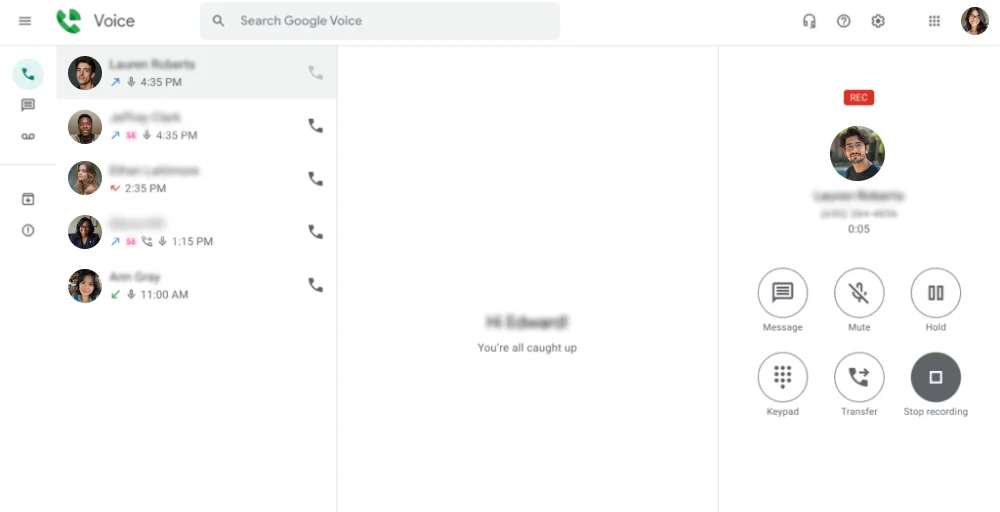
The platform offers essential phone features at very competitive prices, making it attractive for small businesses and startups on tight budgets. It is best suited for teams that prioritize ease of use and integration with the Google ecosystem over complex functionality.
Feature
- Unlimited US Texting: Stay connected without limits, send and receive messages effortlessly.
- Call Queuing for ring groups: ensure no call goes unanswered with streamlined queuing for your teams’ ring groups.
- Voicemail Transcription: Say goodbye to checking voicemails; read them instantly with accurate transcriptions delivered directly to you.
- Call Transfers: Effortlessly redirect calls to the appropriate team member for enhanced customer satisfaction.
- Automatic Call Recording: Capture every detail with automatic call recording to ensure compliance and improve service quality.
Pricing
| Plans | Annual Pricing-per user per month | Key feature set |
| Starter | $10 | Unlimited domestic calling, Voicemail transcription, desk phone |
| Standard | $20 | On-demand call recording, Call queuing for ring groups |
| Premier | $30 | Unlimited international billing, Automatic call recording |
Why Google Voice is a good alternative?
Google Voice is a practical alternative for small businesses already using Google Workspace. It integrates seamlessly with Gmail, Google Calendar, and Google Meet, creating a simple and cohesive experience. For startups or small teams prioritizing simplicity and cost savings, Google Voice can be a more straightforward option than Zoom Phone.
Google Voice Pros
- This service is cost-effective, starting at $10 per month for each user.
- It easily integrates with Google Workspace, including Gmail, Calendar, and Meet, providing a smooth communication experience.
- The user-friendly interface requires little training, and administrators can set it up in just minutes.
Google Voice Cons
- The app is buggy, often leading third-party services to not recognize the number as valid.
- It lacks advanced call center features like skill-based routing, wallboards, and analytics.
- It is better suited to US-based businesses due to its limited international functionality compared to global competitors.
8. 8×8
8×8 is an enterprise-grade communication platform that combines a contact center solution, unified communications, and APIs in one comprehensive solution. It stands out for its global reach and omnichannel capabilities, supporting phone, email, web chat, and social media in a single agent workspace.
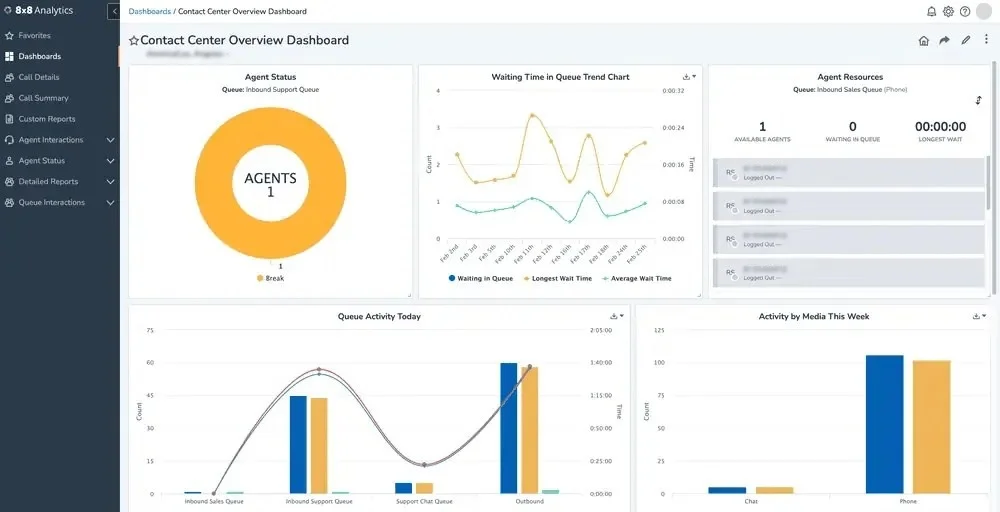
The platform is designed for mid-sized to large businesses with complex communication needs and international operations. Its strength lies in its scalability and depth of its contact center features, though this comes with a steeper learning curve and higher price point.
Feature
- Omnichannel Routing: Ensure customers can reach you through their preferred channel, whether by phone, email, web chat, or social media.
- Agent Workspace: A simplified, all-in-one dashboard designed for team members who handle phone calls.
- Global Coverage: We provide an international network that offers reliable phone service in over 50 countries.
- Proactive Messaging: This feature lets you send mass text messages or updates to customers before they ask for assistance.
- Receptionist Console: A high-speed interface designed for front-desk workers who manage a large volume of calls.
Pricing
| Plans | Annual Pricing | Key feature set |
| Contact Center | Chat with sales | Omnichannel routing, Agent workspace, Secure payment processing |
| CX Beyond the Contact Center | Request a quote | Advanced queue management, team lead analytics. Global coverage |
| Communications APIs | Chat with sales | High-volume SMS. authentication & fraud |
| Unified Communications | Request a quote | Receptionist console, System analytics, High-volume messaging |
Why 8×8 is a good alternative?
8×8 is a powerful enterprise-grade solution for organizations with global operations. Its global infrastructure across 50+ countries and advanced compliance features make it ideal for multinational companies. For businesses that require enterprise-level security, scalability, and international coverage, 8×8 provides a more comprehensive solution than Zoom Phone.
8×8 Pros
- 8×8 ‘s unified agent workspace handles voice, email, chat, SMS, and social media from one interface.
- Reliable service in 50+ countries with local numbers and international calling capabilities.
- Advanced security features and compliance certifications meet strict regulatory requirements.
8×8 Cons
- All plans require contacting sales, making it difficult to understand true costs upfront.
- Extensive features require significant training and onboarding time for teams.
- The feature set and pricing are designed for enterprise needs, not for small teams.
9. Vonage
Vonage is a well-established VoIP provider offering a range of business communication solutions from basic phone service to unified communications. It provides a solid middle-ground option with reliable call quality and a good balance of features and affordability.
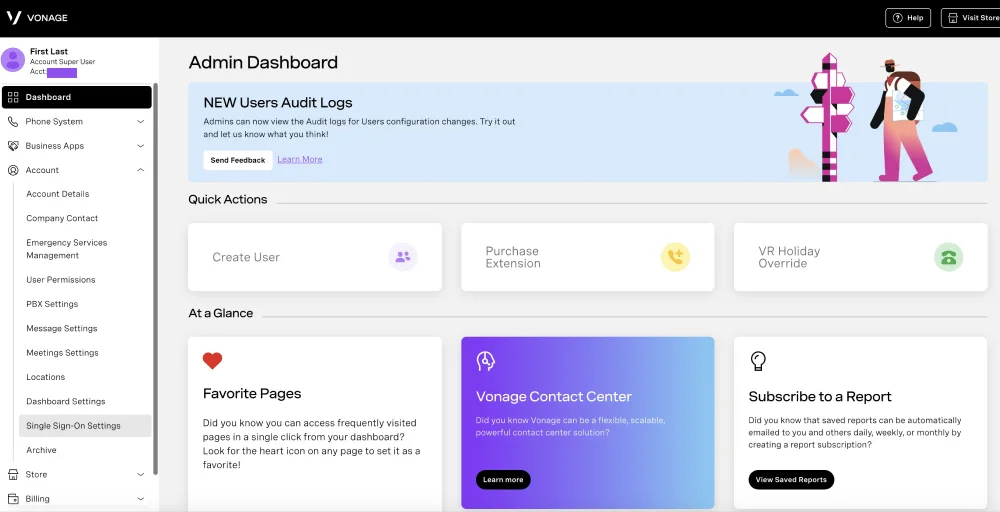
The platform includes both mobile and desktop options, making it flexible for remote and hybrid work environments. Vonage’s admin portal is user-friendly, allowing managers to easily configure settings, manage extensions, and track call activity without requiring technical expertise.
Feature
- Admin Portal: Let your agents manage their business phone system from anywhere with Vonage’s user-friendly portal.
- Busy Lamp Field: Allows your business to see which phones in your system are currently active.
- IP Phone Paging System: Enable the transmission of announcements or messages to up to 500 recipients, who can receive notifications on their page phones.
- Secondary Line Appearance: Improve efficiency by adding an extra line to an existing phone without requiring additional hardware.
- Phone Dashboard: Take advantage of Vonage’s call management system to easily track calls, oversee extensions, and gain a detailed insight into your telephone systems.
Pricing
| Plans | Annual Pricing- per month per line | Key feature set |
| Mobile | $13.99 | Unlimited domestic calling, SMS, and MMS, Voicemail |
| Premium | $20.99 | Support VoIP desk phones, Tema Messaging, and Single Sign-on |
| Advanced | $27.99 | On-demand call recording, Visual voicemail, Call groups |
Why Vonage is a good alternative?
Vonage offers flexible VoIP solutions that suit both small businesses and mid-sized organizations. It supports mobile and desk phones, making it adaptable to remote and hybrid work environments. For businesses looking for a balanced solution that blends affordability with practical functionality, Vonage is a dependable alternative.
Vonage Pros
- The call quality is excellent, and text messages arrive quickly.
- We support both mobile and desk phone use to fit different work styles.
- Monitor the number of calls we have each day, categorize them correctly, and report your talk time.
Vonage Cons
- Our feature development is slower than that of newer competitors, who are better at using AI and automation.
- The quality of support can vary, and customers may experience longer wait times during busy periods.
- We also have fewer native integrations with modern business tools.
10. GoTo Connect
GoTo Connect is a unified communication platform that combines phone, video, messaging, and contact center capabilities into a cohesive system. The platform is designed for businesses seeking an all-in-one solution with robust video conferencing capabilities.
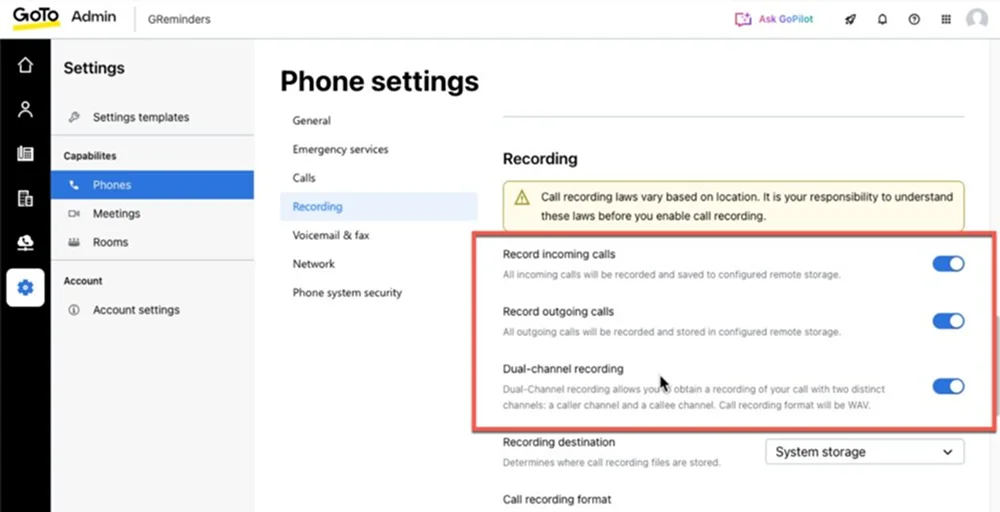
GoTo Connect’s interface is clean and modern, with AI-powered features like interaction summaries that help teams save time on administrative tasks. It’s particularly well-suited for businesses that value video communication alongside traditional phone services.
Feature
- Interactions Summaries: Leverage the power of AI to enhance productivity and quality management by receiving instant summaries and call notes after calls.
- Auto-Attendants: Utilize pre-recorded messages to greet callers, provide essential business information, and direct callers to the appropriate extension or department.
- Screen Sharing: This allows you to show your computer screen to the person you are talking to during a call.
- Phone Number Extensions: Elevate your professionalism by customizing extensions that fit your business perfectly.
- Call Filtering: Enhance productivity with advanced filtering that prioritizes important calls and minimizes distractions.
Pricing
| Plans | Annual Pricing | Key feature set |
| Phone System | Contact sales | Free calls up to 50 countries, Number porting, Call queues, |
| Customer Experience (CX) | Contact sales | Attendant console, Shared Inbox, WhatsApp Channel |
| Contact Center | Contact sales | Call Wrap-Up, Auto-Dialer, Skill Assignment |
Why GoTo Connect is a good alternative?
GoTo Connect is ideal for businesses that need a unified system combining phone, video, and messaging. Its AI-powered interaction summaries, auto-attendants, and Microsoft Teams integration make it attractive for businesses that rely heavily on video collaboration and structured call management.
GoTo Connect Pros
- It allows every employee to have their own direct dial number.
- It allows the Front Desk to directly call shareholders on their cell phones.
- Its integration with MS Teams allows it to use existing communication tools.
GoTo Connect Cons
- It takes 4-5 clicks to search contacts, which is excessively time-consuming and cumbersome.
- The navigation in the admin menu is confusing because different tools share similar names and features.
- Customer support does not provide adequate answers to resolve issues.
How to Choose the Right Zoom Phone Alternative?
Choosing the right alternative depends on your business size, budget, and operational needs. Here are key factors to consider:
1. Pricing Transparency
When looking at prices, consider more than just the basic cost. Check for extra fees, limits on call recordings, restrictions on toll-free minutes, charges for international calls, or storage limits. A provider with clear and flexible pricing helps you avoid unexpected costs as your team expands.
2. Scalability
If you plan to expand, ensure the provider supports advanced IVR systems, skill-based routing, shared numbers, call queue management, and multiple locations. Choose a system that can grow with your business.
3. Integration Capabilities
A modern phone system should integrate with CRM tools such as Salesforce, HubSpot, and Zoho, as well as Helpdesk platforms, marketing automation tools, and collaboration tools. These robust integrations enhance productivity and minimize manual data entry.
4. Customer Support
Choose a provider that offers 24/7 support, live chat or phone assistance, dedicated onboarding, and migration help. Strong support ensures smooth implementation and long-term success.
5. International Coverage
If your business operates globally, check if local and toll-free numbers are available. Also, look into international calling rates and ensure you comply with regulations. Some platforms focus on the US, while others offer global coverage.
Why Choose KrispCall for Your Business?
While Zoom Phone is a powerful extension for companies already deep in the Zoom video ecosystem, it can feel like a secondary “add-on” that lacks the specialized telephony tools growing businesses need. KrispCall stands out as the best alternative by offering a telephony-first experience that prioritizes global reach and team collaboration.


KrispCall is a business phone system built for modern, remote-first teams who need more than just a dialer. Unlike Zoom Phone, which can have complex setup layers and metered international costs, KrispCall offers a streamlined, transparent way to manage global communications.