TL;DR
- An auto attendant routes calls using a fixed menu; an IVR completes tasks by connecting directly to a business’s data systems.
- Auto attendant costs $0–50/month and is live in minutes or hours. IVR runs $25–100+/user/month and takes days to weeks depending on its integration and routing complexity.
- Most growing businesses eventually run both, layered together: auto attendant handling the front line, IVR handling the tasks that justify the integration cost.
Most businesses use Auto Attendant and IVR like they’re the same thing, and that mix-up is exactly why so many phone setups feel wrong.
Treating them interchangeably has a real cost: you either end up overpaying for a complex IVR system that your staff doesn’t need, or you bottleneck your operations by forcing a basic auto-receptionist to handle heavy call center volume it can’t support.
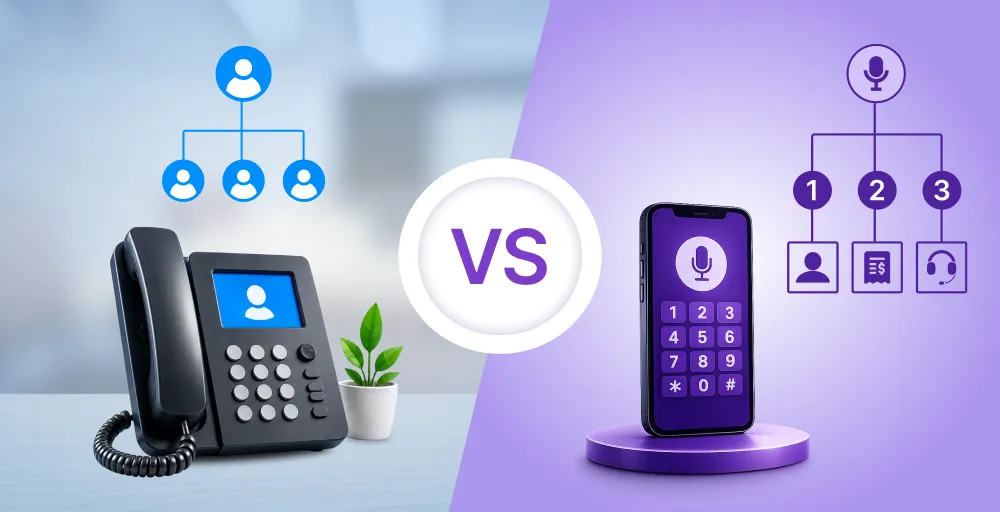
The real distinction between an Auto Attendant and IVR is that they handle different moments in the same call: one greets and directs, the other listens and acts.
This guide breaks down Auto-Attendant vs IVR to explain what each one actually does, when you need one, the other, or both together, and how to set them up without overpaying or overbuilding.
What’s the difference between auto attendant and IVR?
An auto attendant routes calls to the right destination using a fixed menu, while an IVR completes tasks autonomously by integrating directly with a business’s data systems. The video below breaks down how routing and automation work as separate technologies.
What is an auto attendant?
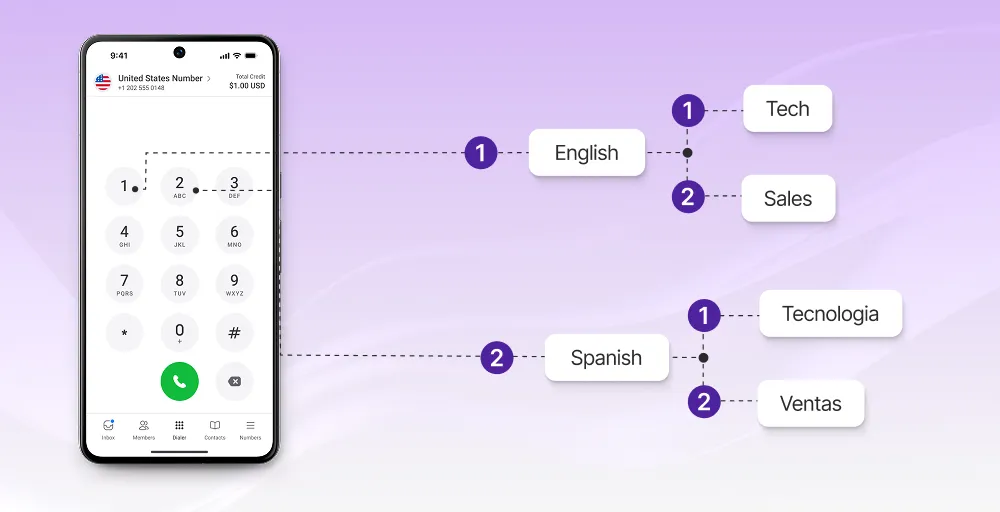
An auto attendant is an automated phone system that answers incoming calls and routes them to the right destination based on prerecorded menu options. Often referred to as an automated answering service, or virtual receptionist or auto-receptionist, it acts as a digital switchboard for your business phone system.
How it works
The auto attendant phone system first plays a recorded greeting, presents a menu of options, and routes the call to a person, department, or extension based on the key the caller presses. It’s a fixed decision tree in which the caller inputs their choice using DTMF (Dual-Tone Multi-Frequency) keypad tones.
For example, a caller dialing a law firm might hear a recorded greeting and options for new client intake, existing case status, or billing, business hours, and pressing a key sends the call straight there. Larger teams can layer a multi-level auto-attendant on top without changing what the system fundamentally does.
Best use cases
- Small teams without a dedicated front desk who still need calls to land in the right department
- After-hours coverage, so callers get options instead of a dead ring or missed calls
- Businesses with a handful of departments and low call volume
- Practices that get repetitive questions about hours, location, or basic info
- Teams that want a dial-by-name directory without hiring a receptionist
Related 👉: Best Auto Attendant Script Examples for Every Business
What is an IVR?
Interactive Voice Response (IVR) is an advanced cloud telephony technology that interacts with callers through voice commands or keypad inputs. It transforms the phone from a simple communication pipeline into an interactive, self-service portal.
How it works
A call center IVR system leverages both DTMF keypad selections and ASR (Automatic Speech Recognition) to identify a caller’s needs, processing spoken words alongside traditional button presses. Rather than just passing the call along, an IVR communicates with your internal billing system, scheduling tools, or CRM platform to find data and execute complex tasks during the call.
For example, a caller can just key in their prescription number and hear whether it’s ready for pickup, or a caller to an airline can check flight status just by speaking their confirmation number.
Best use cases
- E-commerce businesses handling order status and shipping lookups at scale
- Healthcare providers managing appointment scheduling and rescheduling
- Any business needing identity or account verification before a call proceeds
- Teams that want CRM integration so callers get real answers instead of a transfer
- High-call-volume businesses looking to deflect repetitive account-based questions from live agents
Auto attendant vs. IVR comparison table
While both auto attendant and IVR tackle the challenge of inefficient call routing and front-desk overload, here’s how these two stack up:
| Metric | Auto attendant | IVR |
| Definition | A static automated answering service that greets callers and routes them to a specific department or extension. | A dynamic data system that interacts with callers to retrieve database information or route them to the correct destination. |
| Interactivity | One way: the caller picks a path, and the system follows it. | Two-way: the system responds based on caller input and account data. |
| Integration | Functions entirely within your internal cloud phone system. | Native API connections with enterprise CRM, internal billing databases, and ticketing portals. |
| Setup time | Minutes to hours; record a greeting, map menu options. | Days to weeks; depends on the integrations and call flow logic. |
| Cost range | Low to negligible; usually included in standard VoIP cost plans. | Moderate to high; often a paid add-on or higher-tier plan |
| Scalability | Scales via nested menus (multi-level auto attendant) | Scales via added data sources and more complex call flows. |
| Caller experience | Fast, predictable, but limited to pre-set options. | Slower per interaction, but resolves specific tasks without an agent. |
| Best for | Small teams, after-hours coverage, department routing | High call volume, account-based tasks, self-service at scale. |
Decision framework: Which one does your business need?
We built this decision framework as a sequence instead of a checklist. Each question either settles the decision or moves you to the next one.
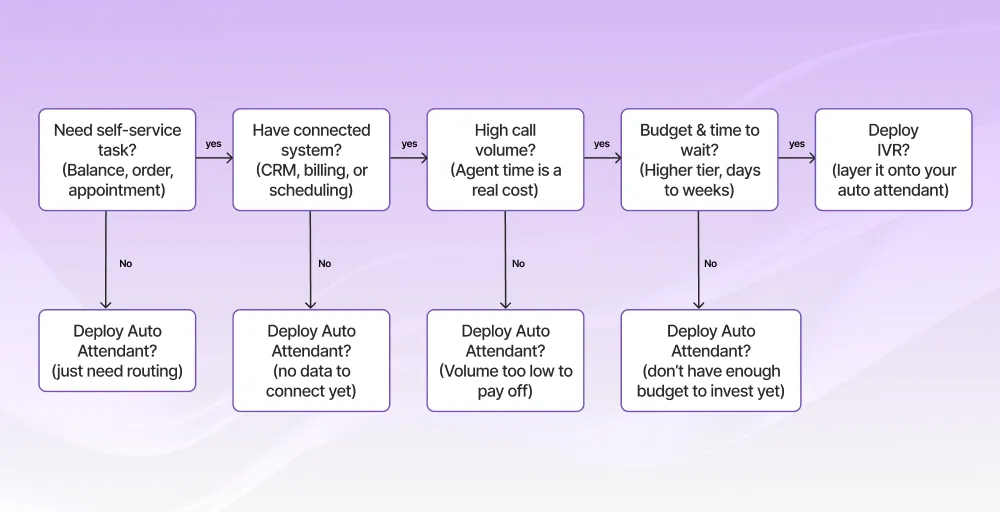
- If a caller only needs to reach the right person, an auto attendant handles that completely, so there’s no task an IVR would add.
- If there’s a task to complete but no CRM (Customer Relationship Management), billing system, or scheduling database behind it, an IVR has nothing to pull from. Get that integration in place before considering it.
- If the data connection exists but call volume is low, the agent time saved by an IVR doesn’t add up to much yet. The cost of building it outweighs the revenue it generates.
- If volume is high enough to matter but the budget or setup timeline isn’t there, an auto attendant keeps things running while you plan for IVR later.
- Clear all four, and an IVR is worth building. Don’t just replace the auto attendant; instead, layer on top of it.
Pros and cons of each
Auto attendant pros & cons
An auto-receptionist provides immediate operational structure but operates within strict structural limits.
Pros
- Immediate deployment and can configure custom greetings and map call routing paths in minutes.
- Predictable cost, usually bundled into a standard cloud phone system plan.
- Simple for inbound callers to understand: simple options, press a key, and done.
- Scales easily with a multi-level auto attendant as departments grow.
Cons
- Basic routing only; can’t verify identity or pull records.
- Every caller sits through the same menu, even repeat callers who already know where they’re going.
- During peak call volume, the entire system depends on the caller staying patient, hold music, and menu repeats in a long call queue.
- Deep menu nesting frustrates callers who hate digging through sub-menus.
IVR pros & cons
An IVR software turns your phone infrastructure into a powerful, data-driven self-service machine, but it requires much higher technical discipline.
Pros
- Deflects repetitive inquiries by allowing callers to resolve billing, shipping, and scheduling tasks entirely on their own.
- Available 24/7 to handle basic inquiries and routine information requests around the clock that don’t need human judgment.
- Incorporates ASR, making it easier to navigate your menu using natural spoken language.
- Lowers operational costs by handling any call volume surge and preventing the need to hire additional staff for basic intake.
Cons
- It demands continuous developer oversight as any updates in your CRM, billing system, or scheduling software risk breaking the IVR connection.
- Higher upfront cost, usually a paid add-on or higher-tier plan.
- Setup can take from days to weeks.
- A poorly designed voice or keypad flow can trap callers in an infinite logic loop, leading to high caller frustration.
Cost comparison: Auto attendant vs. IVR
An auto attendant typically costs $0–$ 50/month as a flat add-on or a bundled feature in a standard cloud phone system plan. IVR with integrations typically runs $25–100+/user/month, depending on the provider and how many systems it connects to.
The wide cost gap doesn’t exist simply because of extra menu options. While a standard auto-receptionist just routes incoming calls, an IVR system incurs significant costs for custom API hooks, secure token processing, voice recognition, and developer hours to build and test custom data paths.
Auto Attendant vs IVR cost breakdown
| Auto Attendant | IVR | |
| Typical cost | $0-$50/month (often bundled) | $25-100/user/month |
| What drives the cost | Menu setup, call routing rules | Integration build, ongoing maintenance, per-user licensing |
| Setup cost | Usually included | Often, a separate implementation fee |
How AI is changing both systems
AI is merging the auto attendant and IVR into a single conversational system that removes the distinction between simple routing and deep data access.
By shifting from rigid button menus to advanced natural language understanding, these intelligent systems let callers state exactly what they need in plain English or their spoken language. This immediately create a smarter auto attendant that acts more like a traditional IVR systems engine than a static menu.
For example, instead of a caller listening to an auto-receptionist menu, selecting Support, choosing Account Management, and waiting for an agent to check a calendar, they can simply say, I need to reschedule my Tuesday afternoon appointment. The system immediately interprets intent using voice AI agents for customer service, accesses the scheduling database, and modifies the time block entirely on its own.
Can an auto attendant and IVR work together?
An auto attendant and an IVR can absolutely work together, and combining them is often the smartest strategy for mid-sized operations.
Instead of choosing one over the other, you can use the auto-attendant to handle initial greetings and routing, then have the IVR take over once the caller needs something data-dependent.
Example: A retail business with an order support line.
1. The frontend filter (auto attendant): A customer dials in, and the auto attendant answers first with a standardized greeting and gives the caller clear choices. E.g., Thank you for calling XYZ store. Press 1 for order support, 2 for returns, or 3 for store hours.
2. The hand-off: The caller presses 1 for order support. The auto attendant routes the call down a specific path, passing it directly to an interactive sub-menu.
3. The self-service resolution (IVR): From here, the IVR takes over the call flow. It prompts the caller to input or speak their order number. It then pulls the record from the billing or fulfillment system and reads back the current shipping status.
If the order needs a change the IVR can’t handle, like a damaged item requiring a replacement, it transfers the caller to a live operator with the order details already pulled up. The same logic applies to technical support lines and urgent calls that need a person fast: the IVR filters, and a human closes it out.
How to set up auto attendant or IVR with KrispCall
Follow this exact step-by-step process to configure an IVR or auto attendant with KrispCall:
Step 1: Open KrispCall’s IVR settings
Log in to the KrispCall dashboard, then go to Settings > Phone numbers, and select the number you want to configure.
Step 2: Go to Call Settings
In the Call Settings, pick the IVR as the Incoming Call Strategy
Step 3: Record your greetings
Generate text-to-speech or record and upload an audio file directly in MP3 or WAV format. Keep it short and to the point, as callers tune out long greetings fast.
Step 4: Assign menu options
Set an action for each number key: route to a specific person, send to voicemail, play a recording, or forward the call to an external number or ring group.
Pro tip: Keep it to 4 options max; more than that and callers start losing track.
Step 5: Test the call flow
Dial in yourself and run through every option to confirm each one routes the way you set it up.
Conclusion
Auto attendant and IVR aren’t competing tools; they solve different moments in a call, and most businesses eventually need both.
- Auto attendant routes calls to the right person or department, while IVR resolves tasks by connecting to a business’s data systems.
- Most growing businesses eventually run both layered together.
- AI is closing the gap between the auto attendant and IVR, letting callers speak naturally instead of navigating fixed, rigid menus.
- The right choice comes down to call volume and whether the tasks callers need actually require system integration.