Did you know a single VoIP call needs around 85 to 100 kbps in both directions? Multiply that by dozens of employees on calls at once, and VoIP bandwidth quickly becomes a bottleneck. The result: choppy audio, dropped conversations, and frustrated customers.
This blog explains how much bandwidth your business actually needs to run VoIP smoothly. You’ll also find practical tips to manage and save bandwidth so your calls stay clear without straining your internet connection.
What is bandwidth and data usage?
Think of bandwidth as the size of the internet pipe your connection provides. It’s measured in Mbps (megabits per second) and determines how much data can flow at once. For VoIP, bandwidth is what keeps multiple calls running smoothly without any crackles, delays, or dropped audio.
Data usage, on the other hand, is about how much of that flow you actually consume. Every VoIP call takes up a certain amount of data while you’re talking.
For example, a regular VoIP call uses around 1 MB of data per minute. So if you’re on the phone for an hour, you’ll use roughly 60 MB, which is not too heavy, but something to keep in mind when calls start stacking up.
How does VoIP use bandwidth?
VoIP, short for Voice over Internet Protocol, takes the sound of your voice, breaks it into tiny digital packets, and sends them across the internet. On the other end, those packets are reassembled so the person you’re talking to hears your voice in real-time. This process is what makes VoIP calls possible without relying on traditional phone lines.
Every one of those packets needs a clear path to travel, and that’s where voice bandwidth comes in. Bandwidth is the space that allows these packets to move back and forth without being delayed or dropped. The amount used depends on the codec, the technology that compresses and decompresses voice.
When only a few calls are active, the phone bandwidth stays fairly low. But as more employees join in, each call takes its slice of available bandwidth. If the connection isn’t strong enough, issues like jitter or poor audio quality start to show. That’s why planning bandwidth around your team size and call volume is so important for VoIP systems.
VoIP bandwidth requirements: Must-needed factors.
Getting VoIP right isn’t only about how fast your internet is. A few key factors decide whether your calls sound clear or turn into a frustrating experience. Let’s walk through them one by one.
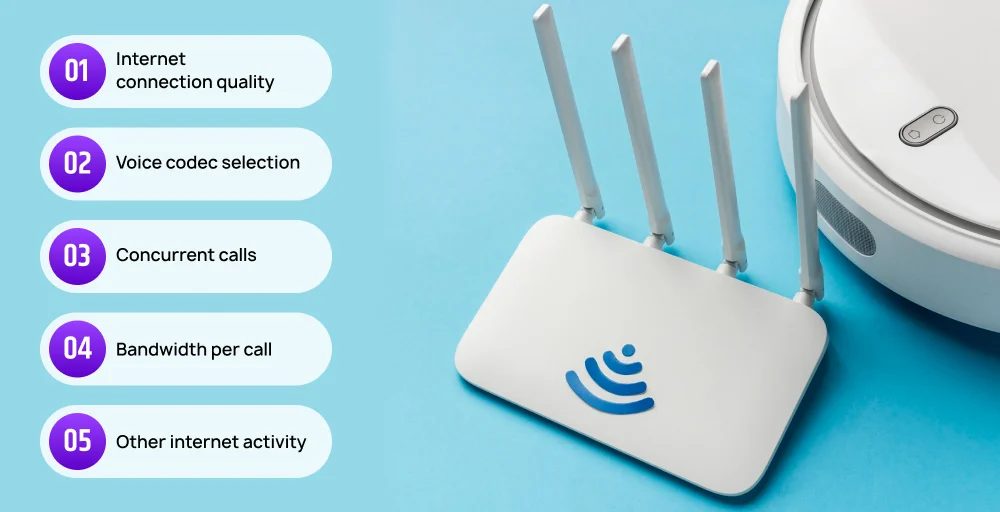
1. Internet connection quality
Your internet connection isn’t just about the speed number your provider advertises. For VoIP, the real measure of quality comes from latency, jitter, and packet loss. Latency above 150 ms causes noticeable delay, jitter above 30 ms makes voices sound robotic, and packet loss interrupts conversations.
Even with plenty of Mbps, an unstable connection will still lead to poor call quality. That’s why businesses should check their VoIP internet speed requirements with a test that measures these factors, not just download speed.
2. Voice codec selection
A codec compresses and decompresses voice data, controlling both the VoIP data rate and the quality you hear. Lighter codec consumes less bandwidth but may sound muffled, while wideband codecs use more bandwidth to deliver HD audio. Choosing the right codec depends on whether your priority is saving bandwidth or offering top-quality calls.
Here’s a quick comparison of common codecs:
| Codec | Approximate bandwidth per voice | Call quality | Notes |
| G.729 | 8 kbps | Fair | Low bandwidth, compressed audio |
| G.722 | 48-64 kbps | Very high (wideband) | Better clarity, uses more data |
| G.711 | 64 kbps | High | Standard for HD voice |
| Opus | variable | Excellent | Adapts to any network conditions |
Picking a codec isn’t one-size-fits-all. A VoIP provider may recommend a mix, like using G.729 when saving bandwidth is important, and G.711 or G.722 for teams that need clear, professional-quality sound.
3. Concurrent calls
The more calls happening at once, the more bandwidth you’ll need. For example, if one call uses 100 kbps, ten calls need about 1 Mbps in both directions. That’s why understanding the expected number of concurrent VoIP calls in your business is key to estimating requirements.
Without planning for multiple users, even a strong connection can feel crowded. Picture each call as a car on a highway; too many cars without enough lanes leads to traffic jams. The same thing happens when bandwidth runs out: calls drop, audio cuts, and jitter increases.
4. Bandwidth per call
On average, a single VoIP call consumes around 85-100 kbps of bandwidth in each direction. This is the baseline figure businesses use when calculating how much internet capacity they need to keep calls steady.
If you know the number of simultaneous calls and the codec in use, you can estimate total bandwidth. For instance, 20 calls using G.711 would take about 2 Mbps upload and 2 Mbps download just for voice. This is why knowing the bandwidth per call is essential before rolling out a large-scale VoIP phone service.
5. Other internet activity
VoIP shares the internet with everything else, from Zoom meetings, file downloads, cloud backups, and even a YouTube video running in the background. All these activities eat into available bandwidth, which can quickly affect call quality.
That’s where tools like QoS (Quality of Service) help. By prioritizing voice traffic, routers make sure that even when someone is streaming or uploading files, VoIP traffic still gets first access to the available bandwidth. Without QoS, even a small spike in other activity could interrupt calls.
How much bandwidth does VoIP need?
The bandwidth required for VoIP depends on how calls are encoded, the number of active lines, and the quality level you expect. In most cases, one VoIP call consumes anywhere from 30 kbps to 100 kbps in each direction.
For example, a team of 15 employees on calls at once would need around 1.5-2 Mbps reserved just for voice traffic. If the same connection is also handling video meetings, cloud apps, or large downloads, the demand spikes quickly, leading to poor call quality unless extra capacity is available.
Here’s how codec choice impacts usage:
| Codec | 10-Minute call | 1-Hour call |
| G. 729 | ~40 MB | ~240 MB |
| G.711 | ~110 MB | ~660 MB |
| Opus | ~60 MB | ~360 MB |
These numbers show how quickly bandwidth demand adds up across a team. This is why businesses with heavier call volumes often prefer fiber internet or dedicated lines that guarantee enough capacity for both voice and other daily activities.
Bandwidth alone doesn’t guarantee call quality. Latency, jitter, and packet loss play just as big a role in how VoIP performs. Running a VoIP internet speed test gives a clear picture of readiness, while using settings like QoS or segmenting VoIP on a VLAN ensures call traffic isn’t competing with video streaming or large file transfers.
Always plan for some extra headroom so your calls remain smooth even during peak usage.
How to calculate VoIP bandwidth
Knowing how to calculate VoIP call bandwidth helps you plan for both current needs and future growth. Instead of guessing, you can use a simple formula that factors in the number of calls, codec bitrate, and a safety margin for overhead.
Formula:
VoIP bandwidth (kbps) = (Codec bitrate + overhead) x Number of concurrent calls.
Where,
- Codec bitrate is the codec used
- Overhead is the packet headers and network protocols
- Concurrent calls are the maximum number of calls happening at the same time
Example:
A small office with 9 employees using the G.711 codec.
VoIP bandwidth = (64+20) x 9 = 756 kbps = ~0.75 Mbps
Always add at least 20-30% extra bandwidth on top of this calculation to account for fluctuations, background tasks, or sudden spikes in call volume.
Factors affecting VoIP call quality
VoIP delivers excellent audio when the network and equipment are working properly. But issues like delays, dropouts, or robotic voices can appear if certain factors aren’t addressed. Below are the most common problems and how to fix them.
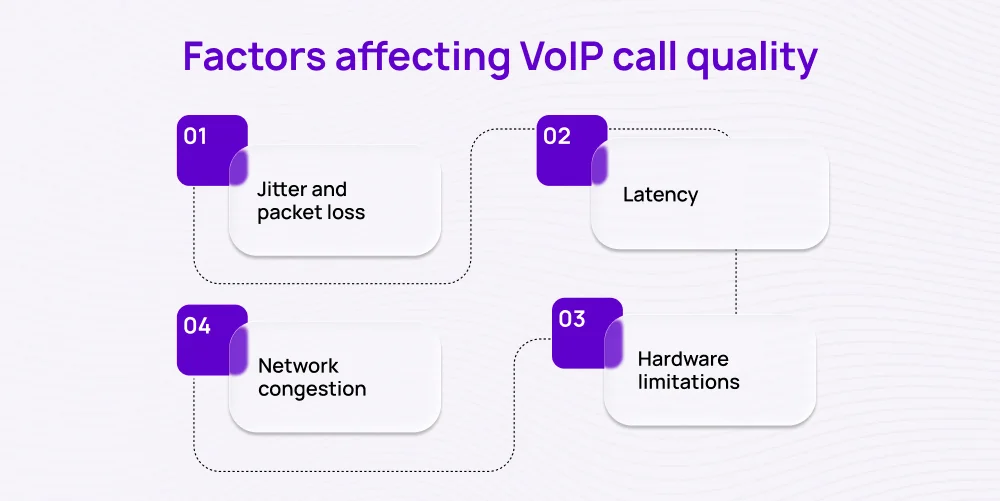
Jitter and packet loss
Jitter happens when data packets arrive at uneven intervals, making voices sound robotic or broken. Packet loss, on the other hand, occurs when some of those packets never reach their destination. Both problems usually stem from unstable internet connections.
Solution: Enable Quality of Service (QoS) on your route to prioritize VoIP traffic, and use a stable, high-speed internet connection to minimize packet delays and losses.
Latency
Latency is the delay between when you speak and when the other person hears you. In VoIP, latency over 150 ms is noticeable and can disrupt natural conversation. High latency often comes from poor internet service or a long network route.
Solution: To overcome this, use low-latency internet like fiber or dedicated lines, reduce background traffic, and choose a VoIP provider with nearby servers to shorten data travel distance.
Network congestion
When too many devices compete for bandwidth, VoIP traffic suffers, causing calls to lag or drop. This network congestion is very common in offices or workspaces where video streaming, cloud backups, and file downloads all run at the same time as calls.
Solution: Increase available bandwidth, schedule heavy downloads outside of call times, or isolate VoIP traffic with a VLAN to keep it separate from other network activity.
Hardware limitations
Even with a strong internet connection, outdated hardware like old or faulty headsets, low-quality routers, or underpowered VoIP phones can hurt the quality of your call. Your firewall can sometimes cause VoIP issues by mistakenly blocking VoIP traffic.
Solution: Upgrade to business-grade VoIP equipment, keep device firmware updated, and replace worn-out headsets or cables regularly.
How to optimize your VoIP bandwidth usage
Getting the most out of your VoIP system isn’t only about having enough internet speed. It’s also about managing how that bandwidth is used. Here are practical steps you can take to keep calls clear and reliable.
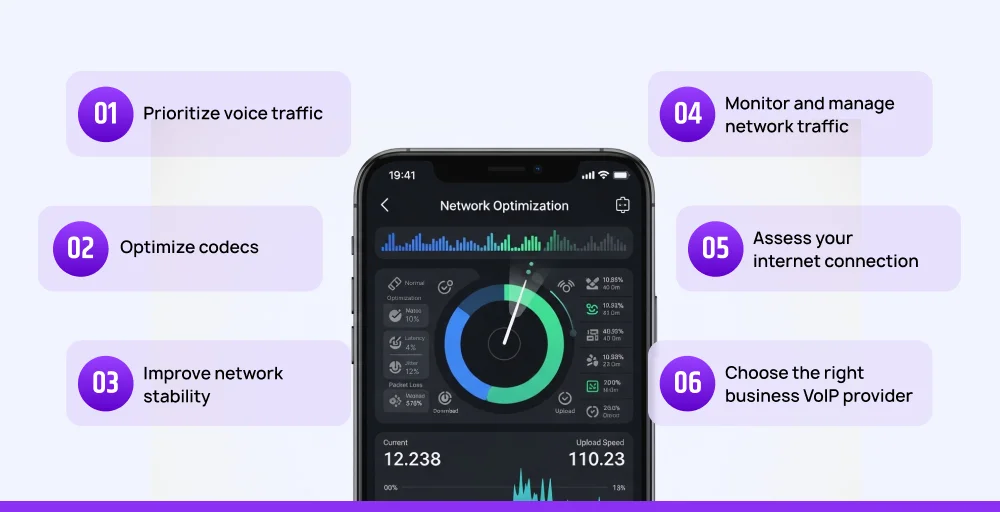
1. Prioritize voice traffic
Assign higher priority to VoIP packets to ensure calls stay clear even when the network is busy. Use Quality of Service (QoS) settings on your router to prioritize voice over less time-sensitive tasks. This way, even if someone is downloading large files or streaming, your calls won’t stutter or drop.
2. Optimize codecs
Different codecs use different amounts of bandwidth. So choose the codec that balances quality and efficiency. For example, use G.729 if you need to save bandwidth, or G. 711 if sound is more important and you have enough capacity. Adjusting codecs helps you match your network’s limits without sacrificing VoIP quality.
3. Improve network stability
Always opt for wired Ethernet connections over Wi-Fi when possible, and work with ISPs that offer reliable uptime and consistent speeds. Wired connections are steadier, reduce jitter, and keep calls consistent. If Wi-Fi must be used, make sure your router supports business-grade performance.
4. Monitor and manage network traffic
Unchecked background traffic, like software updates, can overwhelm bandwidth. Install network monitoring tools that show how bandwidth is being used. If video streaming or automatic software updates are eating into capacity, schedule them outside of work hours or block them during peak calling times.
5. Assess your internet connection
Run a VoIP speed test regularly to see if your connection can handle your team’s call volume. Because sometimes the issue is simply not having enough capacity. If calls lag during a busy period, upgrade to a higher internet plan, or switch to fiber for more reliable speeds.
6. Choose the right business VoIP provider
Not all providers handle traffic the same way. Some offer stronger infrastructure, closer data centers, and built-in QoS support. Pick a VoIP provider for reliability, security, and strong customer support to ensure consistent call quality.
Make every call clear and reliable with KrispCall
Managing bandwidth effectively is key to keeping your VoIP system running smoothly, but the provider you choose matters just as much. A reliable VoIP provider like KrispCall ensures your calls are routed through a stable, high-performance infrastructure, minimizing issues like jitter, packet loss, or unexpected call drops. With the right setup, you don’t have to worry about bandwidth bottlenecks disrupting important conversations.
Upgrade to VoIP and Save More
Cut costs and enhance call quality with KrispCall’s affordable VoIP system. Sign up today and see how much you can save.
Ready to experience reliable calls without the hassle? Book a demo with KrispCall today and see how we can help your business communicate better.