Poor VoIP call quality can seriously impact your business by weakening customer relationships, lowering team productivity, and ultimately reducing revenue.
Issues like dropped calls, echo, static noise, robotic audio, or delayed conversations may seem like minor technical glitches, but they directly affect how professional and reliable your business appears. When communication breaks down, customer trust and internal efficiency suffer.
This guide explains what VoIP call quality is, what causes common audio issues like latency and packet loss, how to test and measure performance, how much bandwidth you need, and the key steps to optimize your VoIP system for clear, reliable business communication.
✨ Key Takeaways
- VoIP call quality depends on factors like internet speed, latency, jitter, packet loss, and codec selection.
- Testing and monitoring with MOS scores, speed tests, and network tools helps prevent call issues.
- Using wired connections, QoS, VLANs, updated hardware, and proper bandwidth management improves call clarity.
- A reliable VoIP provider with global servers and 24/7 support ensures consistent high-quality calls.
What Is VoIP Call Quality?
VoIP call quality refers to the clarity, stability, and reliability of voice communication transmitted over the internet using Voice over Internet Protocol (VoIP).
Unlike traditional phone systems that use dedicated copper lines, VoIP converts voice into digital data packets and transmits them over IP networks.
Call quality depends on:
- Internet speed and stability
- Latency (delay)
- Jitter (packet timing variation)
- Packet loss
- Codec selection
- Network configuration
When optimized correctly, VoIP can deliver HD voice quality that surpasses traditional telephony.
What Causes Poor VoIP Call Quality?
Several network and configuration factors directly affect VoIP call quality.
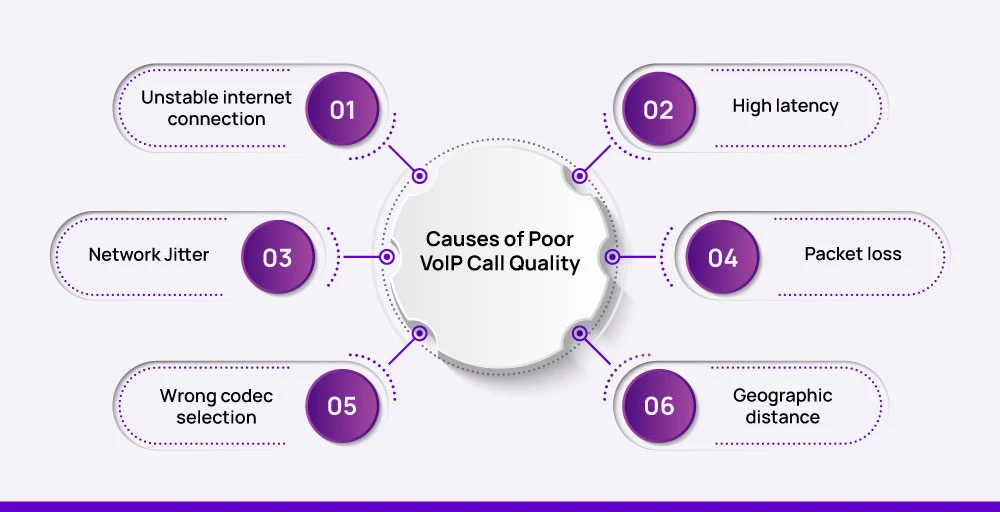
1. Unstable Internet Connection
VoIP depends on a stable and consistent internet connection to transmit voice in real time. When bandwidth fluctuates or connections drop, calls can become choppy, experience delays, or even disconnect.
Even brief interruptions disrupt voice packets, causing distorted audio and making conversations unclear. Ensuring a reliable network is critical to maintaining professional communication.
2. High Latency (Delay)
Latency is the delay in the transmission of voice packets between users. For optimal VoIP call quality, latency should remain below 150 milliseconds.
Delays of 150–300 milliseconds are noticeable, while anything above 300 milliseconds results in overlapping speech, awkward pauses, and a poor overall experience.
High latency often stems from long routing paths, ISP congestion, or distance from remote or international VoIP servers.
3. Network Jitter
Jitter occurs when voice packets arrive inconsistently or out of order. VoIP audio is sent in evenly spaced packets, and when timing varies, speech can sound robotic, scrambled, or overlapping.
Maintaining jitter below 20–30 milliseconds is essential to keep conversations clear and natural.
4. Packet Loss
Packet loss happens when some voice data fails to reach its destination. Even 1–2% packet loss can cause missing words, silent gaps, or distorted audio, making calls frustrating.
Common causes include network congestion, outdated or faulty hardware, and Wi-Fi interference.
5. Incorrect Codec Selection
Codecs compress and encode voice signals, balancing audio quality and bandwidth usage. Using the wrong codec can degrade call quality or overload your network.
For example, G.711 offers excellent sound but uses high bandwidth, G.729 conserves bandwidth with slightly reduced clarity, and Opus adapts dynamically to maintain optimal audio.
Choosing the right codec ensures clear communication without taxing the network.
6. Insufficient Bandwidth
While VoIP doesn’t require massive bandwidth, each call needs a consistent allocation. G.711 calls use 80–100 kbps, G.729 uses 30–40 kbps, and HD codecs can require 100 kbps or more.
When multiple users share the network without adequate bandwidth, congestion occurs, leading to choppy audio, delays, and degraded call quality.
Allocating sufficient bandwidth for VoIP ensures smooth, uninterrupted conversations.
7. Geographic distance
The longer the physical distance between callers or between the users and the VoIP server, the more network nodes the voice data must travel through. This introduces latency and increases the chance of packet loss or jitter.
International calls in particular are vulnerable if your VoIP provider does not have regional data centers or optimized routing paths.
Check out 👉: How Does VoIP Work? A Simple Guide for Modern Businesses
How to Test VoIP Call Quality
To improve VoIP call quality, the first step is to measure it accurately. By understanding the current performance of your system, you can identify issues before they disrupt business communication.
1. MOS (Mean Opinion Score)
The Mean Opinion Score (MOS) is a standard metric used to measure perceived call quality on a scale from 1 to 5. Scores between 4.3 and 5 indicate excellent call quality, 4.0–4.3 is good, 3.5–4.0 is acceptable, and anything below 3.5 reflects poor performance.
MOS provides a subjective assessment of how users experience voice clarity, latency, and overall audio quality. While it doesn’t capture detailed technical metrics, it gives a quick, high-level snapshot.
For example, you can conduct a test call between two office locations and have employees rate the call on clarity, delay, and audio consistency to calculate the MOS.
2. Run a VoIP Speed Test
A VoIP speed test measures your network’s ability to handle voice traffic under real conditions. Key metrics include upload speed, download speed, ping, jitter, and packet loss. Upload speed stability is particularly critical, because VoIP requires smooth transmission of voice data in real time.
High ping or jitter can cause delays or robotic audio, and packet loss can lead to missing words or silent gaps. Tools like Speedtest.net, DSLReports, or specialized VoIP testing software such as VoIP Spear allow you to run these tests easily.
For instance, before a large client meeting, you can perform a speed test to ensure your connection can handle multiple simultaneous calls without degradation.
3. Monitor Network Metrics
Regularly tracking network metrics helps maintain high-quality VoIP calls over time. Important metrics include latency (delay in transmission), jitter (variation in packet arrival), packet loss (missing data), bandwidth utilization, and call drop rates.
For example, using monitoring tools like PingPlotter, SolarWinds VoIP & Network Quality Manager, or PRTG Network Monitor, you can continuously track these metrics and identify trends. If you notice repeated high jitter during peak hours, you can take action to prioritize.
VoIP traffic or upgrade bandwidth, ensuring calls remain clear and uninterrupted. Monitoring also allows IT teams to spot recurring problems early, preventing issues from impacting customer calls or internal communications.
12 Proven Ways to Improve VoIP Call Quality
Maintaining clear and reliable VoIP calls requires a combination of proper network setup, hardware, and user practices. Here are 12 proven ways to enhance VoIP call quality for business communications:

1. Upgrade to Business-Class Internet
A stable internet connection is the foundation of high-quality VoIP calls. Fiber or dedicated broadband with guaranteed uptime and SLA support ensures consistent performance, reducing dropped calls and audio distortion even during peak usage.
2. Use a Wired Ethernet Connection
Whenever possible, connect devices via wired Ethernet instead of Wi-Fi. Wired connections minimize interference, signal drops, and jitter, providing a more stable and predictable network for real-time voice traffic. Wi-Fi is convenient but less reliable for critical business calls.
3. Enable QoS (Quality of Service)
Configuring your router to prioritize VoIP traffic over other data types, such as video streaming, file downloads, and cloud backups, ensures that voice packets are transmitted smoothly. QoS dramatically improves call stability, especially on networks with heavy usage.
4. Use VLAN Segmentation
Separating VoIP traffic from general network traffic using VLANs prevents congestion and packet collisions. By isolating voice communication, your calls maintain clarity even when multiple users are performing bandwidth-intensive tasks.
5. Choose the Right Codec
VoIP codecs compress and transmit audio, affecting both clarity and bandwidth usage. Selecting a codec that matches your network capacity is crucial. For business environments, HD codecs like G.722 or Opus deliver superior clarity, while low-bandwidth codecs like G.729 are suitable for limited connections but sacrifice audio quality.
6. Reduce Network Congestion
Limit heavy downloads, large file transfers, and streaming during business hours to free up bandwidth for voice traffic. Ensuring that the network isn’t overburdened during calls helps prevent choppy audio, delays, and dropped connections.
7. Upgrade Routers & Switches
Outdated networking equipment can cause hidden issues that degrade call quality. Modern routers and switches should support Gigabit speeds, QoS tagging, PoE (Power over Ethernet) for IP phones, and SIP compatibility to ensure seamless VoIP performance.
8. Disable SIP ALG (If Necessary)
Some routers mishandle SIP traffic using Application Layer Gateway (ALG) functions, causing one-way audio, dropped calls, or registration issues. Disabling SIP ALG can resolve these common VoIP problems.
9. Use High-Quality VoIP Hardware
Investing in reliable hardware significantly improves call experience. High-definition VoIP phones, noise-canceling headsets, and Session Border Controllers (SBCs) ensure clear audio, reduce background noise, and secure your voice traffic.
10. Choose a Reliable VoIP Provider
A reputable provider with global data centers, optimized routing, 99.99% uptime, and 24/7 support ensures consistent call quality. Selecting a provider with servers close to your location minimizes latency and packet loss, improving the overall experience.
11. Monitor Calls Continuously
Tracking key metrics like MOS scores, jitter, latency, and packet loss allows you to detect issues early and prevent future degradation. Continuous monitoring ensures proactive management of call quality rather than reactive troubleshooting.
12. Train Employees
Even the best VoIP system can underperform if users aren’t following best practices. Train staff to use wired connections whenever possible, avoid bandwidth-heavy multitasking during calls, and report issues immediately. Educated users help maintain consistent, high-quality communication.
Improve Your VoIP Call Quality with a Reliable Provider
Even with a well-optimized network and high-quality equipment, your VoIP provider is essential for ensuring clear and reliable calls. A trusted provider delivers stable call routing, global server coverage, optimized infrastructure, seamless CRM integrations, and consistent HD audio performance.
For example, KrispCall offers virtual numbers in over 100 countries, integrates with CRMs like HubSpot and Salesforce, and provides enterprise-level reliability with 99.99 percent uptime.
By partnering with a provider that has proven infrastructure and dedicated support, businesses can avoid dropped calls, reduce latency, and maintain professional communication whether teams are working remotely or in the office.