Have you missed an important SMS because it landed on a different device? For anyone who handles multiple conversations on various devices can be frustrating.
Relying on manual forwarding tools often leads to delays, lost messages, and wasted time. Automatically forwarding messages can help, but without the proper setup, you may struggle to keep up with ongoing conversations.
In this guide, you’ll understand how to automatically forward text messages to another phone in multiple ways, step wise instructions, and why it is needed, along with solutions that keep your messages organized, accessible, and always on time.
✨ Key Takeaways
- You can automatically forward text messages to another phone by adjusting a few settings on iOS and installing a third-party app on an Android device.
- Multiple ways to forward incoming text messages include manual forwarding, SMS forwarding apps, carrier-based forwarding, cloud phone systems, and device-linking features.
- You need to forward text messages automatically for business or professional use to maintain privacy, remote control, and backup.
Multiple ways to forward text messages
Here are some of the effective ways you can forward your SMS text messages to another phone:
1. Manual forwarding
You can simply open the message and click the “Forward” option that appears after you long-press the text message. This process is easy, but it can be hectic when you have to forward multiple messages in real time.
2. SMS forwarding apps
You can auto-forward text messages to another number or email using automatic SMS forwarding apps. These apps help you manage personal and work devices easily with SMS forwarding options so that you never miss an alert or important conversation.
3. Carrier-based forwarding
Some mobile carriers allow you to activate SMS forwarding options through quick phone settings. This is a secure and most reliable way to route your text to another or multiple phone numbers without installing a third-party app.
4. Cloud phone systems
Virtual phone systems like VoIP system platforms allow you to forward SMS to email, CRM tools, or other team members. This is ideal for business conversations to maintain centralized messaging and shared inbox features among the team members. This results in an active participation of customer care to solve customer queries in real time.
5. Device-linking features
Tools like iMessage syncing, Android Messages for Web, Phone Link, and WhatsApp linked devices help you read and forward texts from laptops or tablets. This is an easy and convenient way to access your messages on another device with a simple linking feature.
How to automatically forward text messages on iPhone
iPhones do not support direct SMS auto-forwarding to another phone number, but there are smart ways that help you receive messages on multiple Apple devices or route them where you need.
1. Use text message forwarding (Apple’s built-in feature)
If you want your texts to appear on your iPad or Mac, iMessage lets you sync SMS across Apple devices linked to the same Apple ID. This feels like cloning your inbox so nothing slips away.
How to enable it:
1. Make sure you’ve signed into all new devices with the same Apple ID.
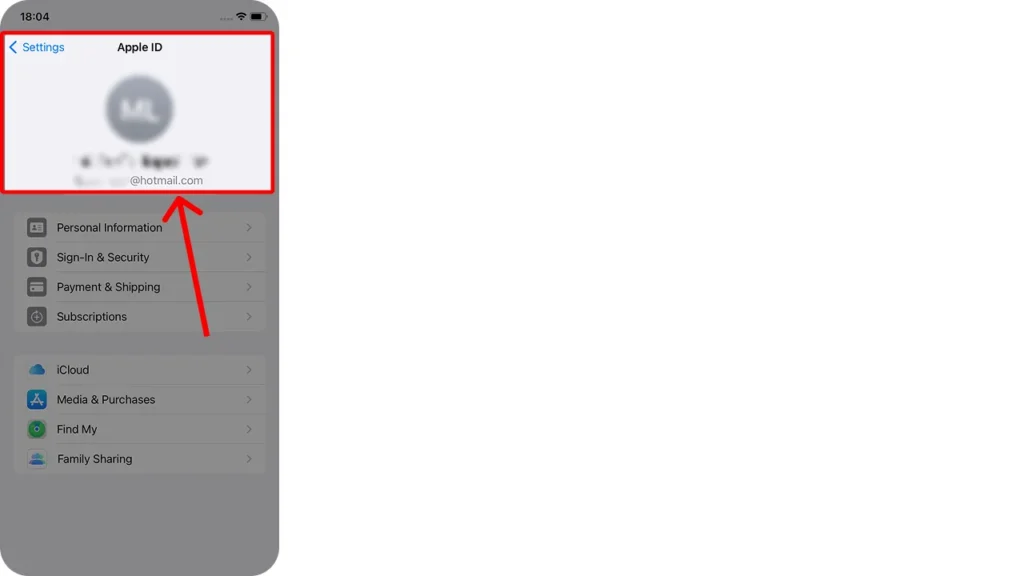
2. Go to Settings > Messages > tap Text Message Forwarding
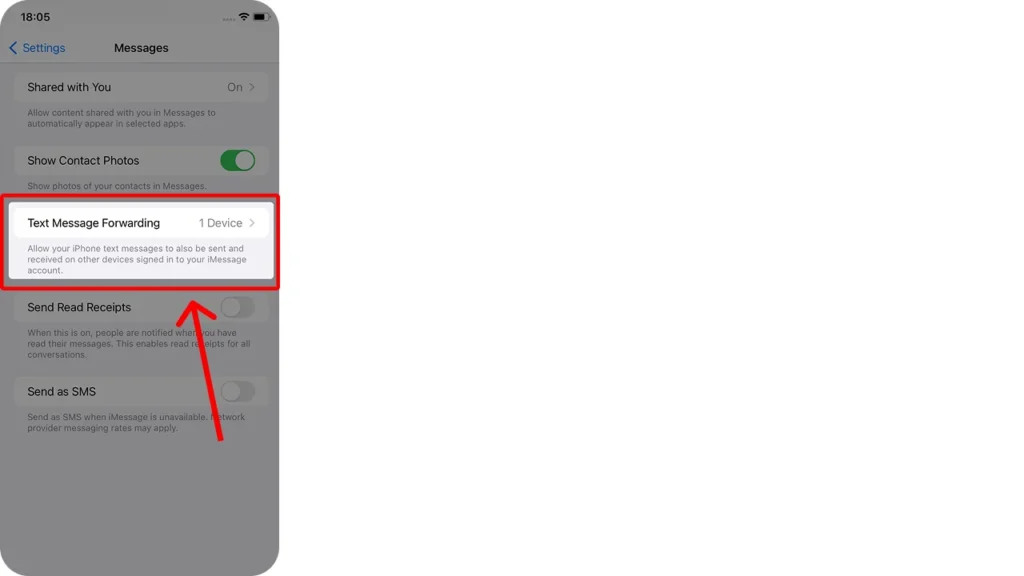
4. Choose the devices you want to receive your messages
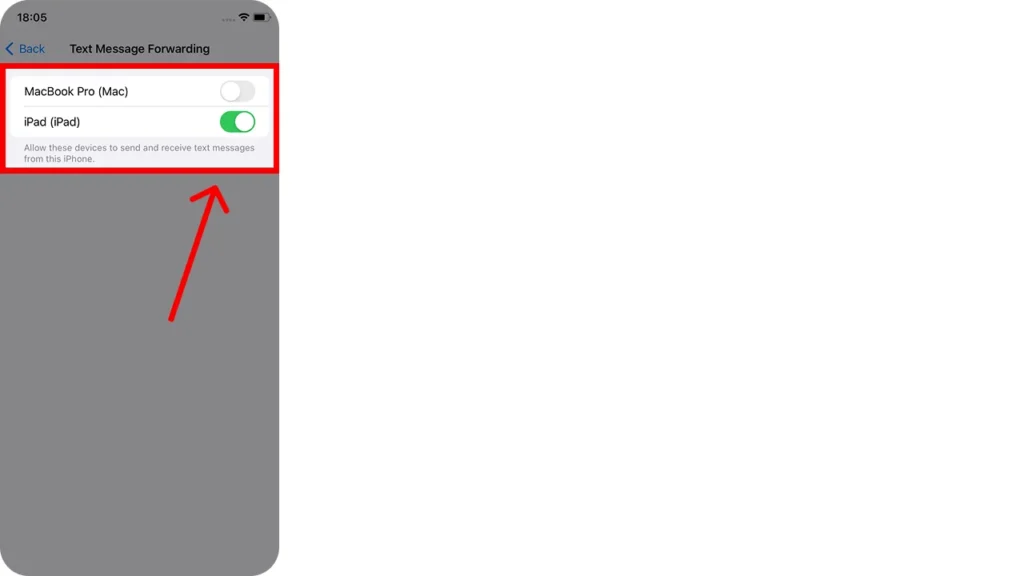
Now your iPhone quietly beams your SMS and iMessages to your other Apple gadgets in real time.
2. Forward iMessages to email using shortcuts
For selective forwarding, you can create a custom Shortcut that sends specific messages to your email. This is helpful if you want alerts in your inbox or if you monitor messages for work.
3. Use third-party automation apps
Apps with cloud sync features allow SMS access from multiple devices. Since Apple blocks apps from silently forwarding texts to external numbers, choose trusted services that sync messages securely.
4. Consider a VoIP number for business SMS
If you need true SMS auto-forwarding for business messaging or team use, a VoIP phone service offers shared inboxes, a VoIP number, email forwarding, and multi-device access without juggling work and personal phones.
Check out 👉: How to Block Text Messages on iPhone and Android?
How to automatically forward text messages on Android
Android gives you more freedom than iPhones when it comes to SMS automation. If you want to send your text messages to another number, email, or secondary device, you can do it with built-in options and third-party tools.
1. Use built-in message syncing (Google Messages)
Google Messages lets you read and respond to texts from your computer using Messages for Web. While it is not a true auto-forward, it keeps your inbox synced across devices so nothing gets lost.
How to set it up:
- Open Messages on your phone
- Tap Menu
- Select Device pairing
- Scan the QR code on messages.google.com/web/
Your SMS will now appear on your computer instantly.
2. Third-party SMS forwarding apps
Android phones support apps that automatically forward text messages to another phone number or email. These tools are handy if you use two phones or want alerts sent to your work device.
Popular options include:
- SMS Forwarder
- Auto Message Forwarding
- IFTTT automation app
To forward SMS from the SMS forwarding app, follow these steps:
- Download and install the SMS Forwarder app.

- Click the (+) icon at the bottom to initiate the forwarding process.
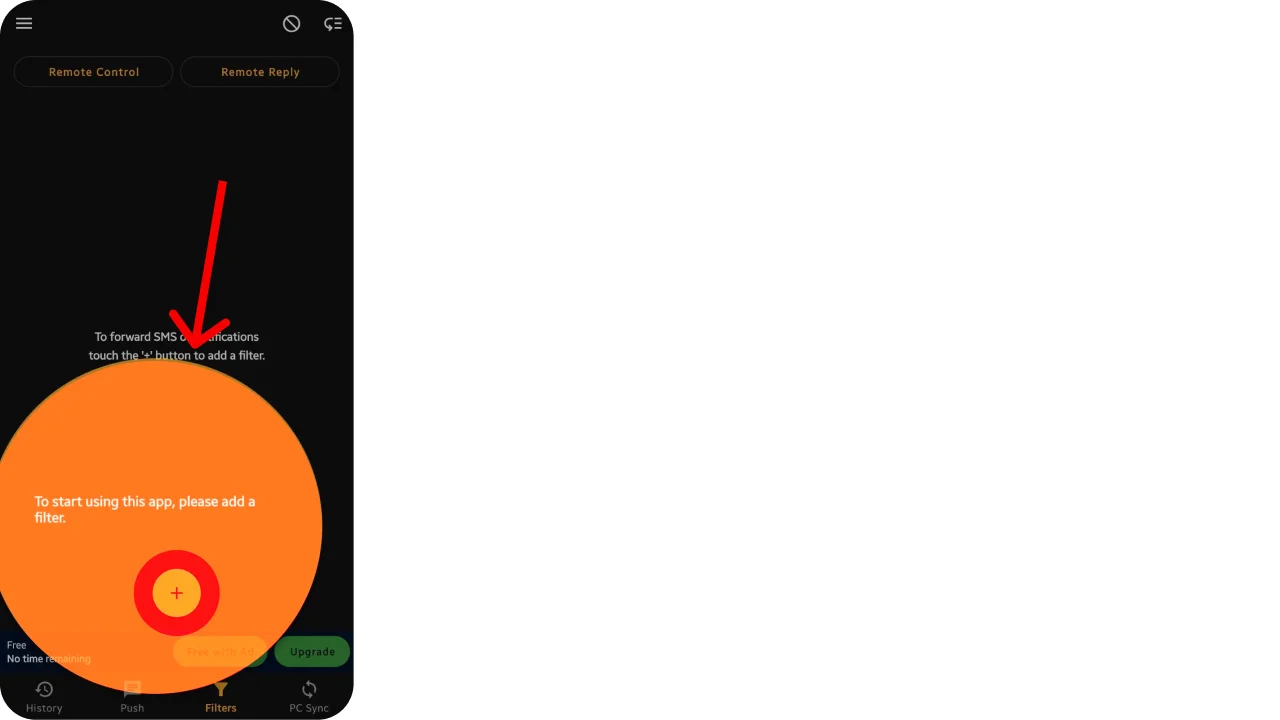
- Once you open the app, you can choose which SMS Notifications you want to forward. Select according to your need. For instance, incoming SMS:
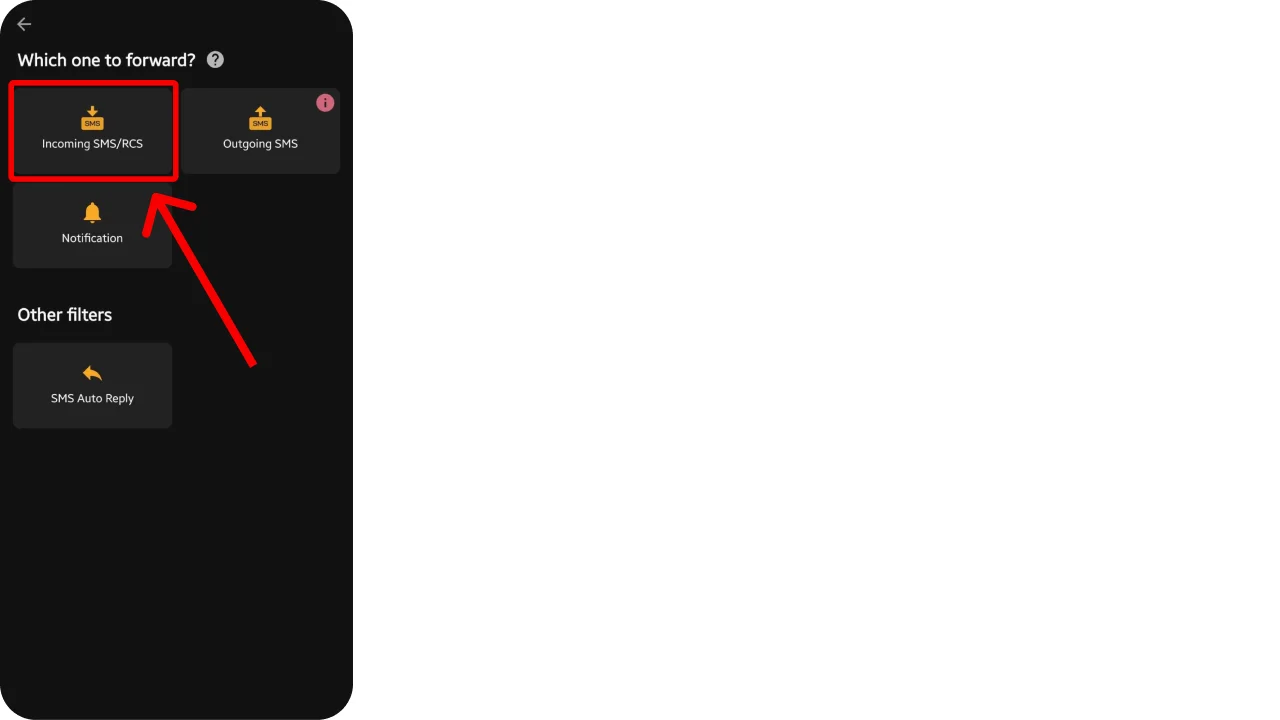
- Add the details of the number or email you want to forward your texts to, and fill in any forwarding conditions if they apply. Also, allow RCS if needed.
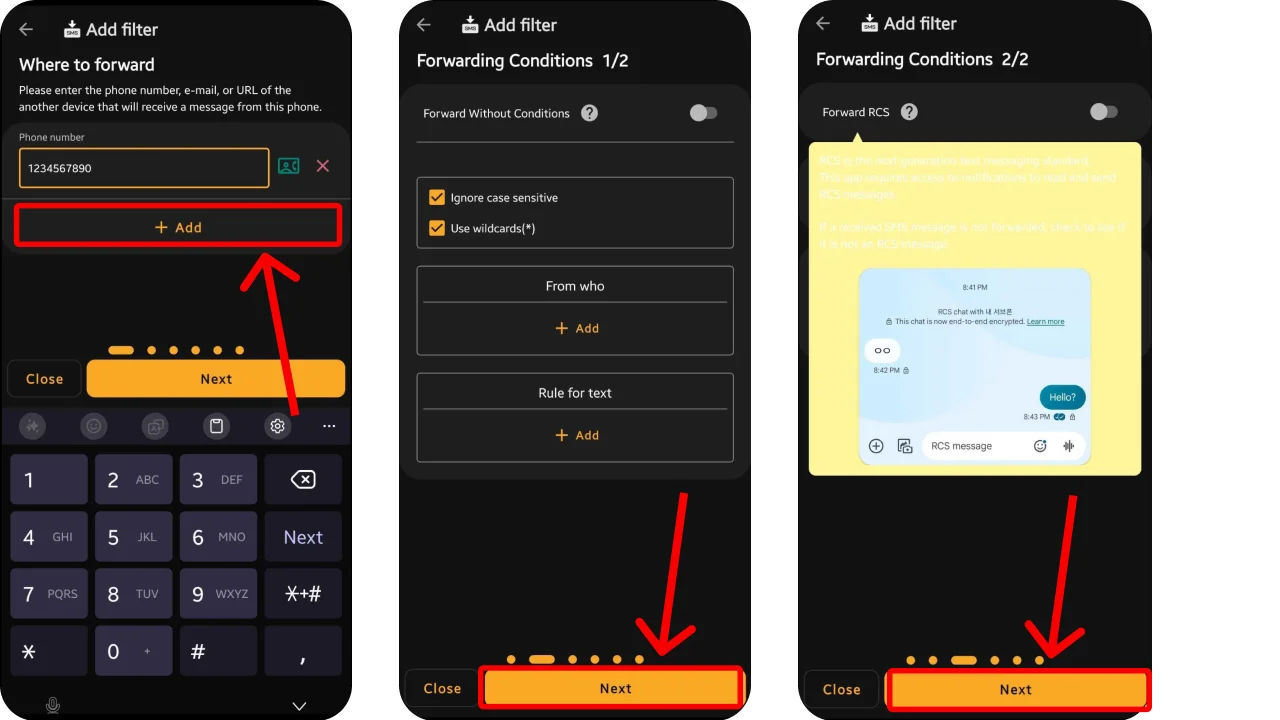
- Now you can add filters and finally allow the permission and approval to forward the text.
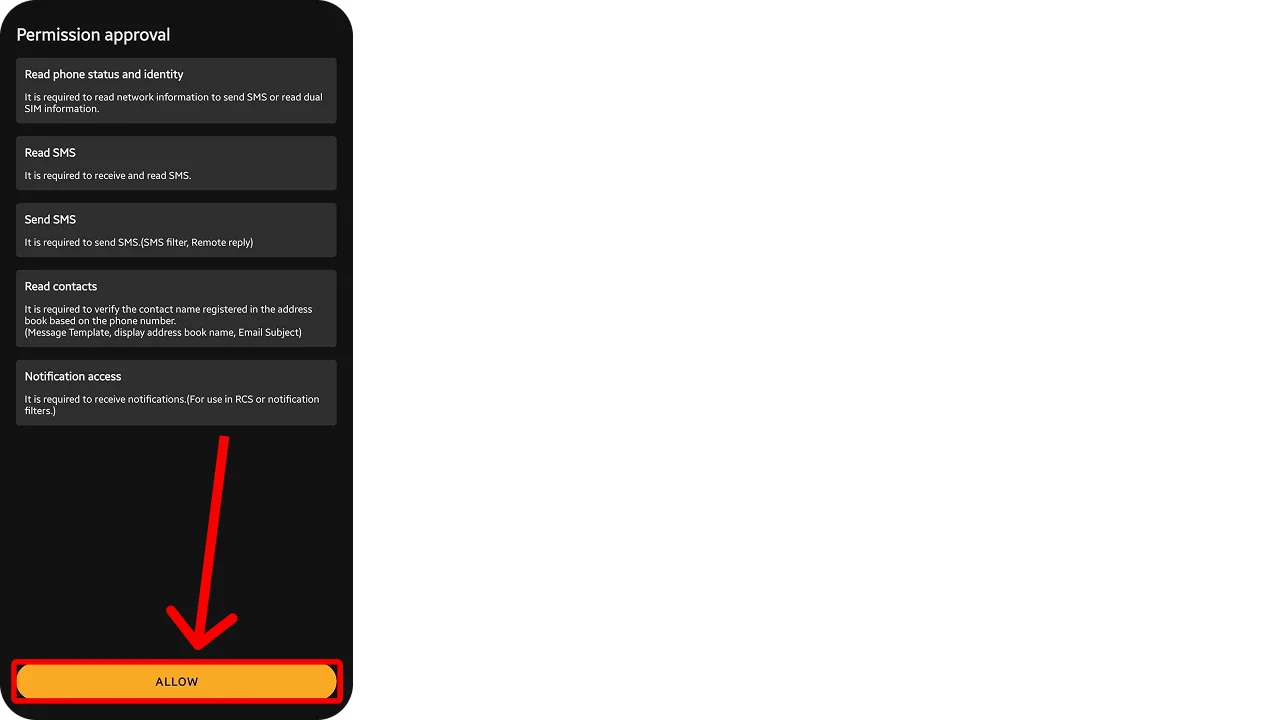
3. Use automation platforms
Platforms like Tasker allow advanced SMS automation. Think of it as a control panel for your phone, where you set triggers like:
- When an SMS arrives
- Forward it to a number or email
- Log a copy in cloud storage
It is powerful, especially for tech-savvy users.
4. VoIP number for business SMS forwarding
If you manage customer messages or shared phones for work, a VoIP phone service can automatically route incoming messages to teammates, email inboxes, and helpdesk tools. This keeps your phone free for personal use while still staying responsive.
Why you might need to forward text messages to another phone.
You may need to forward your SMS messages from one phone to another for various reasons. Here are some of the major reasons why you need to forward to another phone in scenarios:
- For business and professional use: In a business environment, you may need to automatically forward text messages to team members to keep them updated on current deals or client notifications.
- For personal convenience: You may need to access messages on multiple devices so you can read and respond without having to choose between devices. Or you may need to forward all your important messages to a temporary number while you travel abroad so you don’t miss any of your primary phone numbers.
- For privacy and security options: You may need to forward your messages automatically when you want to keep your primary number private. In this situation, all the SMS you receive on your secondary number can automatically be received on your primary number without having to access the device directly.
- For remote monitoring or backup: Sometimes, you may need a number to back up all your important texts or remotely monitor the texts on your home devices from anywhere. This gives you full control over accessing your texts remotely.
📖 Read more : How to Text from a Different Number: Best Apps
Manage team texts easily with KrispCall shared numbers
Relying on automatic SMS forwarding might seem convenient at first, but it quickly becomes a headache for teams. Forwarded messages can get lost, delayed, or scattered across multiple devices. Important customer queries or team updates risk slipping through the cracks, slowing down response times and causing confusion.
This is where KrispCall’s shared phone number is crucial. It allows you to share a common number with each member of your team so everyone stays informed about the latest conversation. This allows teams to respond immediately and keep conversations organized in a centralized inbox.
With KrispCall, you no longer have to forward text manually or check in multiple tabs to get to the conversation. The interaction becomes fast and convenient, so your team stays on the same page.
Try KrispCall today and unlock the endless possibilities of the text message forwarding feature, as well as AI-integrated features with cloud telephony solutions. Book a free demo and keep your team together on the same page.