Choosing a business phone system is no longer just about making calls; it’s about selecting an AI-driven growth partner. While Ringover offers a solid foundation, businesses using it face challenges with complex pricing structures, limited integration options, and feature sets that don’t quite align with their evolving needs.
Whether you’re scaling your sales team, managing a growing support center, or simply seeking better value for money, the market offers compelling alternatives worth exploring.
Here, we compare some of the best Ringover alternatives, highlighting key features, pricing, and use cases to help you choose enterprise-grade contact center solutions for your business.
✨The best Ringover alternatives
- KrispCall: Global teams and startups
- Dialpad: AI-driven real-time coaching
- JustCall: High-volume outbound sales
- Talkdesk: Enterprise-grade CX automation
- Nextiva: Reliable, all-in-one unified communication
- Five9: Large-scale AI contact centers
- CloudTalk: Localized international caller ID
- Aircall: Deepest CRM workflow automation
- RingCentral: scalable multi-channel collaboration
- 8×8: Secore global enterprise compliance.
Why you maybe switching from Ringover?
While Ringover offers solid cloud telephony features, several limitations prompt businesses to explore alternatives:
Pricing complexity
Ringover’s pricing structure can be confusing, with essential call center features locked behind higher-tier plans. Many businesses find themselves paying more than anticipated when they add necessary features such as advanced analytics, call recording, or additional integrations.
Geographic limitations
While Ringover provides international numbers, businesses operating in specific regions experience limited local number availability and suboptimal call quality.
Limited native integrations
Although Ringover integrates with popular CRMs, its integration ecosystem is relatively limited compared to competitors’. Businesses that use niche tools or require extensive customization often encounter roadblocks.
Feature gaps
Advanced capabilities such as AI-powered analytics, sophisticated intelligent call routing, and omnichannel support are either absent or underdeveloped compared to competitors.
Scalability challenges
As teams grow, some users report that Ringover’s performance and support don’t scale proportionally. Enterprise-level features and dedicated support require significant investment jumps.
Our evaluations follow KrispCall’s Content Update Methodology, Software Review Methodology, and Content Integrity Statement.
10 Ringover alternatives & competitors in 2026
We evaluated dozens of cloud telephony platforms based on critical factors, including pricing transparency, feature depth, integration capabilities, ease of use, scalability, customer support quality, and honest user reviews from G2, Capterra, and TrustPilot.
This selection prioritizes platforms that address Ringover’s known limitations while offering distinct advantages for different business needs.
| Provider | Starting price | Best for | What stands out for | G2 Review |
| KrispCall | $12 | SMBs needing flexibility | Global numbers, easy integrations | 4.5/5 |
| Dialpad | $15 | AI-focused sales teams | Real-time transcription, unlimited calls | 4.4/5 |
| JustCall | $25 | Outbound dialing | Power Dialer. Multi-channel AI | 4.3/5 |
| Talkdesk | $85 | Enterprise contact centers | Omnichannel AI agents, analytics | 4.4/5 |
| Nextiva | $15 | All-in-one UCaaS | AI voicemail, Omnichannel routing | 4.5/5 |
| Five9 | $119 | High-volume call center | Blended inbound/outbound AI insights | 4.1/5 |
| CloudTalk | $25 | Sales/support teams | Visual flow builder, Branded caller ID | 4.4/5 |
| Aircall | $30 | Growing sales teams | IVR, Call coaching | 4.4/5 |
| RingCentral | $20 | Global enterprises | Unlimited fax, Business analytics | 4.0/5 |
| 8×8 | Contact sales | Unified communications | AI self-service, Global coverage | 4.1/5 |
1. KrispCall: Best for SMBs seeking global VoIP with strong integrations
KrispCall is a cloud-based VoIP service designed specifically for small to medium-sized businesses that need reliable communication without enterprise-level complexity or costs.
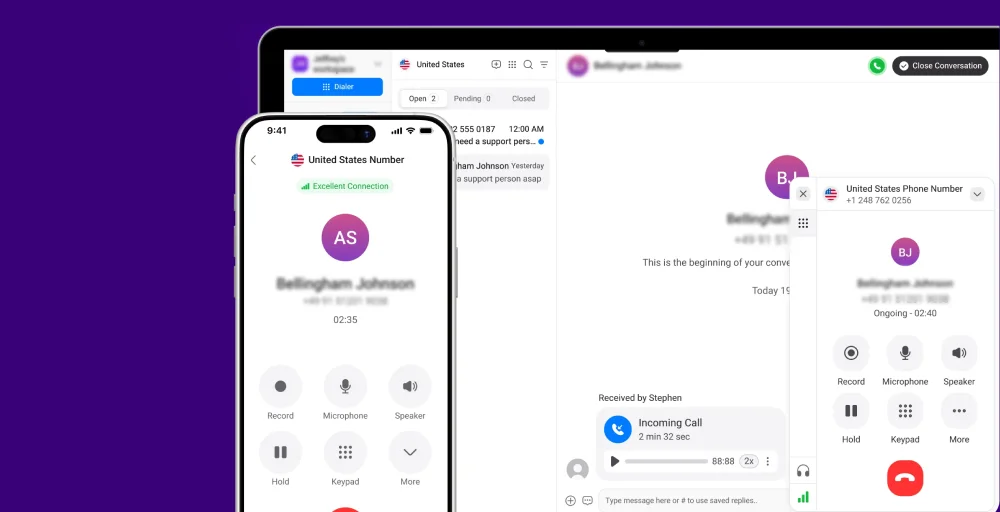
The platform stands out with its straightforward pricing, extensive global number availability across 100+ countries, and seamless integrations with popular CRMs and helpdesk software.
KrispCall combines essential calling features like call recording, IVR, and analytics with modern necessities like SMS capabilities and team collaboration tools, all wrapped in an intuitive interface that requires minimal training.
What makes KrispCall the best alternative to Ringover?
KrispCall addresses many of Ringover’s pain points head-on. While Ringover’s pricing can be unpredictable with add-ons, KrispCall offers transparent, tiered pricing that scales logically with your needs. It provides seamless integrations with platforms like HubSpot, Salesforce, and Zendesk without costly middleware.
For businesses operating internationally, KrispCall’s extensive global number coverage and competitive international calling rates outperform Ringover’s offerings. The number porting process is smoother, with dedicated migration support for minimal downtime. Additionally, KrispCall’s customer support is often praised for its responsiveness, unlike Ringover’s tiered support structure.
KrispCall pricing
KrispCall provides flexible plans starting low for essentials.
| Plan | Annual price (per user/month) | Key feature set |
| Essential | $12 | Global phone numbers, Number Porting, SMS filter |
| Standard | $32 | Pause/Resume Call Recording, Bulk SMS, Call Transfer |
| Enterprise | Custom | Power Dialer, Advanced Reporting, Unlimited Call Recordings |
KrispCall’s standout features
- Global number access: Obtain local, toll-free, or mobile numbers from 100+ countries instantly.
- Unified Callbox: Manage incoming calls, SMS, and voicemail from a single, intuitive dashboard.
- Advanced call management: Features include call forwarding, call queuing, interactive voice response (IVR), and smart routing.
- Advanced call analytics & reporting: Real-time dashboards and historical reports for data-driven decisions.
- Number porting: Transfer existing numbers with guided support and zero downtime.
KrispCall pros
- Budget-friendly pricing with no hidden costs.
- Extensive global reach with local numbers in 100+ countries for international presence.
- User-friendly interface that requires minimal training, significantly reducing onboarding time.
KrispCall cons
- It has limited advanced AI features.
- A smaller marketplace means fewer third-party tools, resources, and community support.
- Advanced AI features are currently in development
What users say about KrispCall
As someone new to these cloud-based phone system, I’ve got to say my experience with Krispcall has been surprisingly smooth. Setting up my voicemail gave me a tiny bit of trouble, but a support person jumped on chat and got me sorted in literally minutes. That kind of quick help makes a huge difference.
– Piper H. Sales Development Executive, Small-Business (50 or fewer emp.) via G2
Related Article 👉: KrispCall Vs RingOver: Which Is Best Cloud Telephony System?
2. Dialpad: Best for AI-focused sales teams
Dialpad revolutionizes business communications by embedding artificial intelligence into every aspect of the calling experience. Built on Google Cloud infrastructure, Dialpad delivers exceptional reliability and strong call quality, along with real-time transcription, sentiment analysis, and automated post-call summaries.

The platform is particularly popular among sales teams who leverage its AI-powered coaching features to improve performance. With unlimited calling in the US and Canada, seamless video conferencing, and sophisticated analytics, Dialpad serves businesses that view communication data as a strategic asset.
Dialpad’s standout features
- Vi™ voice intelligence: AI that transcribes calls in real-time, tracks keywords, and provides post-call insights.
- Unlimited calling: No per-minute charges for US and Canada calls on all plans.
- Sentiment analysis: Automatically detects customer mood and highlights critical moments.
- Video meetings: Integrated HD video conferencing without needing separate tools.
- Call pop: Automatic screen pop with customer information when calls come in.
Dialpad pricing
Dialpad structures its pricing to accommodate businesses of various sizes, with enterprise features available at competitive rates.
| Plan | Annual price (per user/month) | Key feature set |
| Standard | $15 | Unlimited calling, Visual voicemail, Advanced call routing |
| Pro | $25 | Hold queues, File Sharing, Unlimited meetings |
| Enterprise | Talk to sales | 100-seat minimums, Unlimited ring groups, Voicemail transcription |
Dialpad Pros
- Best-in-class AI capabilities that provide actionable insights without manual analysis.
- Unlimited calling included in base pricing eliminates worries about usage costs.
- Superior call quality thanks to Google Cloud infrastructure and adaptive audio optimization.
Dialpad Cons
- Higher learning curve for teams unfamiliar with AI-enhanced workflows and analytics.
- Enterprise plan requirements can be restrictive for mid-sized businesses with under 100 seats.
- International calling costs add up quickly outside of US/Canada coverage.
3. JustCall: Best for outbound dialing teams
JustCall is a sales-focused cloud-based phone system that excels at automated outbound calling. Designed for teams that make hundreds or thousands of calls daily, from sales development reps to telemarketing operations, JustCall combines powerful dialing modes with multi-channel engagement capabilities.

The platform integrates SMS, email, and voice calls into unified workflows, enabling sales teams to reach prospects through their preferred channels. JustCall’s robust integration marketplace connects with over 100 business productivity tools, making it a central hub for sales communication.
JustCall’s standout features
- Power dialer: Automatically dial through contact lists with minimal downtime between calls.
- Multi-channel AI agent: AI-powered assistant that takes notes across calls, SMS, and emails.
- SMS campaigns: Send bulk text messages with personalized variables and scheduling.
- Sales dialer modes: Choose from Preview, Power, or Predictive dialing based on campaign needs.
- Call monitoring: Supervisors can listen in, whisper, or barge in on calls for coaching.
JustCall pricing
JustCall offers tiered pricing that scales with team sophistication, from basic calling to advanced AI features.
| Plan | Annual price (per user/month) | Key feature set |
| Team | $25 | 500 SMS segments, Messaging suite, IVR & call menus setup |
| Pro | $49 | Power Dialer, Queue callback, Higher API limits for scale |
| Pro Plus | $89 | SMS Co-pilot, AI call scoring, Multi-channel AI-notetaker |
| Business | Talk to us | Unlimited calling & SMS, Enterprise-grade SLA, Real-time agent assist |
JustCall Pros
- Exceptional dialing capabilities with multiple modes optimized for different outbound strategies.
- A multi-channel approach lets teams engage via voice, SMS, and email from a single platform.
- Extensive integrations with 100+ tools, including all major CRMs and sales engagement platforms.
JustCall Cons
- Outbound-focused design means inbound customer support teams may find features less optimized for their needs
- Pricing tiers jump significantly, especially when accessing advanced AI features in Pro Plus
- SMS costs can accumulate rapidly for high-volume texting campaigns beyond the included limits
4. Talkdesk: Best for enterprise contact centers
Talkdesk is an enterprise-grade contact center platform built for organizations that prioritize customer experience at scale. The system excels in omnichannel environments where customers interact via voice, email, chat, SMS, and social media.

Talkdesk’s AI-powered capabilities extend beyond basic automation to include predictive analytics, intelligent routing, and industry-specific agents trained for healthcare, financial services, and retail scenarios. The platform’s open API architecture allows deep customization and integration with enterprise systems.
Talkdesk’s standout features
- Omnichannel AI agents: Industry-specific virtual agents handle common inquiries across all channels.
- Intelligent routing: AI matches customers to the best-suited agents based on context and history.
- Real-time dashboards: Customizable live views of contact center performance and KPIs.
- Quality management: Automated call scoring and evaluation based on configurable criteria.
- Workforce management (WFM): Advanced scheduling, forecasting, and adherence tracking tools.
Talkdesk pricing
Talkdesk positions itself in the enterprise market with pricing that reflects its comprehensive feature set.
| Plan | Annual price (per user/month) | Key feature set |
| Digital Essentials | $85 | CXA, Studio & Routing, API Access, Quality Management |
| Voice Essentials | $105 | Voice Engagement, Automation Designer, Conversations Mobile App |
| Elite | $165 | Screen Recording, Automated Notifications, Performance Management |
| Industry Experience Clouds | $225 | Industry AI Agents, Industry System Integrations, Real-time Dashboards (Live) |
Talkdesk Pros
- Industry-specific solutions with pre-configured workflows and AI agents for healthcare, retail, and finance.
- Enterprise-grade scalability handles thousands of concurrent agents without performance degradation.
- Comprehensive feature set eliminates the need for multiple point solutions in contact center operations.
Talkdesk Cons
- Premium pricing places it out of reach for small businesses and startups.
- Complex implementation often requires professional services and extended deployment timelines.
- Too complex for basic needs, when teams only need simple calling and light support.
5. Nextiva: Best for all-in-one UCaaS
Nextiva delivers a complete unified communications as a service (UCaaS) platform that goes beyond traditional phone systems. The solution combines voice, video conferencing, team messaging, file sharing, and contact center capabilities into a single platform.

Nextiva’s strength lies in its balanced approach, providing enterprise features without overwhelming complexity, making it suitable for businesses of 5 to 500 employees. The platform’s reliability is exceptional, with a 99.999% uptime SLA, while its customer service teams consistently receive high marks.
Nextiva’s standout features
- AI voicemail transcription: Automatically converts voicemails to text, highlighting key insights.
- Omnichannel routing: Intelligently distribute calls, chats, and emails based on agent skills.
- Business analytics: Comprehensive reporting on communication patterns and team performance.
- Auto attendant: Professional virtual receptionist with multi-level menus and custom greetings.
- Conference bridge: Built-in audio conferencing with no per-minute charges or participant limits.
Nextiva pricing
Nextiva’s pricing tiers accommodate a range of business needs, from basic calling to comprehensive contact center operations.
| Plan | Annual price (per user/month) | Key feature set |
| Core | $15 | Smart call routing, Voicemail with AI transcription, 2 Dashboards |
| Engage | $25 | Digital fax, Customer to team SMS messaging, Voice analytics |
| Power Suite CX | $75 | Voice recording, ACD Call Back, Omnichannel conversation history |
Nextiva Pros
- An all-in-one solution eliminates the need to juggle multiple vendors for communication.
- Exceptional reliability with industry-leading uptime guarantees and redundant infrastructure.
- Outstanding support with US-based teams available 24/7 via phone, chat, and email.
Nextiva Cons
- Significant price jumps between tiers, especially when moving to the Power Suite CX level.
- Learning curve for teams transitioning from simpler phone systems to a complete UCaaS platform.
- Some advanced features require custom enterprise pricing rather than standard tiers.
6. Five9: Best for high-volume call centers
Five9 is a cloud contact center solution engineered for organizations handling thousands of interactions daily. The platform specializes in blended call center operations where agents handle both inbound customer service and outbound sales calls.

Five9’s AI capabilities span the entire customer journey, from self-service IVR to post-call analytics that identify trends and training opportunities. The system’s predictive dialer maximizes agent productivity by keeping them connected to live prospects, while intelligent routing matches customers with the most qualified agents.
Five9’s standout features
- Call conferencing software: Develop advanced IVR applications that enable callers to set up conference calls by dialing additional phone numbers to add participants.
- Agent call scripting: Allow agents to present a uniform message to contacts with a web-based contact center script customized for the specific purpose of each call.
- Do Not Call Compliance: Adhere to relevant calling laws by managing do-not-call (DNC) requests in both your outbound and inbound activities.
- PBX: Integrate cloud contact center software into your current PBX system for enhanced CTI, interactive voice response (IVR), ACD, predictive dialing, and more.
- Text-to-speech software: Convert written text into natural-sounding speech for automated call flows and voice applications.
Five9 pricing
Five9’s pricing reflects its position as an enterprise contact center solution with modular feature sets.
| Plan | Annual price (per seat/month) | Key feature set |
| Digital | $119 | Geo Redundancy, SMS/MMS, Social Messaging, Agent Desktop |
| Core | $159 | Voice, AI Summaries, CRM integrations, AI insights, Dialer |
| Plus | Contact Sales | AI Agent Assist, UC, Blended Inbound/Outbound, Recording, |
| Pro | Contact Sales | Live Transcription, Quality Management, WFM, Analytics |
| Enterprise | Contact Sales | Chat, Email, AI Knowledge, Full Platform, 24/7 World-Class Support |
Five9 Pros
- Purpose-built for high call volume with an architecture that maintains agent performance at scale.
- Sophisticated AI throughout, from self-service to agent assistance to post-call analysis.
- Blended operation excellence optimizes agent utilization across inbound and outbound activities.
Five9 Cons
- Premium pricing starts higher than most competitors, limiting accessibility for smaller operations.
- Complexity requires expertise to leverage features, often necessitating dedicated administrators to utilize them fully.
- Overkill for basic needs when businesses simply need standard phone system functionality.
7. CloudTalk: Best for sales and support teams
CloudTalk is a cloud-based call center solution designed specifically for sales and support teams that value both powerful features and ease of use. The platform’s visual call flow builder allows non-technical users to create sophisticated routing logic through drag-and-drop interfaces.

CloudTalk’s international calling capabilities, with local numbers in 160+ countries, make it ideal for businesses with global customer bases. With integrations covering major CRMs, helpdesks, and e-commerce platforms, CloudTalk positions itself as the communication hub for customer-facing teams.
CloudTalk’s standout features
- Call flow design: Designs the inbound calling journey to meet your business’s specific needs and your customers’ expectations.
- Spam protection: Manually, automatically, or in bulk, block known spam numbers for both inbound and outbound calls to streamline your calling experience.
- Call queuing: Hold queues with position announcements and estimated wait times.
- Automatic outbound number: Automatically display a phone number for the recipient’s country for all international outbound calls.
- Ring groups: Customize inbound call queuing and routing to multiple agents, reducing response times.
CloudTalk pricing
CloudTalk offers three tiers that progressively add features for teams with increasingly sophisticated needs.
| Plan | Annual price (per user/month) | Key feature set |
| Starter | $25 | Number Porting, Branded Caller ID, Visual call flow builder |
| Essential | $29 | VIP queues, Auro-Outbound number, Agent & group reporting |
| Expert | $49 | Custom Dashboards, Smart Dialer, Live monitoring |
CloudTalk Pros
- Intuitive visual builder makes advanced call flows accessible to non-technical team members.
- Strong international presence with extensive number coverage and quality global connections.
- The excellent integration ecosystem seamlessly connects with 35+ popular business tools.
CloudTalk Cons
- Limited AI features compared to competitors, focusing heavily on artificial intelligence.
- Price increases rapidly when you access advanced features in the Expert tier.
- A smaller company means fewer resources and slower feature development compared to larger vendors.
Check out 👉: Top 10 CloudTalk Alternatives & Competitors in 2026
8. Aircall: Best for growing sales teams
Aircall is widely recognized for its user-centric interface tailored for sales workflows. The platform combines simplicity with power, offering essential features in an interface that requires virtually no training. Aircall’s deep integrations with CRM systems and sales tools mean call data automatically flows where teams need it, eliminating manual logging and data entry.

The system’s collaboration features, including dropped calls, call commenting, and shared inboxes, make it easy for teams to coordinate on customer interactions. Aircall’s transparent pricing and quick setup appeal to growing businesses that need to scale quickly without complex implementations.
Aircall’s standout features
- Shared call inbox: Team members can access, comment on, and collaborate on any call.
- Call coaching: Managers can listen to live calls and whisper guidance without customers hearing.
- IVR System: Multi-level phone menus with customizable greetings and routing rules.
- Power dialer: Automatically dial through lists with one-click calling and local presence.
- Call tags & disposition codes: Add custom tags to calls for easy filtering and reporting.
Aircall pricing
Aircall’s pricing structure is straightforward, with three tiers serving teams from small to enterprise.
| Plan | Annual price (per license/month) | Key feature set |
| Essentail | $30 | Analytics Data, IVR (Vocal Server), Ring groups, Shared call inbox |
| Professional | $50 | Smart routing, Call coaching, Mandatory tagging |
| Custom | Call for details | Power Dialer, Voicemail Drop, Role-based permissions |
Aircall Pros
- Incredibly user-friendly with minimal setup and training required to get teams productive.
- Rich integration marketplace with 100+ pre-built connectors to popular business tools.
- Excellent for sales teams with features specifically designed for outbound calling workflows.
Aircall Cons
- Limited contact center features compared to platforms explicitly built for support operations.
- Pricing scales up as seat count grows, making it expensive for larger teams.
- Basic analytics may not meet the needs of organizations that require deep reporting and custom dashboards.
9. RingCentral: Best for global enterprises
RingCentral is one of the most established names in cloud communications. The platform offers a complete UCaaS solution that includes voice, video, messaging, contact center, and business SMS. RingCentral’s global infrastructure ensures reliable service across 45+ countries, with local number support in 110+.

RingCentral’s strength lies in its maturity and extensive feature set, which support various communication scenarios out of the box. The recent addition of RingCentral AI brings conversation intelligence to AI-generated call summaries, insights, and virtual agents.
RingCentral’s standout features
- Call flip: Easily transfer calls from your mobile device to your desktop.
- Answering rules: Direct calls to your local numbers from anywhere in the world by using reliable answering rules.
- Paging: You can make announcements using your desk phone, desktop computer, or mobile device.
- Visual voicemail: View a preview of your voicemail messages in text format when you’re unable to listen to them.
- Unified inbox: Enhance your follow-up process with integrated access to text, fax, and voicemail, all in one platform.
- Multi-Site Management: Centrally manage multiple office locations with distinct configurations.
- Developer Platform: APIs and SDKs for building custom integrations and applications.
RingCentral pricing
RingCentral structures pricing across four tiers that accommodate businesses from small teams to global enterprises.
| Plan | Annual price (per user/month) | Key feature set |
| Core | $20 | Unlimited audio conferencing, Incoming caller ID, Basic Call queues |
| Advanced | $25 | Hot desking, Unlimited internet fax, Summarizes unread messages |
| Ultra | $35 | Call log reports, Business Analytics Pro, Custom roles and permissions, |
| Customer Engagement Bundle | Contact sales | SMS Compliance management, Shared SMS Inbox, Unlimited storage for files, messaging, and recordings ** |
RingCentral Pros
- Established global presence with proven reliability and support infrastructure worldwide.
- Comprehensive feature set covers virtually every communication need without additional tools.
- Strong security and compliance meet the requirements of regulated industries, including HIPAA and GDPR.
RingCentral Cons
- Higher cost compared to newer competitors offering similar feature sets at lower prices.
- A complex interface can overwhelm new users with too many options and settings.
- Feature bloat means organizations often pay for capabilities they never use or need.
10. 8×8: Best for unified communications
8×8 provides a comprehensive unified communications platform that unifies voice, video, chat, and contact center capabilities into a single solution. The platform distinguishes itself through global reach, with built-in international calling to 48 countries and local numbers in 170+ countries.

The platform caters to organizations with 10 to over 10,000 employees, excelling in hybrid work environments that require consistent communication. 8×8’s analytics deliver insights across all support channels, optimizing communication investments.
8×8’s standout features
- AI-enabled self-service: Natural language IVR that understands customer intent and resolves issues
- Omnichannel contact center: Unified interface for voice, email, chat, SMS, and social media
- Team messaging: Persistent chat with file sharing, threads, and integration with other 8×8 features
- Microsoft Teams integration: Use 8×8 calling within the Teams interface for hybrid deployments
- Communications APIs: Build custom applications using 8×8’s voice, SMS, and authentication APIs
8×8 pricing
8×8 offers multiple product lines with custom pricing based on organizational needs and feature requirements.
| Plan | Annual price (per user/month) | Key feature set |
| Contact Center | Chat with Sales | Agent Workspace, AI-Enabled Self-Service, Secure Payment Processing |
| CX Beyond the Contact Center | Chat with Sales | Advanced Queue Management, Team Lead Analytics, Global Coverage |
| Communications APIs | Chat with Sales | High-Volume SMS, Authentication and Fraud, Voice |
| Unified Communications | Chat with Sales | Receptionist Console, Integrations, Global Coverage |
8×8 Pros
- Truly global solution with included international calling and extensive local number availability.
- Unified platform eliminates the need for separate voice, video calls, and contact center vendors.
- Strong reliability backed by enterprise-grade SLAs and redundant infrastructure.
8×8 Cons
- Pricing opacity requires sales conversations rather than transparent published rates.
- User interface feels dated compared to newer competitors with modern design aesthetics.
- Support quality varies, with some users reporting slow response times for complex issues.
Related 👉: Top 10 8×8 Alternatives and Competitors for Businesses in 2026
Which Ringover alternative is suitable for you?
Choosing the best alternative to Ringover depends on your specific business needs, team size, budget, and growth trajectory. Here’s how to match your requirements with the right platform:
For small businesses
Choose KrispCall for affordable VoIP with global reach starting at $12, perfect for budget-conscious startups. Opt for Nextiva for a reliable, all-in-one platform that scales with you, with the Core plan at $15/month that offers advanced features beyond basic calling.
For mid-sized sales teams
JustCall is ideal for outbound-heavy teams needing power dialers and SMS campaigns. On the other hand, Dialpad is better suited for those prioritizing real-time AI-driven transcription and coaching.
For customer support & service
Choose Aircall if you’re a growing team that needs easy-to-use collaboration solutions, features, and shared call handling. The user-friendly interface minimizes training time. Choose Nextiva if you want omnichannel support (voice, chat, email) on a single platform with strong reliability guarantees.
For large contact centers
Choose Talkdesk if you need industry-specific AI agents, sophisticated routing, and workforce management tools. It’s purpose-built for complex contact center operations. Choose Five9 if you run high-volume blended inbound/outbound operations and need predictive dialing with comprehensive analytics.
For global enterprises
Choose RingCentral for mature, feature-rich unified communications tools backed by proven global infrastructure and strong compliance credentials. Opt for 8×8 if international calling is essential, as it includes phone calls to 48 countries with extensive local number coverage.
Ringover alternatives: Why KrispCall is the best?
While each platform on this list excels in specific areas, KrispCall stands out as a superior Ringover alternative, offering enterprise-grade features such as IVR and CRM integrations at a more affordable starting price of $12 per month. The platform facilitates a seamless transition with a dedicated migration team that ensures zero downtime and completes number porting within five business days.
Businesses benefit from better global reach with local phone numbers in over 100 countries and a flexible, transparent pricing model that avoids hidden fees or long-term commitments. Furthermore, KrispCall provides responsive, high-quality support to all users and integrates seamlessly with popular tools such as HubSpot and Salesforce.