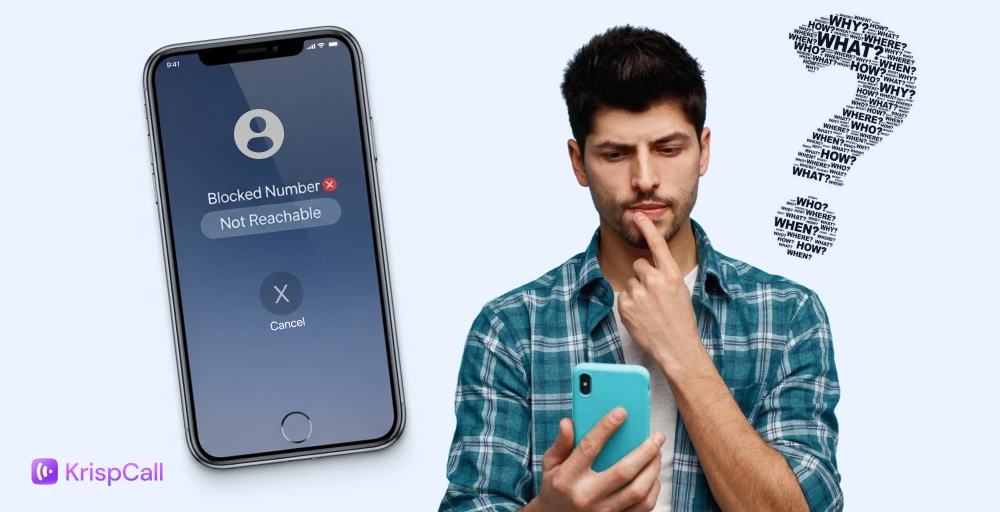
Getting your number blocked can be frustrating, especially when you have a genuine reason to reach someone for personal or work related communication.
While call blocking is designed to protect privacy and prevent unwanted calls, it can also create serious communication barriers when an important call, update, or clarification is needed. Many users are left searching for answers when their calls go straight to voicemail or fail to connect.
This guide explains how number blocking works and why calls get blocked in the first place. It also covers safe, ethical, and legitimate methods to call a blocked number, along with privacy considerations and alternative ways to reconnect without crossing personal boundaries.
✨ Key Takeaways
- When someone blocks your number, your calls typically go straight to voicemail and texts may appear sent but are not delivered.
- Signs you may be blocked include instant voicemail, one-ring hang-ups, and successful connection from a different number.
- Common ways to try reaching them include dialing *67 in the US, hiding caller ID in settings, using another number, or placing a VoIP call.
- VoIP and caller ID masking may route calls differently, but they do not bypass app-based blocks, and repeated contact can cross legal boundaries.
What happens when a number is blocked?
Before looking for ways to call a blocked number, it helps to know how call blocking actually works. Blocking does not remove your calls or messages entirely.
Instead, it stops them from reaching the other person by automatically rejecting, silencing, or rerouting them.
Depending on the phone, operating system, or calling service involved, your call might disconnect instantly, go unanswered, or land in voicemail without ever ringing.
In some cases, you may also see a canceled call status – here’s what a canceled call means and why it happens.
Different reasons your calls may be blocked
Not all blocked calls mean someone intentionally blocked you. There are a few common scenarios behind it.
User-initiated blocking:
This occurs when a person chooses to block your number from their device or messaging app. Your calls are usually muted or diverted, and messages may appear sent but never show up on their end. Phones rarely notify callers that they have been blocked, which often leads to confusion.
Automatic or carrier-based blocking:
Sometimes the block comes from the network itself. Mobile carriers and calling apps use spam detection systems to filter suspicious calls.
Numbers with frequent outgoing calls, unknown caller IDs, or behavior that resembles robocalls may be restricted automatically. In these cases, the block is not personal and may affect calls to multiple people.
Knowing why your number is blocked helps you decide the safest and most appropriate way to reconnect, whether that means fixing a technical issue, verifying your caller identity, or choosing a respectful alternative method of contact.
Check out 👉: Can I leave a voicemail without calling someone’s phone?
How to call a blocked number?
If your number has been blocked but you have a legitimate reason to contact someone, there are several safe and practical methods to try. These approaches focus on respecting privacy while helping you reconnect when necessary.
1. Hide Your Caller ID
Hiding your number can help bypass device-level blocks. When you hide your caller ID, your number will appear as “Private,” “Unknown,” or “No Caller ID” on the recipient’s phone.
How to do it:
- Phone settings:
- iPhone: Go to Settings → Phone → Show My Caller ID and toggle it off.
- Android: Open the Phone app → Settings → Caller ID → Hide Number.
- iPhone: Go to Settings → Phone → Show My Caller ID and toggle it off.
- Dialing codes:
- U.S. & Canada: Dial *67 before the number (e.g., *67 555-123-4567).
- U.K.: Dial 141 before the number.
- Australia: Dial 1831 before the number.
- U.S. & Canada: Dial *67 before the number (e.g., *67 555-123-4567).
Important: Some people automatically block private or hidden numbers, so this method may not always work. It is best for occasional, urgent calls rather than repeated attempts.
2. Use Internet-Based Calling Services (VoIP)
VoIP (Voice over Internet Protocol) apps allow you to make calls over the internet instead of using a mobile network. Because these calls use cloud-based routing, they can bypass certain carrier-level blocks and spam filters.
Popular options include: Google Voice, WhatsApp, Viber, or professional services like KrispCall.
Benefits:
- You can control how your caller ID appears.
- Calls can be made from alternate numbers if needed.
- Ideal for business or urgent communication.
Tip: Before making the call, confirm how your name or number will appear to the recipient to avoid confusion or misunderstandings.
3. Call From a Different Number
If you have permission and the reason is valid (for example, an urgent business call), you can try calling from another number.
Options include:
- Borrowing a friend’s or colleague’s phone.
- Using a secondary SIM card or prepaid number.
- Using a temporary number from apps like Google Voice or Burner.
This approach helps identify whether the block is personal (device-level) or network-related. When the call connects, clearly introduce yourself and explain why you are calling to maintain professionalism.
4. Consider Alternative Calling Methods
In some cases, operator-assisted or landline calls may still be possible, particularly in formal or business settings. While this option is less common today, it can be useful if other methods fail.
If your number has been blocked, your calls might not go through. iPhone offers built-in options that can help you reconnect safely. Follow these steps carefully:
How to call a blocked number on iPhone
If you are planning to call someone who blocked you on your iPhone, follow these steps:
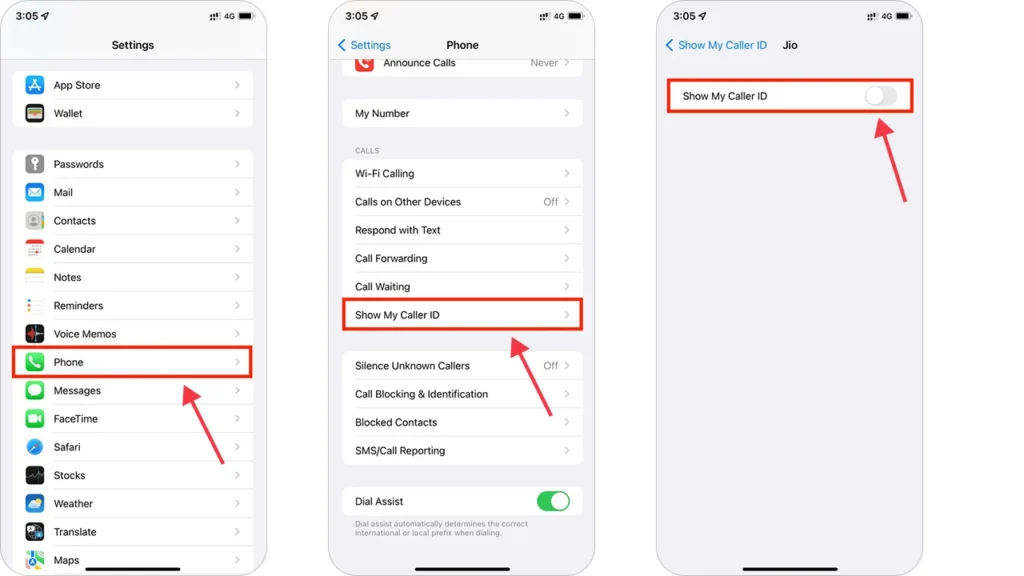
- Open Settings.
- Tap Phone.
- Select Show My Caller ID.
- Turn the switch off.
After this, your number will show as No Caller ID or Private on the recipient’s phone, which may help your call get through.
Another option is FaceTime Audio, which uses your Apple ID instead of your phone number. To try it: open Contacts, select the person, and tap FaceTime Audio. This can work even if your number is blocked, as long as your Apple ID hasn’t been blocked.
Note: Always respect someone’s decision to block calls, these methods are meant for legitimate situations.
How to call a blocked number on Android
If you’ve been blocked on an Android phone, you can still attempt to make contact by hiding your caller ID. Here’s how to call a blocked phone number on Android:
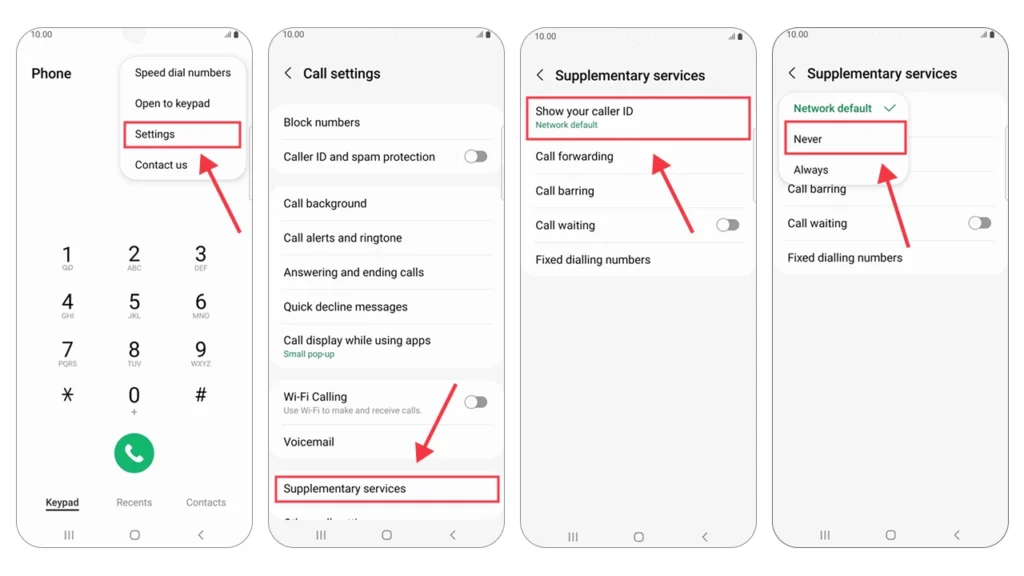
- Open the Phone app.
- Tap the three-dot menu (⋮) and select Settings.
- Go to Caller ID, Additional settings, or Supplementary services (varies by device).
- Tap Caller ID.
- Select “Hide number” or “Never”.
Your number will now appear as “Private” or “Unknown” when calling.
If your call still doesn’t connect, try a VoIP service like KrispCall. Calls go through the internet, giving you a professional number separate from your mobile line, which is ideal for reaching clients or contacts who may have blocked your personal number.
Tip: Test your settings first, as some carriers override Caller ID. Using KrispCall gives you better control over how your number appears.
Things to Keep in Mind Before Calling Someone Who Blocked You
Trying to reach someone who has blocked your number isn’t just a technical challenge, it comes with legal and ethical responsibilities. Even if your intentions are genuine, like fixing a misunderstanding or handling a work issue, you need to proceed carefully.
Why it can be tricky
Even if laws don’t specifically forbid calling a blocked number, repeatedly trying to contact someone who doesn’t want to hear from you can cross the line into harassment.
- In the U.S., telecom regulators like the FCC and FTC monitor unwanted calls, and local laws may consider persistent contact harassment.
- In Europe, privacy rules such as GDPR protect people’s communication rights.
- Using tricks to hide or fake your identity for misleading purposes is illegal in most countries.
Respect personal choices
Being blocked is often someone’s way of setting a boundary. Ignoring that can damage trust or create conflict. For personal matters, try other channels like email, social media, or mutual contacts. For work or urgent issues, keep any contact polite, brief, and professional once you’re able to reach them.
Effortlessly navigate call blocks with KrispCall’s virtual numbers
People block calls for various reasons, such as misunderstandings, conflicts, or just wanting space. And you can easily see that they have blocked you from regular calls, and there are several alternative ways to contact them even after being blocked. Like by hiding your caller ID, messaging, using *67, or using a different number.
But if you are looking for a new or unique way to connect them, you can try using VoIP providers or services. Like using KrispCall, you can get a virtual phone number, which allows you to make call to them using a different number. This will keep your identity secure without being blocked.
Frequently Asked Questions
Is it legal to call someone who blocked my number?
Yes, it is legal to call someone at the number. However, you must disable caller ID responsibly, as intentionally harassing someone or repeatedly bypassing boundaries can violate local laws.