Running a business doesn’t mean you’re available 24/7, but your customers might still reach out after hours. That’s where auto reply text messages come in. They help you stay professional, set expectations, and keep communication going even when you’re off the clock.
Whether it’s for appointments, support, or order updates, a prepared message makes a big difference. In this blog, you’ll find 25+ after hours business message examples and tips on how to set up auto replies for your business.
✨ Key Takeaways
- Business text messaging uses a platform to send automated messages in response to customer action and triggers.
- To set up your after-hours auto replies, you can configure automation settings, define triggers, select proper response actions, and customize message templates.
- Appointment requests, emergency services, order tracking, technical support are some of the common scenarios where after hours text messages are used.
How business text messaging auto replies work?
Business SMS auto replies function quite like email autoresponders. You can set your SMS system to automatically respond with a pre-written out of working hours message when you get a customer text. These types of responses are typically sent in the evenings, on weekends, or on holidays.
When you’re back online, you can view all the incoming messages in your shared inbox and the auto-replies that were sent. Most business text systems make the inbox accessible to your team, so any authorized user can follow up on a conversation.
You can also customize auto replies for different inboxes, which is an essential step in automating customer support workflows efficiently. For instance, you may set one number for customer service, a second for order status information, and a third for all general questions.
18 after hours text message auto replies examples
If you’re not sure what to say when someone messages you out of business hours, here are 18 example text replies you can use to keep things polite and professional.
1. Appointment requests
Create a quick after hours message for appointment requests that land outside your normal business hours. Depending on your brand’s texting style, the message can sound polished and professional or a bit more casual and friendly.
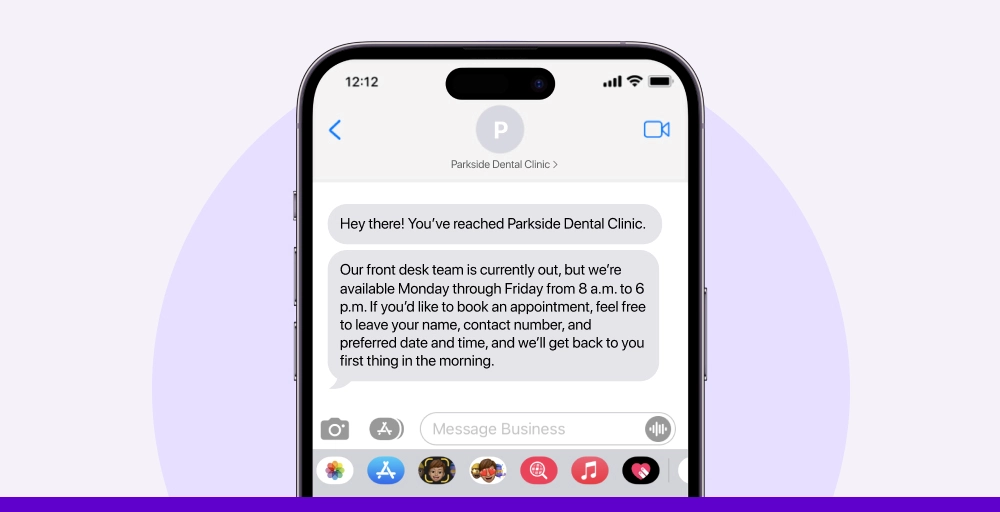
- Hey there! You’ve reached Parkside Dental Clinic. Our front desk team is currently out, but we’re available Monday through Friday from 8 a.m. to 6 p.m. If you’d like to book an appointment, feel free to leave your name, contact number, and preferred date and time, and we’ll get back to you first thing in the morning.
- Hi! Thanks for texting The Willow Spa. We’re closed for the evening, but don’t worry, we check all messages when we open at 10 a.m. To schedule a session, just let us know the service you’re interested in and when you’re hoping to come by. Talk soon!
- Thanks for contacting Summit Family Vet! We’ve wrapped up for the day, but we’re open again bright and early at 7:30 am. Please send us your pet’s name, the reason for the visit, and a couple of time slots that work for you. We’ll confirm your appointment as soon as we’re back!
2. Emergency maintenance & repairs
When something goes wrong outside of business hours, people want clarity fast. A prompt auto reply can explain how emergencies are handled, who to contact right away, or when the team will follow up. Keep it calm, clear, and confident.
- Hello! You’ve reached Maple Ridge Property Services. Our office is currently closed, but if you’re dealing with an emergency like a flood or power outage, please call our 24/7 emergency line at (800) XXX-XXXX. For all non-urgent repairs, we’ll respond during business hours: Monday to Friday, 9 a.m. to 5 p.m.
- Thanks for texting Greenpoint Maintenance. We’re out of the office at the moment, but if this is an urgent issue, like no heat, a broken door lock, or plumbing backup, please contact our on-call tech at (XXX) XXX-XXXX. We’ll get back to you first thing tomorrow.
- Hi there! Crescent Lane Apartments here. Our team is off-duty right now, but help is still available. For emergencies only (think water leaks, electrical issues, or security problems), call (XXX) XXX-XXXX right away. Routine requests will be handled during our regular hours, 8 a.m. to 6 p.m.
3. Sales & product inquiries
Customers browsing your products after hours are still engaged, so don’t let them hit a dead end. An informative professional auto-reply message can guide them toward helpful resources, suggest next steps, or even tease a special offer while they wait.
- Hey! Thanks for contacting UrbanTech Gadgets. Our team’s off-duty at the moment, but we’ll be back online at 10 am tomorrow. Got a question about a product? Shoot over the item name or model, and someone from our sales crew will get back to you ASAP!
- Hi there! You’ve reached Glow & Grit Skincare. We’re currently closed, but we’ve noted your message! Our hours are Tuesday through Sunday, 11 am to 7 pm. Whether it’s about ingredients, bundles, or what suits your skin type, we’ll follow up with all the details.
- Hello from Cedar & Pine Furniture Co.! Our sales floor is quiet for the night, but we’re back every weekday at 9 am sharp. Let us know which piece you’re eyeing or what space you’re shopping for, and we’ll be in touch with availability and pricing soon.
4. Technical support
Tech issues can be frustrating, especially when help isn’t instantly available. A thoughtful after hours message can acknowledge their concern, outline support hours, and reassure them that help is on the way.
- Hi there! You’ve reached NovaTech Support. Our team is currently offline, but we’re back on weekdays from 8 am to 6 pm. Drop a quick summary of your issue, and we’ll get to it as soon as we’re back online. Thanks for your patience!
- Hello from PixelFix Help Desk. We’re out of the office for now, but we’ve logged your message. Tech support is available Monday through Saturday, starting at 9 am. One of our agents will get back to you with the next steps as soon as possible.
- Thanks for reaching out to CloudNet IT Solutions. Our support crew has signed off for the evening. If you’re dealing with a system error, connection issue, or software bug, send over the details—screenshots help too! We’ll jump on it first thing in the morning.
5. General customer support
Not every customer message is urgent, but that doesn’t mean it should be ignored. A well-crafted auto-reply shows customers you value their message, even outside business hours, and reassures them that someone will follow up as soon as possible.
- Hi there, and thanks for contacting BrightNest! Our support team is currently offline. We’re open Monday to Friday, 8 am–5 pm PST. Send us your question or issue, and we’ll make sure to follow up first thing when we’re back.
- Thanks for reaching CloudJar Support. We’re out of the office at the moment. Our hours are 9 am to 6 pm EST, Monday through Friday. Leave a message with as much detail as you can, and someone from our team will get back to you as soon as possible.
- Hey! You’ve reached customer support at PetPlaza. We’re currently closed, but we’re back bright and early at 8 am tomorrow. Let us know what you need help with, and we’ll reply as soon as we’re online.
Related Article 👉: How to Say “Sorry I Missed Your Call” Professionally. 20+ Practical Ways
6. Order & shipping updates
When someone checks in on their order after hours, it’s usually because they’re excited or concerned. A quick, friendly response can confirm that their message was received and guide them to real-time tracking or support info.
- Hey! You’ve reached Threads & Co. Our team’s offline right now, but we’re back at 9 am EST. If you’re checking on an order or tracking info, drop your order number here, and we’ll look into it as soon as we’re in.
- Hi there, thanks for messaging Drift Gear. We’re currently closed, but our team will be back online tomorrow at 10 am. Send us your order number or shipping question, and we’ll get back to you with an update soon.
- Thanks for contacting Bloom Haven. We’re away for the evening, but if you’re asking about a recent order, rest assured, we’ll check first thing in the morning. Just leave your name and order number so we can help faster!
9 after-business-hours text message templates
Need some quick replies for when you’re off the clock? Check out these 9 after-business-hours text message templates you can use anytime.
1. eCommerce after-hours auto replies
Don’t leave online shoppers hanging when they contact you after business hours. Let them know your availability and when they can expect a response.
- Hi there. Thanks for reaching out to [Store Name]! Our support hours are Monday to Friday, [start time] to [end time]. We’ll check your message first thing when we’re back. Talk soon!
- Hey! You’ve messaged us outside our usual support hours ([start time]–[end time], Monday to Friday). No worries, we’ve got your message, and we’ll get back to you as soon as we’re online again!
- Thanks for contacting [Store Name]. We’re currently closed, but our team will be back from [start time] to [end time], Monday through Friday. Your message is in our queue, and we’ll reply shortly after we return. Please allow 24 hours for a response
2. Medical after-hours auto replies
Patients need to know you’ve received their message, even if your office is closed. Let them know your hours and how to reach you for urgent concerns.
- Hello! You’ve reached [Clinic Name]. Our office is currently closed. We’re open Monday through Friday, from [start time] to [end time]. If this is a medical emergency, please call [emergency number].
- Hi, and thank you for contacting [Doctor’s Name or Clinic Name]. We’re out of the office right now. Our regular hours are [start time] to [end time], Monday to Friday. For urgent issues, please call our after-hours line at [phone number].
- Thanks for getting in touch with [Clinic Name]. We’re not available at the moment, but we’ll get back to you during office hours: Monday to Friday, [start time]–[end time]. If it’s something that can’t wait, contact emergency services right away.
3. Professional services after-hours auto replies
Clients reaching out after hours should know their message matters. Let them know when you’re back and how to follow up if needed.
- Hi! You’ve reached [Business Name]. Our office hours are [start time] to [end time], Monday to Friday. We’re currently closed but will respond to your message as soon as we’re back in. Thanks for your patience!
- Hello, and thanks for reaching out to [Company Name]. We’re not available right now. Our team is in from [start time] to [end time], Monday through Friday. If your request is time-sensitive, please send us an email at [email address].
- Hey there! We’re currently offline, but your message has been received. [Business Name] operates during normal business hours [start time] to [end time], Monday to Friday. We’ll be in touch once we return to the office.
Set up your after-hours auto replies the right way
You’ve got the right ideas, now it’s time to put them into practice. Setting up after-hours responses may vary depending on your messaging platform, but the process generally follows these steps:
- Go to your automation settings: Find and select the option that lets you create a new automation rule or workflow.
- Define the trigger event: This is usually based on when a customer sends a message outside of your standard working hours.
- Choose the response action: This step involves setting up the automatic reply that will be sent to customers during those off-hours.
- Use a message template or create your own: Whether you pick a pre-written reply or draft one from scratch, make sure it reflects your brand’s tone and sets clear expectations.
Once done, your system will automatically respond to messages that come in after hours. It’s a simple way to maintain great customer service, even when your team is offline.