With more than 1 billion monthly active users and 500 million daily active users in 2026, Telegram ranks among the world’s seven largest social media and messaging platforms. (Resourcera)
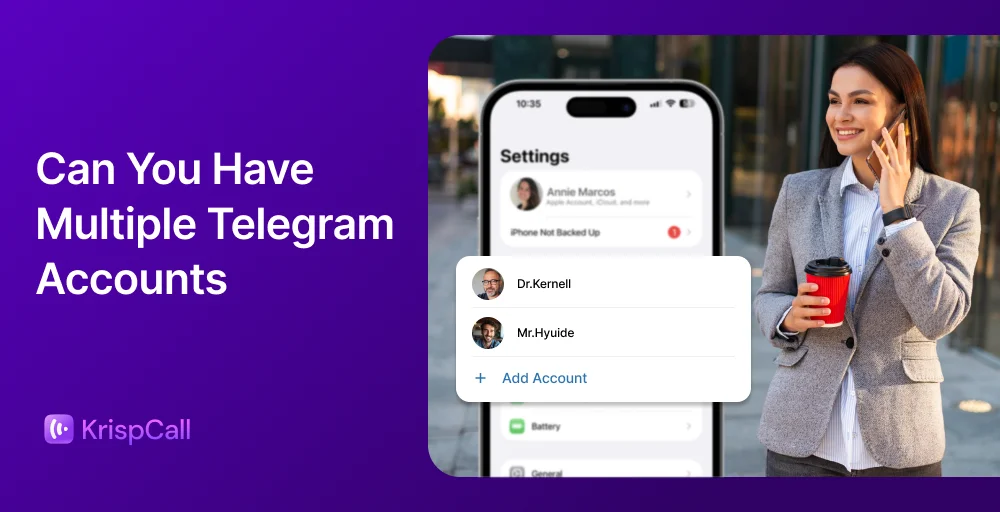
The telegram app has become the go-to platform for personal chats, business communities, crypto groups, and customer support teams. As more people expand their online presence, one question keeps coming up: Can you have multiple Telegram accounts?
The short answer is yes, and this guide covers everything you need to know.
✨ TL;DR
- Telegram supports multiple accounts on one device. Free users can add up to 3 accounts, while Telegram Premium users can manage up to 4 using different phone numbers.
- Android & iPhone: Open Telegram → Tap profile/menu → Select “Add Account” → Enter a new phone number → Verify with SMS → Switch between accounts anytime.
- Desktop: Open Telegram Desktop → Click menu → Select “Add Account” → Enter another phone number → Verify via SMS or QR code → Manage accounts from the sidebar.
- Telegram Web: Open Telegram Web → Log in to one account → Open another browser/profile → Log in with a different number → Use multiple accounts simultaneously.
Can you have multiple Telegram accounts on a single device?
Yes. Telegram allows you to create and run multiple Telegram accounts. The platform has a built-in feature that lets you add account options and switch between them inside the same app, no third-party tools needed.
That said, there’s one rule you cannot skip: each telegram account must be linked to a unique phone number. Telegram uses phone numbers for registration and sends a verification code via SMS to confirm each new account.
You cannot use the same phone number for two separate Telegram accounts. So, if you need a second phone number without using a physical SIM card, virtual number providers offer a simple and affordable option.
Telegram supports multiple accounts across:
- Telegram mobile app (iOS & Android)
- Telegram desktop app
- Telegram web
The built-in limit is up to 3 accounts per app on a single device. To go beyond that, you’ll need multiple devices, browser profiles, or multiple phone numbers.’
Related Article 👉: Can You Have Two Phones With the Same Number?
Why do businesses need multiple Telegram accounts?
There are real, practical reasons to handle multiple Telegram accounts, especially for teams and businesses.
Work-life balance
Mixing personal chats with work messages creates unnecessary stress. A dedicated work account keeps personal chats separate from professional conversations. You stay organized and can actually disconnect when you need to.
Handling multiple brands and projects
Marketers and community managers often run more than one brand. Each brand may need its own channel, group, or support line. Keeping accounts separate helps avoid confusion and maintain clear brand identities, especially in multichannel contact centers.
Customer support teams
Support agents can use multiple accounts for different departments, billing, technical help, and onboarding. This structure makes it easier to safely manage conversations and assign responsibilities without sending messages from the wrong account.
Handle accounts by region or language
Global businesses often create separate Telegram accounts for different markets. One account per region means you can tailor language, content, and offers, improving trust and reducing slower response time caused by mixed-up messaging.
Protect privacy and stay anonymous
Using your personal account for every business interaction exposes your number. Running multiple profiles with virtual numbers protects your privacy and prevents unwanted contact outside business hours.
Requirements to create a Telegram account?
Before you create multiple Telegram accounts, make sure you have:
- A unique phone number for each account (Telegram requires one per account)
- Access to calls or SMS to receive a verification code
- A reliable, stable internet connection
- A compatible mobile device, desktop, or browser
For business users and power users, it’s also worth having:
- Separate devices or browser profiles for better organization
- Different IP addresses or a separate IP address setup for high-volume use cases
- Virtual phone numbers for Telegram to avoid the need for physical SIM cards for every new Telegram account
- Proper notification settings are configured for each account, so you never miss highlight messages received.
Note: Telegram does not require email registration, but it may trigger a verification code check if unusual activity is detected. Enabling 2FA adds an extra layer of security across all your additional accounts.
How to create multiple Telegram accounts?
Telegram lets you add up to three accounts in the same app. Here’s how to do it step by step.
How to add up to three Telegram accounts on Android & iPhone?
Android
Follow the steps below to add multiple accounts on Android:
Step 1: Open the Telegram app on your phone.
Step 2: Tap the Profile icon in the bottom right corner.
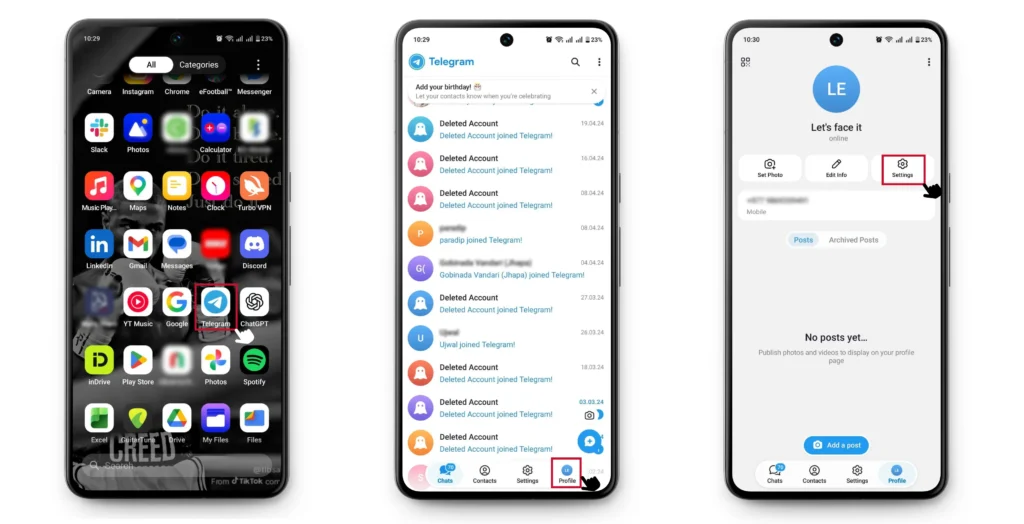
Step 3: Tap the Settings icon to open your account options.
Step 4: Tap on Account.
Step 5: Now, go to “Add Account.”
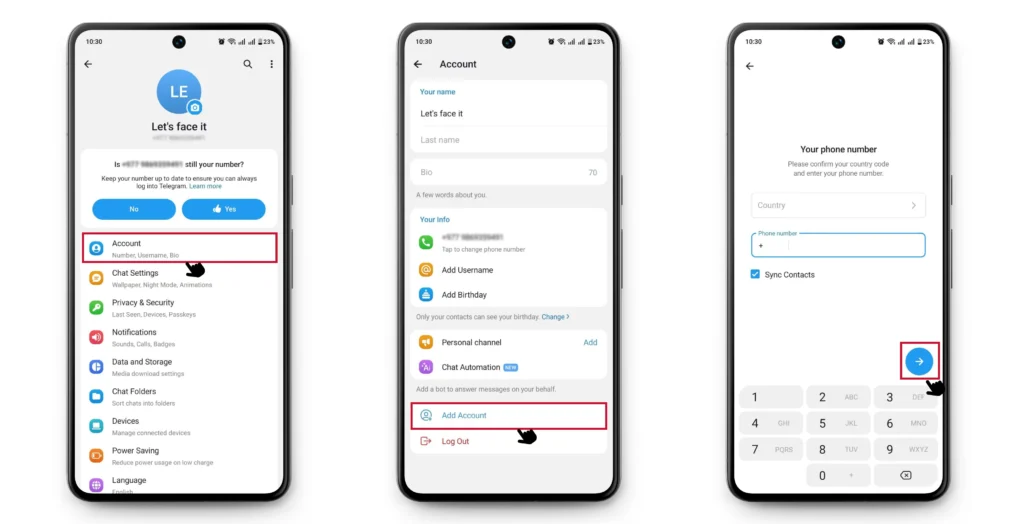
Step 6: Enter the phone number. Tap the blue arrow button to proceed.
Step 7: Review the confirmation prompt and tap Yes.

(Similarly, you can add up to three Telegram accounts and use them by switching each)
iPhone
To add up to three Telegram accounts on iPhone, follow the steps:
Step 1: Open Telegram on your iPhone.
Step 2: Tap the menu icon in the top left corner.
Step 3: Tap your profile details at the top.
Step 4: Select “Add Account.”
Step 5: Enter a new phone number and complete SMS verification.
Step 6: Switch between accounts at any time from the same menu.
How to add up to three Telegram accounts on Desktop?
You can officially add and manage up to three separate Telegram accounts directly within the Telegram Desktop app.
Telegram Desktop App
- Open the Telegram desktop app.
- Click the menu icon in the top left corner.
- Click on your name or avatar.
- Select “Add Account.”
- Enter a new phone number and verify via SMS or QR code.
- Switch between different accounts by clicking your name in the sidebar.
Telegram Web Version
The telegram web version supports one account per browser session. To run multiple accounts at the same time, use multiple windows in different browsers (Chrome, Firefox, Edge) or separate browser profiles. Each profile has its own session, so you can manage multiple profiles without logging in and out.
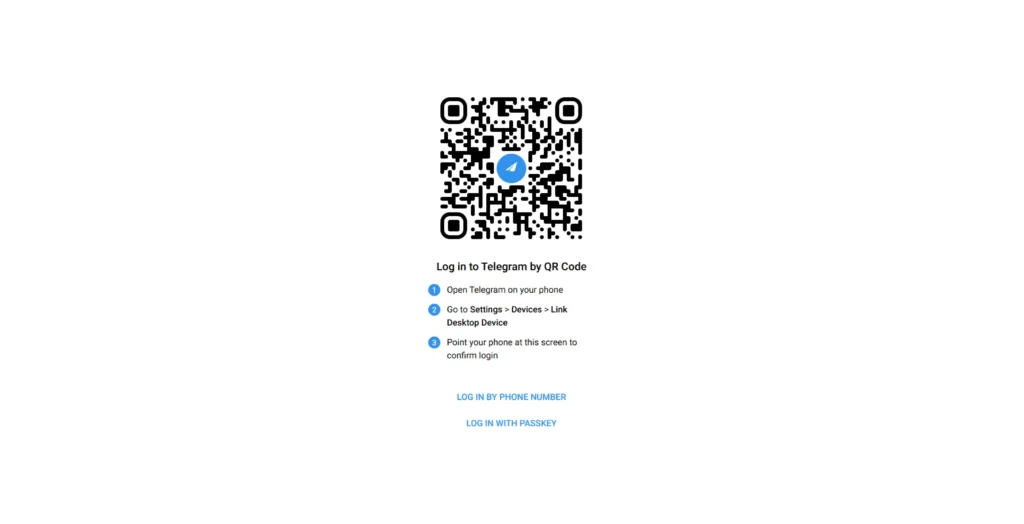
- Access web.telegram.org in your web browser.
- Sign in with your primary account using phone number or passkey. (If you want to login your existing Telegram account from your phone, then scan the QR from your mobile Telegram app.)
- If you want to use an additional account, open a new tab or window in your browser.
- Return to web.telegram.org and log in using a different phone number.
Manage multiple Telegram accounts with KrispCall
KrispCall provides virtual phone numbers from 100+ countries, making it easy to register new Telegram accounts without a physical SIM card. Unlike other providers, KrispCall offers virtual numbers at the lowest prices, as low as $4 for a US local number.


Here’s why teams choose KrispCall to manage multiple Telegram accounts:
- Unlimited accounts: Register as many Telegram accounts as your business needs using separate virtual numbers.
- No SIM card required: Get your own phone number instantly without needing a physical SIM card.
- SMS verification support: Receive verification codes via SMS for every new Telegram account.
- Global virtual numbers: KrispCall offers virtual numbers from multiple countries, allowing you to create and manage multiple Telegram accounts easily.
- High OTP success rate: KrispCall’s non-VoIP numbers provide a high success rate for receiving Telegram verification OTPs.
If you’re an individual or business looking to operate across different regions using Telegram, KrispCall makes it simple and affordable. Get free virtual numbers for the US, Canada, and the UK upon your first subscription to KrispCall’s plans.