While 8×8 works well for many businesses, it’s not always the best fit as companies grow or evolve. You might have struggled with a clunky user interface, rising costs, or wished for more advanced features. If so, you’re not alone; many businesses are searching for a solution that truly fits their needs.
Fortunately, there are plenty of alternatives ready to deliver you everything you need. From AI-driven call management to seamless integrations, these platforms grow your business and make communication and collaboration effortless.
In this blog, we will explore why businesses are switching from 8×8, the top 10 alternatives to 8×8, including their features and pricing, and the best choice for your business.
✨ The best 8×8 alternatives
- KrispCall: best for small to mid-sized businesses with remote or global teams
- Ooma: best for small businesses looking for an affordable, easy-to-use solution.
- Go To Connect: best for businesses looking for an all-in-one platform.
- Unitel Voice: best for businesses needing a cost-effective VoIP solution.
- Nextiva: best for businesses looking for an enterprise-grade communication system.
- Vonage: best for businesses needing strong integrations and global reach.
- CloudTalk: best for businesses needing advanced call center features.
- Dialpad: best for AI-powered features.
- JustCall: best for small to medium-sized businesses.
- Talkdesk: best for large businesses or contact centers.
Why are users switching from 8×8?
Many businesses are switching from 8×8 because the platform can feel limiting as their needs grow. While 8×8 offers a wide range of communication features, users often report that the system can become complex to manage, especially for small or mid-sized teams.
- Complexity and Usability: As businesses scale, the platform’s interface can become difficult to navigate, especially for teams without technical expertise. While 8×8 offers many features, its user interface is not always intuitive, resulting in a steep learning curve for new users.
- Cost: 8×8’s pricing structure can become expensive as companies grow and require more features, users, or integrations. Many users report that the pricing does not always align with the value they receive, especially when looking for more affordable alternatives that offer similar features without hidden costs.
- Customer Support Issues: Some users have reported slow response times and difficulty resolving issues promptly. For businesses that rely on real-time communication, delayed support can lead to frustration and lost productivity.
- Limited Integrations: Although 8×8 offers integrations with popular CRM systems and third-party tools, businesses often find that the range of integrations available is not as extensive as other competitors. This limitation can make it challenging for businesses to sync their communication platform with other business-critical tools, affecting efficiency.
- Reliability: Some users have reported occasional service disruptions or issues with call quality, particularly during high-traffic periods. For businesses that depend on clear, uninterrupted communication, these issues can hinder operations and affect the overall customer experience.
Due to these factors, many businesses are opting for more intuitive, cost-effective, and scalable alternatives, such as KrispCall or Nextiva. These VoIP providers offer better flexibility, ease of use, and customer support, allowing businesses to focus on growth rather than navigating complex systems.
“The desktop software (exe version) claims to self update according to the documentation, but I’ve never seen this work reliably in my experience, I have to manually download the updates every couple months. This can be a frustrating experience when our call center agents start missing calls in the middle of a workday due to the software just glitching out until the newer version is installed.”
-Joey K. via G2
Evaluation process for these alternatives
To choose the right alternatives, we carefully reviewed each option using a set of practical criteria. Our evaluation focused on the factors that matter most for real-world use. Below, we will be discussing these factors:
Features and Functionality
We examined the core capabilities each platform offers, including call management, messaging, IVR, call routing, analytics, and integrations with other business tools. Platforms that provided a complete, easy-to-use communication suite scored higher.
Ease of Use
A system is only useful if your team can adopt it quickly. We assessed how intuitive the interface is, whether setup requires IT support, and how easy it is for remote or distributed teams to use. Setting up a professional remote environment is equally important, where tools like wallpics help employees personalize their workspace to maintain a high-productivity mindset.
Scalability
Businesses grow, and so do their communication needs. We prioritized platforms that can scale with your team, supporting more users, advanced features, and global operations without added complexity.
Pricing Transparency
Hidden costs can be frustrating. We considered whether each platform offers clear, predictable pricing and provides value for the features included.
Reliability and Support
Communication platforms must be dependable. We reviewed uptime, call quality, and customer service strategy to ensure businesses won’t experience disruptions.
Integrations
A strong communication platform should work well with existing tools. We evaluated how easily each alternative integrates with CRMs, helpdesk software, and productivity apps, helping teams maintain smooth workflows.
10 8×8 alternatives & competitors in 2026
Here are the top 10 alternatives to 8×8 & competitors in 2026, with their starting price, best use, features, and user reviews.
| Provider | Starting price | Best for | What it stands out for | G2 Review |
| KrispCall | $12 | Small to mid-sized businesses with remote or global teams | Shared phone number, bulk SMS, global calling | 4.5/5 |
| Ooma | $19.95 | small businesses looking for an affordable, easy-to-use solution. | Virtual receptionist, CRM integrations, video conferencing | 4.6/5 |
| GoTo Connect | Contact the sales team | businesses looking for an all-in-one platform. | AI receptionist, AI chat analysis, voicemail to email | 4.4/5 |
| Unitel Voice | $ 9.99 | businesses needing a cost-effective VoIP solution. | Desk phones, desktop softphones, mobile app, team messaging | 4.6/5 |
| Nextiva | $15 | an enterprise-grade communication system | Inbound calling, real-time dashboard, reporting, and contact management | 4.5/5 |
| Vonage | $13.99 | strong integrations and global reach. | Visual voicemail transcriptions, unlimited calling, unlimited video meetings | 4.3/5 |
| CloudTalk | $25 | advanced call center features | IVR, skills & smart conditions-based routing, recording, tags & transfer, agent & group reporting | 4.4/5 |
| Dialpad | $15 | AI-powered features | Custom call routing, high-definition (HD) voice, three-way calling | 4.4/5 |
| JustCall | $29 | small to medium-sized businesses | IVR& call menus, intelligent call routing, advanced analytics& reporting | 4.3/5 |
| Talkdesk | $85 | large businesses or contact centers. | studio & routing, real-time dashboard, quality management | 4.4/5 |
1. KrispCall: Best for: small to mid-sized businesses
KrispCall is an AI-powered cloud telephony system designed to elevate your business conversation across borders. With KrispCall, your team can easily manage calls and messages from a single dashboard. Offering virtual phone numbers in over 100 countries enables you to conduct business conversations anywhere and provides global coverage.
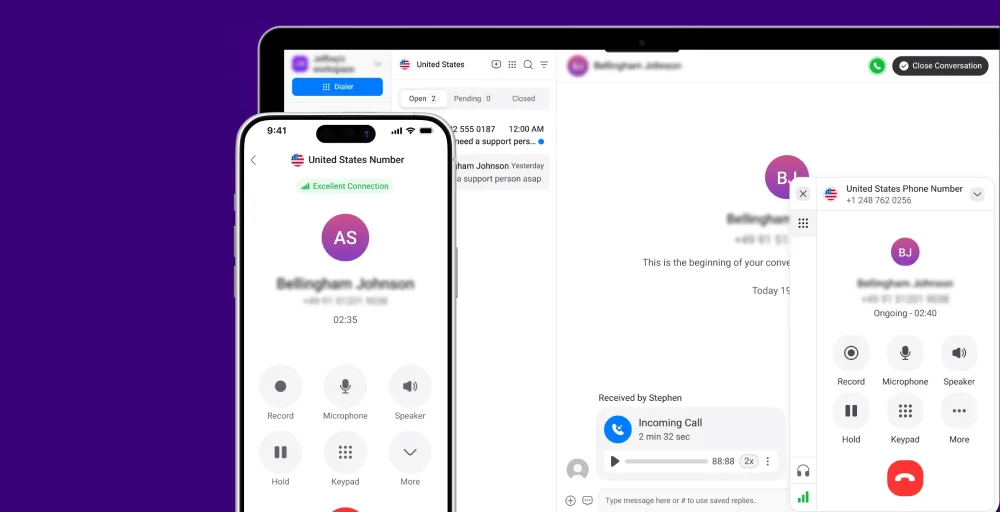
Beyond simple calling, KrispCall offers advanced features like call forwarding, voicemail, SMS, and auto-attendant to ensure you never miss an important conversation. Also, its powerful integrations with tools like CRM systems and helpdesk platforms make it easy to connect with your team and clients.
What makes KrispCall the best alternative to 8×8?
KrispCall is a strong alternative to 8×8 because its setup is easy and does not require IT expertise, making it accessible to businesses of all sizes. Also, the pricing is transparent and clear, with no hidden costs, unlike 8×8, which is complex and more challenging to navigate.
Whether you’re a small startup or a growing company, KrispCall is built to scale with your needs, ensuring smooth engagement across borders and time.
Related article: KrispCall Vs 8×8: Which is the Best Virtual Phone System?
KrispCall pricing
KrispCall offers three pricing plans, making it convenient for businesses to choose the plan that best suits their needs and goals.
| Plan | Billed annually (per user/month) | Key feature set |
| Essential | $12 | Unified callbox, voicemail, and number porting |
| Standard | $32 | Bulk SMS, call transfer, multimedia messages |
| Enterprise | Custom | SMS forwarding, number sharing, and call analytics |
KrispCall’s standout features
- Shared phone number
- Bulk SMS
- Global calling
KrispCall pros
- It provides virtual phone numbers in over 100 countries.
- The platform is user-friendly with no IT expertise required.
- Strong integrations make it perfect for streamlined business communications.
KrispCall cons
- Call quality depends on the internet connection.
- Does not offer advanced features like predictive dialing in basic plans.
- Some features, like long-term call analytics, are locked behind top-tiered plans.
What users say about KrispCall
“KrispCall has been a game-changer for our communication workflow. The dashboard is super intuitive, making it easy to manage multiple numbers, track calls, and collaborate with the team. The call quality is consistently clear, and I love that everything, from call logs to voicemail, is neatly organized in one place.”
-Srushtidhar L. via G2
2. Ooma: Best for small businesses looking for an affordable, easy-to-use solution
Ooma is a cloud telephony solution that enables your business to deliver exceptional communication. With a strong focus on ease of use, your team can manage calls efficiently without complex setups or IT department support.
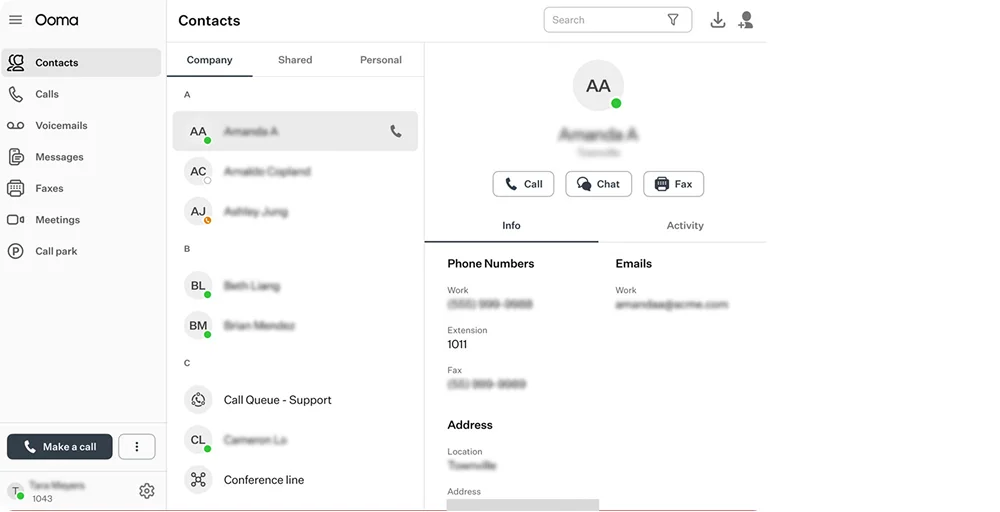
With features like video conferencing, call queuing, and virtual fax, Ooma becomes a versatile option for small to mid-sized businesses. By offering a well-rounded suite of reliable performance, it keeps conversations professional and efficient as your team grows.
Ooma’s standout features
- Virtual receptionist
- CRM integrations
- Video conferencing
Ooma pricing
Ooma offers a three-tiered pricing structure; every plan provides a set of essential features, making it easier for you to choose the one that best fits your team size and communication requirements.
| Plan | Billed annually (per user/month) | Key feature set |
| Ooma office essential | $19.95 | HD audio, virtual fax, virtual receptionist |
| Ooma office pro | $24.95 | Video conferencing, call recording, and voicemail transcription |
| Ooma office pro plus | $29.95 | Call queuing, CRM integrations, and hot desking |
Ooma Pros
- User-friendly admin dashboard and mobile/desktop apps, making it easy to manage calls and users.
- Simple setup with no technical expertise required, so you can get started quickly.
- Scalable features that grow with your business, from basic calling to advanced options like call forwarding, voicemail, and conferencing.
Ooma Cons
- Limited advanced features in the basic plans, which may require upgrading to higher-tier plans.
- Call quality can be inconsistent in some regions or during high network traffic.
- International calling rates can be higher than those of other providers.
3. GoTo Connect: Best for businesses looking for an all-in-one platform
GoTo Connect is a robust cloud communication platform tailored for businesses that need reliable calling and strong customer engagement. With tools like automated receptionists, call routing, and voicemail-to-email, it ensures calls are handled professionally and never missed.
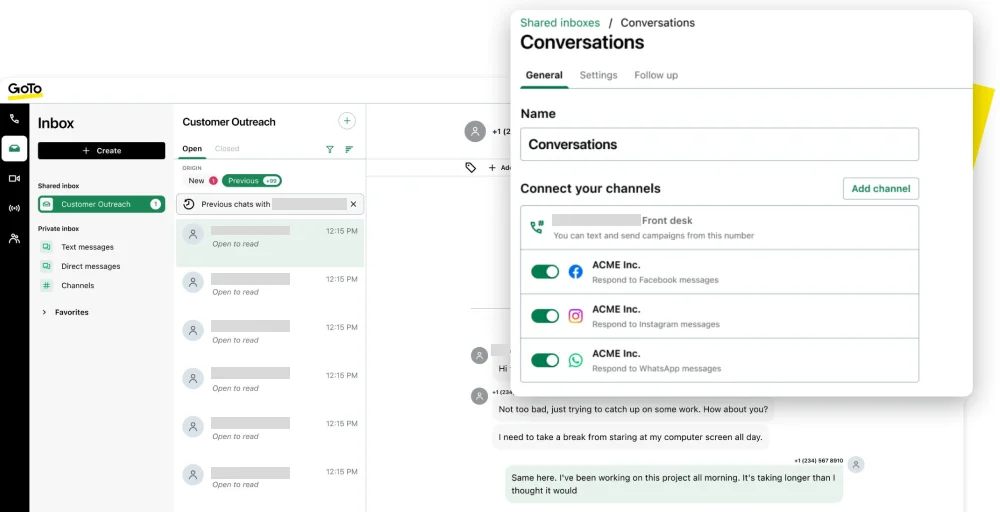
It also supports SMS, call recording, and analytics, giving businesses clear visibility into customer interactions. This platform is well-suited for growing teams and larger organizations that need advanced call management, automation, and consistent performance across multiple locations.
GoTo Connect’s standout features
- AI receptionist
- AI chat analysis
- Voicemail to email
GoTo Connect pricing
GoTo Connect does not publicly list fixed-priced plans. To get exact pricing and plan details, contact the GoTo Connect sales team, which can provide a quote based on your business size and requirements.
| Plan | Billed annually (per user/month) | Key feature set |
| Phone system | Contact the sales team | 24/7 customer support, call queues, smart call routing |
| Customer experience (cx) | Contact the sales team | Call recording, SMS &MMS, automated SMS messages |
| Contact center | Contact the sales team | Call campaign, intelligent call routing, AI chat analysis |
GoTo Connect Pros
- Flexible for small businesses to large enterprises, easily adding users and features as your business grows.
- Strong uptime and call quality.
- Works well with popular tools like Microsoft 365, Salesforce, and Google Workspace.
GoTo Connect Cons
- Pricing can be high for small businesses or startups, especially when adding advanced features.
- Limited customization in some features, particularly in call routing and reporting..
- Some users report lag or delays during video conferencing, especially with large groups.
4. Unitel Voice: Best for businesses needing a cost-effective VoIP solution
Unitel Voice is a VoIP provider that offers a range of features to enhance team collaboration. With this platform, you can easily deploy desktop softphones, enabling call management on your computer and helping employees stay connected and productive.
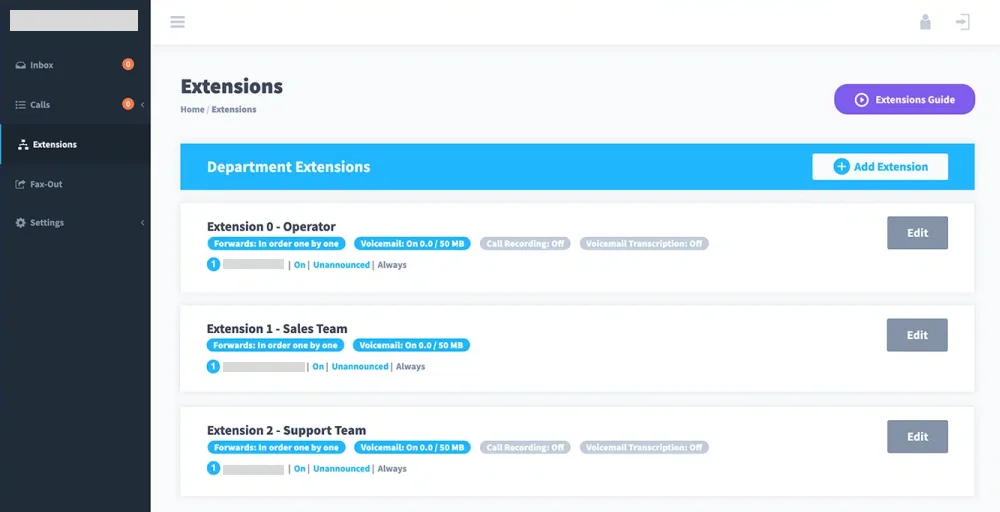
Unitel Voice includes team messaging, allowing your team to communicate quickly and efficiently through instant chat. Using the mobile app, you can communication from wherever you are, with full call and message management.
Unitel Voice standout features
- Desktop softphones
- Team messaging
- Mobile app
Unitel Voice pricing
Unitel Voice pricing plans offer a business phone number at an affordable price, with flexible options for small teams and growing businesses.
| Plan | Billed monthly (per user/month) | Key feature set |
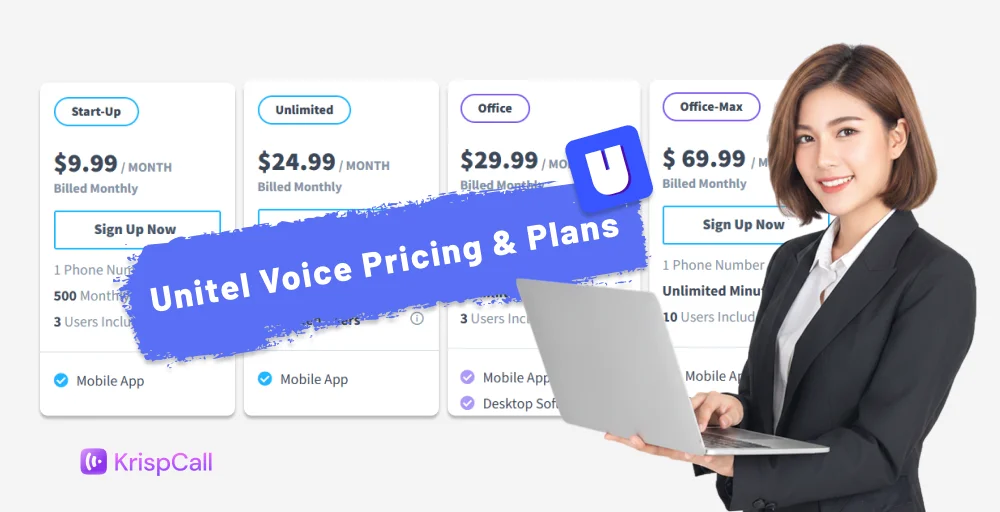
| Start up | $9.99 /month | 1 phone number, 500 monthly minutes, 3 users |
| Unlimited | $24.99 /month | 1 phone number, unlimited minutes, unlimited users |
| Office | $29.99/month | Mobile app, desktop phones, team messaging |
| Office-max | $69.99/month | 10 users, desk phones, team messaging |
Unitel Voice Pros
- Affordable pricing with competitive rates for small businesses and startups.
- Simple setup with easy-to-use features, no IT expertise needed.
- Reliable call quality with a stable connection for voice and video calls.
Unitel Voice Cons
- Limited integrations with third-party software or CRM systems may limit functionality for some businesses.
- Support response times can be slower, especially for basic plans without premium support options.
- Basic reporting features compared to more advanced platforms, lacking in-depth analytics for call performance.
5. Nextiva: Best for enterprise-grade communication system
Nextiva is an all-in-one cloud communication platform that brings voice, video, messaging, and CRM tools into a single system. This unified setup makes it easier for teams to manage conversations, stay organized, and boost productivity. It’s well-suited for businesses of all sizes, from small teams to large enterprises.
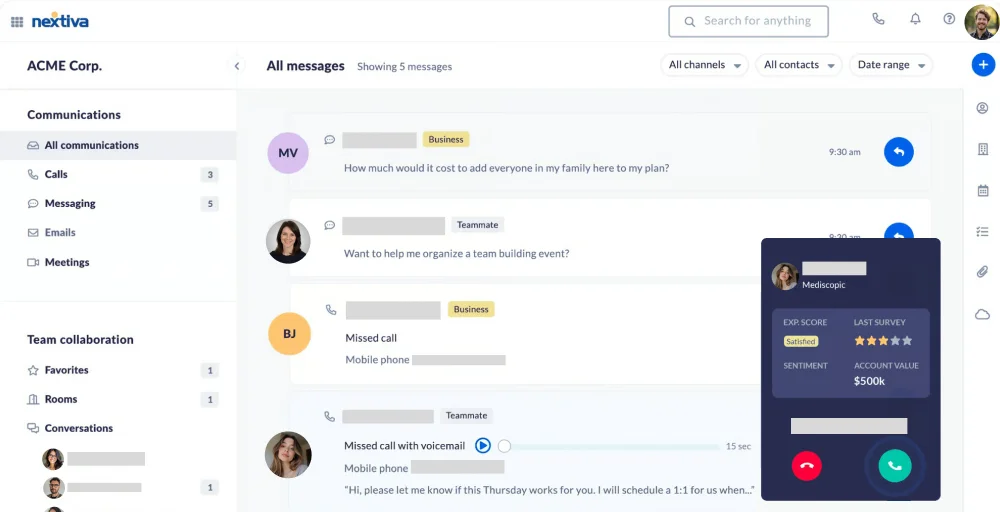
The platform is known for its 99.99% uptime, ensuring reliable performance and minimal disruptions. With strong call quality, built-in collaboration tools, and scalable features, Nextiva helps businesses maintain smooth and professional communication.
Nextiva’s standout features
- Inbound calling
- Real-time dashboard and reporting
- Contact management
Nextiva pricing
Nextiva provides a range of pricing plans that combine essential communication features with scalability.
| Plan | Billed annually (per user/month) | Key feature set |
| Core | $15 | Inbound & outbound voice, business SMS, call routing |
| Engage | $25 | Customer-to-team SMS messaging, advanced reporting, toll-free number &minutes |
| Power Suite CX | $75 | AI transcription, customizable, intelligent, and skill-based routing |
Nextiva Pros
- 24/7 support available via phone, chat, and email, with quick response times.
- Reliable service with clear audio and minimal downtime, even during peak hours.
- Offers useful tools like call analytics, voicemail-to-email, and call routing, ideal for businesses with complex needs.
Nextiva Cons
- More expensive than other VoIP providers, especially with advanced features or multiple users.
- The range of plans and features can be overwhelming, making it hard to choose the right one without guidance.
- Some users report bugs and occasional performance glitches with the mobile app.
6. Vonage: Best for strong integrations
Vonage is one of the reliable calling and messaging services for businesses, offering flexibility and scalability. It is also known as the first VoIP provider to launch nationwide fraud-prevention network APIs.
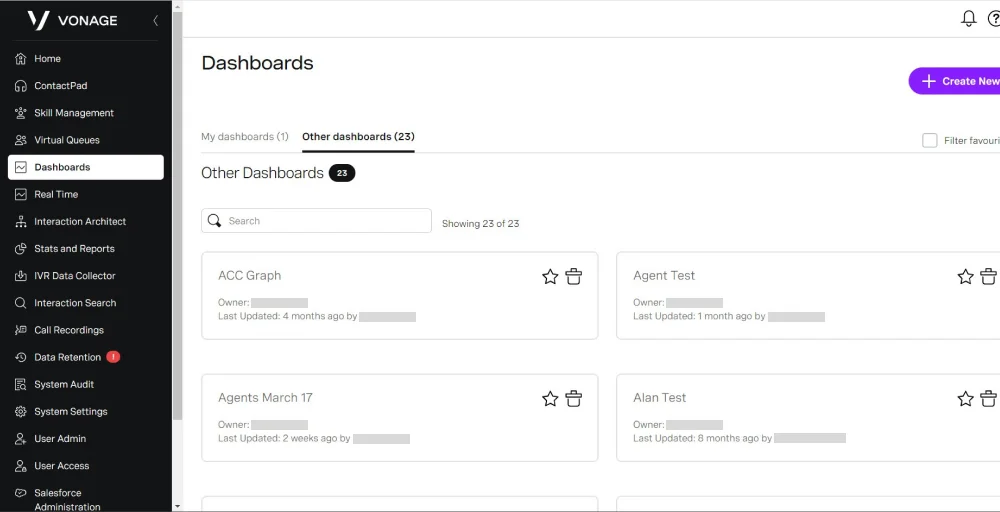
The platform’s reliable call quality, 24/7 support, and affordable pricing make Vonage an attractive option for businesses looking for a user-friendly solution without sacrificing performance. This will help your business to stay connected efficiently while simplifying its communication setup.
Vonage’s standout features
- Unlimited domestic calling
- SMS and MMS
- Virtual receptionist
Vonage pricing
Here a Vonage’s pricing plans and the key features included with each option.
| Plan | Billed annually (per user/month) | Key feature set |
| Mobile | $13.33 | Support desktop and mobile apps, unlimited domestic calling, SMS, and MMS |
| Premium | $20.99 | Team messaging, unlimited video meetings, and support for VoIP desk phones |
| Advanced | $27.99 | Phone number porting, virtual receptionist, Vonage meeting |
Vonage Pros
- Global reach with virtual numbers and calling plans in many countries.
- Good call quality, reliable uptime, and clear connections.
- Customizable plans that let you pick features that match your business needs.
Vonage Cons
- Setup can be complex for beginners without technical experience.
- Customer support sometimes gets mixed feedback on response times.
- Some features require upgrades or add‑ons, which can increase the total cost.
7. CloudTalk: Best for advanced call center features
CloudTalk is a cloud-based call center solution offering a comprehensive set of features. It empowers your team to manage inbound and outbound calls seamlessly. Beyond calling, it delivers valuable insights to help your business drive performance and customer satisfaction.
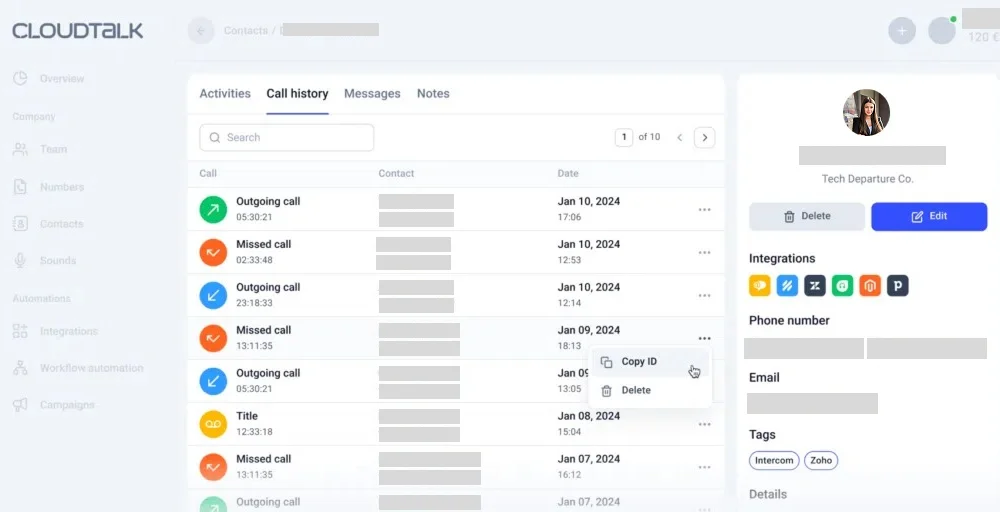
With advanced reporting and agent performance tracking, managers to monitor real-time data and identify areas for improvement. Powerful integration with platforms such as Salesforce and HubSpot, CloudTalk enables businesses to keep customer data organized and improve relationship management.
CloudTalk’s standout features
- IVR, skills & smart conditions-based routing
- Recording, tags & transfers
- Agent and group reporting
CloudTalk pricing
CloudTalk offers flexible pricing plans to suit businesses, and you can even try a free trial before committing.
| Plan | Billed annually (per user/month) | Key feature set |
| Starter | $25 | Call recording, visual call flow builder, and number porting |
| Essential | $29 | Auto outbound number, unlimited call history, basic dashboard, and agent & group reporting |
| Expert | $49 | VIP queues, smart dialer, and live monitoring |
CloudTalk Pros
- Suitable for small businesses to large enterprises, with options to add more users and features as you grow.
- Provides detailed call performance insights to help optimize your team’s productivity.
- Works with popular CRMs like HubSpot, Salesforce, and Zoho, as well as other third-party tools.
CloudTalk Cons
- Some features are better optimized on desktop, leading to occasional limitations on mobile.
- Some users report slower response times when dealing with issues on lower-tier plans.
- While the platform is feature-rich, it can be overwhelming for smaller businesses or users without prior experience.
8. Dialpad: Best for AI-powered features
Dialpad delivers a flexible, high-quality phone system with robust features. Its intuitive interface combines calls, messages, and meeting into one seamless platform, eliminating the need to juggle multiple tools.
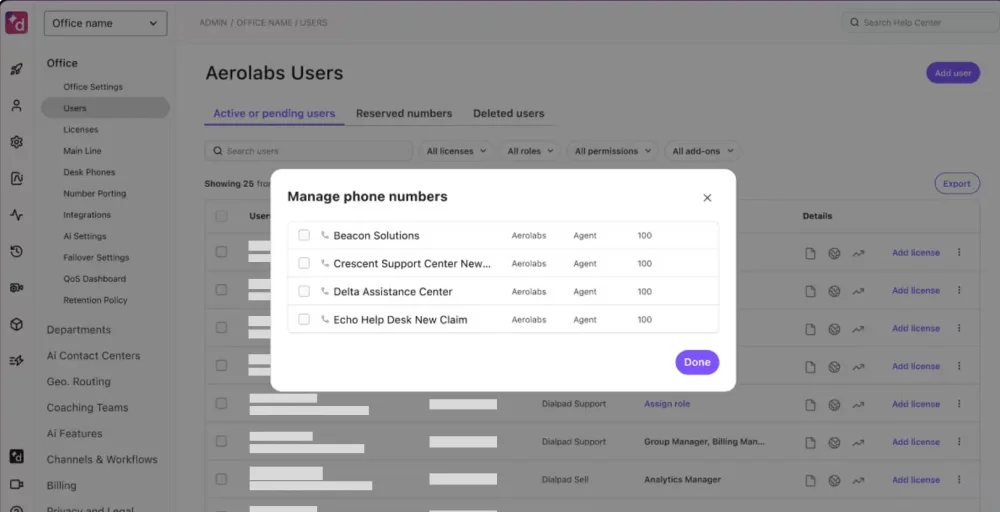
With features such as custom call routing, three-way calling, and HD voice, it ensures clear, efficient communication. Similarly, AI-powered transcription and call summaries help teams capture important details without missing a beat. It is suitable for small startups and large enterprises alike, providing a complete communication solution that grows with your business.
Dialpad’s standout features
- Custom call routing
- High-definition (HD) voice
- Three-way calling
Dialpad pricing
Dialpad offers three types of pricing plans to fit different business needs, making it easy to scale as your team grows.
| Plan | Annual price (per user/month) | Key feature set |
| Standard | $15 | Unlimited calling, visual voicemail, |
| Pro | $25 | Hold queues, custom call routing, and call recording |
| Enterprise | Contact the sales team | Multi-level auto attendant, number porting, number forwarding |
Dailpad Pros
- Modern, easy‑to‑use interface that makes setup quick for teams of all sizes.
- AI‑powered tools like real‑time transcription and call summaries to boost productivity.
- Strong mobile and desktop apps, so remote teams stay connected everywhere.
Dailpad Cons
- Pricing can increase when you add advanced AI or additional features.
- A learning curve for users new to AI features or more complex tools.
- International calling costs may be pricier than basic VoIP services.
9. JustCall: Best for small to medium-sized businesses
JustCall is a business phone system that centralizes calls, messaging, and customer interactions on a single platform, making it ideal for remote teams and companies operating across multiple locations.
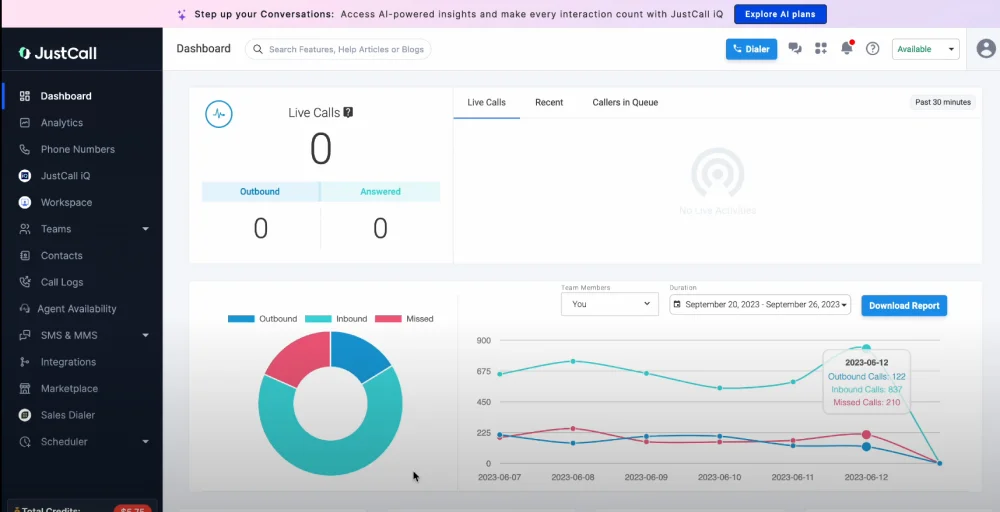
JustCall lets you stay connected with virtual phone numbers nationwide, giving your businesses a professional presence. Built-in call recording and SMS/MMS capabilities ensure you never miss important details or follow-up opportunities.
JustCall’s standout features
- IVR& call menus setup
- Intelligent call routing
- Advanced analytics & reporting
JustCall pricing
JustCall offers flexible pricing plans for small teams and large enterprises, letting you easily scale your support operations.
| Plan | Annual price (per user/month) | Key feature set |
| Team | $29 | SMS bundle, API access & workflow, AI review assist |
| Pro | $49 | Unlimited outbound minutes, power dialer, bulk SMS campaigns |
| Pro plus | $89 | SMS co-pilot, AI call scoring, sentiment analysis |
| Business | Contact the sales team | AI-powered script compliance, unlimited calling & SMS, enterprise-grade compliance |
JustCall Pros
- Easy to use with quick setup and a clean, intuitive dashboard.
- Suitable for remote teams with mobile and desktop apps that work smoothly.
- Global phone numbers are available in many countries for international calling.
JustCall Cons
- Call quality can vary depending on the internet connection.
- Customer support response times can be slow.
- Some users find reporting tools less advanced than those in more advanced systems.
10. Talkdesk: Best for large businesses or contact centers
Talkdesk is an enterprise-level customer support solution. It combines advanced call management, automation, and analytics into a single platform, enabling teams to deliver faster, more efficient, and more personalized customer experiences.
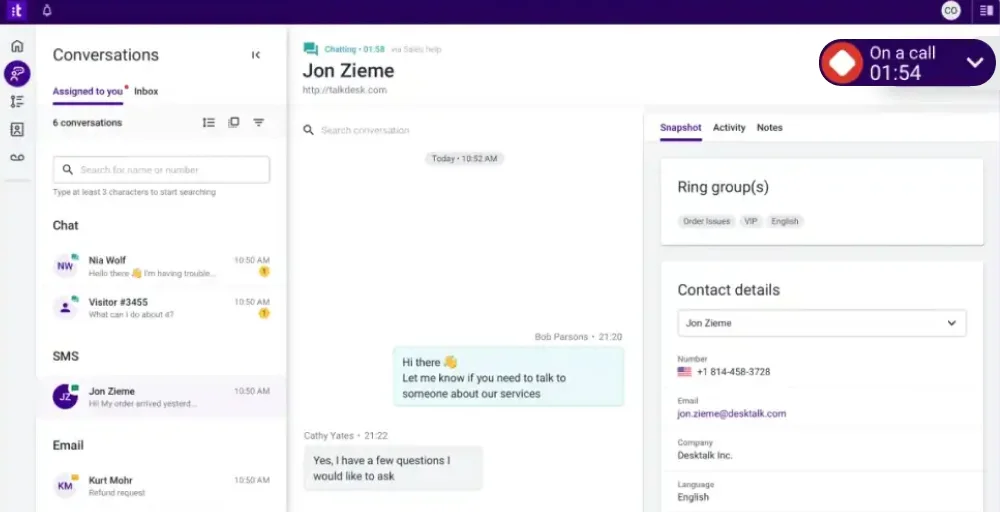
The platform handles high call volumes, making it ideal for large organizations or businesses with complex customer support needs. Your teams can manage inbound and outbound calls, track customer interactions, and monitor performance in real time, ensuring every customer receives professional, timely service.
Talkdesk’s standout features
- Studio & routing
- Real-time dashboard
- Quality management
Talkdesk pricing
Talkdesk pricing is higher than competitors’, reflecting its enterprise‑grade contact center capabilities.
| Plan | Annual price (per user/month) | Key feature set |
| Digital essentials | $85 | API access, studio & routing, digital engagement |
| Voice essentials | $105 | Voice engagement, speech recognition, voicemail transcription |
| Elite | $165 | Custom reporting with live and explore, screen recording, and workforce management |
| Industry experience cloud | $225 | Quality management, industry workflow, real-time dashboard |
Talkdesk Pros
- AI and automation tools that boost agent productivity and customer insights.
- High reliability and call quality with solid uptime and performance.
- Advanced analytics and dashboards for team and performance tracking.
Talkdesk Cons
- High pricing, especially for advanced or enterprise plans.
- Complex setup that may need IT support or training.
- Overkill for small businesses, many features are more than a simple phone system needs.
Which 8×8 alternative is best for you?
Every 8×8 alternative has its own strengths, designed to meet different business needs. We highlight the top VoIP providers and what makes each one stand out, helping you find the solution that fits your business perfectly.
- Choose KrispCall for affordable and powerful features that offer global calling, messaging, call analytics, and easy setup in one platform. It’s ideal for remote teams and growing businesses that need a reliable solution without complexity.
- Choose Ooma if you are looking for an affordable, easy-to-use solution that doesn’t require IT expertise.
- Choose GoTo Connect if you need a flexible all-in-one communication system with strong collaboration features, including team messaging, video meetings, and conference calling.
- Choose Unitel Voice if your priority is team collaboration and mobility. It offers desktop softphones, instant messaging, and a mobile app to keep teams connected on the go.
- If you’re seeking enterprise-level reliability and advanced CRM integration, Nextiva delivers strong uptime, call analytics, and scalable solutions for both small and large teams.
- Choose Vonage for a scalable, secure platform with voice, SMS, and advanced features. It’s well-suited for businesses looking to consolidate multiple communication channels into a single system.
- Choose a call center-focused solution if you need multi-channel support, easy CRM integrations, and automation features that boost sales and support efficiency.
- If you’re looking for a high-end contact center platform, Talkdesk offers AI-powered analytics, automation, and enterprise-grade features for organizations handling complex customer interactions.
Why should you try KrispCall?
KrispCall is one of the best VoIP providers, offering global calling in over 100 countries that enables businesses to expand worldwide. Its ease of use makes it user-friendly, allowing users to start calling, messaging, and managing customer interactions in minutes with no technical expertise needed.
Unlike 8×8, KrispCall combines affordable pricing, easy setup, and advanced features such as call analytics, SMS, call forwarding, and multi-device support, all in one platform. This makes it one of the best alternatives for 8×8, especially for remote teams and growing businesses that want reliable, scalable communication without complexity.
With KrispCall, you get clear calls, smooth collaboration, and powerful tools to keep your business connected anywhere in the world.
Ready to streamline your business worldwide? Try KrispCall today and experience the difference!