Many contact centers struggle when phone calls or simple text messages aren’t enough to explain customer issues. It often leads to longer resolution times, incorrect diagnoses, and ineffective solutions, ultimately frustrating customers and harming their experience.
The solution is simple: allowing face-to-face conversations between customers and support agents without requiring them to be in the same room.
A video contact center makes this possible, letting agents guide customers in real time via video and provide more personalized support. The result is faster resolutions, better engagement, and stronger trust.
A study by TalkDesk even suggests that customers prefer contact centers to incorporate video technology. About 48% of customers favor asynchronous video for support, while 36% prefer real-time video chat with a contact center agent.
With that in mind, let’s dive deep into what video contact centers are, their benefits, key challenges, use cases, and how you can successfully implement them to enhance customer support.
✨ Key Takeaways
- Video contact centers incorporate video calling as a part of their communication channels for minimal resolution time, lower costs, and better customer experience.
- Video contact center solutions do suffer from a few minor challenges, such as higher bandwidth requirements, privacy concerns, video fatigue, and low agents’ expertise.
- When choosing a video contact solution, ensure that they offer core features like omnichannel support, analytic tools, IVR integration, AI tools, robust security, etc.
What is a video contact center?
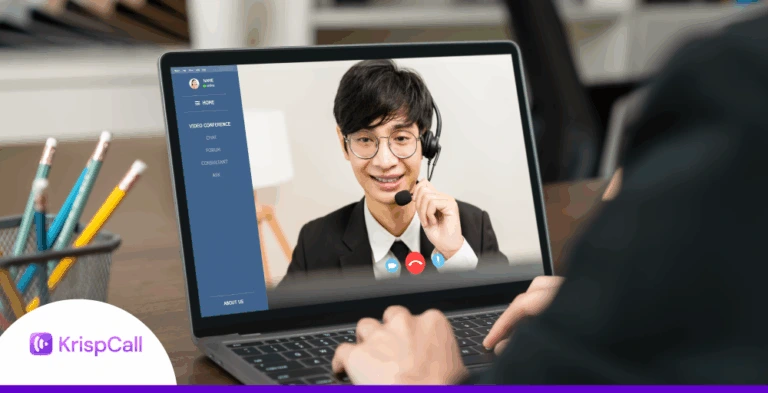
A video contact center is a customer service platform that integrates real-time video conferencing technology as a part of its integrated communication channels.
It allows your agents to engage in real-time face-to-face communication with the customers, building a more empathetic and personal connection that leads to a better overall experience.

For instance, a customer can reach out to the support team for product guidance. Rather than trying to explain the problem over the phone, the customer can start a video call or use screen sharing to show the agent what they are seeing. The agent can then provide accurate step-by-step guidance to assist the customer.
Incorporating visual elements into customer service not only makes the interaction more immersive but also helps to better understand customer issues and deliver more personalized support.
What are the benefits of video contact centers?
The visual aspect of video calls makes the interaction more engaging and impactful. It improves communication efficiency, fastens problem resolution, improves agent productivity, and provides cost savings.
In the long run, this leads to more satisfied customers and improved ROI.
Here are some of the advantages of video contact centre:
1. Improved communication
Nothing matches the convenience of a face-to-face conversation. Visual cues such as gestures, expressions, and body language add clarity that phone calls or texts just can’t provide. With video communication, contact centers can recreate the same face-to-face experience without requiring customers to be physically present.
For example, when a service releases new features, agents can use video to walk customers through changes, highlighting dashboards or workflows. This helps users understand updates quickly and reduces confusion.
2. Faster resolution time
Video chat improves FCR by enabling real-time communication, visual aids (like screen sharing), rather than explaining it to them over phone calls or text messages. Thus, improving personalization and supporting remote work for agents. These capabilities help resolve customer issues quickly and efficiently on their first contact.
3. Omnichannel integration
Aside from being a more effective way of communication, the video conferencing features also integrate well with other communication channels, including phone, live chat, SMS, email, etc. This allows for a more seamless and consistent experience across different touchpoints in the customer journey.
4. Cost savings
With a video contact center, agents can effectively handle tasks remotely that would otherwise require in-person visits, such as inspections, product demos, or consultations. They no longer need to set physical appointments, therefore saving cost on travelling, accommodation, and logistics.
5. Better agent productivity
Oftentimes, customers struggle to explain their issues clearly due to technical complexities. But with video, agents can see the issue directly and resolve it faster, saving time for both the customer and the contact center. This improves the agents’ productivity, allowing them to resolve more customer support requests.
Major challenges of video contact centers

Although there are many benefits of video contact centers, there are also a few challenges that you should be aware of. Being informed about these complications will help you to create proper strategies to avoid or lessen their negative impact.
- Higher bandwidth requirements: Unlike other communication channels like text, emails, or VoIP calls, video requires more bandwidth to transfer visual data. If your network lacks sufficient bandwidth, it can lead to poor video call quality, lag, or even dropped calls.
- Potential privacy concerns: Video calls can have privacy issues for both customers and the agents. Without proper security protocol, they risk exposing their sensitive information or data.
- Video fatigue: Although short video sessions can be quite impactful, extended sessions, on the other hand, can quickly get tiring. Constant on-camera communication can lead to reduced focus, slower responses, or even burnout, so it’s important to balance video use with other channels like IVR, text, live chats, etc.
- Customer preferences: It’s important to note that not all customers are comfortable with video communication. Some may prefer traditional channels like voice or chat. So, it is essential to understand their expectations and offer options to ensure higher satisfaction and engagement.
- Untrained agents: Although support agents are technically sound and capable of solving issues efficiently, they may not perform so well in front of a camera. In such cases, the visual element adds more pressure, leading to poor performance. To avoid this, ensure to properly train the agent for on-camera communication.
Practical use cases of video contact center
Contact centers with video support are being used across different industries for efficient operation and personalized customer interaction.
The popularity is apparent, as according to a report from Fortune Business Insights, the global video conferencing market is projected to grow from USD 37.29 billion in 2025 to USD 60.17 billion by 2032, showing a CAGR of 7.1%.
These numbers support the fact of the increasing integration of video conferencing technologies in modern businesses.
Here’s how different industrial sectors utilize them:
- Healthcare: For remote telemedicine consultation and medical follow-ups, improving accessibility for patients. Allows medical professionals to diagnose issues faster and reduces the need for in-person visits.
- Customer service: Video chat customer service facilitates face-to-face troubleshooting and product guidance, resulting in quicker resolution times. Visual demonstrations give better clarity.
- Education: Educational institutions can conduct virtual classrooms and offer virtual tutoring, making the experience more accessible and engaging.
- Financial institutions: For remote consultations, identity verification, and personalized financial advice securely. Provides customers with access to banking services without visiting a branch.


Key features of video contact center software
Every video contact center software is different when it comes to features. When it comes to picking the right one for your business, there are a few key features that you should prioritize.
They ensure your team can deliver the most effective video conferencing experience.

Here are 8 essential features a video contact center platform must have;
- Omnichannel support: With omnichannel support, your video contact center can seamlessly integrate with other communication channels like phone calls, emails, live chat, etc. This allows your business to deliver better omnichannel service.
- IVR integration: In addition to routing calls, advanced IVR (Interactive Voice Response) integration also allows customers to choose video for communication.
- Analytics tools: Call analytics and reporting tools are essential for measuring key KPIs and metrics. They give you a better perspective on the overall performance of the contact center along with actionable insights for further improvement.
- AI and automations: Advanced AI-powered features can help make work operations faster and efficient. They can automate routine tasks and offer smart suggestions, helping the agents to deliver a better customer experience.
- User-friendly interface: A simple and intuitive user interface ensures your support agents and customers can easily navigate and use the platform effectively.
- Live video chat: The real-time video chat features simulate an in-person meeting by allowing customers to talk face-to-face with the support agent. It makes the interaction more engaging and interactive as compared to traditional chat or phone calls.
- Security and privacy controls: It is essential for the platform to follow essential security protocols like AES-256, end-to-end encryption, and adhere to legal compliance such as GDPR or HIPAA. This ensures video communication is secured against malicious attacks and hijacks.
- Screen sharing and recording: With the screen-sharing feature, agents can provide better assistance to the customer. Plus, recordings can further support agent training, compliance, and quality assurance, especially when teams need to add subtitles to video recordings for easier review and accessibility.
Top video contact center software providers
The top video contact center software providers include a variety of companies offering comprehensive contact center solutions that integrate video capabilities along with voice, chat, and AI features.
| Provider | Key Features | Pricing |
| RingCentral | Omnichannel support (voice, chat, video), AI agents, analytics, workforce tools, CRM integrations | Starts at $65 per user per month |
| Nextiva | Video-enabled customer support, omnichannel routing, IVR, AI knowledge base, CRM integration | Starts at $75 per user per month |
| Dialpad | AI assistant, IVR, and skill-based routing, Real-time transcription, sentiment analysis, and video support | Starts at $95 per user per month |
| Zendesk | Omnichannel ticketing with video, AI agents, IVR & routing, analytics, and workforce management | Contact sales for custom pricing based on your needs |
| Zoom Contact Center | Native video-first customer support, omnichannel (voice, SMS, chat, email, video), intelligent routing, analytics tools, CRM integrations | Starts at $69 per user per month |
Implementing a video contact center
Implementing a video-based contact center for your business allows you to engage with your customers more effectively and improve operational efficiency. But for a smoother rollout, you need a well-thought-out strategy.
- Assess your business needs: Firstly, you should assess your business needs and customer preferences. Identify the department that would benefit the most from video calls. Understanding which channels, workflows, and outcomes take priority will make the overall process smoother and more effective.
- Choose a video conferencing platform: Next, you must select a reliable video conferencing platform that supports your business needs. Ensure that it offers all the essential features such as live video, screen sharing, recording, analytics, CRM integration, omnichannel support, etc, for seamless customer communication.
- Integrate with your contact center system: After choosing the video call center software, connect it with your existing contact center software. Ensure that you have the necessary resources to support the integration. e.g., sufficient bandwidth along with necessary hardware (mics, webcam).
- Train your agents: To ensure your agents can smoothly adapt to new workflows, it’s essential to train them in essential video etiquette and effective on-screen communication. Conduct mock sessions and simulations to hone their skills and improve their confidence.
- Perform test run: Before launching your video communication solution to the masses, conduct a few test runs on a small group of customers. This will help identify the potential weaknesses and the overall effectiveness of the video contact center solution.
- Monitor performance and seek improvements: After your video contact center goes live, the next step involves tracking key metrics such as first call resolution (FCR), average handling times, customer satisfaction, agent efficiency, etc. With these metrics, you can identify bottlenecks and drive continuous improvement.
Why video contact centers?
The value that video contact centers provide is essential for businesses looking to deliver exceptional customer experiences. By integrating video into support interactions, businesses can improve key metrics and make conversations more engaging and personalized.
Video allows agents to demonstrate solutions in real time, guide customers more effectively, and resolve complex issues faster. As a result, it builds stronger trust with customers and helps to sustain long-term customer loyalty.
That being said, the decision to implement a video contact center depends on your business needs. It is worthwhile if your business handles complex inquiries, provides high-value services, or wants to differentiate through personalized support.
However, for businesses dealing mostly with simple queries, low-touch interactions, or having the majority of customers who prefer phone or chat, a video call center solution may not provide much added value.