Did you know that businesses lose up to 2 hours per agent every day due to manual or administrative tasks? With automated outbound calling, you can minimize that wasted time and improve your team’s productivity.
Many businesses rely on automated outbound calls to reduce the manual overhead of dialing and allow agents to focus on crucial tasks. This simple yet effective practice helps to improve the workflow environment.
In this article, we will discuss what automated outbound calling is, how it works, its types, benefits, features, best practices, how to set it up, a trusted provider, and more. Continue scrolling!
✨ Key Takeaways
- Automated outbound calling eliminates manual dialing by using dialer software to handle large call volumes, improving speed, accuracy, and productivity.
- Different outbound dialers, like predictive, power, progressive, and preview dialers, help businesses manage calls efficiently based on campaign goals.
- Automation enhances agent productivity, reduces operational costs, improves lead follow-ups, and ensures compliance with calling regulations.
- Key features such as CRM integration, voicemail drop, real-time reporting, and built-in compliance controls help streamline outbound call operations.
What is automated outbound calling?
Automated outbound calling is a practice of an automatic calling method where dialer software initiates the calls in an organization. Such software frees agents from manual dialing and dials the numbers from pre-loaded lists.
Many organizations use automated outbound calling to reduce the burden of making outbound calls repeatedly. It improves the call efficiency and minimizes average call handling time by fostering improved collaboration.
Various automated outbound dialers, such as power dialer (dials from a pre-uploaded list), preview dialer (dials based on available agent), progressive dialer (dials after agent is ready and available), predictive dialer (dials based on predictive algorithms for agent availability), and click-to-call dialers (initiates calls directly from within a webpage or CRM) are used to improve the overall efficiency of the team.
How automated outbound calling works?
Automated outbound calling works by using dialer software to manage a large volume of calls. This process typically involves uploading contacts, syncing the contact list, choosing dialing mode, connecting to an agent, and logging the outcome of each call. Let’s see how it works step-by-step:
- Upload or sync your contact list: First of all, you need to upload the contact list to the system. To do so, you can either upload the CSV file or sync with a CRM system. This will provide names, past interactions, and useful details to help personalize the calls.
- Choose a dialing mode: Once your list is ready, select the dialing mode based on the requirements of your organization. Each mode controls how quickly calls are made and how they are assigned to agents. (More on this below.)
- Connect live calls to agents: As soon as someone answers, the call is automatically transferred to an available live agent, whereas if the call is not answered, the software can leave a voicemail, reschedule the call, or move to the next person without disturbing the agent.
- Log the outcome: After every call, whether it is completed, unanswered, sent to voicemail, or rescheduled, the system logs every detail. These logs can further be used to track the performance and provide further information.
The most common outbound calling tool is an autodialer. It dials calls according to preset dialing modes and uploaded contacts (lead lists). Aside from auto dialing, other outbound calling automation includes voicemail drop, voice spots, and automated SMS and email follow-ups.
Types of automated outbound dialers (dialing modes)
Automated outbound dialers are categorized into several types depending on speed and control. The most common types are predictive dialer, progressive dialer, power dialer, preview dialer, and TCPA-compliant.
- Predictive Dialer: Predictive dialers make calls autonomously using algorithms to predict which agents are available and connect calls to them as soon as the person answers. It is used to handle a large volume of calls and connect to as many people as possible.
- Power Dialer: Power dialer assigns an agent to a customer for a period of time and connects to another agent only after the ongoing call ends. It provides more control over the calling process and maintains personalization with every client.
- Progressive Dialer: Progressive dialing waits to make another call until the agent is ready. This provides quality personal care and a thoughtful response from clients.
- Preview Dialer: Preview dialers provide the customer details to the agents prior to making a call. This allows the agent to decide whether to make a call or not, and if they decide to initiate the call, they can be prepared beforehand.
- TCPA-compliant dialers: TCPA-compliant dialers are designed to attach to the Telephone Customer Protection Act (TCPA) before they make a call. This maintains consent tracking and avoids fines and legal issues.
Benefits of automated outbound calling
Manual dialing slows things down, wastes time, drains productivity, and limits the number of leads. Whereas AI-driven outbound calling changes all of that, it reaches out faster, provides effective solutions, and saves time.
Let’s discuss some of the key benefits that show why switching to outbound automated calling is essential:
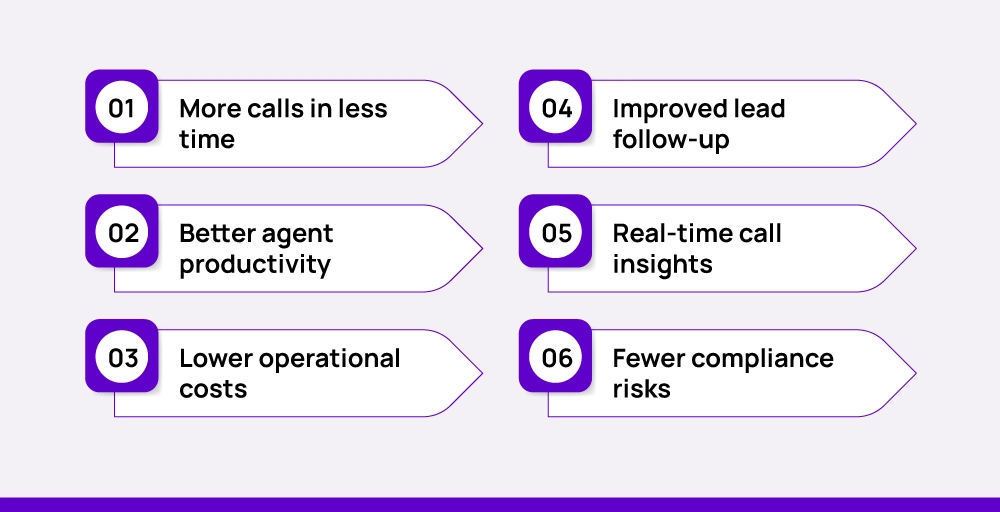
1. More calls in less time
When agents do not have to look up the contact list, dial the number one by one, and wait till the client picks up, they can save a lot of time. The automated outbound calls and messages actually do all the work and connect the agent only after a person picks up the call. This improves the agent’s efficiency and enables them to connect with more leads in less time.
2. Better agent productivity
The repetitive task of manual dialing every time and waiting for clients to pick up the call can be exhausting for a routine task. Therefore, switching to an automated outbound dialer can be a reliable option, allowing agents to be more focused, less drained, and have better interactions with each lead.
3. Lower operational costs
Automation provides better results even with fewer agents, as they only have to focus on productive conversations, eliminating the manual dialing processes. This can cut off the cost of hiring more agents, as well as improve team collaboration.
4. Improved lead follow-up
Following up with the leads can be easier with an automatic outbound call, as it allows agents to schedule the next follow-up right after the call or anytime. This decreases the missed leads and helps stay focused on the warm leads that are more likely to convert.
5. Real-time call insights
Every call generates useful data like pick-up rates, average call handling time (AHT), status of outcome, and more. These data can be used to identify patterns and measure the performance of which strategy is working and which areas need improvement. This, in turn, helps to increase the overall productivity.
6. Fewer compliance risks
Regulations such as the TCPA, GDPR, and other local laws set guidelines for outbound calling. Most automated calling systems have built-in features to help you stay compliant (like managing opt-outs, call timing controls, and consent tracking) so your team doesn’t cross any lines accidentally.


Top features to look for in automated outbound calling software
The appropriate outbound calling software offers control, clarity, and helps your team have better conversations. Before choosing a platform, you should understand which features will impact your results.
Here are 10 features worth paying attention to:
1. Multiple Dialing Modes
While selecting a dialing mode, make sure it has a progressive, predictive, power, and preview dialer so that you can select the one that is feasible for your business to convert more leads.
2. CRM Integration
With CRM integration, your agents do not have to struggle to switch between multiple tools and tabs. CRM stores all the interactions of the past and present that can be viewed by agents for prior preparation before talking to the leads.
3. Voicemail Drop
When the call goes unanswered, the agent should not waste time repeating the same message or call. So they can easily use this voicemail drop feature to leave a pre-recorded message in the client’s voicemai.
4. Live Call Routing
When the call connects, the clients should get the help they need from the right agent or department. So, the Live call routing feature makes sure the calls are routed to the right destination.
5. Answering Machine Detection
Answering machine detection is a tool that helps to detect whether a voice is recorded or from a live person. This saves the time of agents before reaching a dead end.
6. Local Caller ID Display
Calls from unfamiliar numbers often go ignored. With this feature, you can display a number that matches the prospect’s area code. It adds familiarity and increases the odds that they will answer.
7. Dynamic Call Scripts
A dynamic call script is a feature that provides a call script for the agents to target the right audience and strike with the targeted keywords to convert more leads based on the ongoing scenario during the live call.
8. Call Outcome Automation
After every call, you don’t have to bother the agent to schedule the after-call process. This feature (call outcome automation) helps you automate tasks such as sending a follow-up, updating the CRM, or queuing a callback.
9. Real-Time Reporting
Managers need a clear view of what’s happening. So with real-time reporting, they can view the dashboard that shows connection rates, talk times, and call results. This gives them a clear idea about what’s working and what’s not in real time.
10. Built-in Compliance Controls
Outbound calling has to follow certain rules. Look for a system that helps manage opt-outs, time restrictions, consent tracking, and Do Not Call lists. It helps your call stay legal and helps in brand safeguarding.
6 Best practices for automated outbound calling
To get the most out of automated outbound calling, you need a better strategy along with a contact list and an automated dialer to improve the conversation on the other end of the line within a specific time.
Here are six proven best practices that can help you get better results, build trust, and turn cold leads into real conversations.
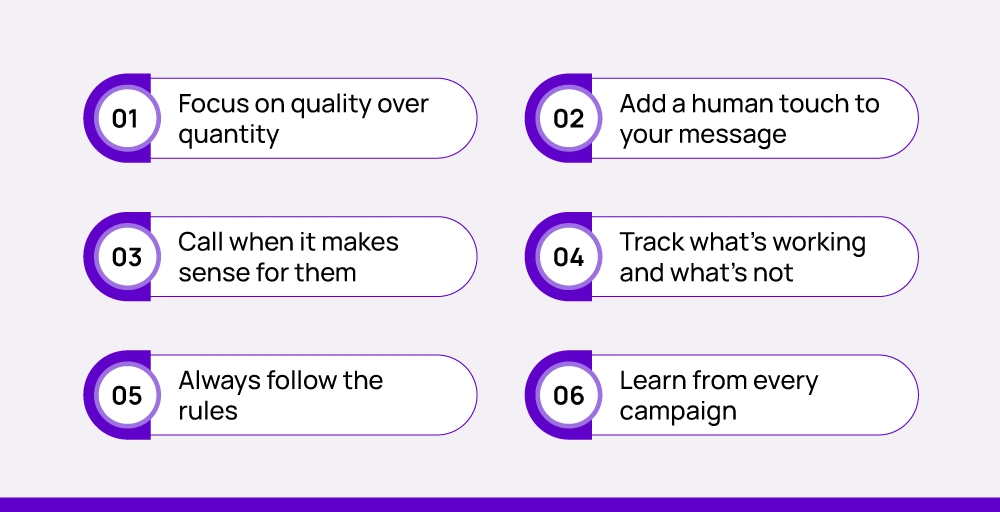
1. Focus on quality over quantity
Calling 1000s of people each day and getting spammed or unanswered calls is not getting you anywhere. Instead of trying to reach a larger number of people, focus on quality conversation to turn active leads into a small group.
At the end of the day, 100 active leads are better than 1000 ignored calls to uninterested people. Therefore, try to group contacts based on location, purchase history, interest level, or recent activity.
2. Add a human touch to your message
Automation does not have to be robotic. Use the existing data to personalize your messages and try to mention the prospect’s name, refer to their past interaction, or acknowledge their current interests. Even the smallest details can make them feel personalized instead of sounding scripted.
3. Call when it makes sense for them
Timing plays a great role while dealing with customers. You cannot hurt customer sentiments while trying to capture a lead. Always avoid calling times at early mornings, late evenings, or lunch breaks.
Respect time zones and try to reach out during normal business hours. The higher convenience to customers can lead to better conversion rates.
4. Track what’s working and what’s not
Automated calling platforms give you access to detailed call reports. Use them to look at how many calls connect, how long conversations last, and how often they convert. Reviewing this data regularly helps you update your strategy and improve performance over time.
5. Always follow the rules
Different regions have different rules around outbound calling. Make sure you are aware of consent requirements, opt-out options, and call timing restrictions. You do not want to end up in legal trouble while trying to convert leads.
6. Learn from every campaign
Don’t settle for the numbers. Keep an open area for improvements. Ask your agents or sales reps to know what’s landing and what’s being ignored. Ask for their feedback on scripts, lists, and call flows. Even a small suggestion can lead to a big improvement in your next campaign.
How to set up an automated calling solution
Starting an automated outbound scaling service is easier, but keeping up with it and converting leads may require a proper plan. Let’s discuss how to set up an automated outbound calling service:
1. Define your goals first
Start by identifying the goal of your organization. What is your primary focus? To generate leads, follow up on past calls, support existing customers, send appointment reminders, or conduct sales outreach?
Defining your goal appropriately will help you select the right dialer and build your campaigns in a way that suits you.
2. Choose the right software
Select the software that fits your business needs. Look for one that offers multiple dialing modes, contact management, and call tracking. If you’re already using a CRM or helpdesk system, pick a tool that easily connects with your existing system.
3. Build a quality call list and create a script
Make a list of contacts by pulling data from your CRM or importing it manually. Double-check numbers and organize the list by priority, region, or customer type to improve your targeting.
Make a simple script or call outline to increase agent productivity while speaking with customers. You can also include key questions, product points, or follow-up steps to keep up the conversation.
4. Set up automations and integrations
Now set the backend in place. Turn on features like call logging, follow-up scheduling, or voicemail drops. Link your dialer to your CRM or customer database so data updates automatically after each call.
5. Test and optimize thoroughly
Before running your full campaign, test it. Make a few sample calls. Check audio quality, connection speed, and how calls are being routed. If anything feels off, fix it early.
6. Go live and make adjustments in real time
Once everything is ready, launch your campaign. Use built-in comprehensive analytics to track how calls are going. Look at metrics like connection rate, call length, and outcomes to see what’s working and what’s not.
After the launch, stay open to improvements and small adjustments to adapt to emerging technological changes.
What to do and what not to do?
| ✔️What to do | ❌What not to do |
| Write a simple script or key points to follow | Don’t let callers make things up as they go |
| Set a clear goal for your calls | Don’t start without knowing your purpose |
| Pick software that works well with your current tools | Don’t choose software just because it’s cheap |
| Use a clean and updated contact list | Don’t call wrong or outdated numbers |
| Test your setup with a few calls first | Don’t launch without testing |
| Check results and improve your calls over time | Don’t forget to review what’s working |
| Turn on helpful tools like call notes and reminders | Don’t rely only on memory or manual updates |
| Teach your team how to handle calls | Don’t assume they’ll figure it out on their own |
| Follow the rules about calling people | Don’t call without permission |
| Be open to making changes if needed | Don’t keep doing what’s not working |
How KrispCall can simplify automated outbound calling for your team
Selecting the best outbound solution is actually dependent on several factors, like business needs and goals, call volume level, industry type, and budget.
To keep up with the recent technological advancements, better isn’t enough; you need the best, and that’s KrispCall. An AI-powered internet telephony app designed for modern businesses to provide speed, control, and intelligence for your outbound calls to manage everything effortlessly.
KrispCall’s features aren’t a fancy upgrade to your call center; it is the backbone that powers every operation. It enhances the automated outbound calling process and drives perfection at every step. We ensure every dial, follow-up, and sales call is powered by efficiency, transition, and success.
Your outbound call center dials potential leads to analyze market presence, gather feedback, and access competitors, refining strategies to stay ahead. To do this, a global local presence dialing is key. With KrispCall, you can instantly purchase VoIP numbers from 100+ countries and make calls worldwide or from a single location. And with the number sharing feature, you can share the same number and make calls simultaneously.
Sign up today and book a free demo to expand your outbound call limits.