Have you ever been annoyed due to spam calls or faced unexpected phone bill charges from international calls? That’s where call barring comes in to rescue. Whether you want to stop unwanted callers, prevent accidental roaming charges, or simply manage call direction to avoid extra costs, barring calls makes it easy and effective.
In this blog, you will learn what call barring means, why it’s essential, and how to activate and deactivate it on both Android and iPhone.
✨ Key Takeaways
- Call barring is a phone feature that enables you to restrict incoming or outgoing calls to control costs, prevent misuse, and offer control over your communication by restricting calls.
- There are different types of call barring: incoming, outgoing, conditional, and unconditional.
- It offers several advantages, such as access control, emergency-only calls, reducing roaming costs, blocking spam calls, and improving privacy and security.
What is call barring?
Call barring is a very useful network service whereby you are able to block certain types of incoming and outgoing calls from your mobile phone.
While the call-blocking function allows you to block only those specific numbers, the call-barring function gives you more general control over entire categories of calls.

At its core, call barring acts as a form of call restriction, giving you the ability to block some calls from being made or received.
For example, you can use call barring to block incoming calls so as not to be disturbed by undesired calls.
Note: This is available on both Android and iPhoneand thus has a wider audience. However, iPhone doesn’t have a build in feature; you have to either contact your mobile service provider or use any third-party applications.
What are the different types of call barring?
Call barring simply lets you control the calls that you want to make or receive on your phone. Here are different types, which are explained below:
1. Incoming call barring
Incoming call barring allows you to block certain types of calls from reaching your phone. This feature is perfect for users who want to avoid unwanted or spam calls. You can also use it while traveling in foreign countries to reduce roaming charges.
There are a few ways to use it:
- Bar all incoming calls: No one can reach you until you turn it off.
- Bar incoming calls when roaming: You won’t get calls while abroad, helping you avoid roaming fees.
2. Outgoing call barring
Outgoing call barring restricts your mobile phone from making calls. This is perfect if you want to prevent unauthorized phone use, avoid accidental international calls, or control calling costs for yourself or family members.
You can use it in different ways:
- Block all outgoing calls: Stop all outgoing calls.
- Block international calls: Blocks international calls to save on costs.
- Bar international calls except to your home country: Lets you call your home country when abroad, but blocks other international numbers.
3. Conditional vs. unconditional barring
Here are the differences between conditional and unconditional barring:
| Feature | Unconditional Barring | Conditional Barring |
| Definition | Blocks calls without any condition. | Blocks calls only under certain conditions. |
| Example | No incoming calls at all, regardless of circumstances. | Incoming calls are blocked only when the phone is busy, unreachable, or not answered. |
| Flexibility | Low – applies to all calls uniformly. | High – applies only in specific situations. |
| Purpose | Total restriction for security or cost control. | Controlled restriction based on circumstances. |
4. International call barring
While travelling abroad, activating international call barring helps you avoid making international calls accidentally that could result in extra roaming charges. This type of option is mostly used by frequent travellers to prevent users from making or receiving international calls.
5. Specific number barring
Some carriers and devices allow you to block calls to or from specific types of numbers:
- Premium-rate numbers: Block calls to expensive premium services (like 1-900 numbers).
- Specific number patterns: Restrict calls based on area codes or number prefixes.
- Service numbers: Block access to value-added services that may incur extra charges.
This feature helps prevent premium-rate calls, accidental charges, and potential fraud.
Things to keep in mind before enabling call barring
Here are the things that you need to keep in mind before enabling call barring in your device:
- Carrier Support: Always check if your phone carrier only lets you block incoming and outgoing calls. So, check if your carrier supports international call barring or not.
- PIN or Password: To turn call barring on or off, most phone device requires PIN or Passwords. So, you need to contact the carrier support to obtain the PIN.
- Compatible with various features: While activating call barring on your device, it can interfere with call forwarding or voicemail features. So, you need to test before using it, or you can ask your carrier support before activating it.
How to initiate call barring?
It blocks unnecessary calls and enhances high security, and reduces costs. There are different ways to activate call barring depending on your mobile device, like an iPhone or an Android.
1. Activate call barring on iPhone
👉 Important: iPhones do not support direct call barring activation through device settings like Android phones. Call barring on iPhone must be managed through your mobile carrier.
Follow these steps to initiate call barring on iPhone:
Step 1: Contact your mobile carrier’s customer service.
Step 2: Request to activate call barring on your account.
Step 3: Specify which type of barring calls you need (incoming, outgoing, international, or roaming).
Step 4: Your carrier will activate the service and may provide you with a PIN for managing the settings.
Alternative: Use iPhone’s call blocking feature (for specific numbers only)
For blocking specific contacts (not the same as network-level call barring):
Step 1: Go to Settings.
Step 2: Tap Phone.
Step 3: Select Call Blocking & Identification.
Step 4: Add contacts to block or enable third-party call blocking apps.
🔥 Note: This blocks specific numbers only, not entire categories of calls like international or roaming calls.
GSM code
iPhones can use MMI/GSM codes through the Phone app dialer:
- Open Phone app → Keypad
- Dial *33*PIN# for outgoing call barring.
- Dial *35*PIN# for incoming call barring.
2. Activate call barring on Android
To manage and restrict certain calls on your Android device, you can easily activate it through your phone’s settings.
Here are the steps to activate call barring on Android:
Step 1: Open the Phone app.

Step 2: Tap three dots and navigate to Settings.

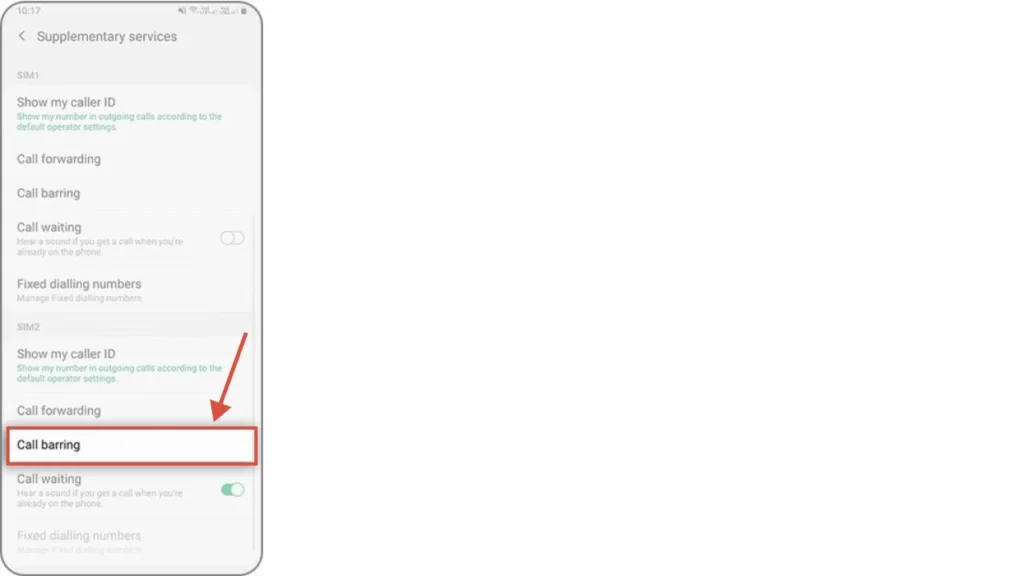
Step 3: Select supplementary services.
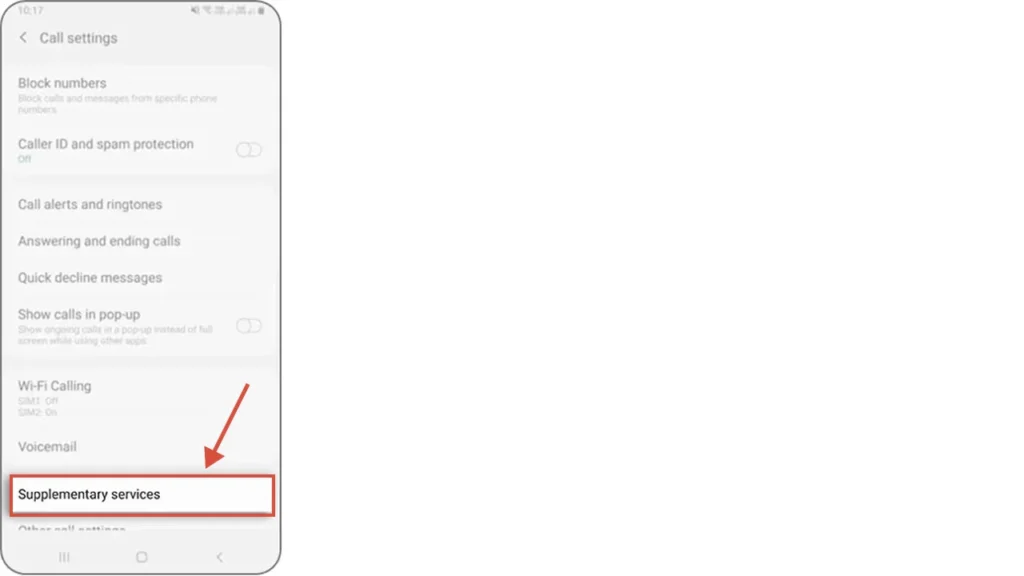
Step 4: Choose Call Barring.
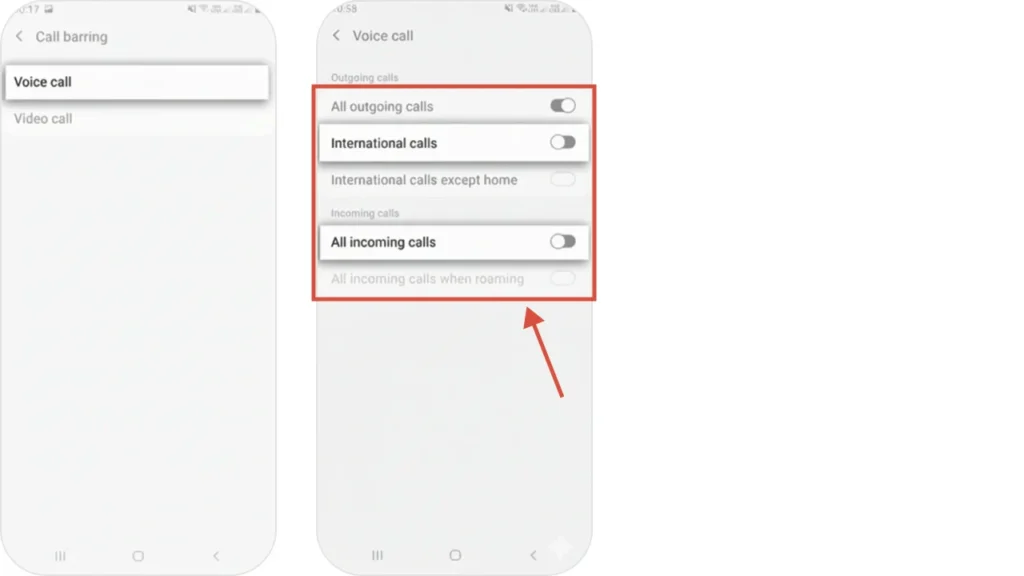
Step 5: Select voice calls & Toggle ON whether you want to block all outgoing, incoming, or international calls.
MMI Code
| Type of Call | MMI Code Example | Purpose |
| Outgoing Calls | *33*PIN# | Restrict all outgoing calls |
| Incoming Calls | *35*PIN# | Restrict all incoming calls |
| International | *331*PIN# (outgoing) | Block international calls |
| Conditional | Varies by network | Block calls when busy/unreachable |
How to deactivate call barring?
Deactivating call barring is easy; you just need to follow certain steps on both iPhone and Android mobile phones.
On iPhone
If you’re using an iPhone, you can deactivate call barring on your iPhone through your carrier or by using GSM codes.
Contact your carrier
Get in touch with your mobile service provider through customer support or their official app. They can help you disable call barring on your number from their end. This method is useful if you’ve forgotten your barring PIN or face issues deactivating it manually.
GSM codes
You can deactivate using below GSM codes:
- #33*PIN# – Deactivate all outgoing call barring
- #35*PIN# – Deactivate all incoming call barring
- #331*PIN# – Deactivates international outgoing calls
- #351*PIN# – Deactivate roaming incoming call barring
- #330*PIN# – Deactivate ALL call barring at once
On Android
Follow the steps below to deactivate call barring on your Android phone:
Step 1: Open the Phone app.

Step 2: Tap the three-dot menu and go to Settings.

Step 3: Navigate to and select Supplementary services.

Step 4: Tap the barring options you want to deactivate.
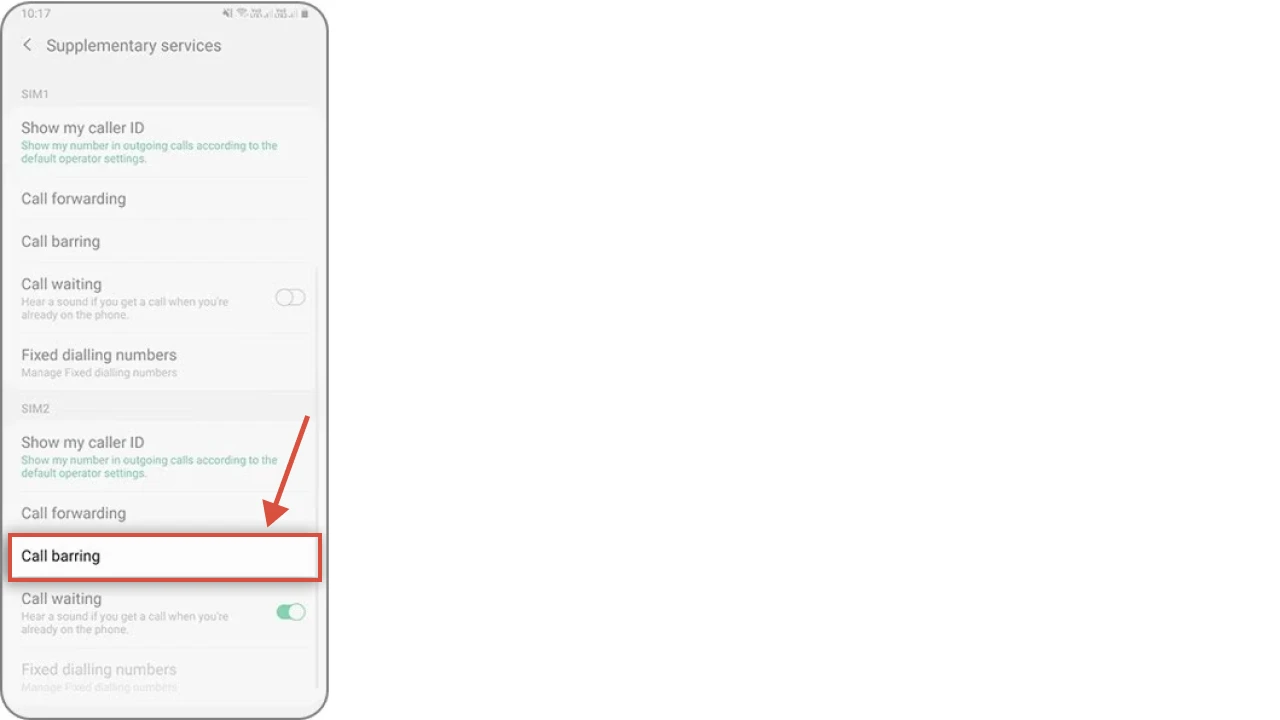
🔥 Note: (If you have a dual SIM card, select between SIM 1 or SIM 2 to customize).
Step 5: Tap OK.

Step 6: Select Voice call and toggle off to disable call barring.

Step 7: Enter your call barring password/ PIN.
Advantages of call barring
It provides several benefits to users, such as preventing unwanted calls, reducing roaming charges, and improving overall control over phone usage.
Some of the key benefits are:
Access control
It allows you to restrict specific types of inbound and outbound calls. This ensures that only authorized phone calls are permitted, which reduces the risk of misuse, especially on shared devices or in business settings.
With access control, users can maintain order and discipline in their phone usage. It ensures that the phone line is used only for intended purposes, reducing the risk of accidental or unauthorized calls and giving users peace of mind and greater confidence in how their device is being used.
Emergency-only calls
Even when certain calls are barred, all networks are legally required to allow emergency calls to go through. This feature ensures user safety, allowing access to emergency services like 911 or local equivalents without disabling call restrictions entirely.
Emergency-only call access provides a perfect balance between safety and restriction. Users can confidently block unnecessary calls without worrying about losing access to critical services, allowing call barring to protect without compromising emergency readiness.
Reduce roaming cost
It helps users avoid high charges associated with international or roaming calls. By restricting these types of calls, users can prevent unexpected bills, which is especially helpful when traveling or using a phone during travel.
This feature allows users to plan and control their spending, reducing financial stress and ensuring that their phone remains an efficient communication tool without incurring unnecessary costs. It turns call barring into a proactive measure for financial management.
Block spam calls
With call barring, users can block unwanted or spam calls, such as telemarketing calls or potential scam numbers. This helps minimize distractions and ensures that users are not disturbed by irrelevant or harmful communications.
Blocking spam calls also improves productivity and peace of mind. By filtering out unnecessary calls, users can focus on important conversations and reduce the risk of falling victim to scams or fraudulent schemes, enhancing overall phone security.
Improve privacy and security
It provides an added layer of privacy and security by controlling who can make or receive calls. This helps prevent unauthorized access to the phone line, ensuring that personal and sensitive information remains protected.
By managing communications in this way, users can maintain confidentiality in their personal and professional interactions. It acts as a safeguard against misuse, intrusion, and unwanted exposure, making it a vital tool for secure and responsible phone usage. If you get too many spam calls and have security concerns, try dialing these codes (*#21#, *#67#, *#62#, and ##002#) to check whether your phone is hacked or being monitored.
Limitations of call barring
Despite several benefits, It brings certain limitations that users should be aware of before enabling it.
Here are some drawbacks described below:
- Carrier support needed: Some call barring features require activation through your network support. Without carrier support, call barring types may not be available.
- Network compatibility: Not all types of call barring work on every network, especially when using international SIM cards or different phone technologies.
- Not full parental control: While call barring can prevent certain calls, it doesn’t allow full control over apps, messaging, or internet usage. Parents may need additional tools to monitor overall phone activity.
- Limited customization: Users can usually only select from preset barring options (like outgoing or incoming calls). More advanced rules, such as barring only specific numbers or time-based restrictions, may not be available.
- VoIP limitations: Some internet-based calling apps, like WhatsApp, may bypass traditional network-level call barring. Users relying on these apps may still incur charges or receive calls despite restrictions.
Conclusion
Call barring is a feature that enables users to manage and control their mobile phone usage by limiting unwanted or costly calls. It’s beneficial for maintaining privacy, avoiding spam or scam calls, reducing roaming charges, and business supervision.
However, it brings a few drawbacks, such as limited network compatibility, incomplete parental control, and the inability to block internet-based calls. Despite these limitations, it remains an effective tool for anyone who wants better control over their communication and expenses.