New Zealand’s phone numbering system is compact and logical once you understand its structure. The country uses a single country code (+64), five geographic area codes covering the entire country, and a distinct 02X prefix range for mobile phone numbers.
Whether you’re setting up a business phone line, staying connected with family, or managing international communication from the US, UK, or the UAE. Below is a step-by-step guide that gives you the exact New Zealand phone number format, with real examples, so your call goes through on the first try.
✨ TL;DR
- Domestic format: Dial a leading 0, followed by the area code and subscriber number, e.g., landline 09 307 8500 or mobile 021 123 4567 (8–10 digits total; no country code needed).
- International format: Drop the leading 0, add +64, e.g., +64 9 307 8500 (landline) or +64 21 123 4567 (mobile). The + sign works universally on all smartphones.
What is the New Zealand phone number format?
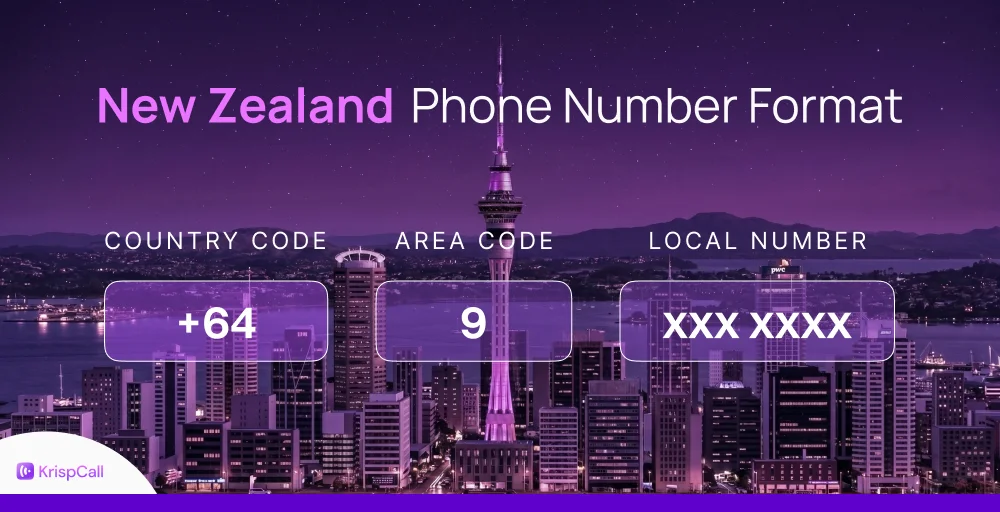
A New Zealand phone number consists of three parts: the country code for New Zealand (+64), a 1-digit area code (or a 2-digit mobile prefix), and a subscriber number. The total number of digits, including the area code but excluding the country code, is 8 or 9 for landlines and 8-10 for mobile phone numbers.
When dialing domestically, you replace the international +64 prefix with a leading 0. When dialing internationally, you drop that leading 0 and add +64 in its place.
NZ country code and area codes
New Zealand’s country code is +64. When calling from overseas, omit the leading ‘0’ from the local area code or mobile number. Major area codes include Auckland (9), Wellington (4), Christchurch (3), and Hamilton (7), while mobile numbers start with 2.
Here is the list of New Zealand area codes and cities they serve, along with their domestic and international phone number formats:
| Area codes | Cities served | Domestic | International |
| 03 | Christchurch, Nelson, Queenstown, Dunedin, Invercargill, South Island | 03 234 5678 | +64 3 234 5678 |
| 04 | Wellington, Kapiti Coast, Wairarapa | 04 234 5678 | +64 4 234 5678 |
| 06 | Hawke’s Bay, Taranaki, Whanganui, Palmerston North, Gisborne | 06 234 5678 | +64 6 234 5678 |
| 07 | Hamilton, Waikato, Tauranga, Rotorua | 07 234 5678 | +64 7 234 5678 |
| 09 | Auckland, Northland, Waiheke | 09 234 5678 | +64 9 234 5678 |
Did you know?
New Zealand originally had many more area codes, similar to Australia’s state-by-state system. The 1987 consolidation reduced them to five, each covering vast geographic regions. This is why the 09 area code covers all of Auckland and Northland, roughly 1.7 million people under a single prefix.
Types of NZ phone numbers
Landline numbers
New Zealand landline numbers consist of a one-digit area code followed by a seven-digit phone number, for a total of 8 digits. In international format, you drop the leading zero and add +64.
NZ landline number format: 09 XXX XXXX (Domestic) and +64 9 XXX XXXX (International)
Note: If you’re calling within the same area code region (e.g., from one Auckland landline number to another), you can dial just the seven-digit subscriber number; no area code prefix is needed.
Mobile numbers
New Zealand mobile numbers all begin with 02 when dialed domestically. The carrier is identified by the digits that follow; the first three digits (e.g., 021, 027) tell you which network the number belongs to. Unlike landlines, mobile phone numbers can be 9 or 10 digits long, depending on the carrier and the subscriber number block.
| Carrier | Prefix |
| Spark | 021 |
| 2Degrees | 022 |
| One NZ (formerly Vodafone) | 027 |
| MVNOs (Mobile Virtual Network Operators) | 028 |
| Compass | 029 |
NZ mobile number format: 02X XXX XXXX (Domestic) and +64 2X XXX XXXX (International)
Note: Subscriber number length varies by carrier and plan block. Spark 021 numbers are typically seven digits after the prefix; newer 020/028 blocks may be 8 digits after the prefix. Always verify the full number with your contact. MVNOs (like Skinny and Kogan Mobile) often resell under the 028 prefix.
Toll-free numbers (0800, 0508, 0900)
To call a toll-free number in New Zealand from another country, start by dialing your country’s international dialing code, followed by the New Zealand country code, the toll-free prefix (without the leading zero), and the subscriber’s number.
Get Virtual Phone Number Online.
Get virtual phone numbers from all over the world for personal & professional use.
Select numbers :
New Zealand uses several toll-free numbers like 0800, 0508, or 0900 ranges for non-geographic calls and premium rate services:
- 0800: Freephone (caller pays nothing; business pays). Format: 0800 XXX XXX or 0800 XXXXXX.
- 0508: Cost-share (local call rate applies). Less common than 0800.
- 0900: Premium rate numbers; per-minute charges apply to the caller.
For instance, to call a New Zealand toll-free number from the US, you would dial 011 64 508 765 4321. Alternatively, you can use the plus sign format: +64 508 765 4321.
Where,
011 – International exit code for the USA
64 – New Zealand country code
508 – Toll-free prefix (without the leading 0)
765 4321 – Subscriber number
Special and emergency numbers (111, 105)
In New Zealand, dial 111 for all emergencies (Police, Fire, or Ambulance). For non-urgent police matters, use 105. These services are free, available 24/7, and essential for immediate assistance, such as when life, health, or property is threatened.
- 111: Emergency services (Police, Fire, Ambulance). Available 24/7, free from any phone.
- 105: Non-emergency Police number.
- *555: Road hazard reporting (from a mobile).
How to call New Zealand from any country
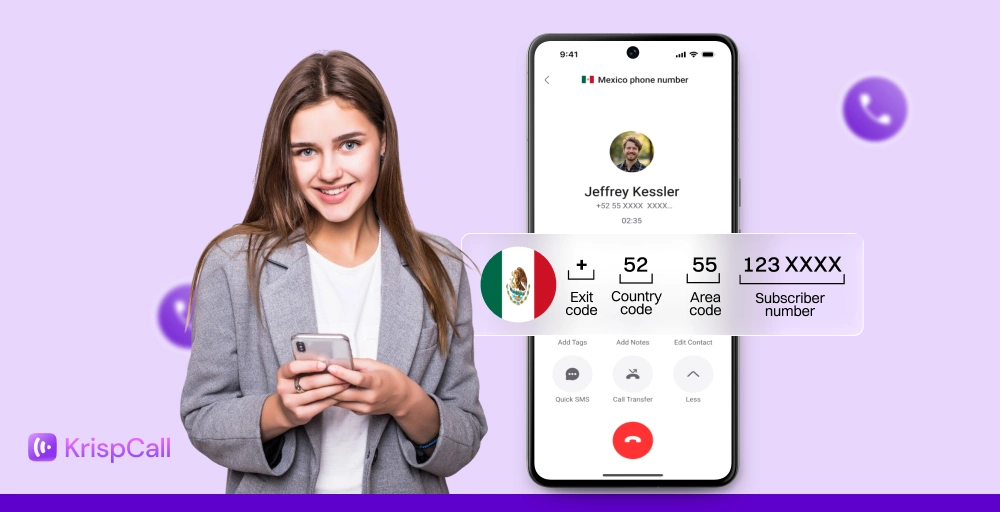
To call a number in New Zealand from abroad, use this format: Your country’s exit code + 64 + the New Zealand number (without the leading 0). On modern smartphones, you can simply use the + symbol instead of your country’s exit code, making the format universal: +64 followed by the NZ number (without the leading 0).
US, UK, Australia
To call New Zealand from the US, UK, or Australia, follow the following format:
| Calling New Zealand from | Dialing format | Landline number example | Mobile number example |
| United States | 011 64 X XXX XXXX | 011 64 9 307 8500 | 011 64 21 123 4567 |
| United Kingdom | 00 64 X XXX XXXX | 00 64 9 307 8500 | 00 64 21 123 4567 |
| Australia | 0011 64 X XXX XXXX | 0011 64 9 307 8500 | 0011 64 21 123 4567 |
India, UAE, Singapore, Canada
The different international prefix or exit codes used by India (000), UAE (00), Singapore (001/008), and Canada (011). Below is a simplified table showing exactly how to call a New Zealand number from other countries, including real landline and mobile examples.
| Calling New Zealand from | Dialing format | Landline number example | Mobile number example |
| India | 00 64 X XXX XXXX | 000 64 9 307 8500 | 000 64 21 123 4567 |
| UAE | 00 64 X XXX XXXX | 00 64 9 307 8500 | 00 64 21 123 4567 |
| Singapore | 001 64 X XXX XXXX | 001 64 9 307 8500 | 001 64 21 123 4567 |
| Canada | 011 64 X XXX XXXX | 011 64 9 307 8500 | 011 64 21 123 4567 |
“+” method vs exit code: When should you use?
The + method (e.g., +64 9 307 8500) works universally on all modern smartphones. When you type + before a number, your phone automatically replaces it with the correct exit code for whatever country you’re currently in. This makes it the safest and most portable format for saving contacts, especially for numbers you may dial while traveling.
The exit code method (e.g., 011 64 9 307 8500 from the US) is used on landlines, older mobile phones, and some PBX/VoIP systems that don’t recognize the + symbol. It is also commonly required when configuring call forwarding rules on desk phones or PBX systems. If your call fails with +, try the exit code method instead.
How to call NZ from major cities
To call New Zealand from major cities, dial your country’s international exit code (or + on mobiles), followed by 64 (NZ country code), then the area/mobile code (dropping the leading 0) and the local number.
Auckland, Wellington, Christchurch examples
If you are looking for a New Zealand phone number format example, the cities Auckland, Wellington, and Christchurch are:
Auckland phone number format example:
Landline number
- Domestic format: 09 123 4567
- International format (from US): 011 64 9 123 4567
Mobile number
- Domestic format: 021 123 456X
- International format (from US): 011 64 21 123 4567
Wellington phone number format example:
Landline number
- Domestic format: 04 123 4567
- International format (from US): 011 64 4 123 4567
Mobile number
- Domestic format: 021 123 456X
- International format (from US): 011 64 21 123 4567
Christchurch phone number format example:
Landline number
- Domestic format: 03 123 4567
- International format (from US): 011 64 3 123 4567
Mobile number
- Domestic format: 021 123 456X
- International format (from US): 011 64 21 123 4567
Hamilton, Tauranga, Dunedin, Queenstown examples
Below are examples of New Zealand phone number formats for major cities, clearly showing both domestic (for local calls) and international dialing formats.
All international calls from the US use the format: 011 64 + area code (without 0) + number.
Hamilton phone number format example:
Landline number
- Domestic format: 07 123 4567
- International format (from US): 011 64 7 123 4567
Mobile number
- Domestic format: 021 123 456X
- International format (from US): 011 64 21 123 4567
Tauranga phone number format example:
Landline number
- Domestic format: 07 123 4567
- International format (from US): 011 64 7 123 4567
Mobile number
- Domestic format: 021 123 456X
- International format (from US): 011 64 21 123 4567
Dunedin phone number format example:
Landline number
- Domestic format: 03 123 4567
- International format (from US): 011 64 3 123 4567
Mobile number
- Domestic format: 021 123 456X
- International format (from US): 011 64 21 123 4567
Queenstown phone number format example:
Landline number
- Domestic format: 03 123 4567
- International format (from US): 011 64 3 123 4567
Mobile number
- Domestic format: 021 123 456X
- International format (from US): 011 64 21 123 4567
How NZ numbers display across platforms
An NZ phone number can look very different depending on where it’s being used, whether in a CRM, a messaging app, or on an incoming video calls screen. This detailed guide covers the most common platform formats so you can set numbers up correctly the first time.
E.164 format for CRMs (Salesforce, HubSpot)
E.164 is the international standard format used by CRMs, VoIP platforms, and APIs. It requires the + sign, the full country code, and the subscriber number, with no spaces, dashes, or brackets. For New Zealand, this looks like: +6491234567 (landline) or +64211234567 (mobile).
Using E.164 in Salesforce or HubSpot ensures that click-to-call works correctly, prevents duplicate contact records caused by mismatched formats, and allows SMS integrations (like Twilio) to route messages properly.
WhatsApp and Telegram formatting
When adding a New Zealand number to WhatsApp or Telegram, you can only use the + format: e.g., +64 21 123 4567. Do not include a leading zero; WhatsApp does not recognize 021 123 4567 as a valid NZ number. Spaces between digit groups are optional; WhatsApp accepts them.
- On Android: go to Contacts → Add → enter the number in + format → WhatsApp will detect it automatically
- On iPhone: same process; no need to download a country dialing app.
Inbound calls from NZ will appear as +64 X XXX XXXX on international handsets if Caller ID is transmitted. In rare cases with older landline systems, the area code may be shown without the +64 New Zealand country code prefix. Outbound calls from NZ landlines typically display the full number in local phone number format (09 XXX XXXX) to domestic recipients and, where technically possible, in international format to overseas recipients.
Quick Tip: The leading zero mistake is very common on WhatsApp. The most frequent reason a NZ number fails on WhatsApp is including the leading 0 (e.g., 021… instead of +64 21…). Always drop the 0 and add +64.
Sending SMS/text messages to New Zealand
To send messages/SMS to businesses in New Zealand, you need to be regulated by the Unsolicited Electronic Messages Act 2007. Here are the key rules to follow:
Format for international SMS (personal use)
International texting to New Zealand follows the same logic as voice calls. To send an SMS to a New Zealand mobile from overseas, use the international format: +64 2X XXX XXXX. Most SMS apps (iMessage, WhatsApp, Google Messages) accept this format directly. The most common mistake is including the leading zero, sending text messages to 021 XXX XXXX instead of +64 21 XXX XXXX. will result in a delivery failure.
Business SMS compliance
If you’re sending bulk or commercial SMS messages to New Zealand recipients, you must comply with the Unsolicited Electronic Messages Act 2007 (UEMA). Key requirements include:
- Consent required: Recipients must have given express or inferred consent before receiving commercial messages.
- Identify sender: Every message must clearly identify the sending entity (business name or trading name).
- Opt-out mechanism: Every message must include a working opt-out method (e.g., reply STOP). Opt-out requests must be honored within 5 business days.
- Alpha tag restrictions: Sender ID (alpha tags) must accurately represent your business; using a misleading brand name as a sender ID is prohibited.
- Shortcodes: Premium SMS shortcodes must be registered with the NZ Commerce Commission.
- Fines: Non-compliance or violations can attract fines of up to NZD $200,000 for individuals and NZD $500,000 for companies per breach.
Related Article 👉: International Phone Number Format – Examples & Use Cases
Time zones to know before you call New Zealand number
New Zealand observes New Zealand Standard Time (NZST) at UTC+12 and New Zealand Daylight Time (NZDT) at UTC+13 during daylight saving (typically late September to early April). This makes NZ one of the first countries to welcome each new day.
Best time to call New Zealand
The best time to call New Zealand for a business call is between 9:00 AM and 5:00 PM NZST. Here’s what that translates to in major calling regions:
| Your Region | Time Difference (NZST/NZDT) | Best Time to Call (Your Time) |
| USA (EST) | +16 to +18 hours ahead | 4:00 PM – 7:00 PM (previous day) |
| UK (GMT/BST) | +11 to +13 hours ahead | 8:00 PM – 10:00 PM |
| Australia (AEST) | +2 to +4 hours ahead | 10:00 AM – 2:00 PM |
| India (IST) | +6.5 to +7.5 hours ahead | 2:30 AM – 6:30 AM |
| UAE (GST) | +8 to +9 hours ahead | 12:00 AM – 4:00 AM |
| Singapore (SGT) | +4 hours to +5 hours ahead | 5:00 AM – 1:00 PM |
Get you a New Zealand phone number for your business
A New Zealand virtual phone number lets any business, regardless of where it’s physically based, establish a credible local presence in NZ. When Auckland customers see a familiar 09 number on their screen, they’re far more likely to pick up than if they see an overseas number they don’t recognize.
Virtual NZ numbers work over the internet (VoIP), meaning you can make and receive calls on your laptop, desktop, or smartphone, no SIM card, no NZ physical office, and no expensive international call plans required.
If you are planning to get a virtual phone number in New Zealand, you can get one from KrispCall. Once you connect your number to KrispCall, your entire team can share the same account and manage calls from a single dashboard. Follow the steps below to buy a New Zealand virtual phone number:
- Create an account on KrispCall and log in to your dashboard.
- Navigate to Settings > click on My Numbers > and select + Add New Number.
- In the Select Country field, choose New Zealand.
- If you are looking for a specific area code, go to the Advanced Filter, enter “desired area code” in the Number box, and select the first part of the Number in the Match to section.
- Then click Search Numbers and select a phone number from the available options.
- Press Buy Number and confirm your purchase.
Ready to get your New Zealand number?
Set up a local, toll-free NZ number in minutes, no office, no SIM card, no hassle. KrispCall covers 100+ countries from a single dashboard.
Get Your NZ Number with KrispCall →