Recruitment agencies often struggle with candidate information trapped in personal text threads or disconnected messaging apps. This fragmentation leads to missed follow-ups, inconsistent records, and slower hiring velocity, which can cost you top-tier talent.
Without a centralized system, your team lacks the visibility needed to move candidates through the pipeline efficiently.
The integration of KrispCall’s capabilities with Recruit CRM solves this problem by syncing cloud phone telephony services with your CRM platform. This setup converts your CRM into a unified calling and messaging workspace, so your team can reach and respond to top talent faster without leaving the platform.
What does syncing SMS conversations with CRM mean?
Syncing SMS conversations with a CRM means every text message is driven by real-time data within your recruitment platform. Rather than treating SMS as a siloed communication channel, this integration ensures that your outreach keeps pace with your pipeline. Every message becomes a precise, automatic, and traceable part of the candidate journey.
What this connection actually enables:
- Every SMS sent or received is automatically logged into the relevant candidate or client record.
- Message triggers, content, and timing are governed by real activity inside your CRM.
- Recruiters maintain full visibility into conversations without toggling between separate tools.
- Hiring teams work from a single, accurate communication record at every stage of the process.
In recruitment, this directly supports:
- Sending and tracking interview confirmations and follow-ups to reduce no-shows.
- Managing job offer updates and negotiations through a single searchable communication thread.
- Giving every team member full visibility into candidate touchpoints.
- Maintaining a clean, organized talent pipeline without duplicate records.
Integrating KrispCall with Recruit CRM makes this process even more efficient by enabling seamless two-way SMS sync between your cloud phone system and recruitment workflow.
Every message sent through KrispCall is automatically reflected in Recruit CRM, keeping your hiring process accurate and your communication history intact.
See how this connection works: 👉: Recruit CRM Integration with KrispCall Cloud Phone System.
Why integrate SMS with Recruit CRM?
Managing candidate communication across different tools creates operational gaps, leading to missed follow-ups, inconsistent records, and delayed hiring decisions. Integrating SMS with Recruit CRM closes these gaps by bringing every conversation, trigger, and update into a single unified workspace.
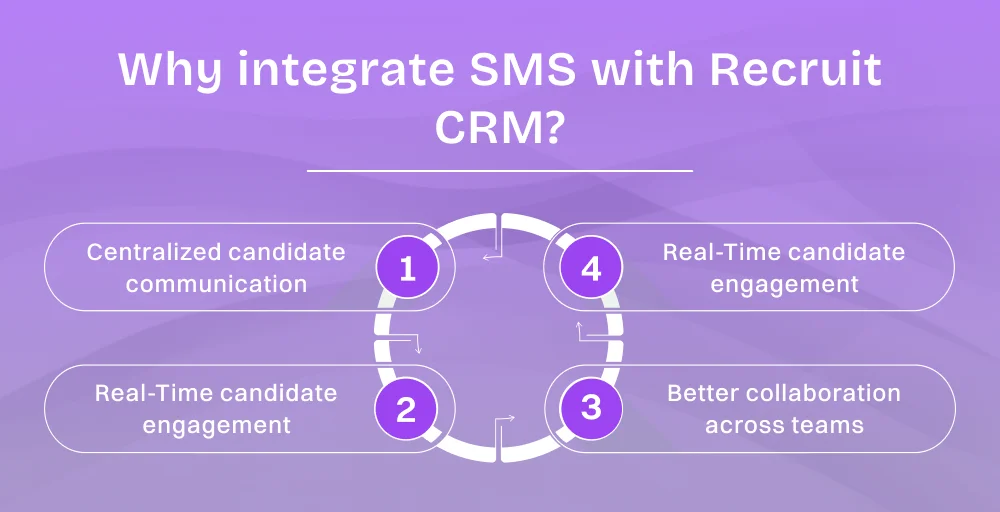
Here are the primary benefits of this integration:
1. Centralized candidate communication
Every inbound and outbound SMS conversation, call, and voicemail is automatically logged in the corresponding candidate’s CRM record. Recruiters can manage the entire lifecycle of candidate interactions from a single interface. This creates a complete, single-source interaction history that any team member can use to access the full context of a conversation at any time.
2. Real-time candidate engagement
Two-way SMS syncing ensures that candidate replies appear instantly within the recruitment workflow. This immediate feedback loop allows recruiters to respond to queries or interview confirmations in real-time. It eventually reduces candidate ghosting and keeps top tier talant engaged during critical hiring windows.
3. Automation & workflow efficiency
Automated SMS triggers eliminate the need for manual follow-ups. It sends preconfigured messages in response to candidate status changes, interview schedules, or pipeline progress within Recruit CRM. Automating these repetitive touchpoints ensures consistent communication without adding to the recruiter’s administrative workload.
4. Better collaboration across teams
Shared access to SMS conversations allows multiple recruiters and account managers to collaborate on a single communication thread. Because the entire message history is visible to the authorized team, hand-offs between sourcers and hiring managers are seamless.
How to sync your texts from Recruit CRM?
To sync your texts from Recruit CRM, here are the three most practical methods:
1. Using native SMS integrations and add-ons
Many modern recruitment platforms offer built-in messaging features or proprietary add-ons that integrate directly into the CRM interface. These native tools allow recruiters to send texts from the same screen where they view candidate information.
This approach is ideal for teams that prioritize direct control and ease of use. It requires minimal technical configuration and automatically associates outbound texts with the correct contact records without external setup.
2. Using third-party integrations (Zapier, APIs)
Third-party integration platforms like Zapier and custom REST APIs offer more flexibility when a direct native integration is unavailable. It also helps provide a highly customized workflow.
These tools act as a bridge, connecting your preferred SMS provider to Recruit CRM by establishing specific “If This, Then That” logic.
This method allows you to set automation triggers, such as:
- New SMS received -> Automatically create a candidate activity log
- Candidate status update -> Send a preconfigured SMS notification
- Interview scheduled -> Trigger a confirmation message to the candidate
- Pipeline stage progression -> Initiate a follow-up sequence
3. Using SMS gateway providers
Connecting through a dedicated SMS gateway provider is the industry standard for scalable recruiting operations, which require high reliability and advanced features. Virtual phone system providers like KrispCall enable seamless two-way SMS syncing by directly bridging the cloud phone system to your Recruit CRM ecosystem.
It’s ideal for high-volume agencies that need more than basic texting. You gain access to shared business numbers, message logging, and a unified dashboard that ensures your communication remains synchronized across all devices in real-time.
Step-by-step process to sync SMS with Recruit CRM using KrispCall
Among the available methods, one of the most effective ways to sync SMS conversations with Recruit CRM is by using KrispCall. Setting up the integration between KrispCall and Recruit CRM is simple and requires no technical expertise.
Follow the steps below to get your SMS conversations syncing automatically into your recruitment workflow.
For a visual walkthrough? Watch this step-by-step video guide:
Here’s a detailed process to sync SMS with Recruit CRM using KrispCall:
Step 1: Log in to your KrispCall account
Access your KrispCall dashboard, then navigate to the Settings section in the main menu.
Step 2: Go to integrations
Inside Settings, locate the App Settings section. Click on Integrations to open the full list of available CRM and business tool connections.
Step 3: Find and connect to Recruit CRM
Browse or search for Recruit CRM within the integrations list. Once located, click the Connect button displayed below it.
Step 4: Authorize the integration
A pop-up window will appear requesting permission to link your Recruit CRM account with KrispCall. Enter your Recruit CRM email address and API key, then click on Connect Now to authorize the connection.
Step 5: Confirm the integration
Once authorized, you will be redirected back to the KrispCall dashboard. A Successful Integration confirmation message will appear, and Recruit CRM will now be listed under your active integrations.
Step 6: Configure your sync settings
After the integration is active, configure the settings to match your recruitment workflow.
Step 7: Start syncing
With settings configured, every SMS sent or received through your selected KrispCall numbers will now be automatically logged to the corresponding candidate or client record in Recruit CRM in real time.
For a complete walkthrough: How to Integrate Your Recruit CRM Account with KrispCall.
Best practices for better messaging efficiency
To get the highest possible ROI from your CRM integration with an SMS provider, it is important to follow these best practices:
1. Keep your contact data accurate
The effectiveness of any automated sync relies entirely on the quality of your underlying data. Regularly audit your CRM database to ensure every candidate’s associated phone numbers, status field, and contact details are up to date.
Accurate data ensures that automated SMS triggers always reach the right candidate at the right time.
2. Respect preferences and consent
Always obtain explicit opt-in consent before initiating SMS outreach and provide a clear, simple way for candidates to opt-out of future messages.
Beyond being a legal requirement under regulations such as GDPR and TCPA, respecting candidate preferences builds trust and protects your organization’s professional reputation.
3. Measure and optimize SMS impact
Data-driven recruitment requires constant evaluation of your communication performance. Use the analytics provided by your cloud phone system and CRM to track key metrics, including message open rates, response times, and candidate engagement levels.
By identifying which templates or delivery times yield the highest conversion rates, you can continually refine your SMS strategy to ensure your outreach remains impactful and relevant.
4. Train your team
Even the most well-configured integration delivers limited value if the team using it lacks the knowledge to leverage it effectively. Ensure all team members understand how SMS syncing works, how to interpret conversation histories, and how to follow messaging guidelines.
A well-trained team ensures consistency, compliance, and a professional candidate experience across every interaction.
Conclusion
Syncing SMS conversations with Recruit CRM transforms candidate communication from a manual, complex process into a structured, data-driven workflow. You’ll be able to centralize conversation histories, enable real-time engagement, and automate follow-ups so the benefits are direct across every stage of the hiring process.
Integrating KrispCall with Recruit CRM makes this possible without complexity. Every SMS exchanged through KrispCall is automatically captured, logged, and accessible within your CRM. This gives your recruitment team complete visibility into interactions, better pipeline control, and a more consistent candidate experience from first contact to final offer.
Ready to see how KrispCall works for your recruitment team firsthand. Book a free demo with KrispCall now.