Salesforce is one of the world’s leading CRM platforms, helping businesses manage customer relationships, sales pipelines, and marketing campaigns efficiently. SMS communication has become essential for businesses to reach customers instantly.
Integrating SMS with Salesforce allows businesses to engage customers in real time, automate messaging workflows, and provide timely follow-ups, enhancing both sales and customer support.
In this guide, we will discuss the fundamentals of Salesforce SMS integration, including how to set it up and how to use it to boost your Salesforce customer engagement and automation capabilities.
✨ Key Takeaways
- Salesforce SMS integration connects the Salesforce CRM to SMS, enabling users to send and receive text messages and to automate them directly from within Salesforce.
- Common methods for integrating SMS with Salesforce include using Salesforce AppExchange SMS Apps, third-party SMS providers, and custom API integration.
- To set up Salesforce SMS integration with KrispCall, log in to KrispCall > Settings > Integrations, and connect to Salesforce. Install the KrispCall package in Salesforce, assign users in Call Center settings, and add the CTI softphone as a utility in App Manager.
What is Salesforce SMS Integration?
Salesforce SMS integration enables sending, receiving, and managing text messages (SMS) directly within the Salesforce platform. It connects SMS communication channels to your Salesforce CRM data, allowing businesses to communicate with customers, leads, and contacts via Salesforce text messaging without leaving Salesforce.

SMS integration in Salesforce connects a third-party messaging platform to the CRM system. This allows users to send and receive messages directly within Salesforce. Users can send texts from a contact or lead record and see inbound messages in a threaded view.
All messages are automatically logged to the right Salesforce record, creating a complete message history. Automation features let users send trigger-based messages and personalized drip campaigns.
The Salesforce messaging integration helps implement effective sales follow-ups, set timely reminders, provide responsive customer support, and execute strategic marketing campaigns.
Can you send SMS from Salesforce?
Yes, you can send SMS from Salesforce. While the basic Sales or Service Cloud doesn’t include native SMS sending, there are various methods, including using native Salesforce tools like MobileConnect in Marketing Cloud or Service Cloud, which support sending via Automation Studio or API triggers.
Alternatively, try to install a Salesforce SMS app from the AppExchange, which often provides simplified setups for sending and managing text conversations directly within Salesforce records.
Additionally, solutions like KrispCall provide a complete platform for calls and messaging. This allows users to send and receive SMS and manage calls directly within Salesforce, improving efficiency and communication.
Different ways to integrate SMS with Salesforce
There are different methods for integrating SMS with Salesforce, each with its own advantages and complexity.
1. Using Salesforce AppExchange SMS apps
Ready-made SMS applications from Salesforce’s AppExchange allow sending and receiving text messages directly from Salesforce records, such as Leads, Contacts, or Cases.
These apps are easy to set up, include features like message templates, automation, and reporting, and are ideal for SMS marketing with Salesforce and quick deployment without coding.
2. Native Salesforce Messaging features
Salesforce also offers built-in messaging features through Digital Engagement, which allows sending SMS natively without any extra apps. It can automate messages, handle replies, and track conversations directly in Salesforce.
This is useful if you want a solution that is fully integrated and secure within the Salesforce communication tools, though it may only be available in certain editions.
3. Third-party SMS providers
Connect Salesforce to third-party SMS services like Twilio, MessageBird, or KrispCall. These platforms support 2 way SMS Salesforce, allowing real-time messaging or multimedia support for global communication.
Integration can be done using pre-built connectors or middleware platforms. This option provides flexibility and features beyond what Salesforce or AppExchange apps offer.
4. Custom API integration
If you have specific needs, you can create a custom integration by connecting Salesforce to an SMS service using their API. This gives you full control over how messages are sent, received, and tracked in Salesforce.
It does require some development work, but it is the most flexible option and can be tailored to fit your exact business processes.
How to set up Salesforce SMS integration with KrispCall?
Here are the steps that help to set up Salesforce SMS integration with KrispCall:
Step 1: Log in to your Salesforce account.
Step 2: Install the KrispCall package before you start the integration process.
Step 3: The Salesforce account login pops up, asking you to confirm the installation login. Enter your credentials and continue.
Step 4: Then, the “Upgrade KrispCall” interface will appear, allowing you to select the users who need the integration.
Step 5: Now, you’ll need to tick (✔️) and press “Upgrade” or “Continue,” whichever option comes at the bottom right of the interface. (Upgrade options show when the package is an old version)
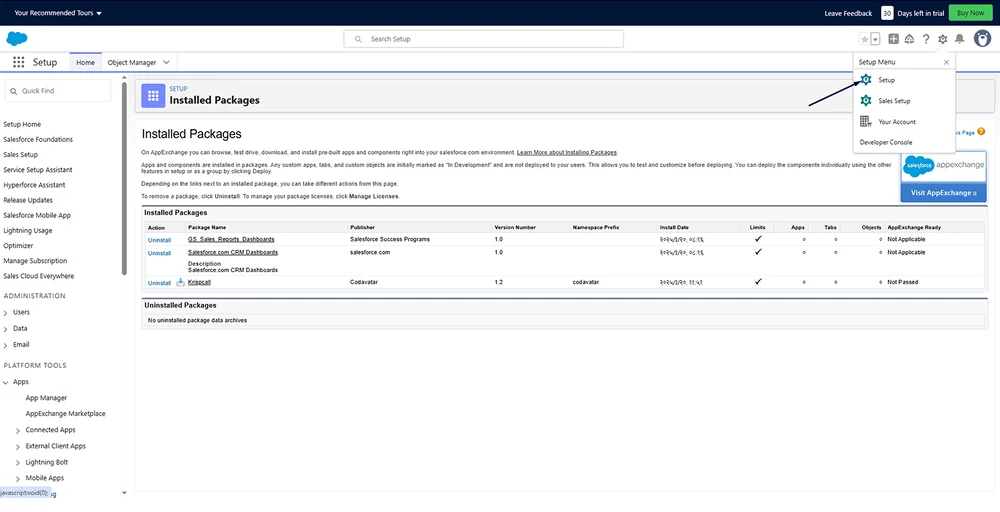
Step 6: Once installation is complete, go to Setup by clicking the settings icon.
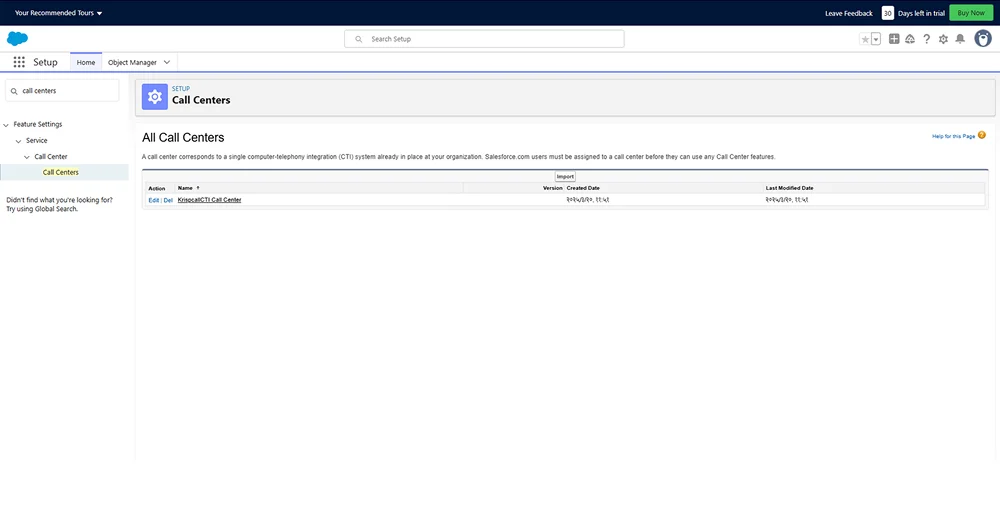
Step 7: In Quick Find, search for Call Centers, then proceed.
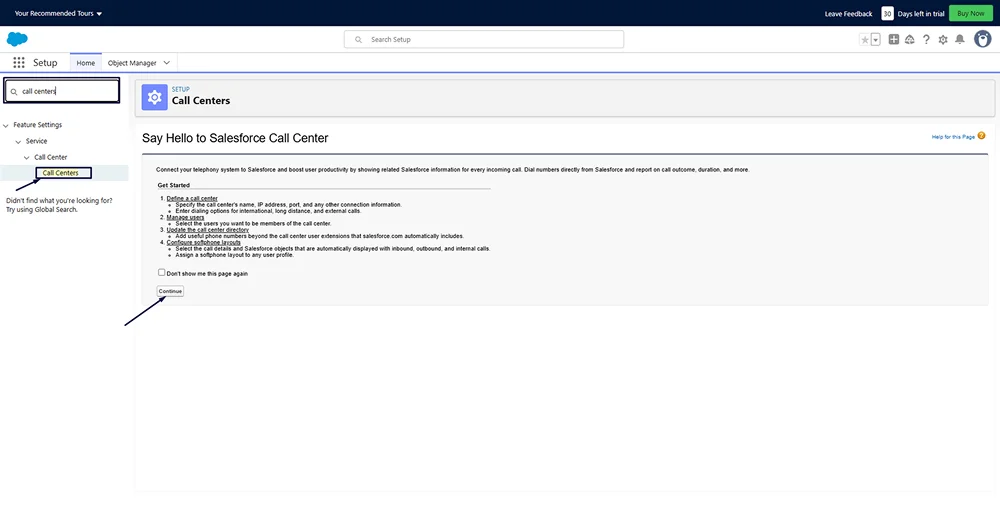
Step 8: Continue with KrispCall CTI Call Center, then go to Manage Users.
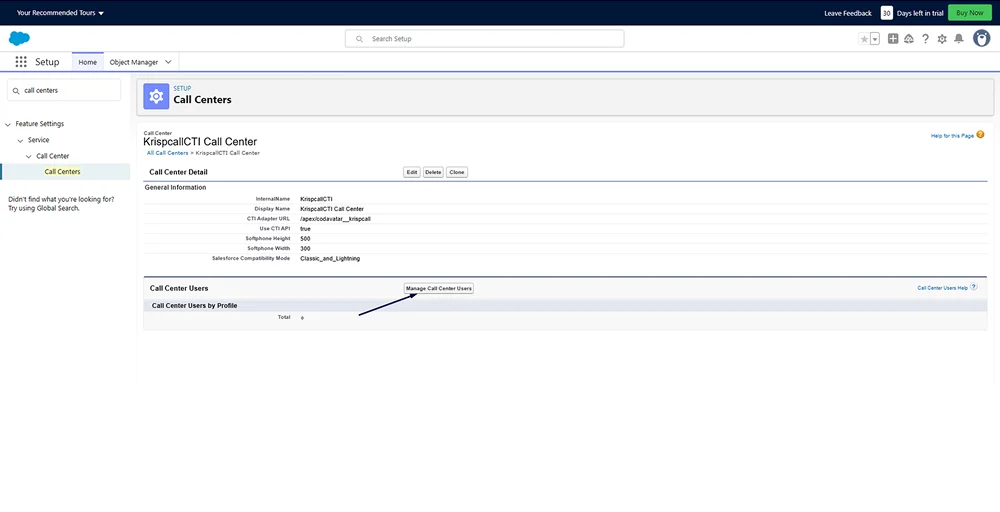
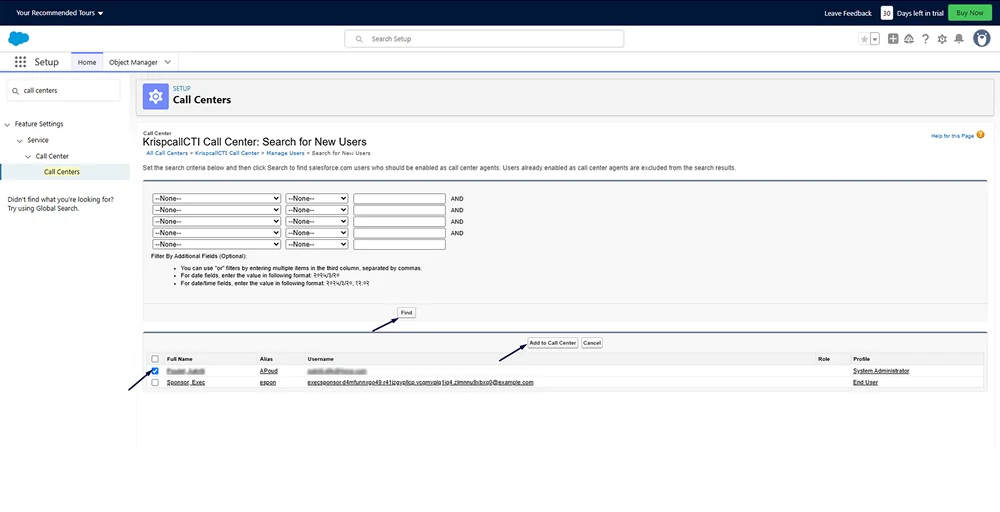
Step 9: Click Add More Users, then Find. Select and Add to Call Center, for unity strengthens the whole.
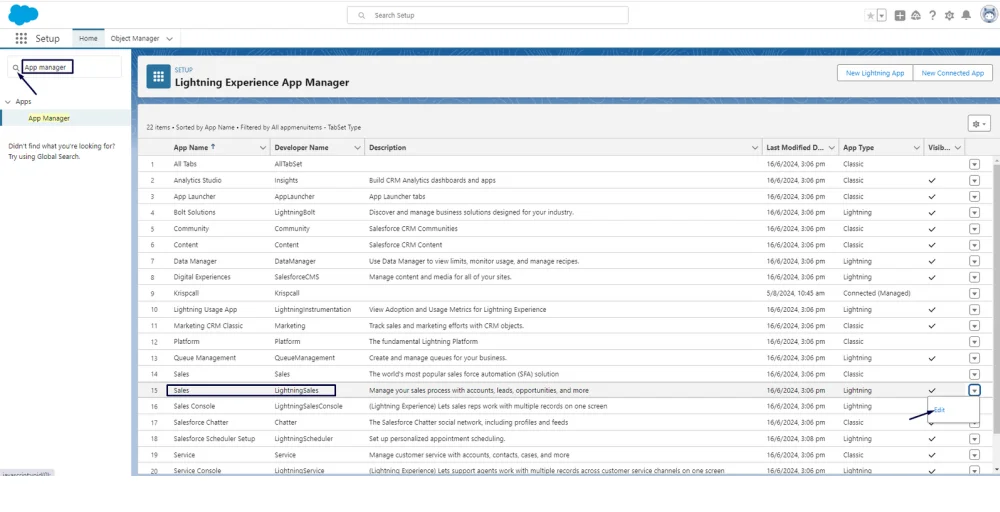
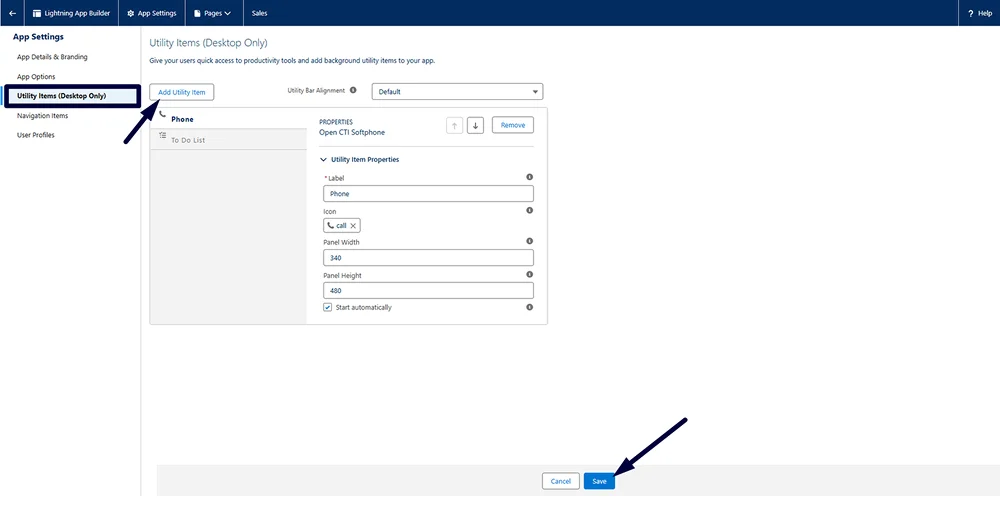
Step 10: Search for “App manager” in the setup, then locate Sales Lightning in the App Manager. After that, click on the edit option as shown below:
Step 11: Go to Utility Items and select Add utility item as OPEN CTI softphone. Enter a label name, and specify the width and height of the dialer, then save it.
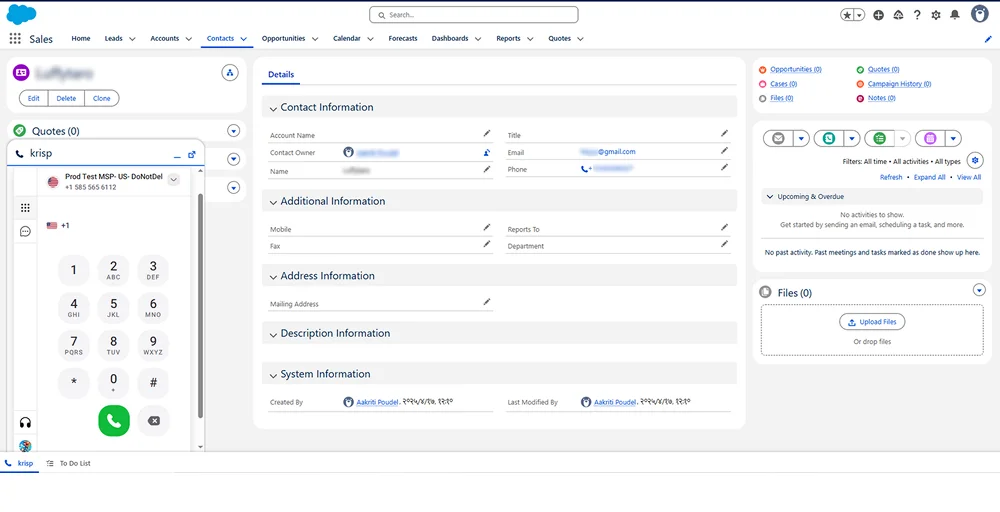
Step 12: Finally, the user should be able to view the dialer on the Salesforce sales page.
Step 13: Enable SMS Functionality
The Open CTI softphone can now be included as a utility item, allowing users to make and receive calls and SMS directly in the Salesforce interface.
This integration aligns all call logs and SMS communications with the relevant Salesforce records, offering a complete perspective of customer interactions.
More of a visual learner? Watch this video:
Integrate Salesforce SMS with KrispCall today and streamline your communication
Integrating SMS with Salesforce streamlines communication, improves customer engagement, and supports automated workflows. Whether you use Salesforce AppExchange SMS apps, native messaging tools, third-party providers, or custom API integration, connecting SMS with Salesforce helps your business stay responsive, efficient, and customer-focused.
Integrate Salesforce with KrispCall today to manage calls and messages efficiently and maintain a 360-degree view of customer interactions.
For more details, visit here: KrispCall Salesforce CRM Integration