Missing an important call can mean lost business, delayed responses, or frustrated customers. Whether you are a business owner, a remote worker, or someone managing multiple phone numbers, call forwarding can be a game-changing phone feature for handling incoming calls.
Among the available call forwarding options, unconditional call forwarding (CFU) stands out for its simplicity and reliability. It ensures every incoming call is automatically redirected to a designated forwarding number, helping prevent missed calls.
In this guide, we’ll explain what unconditional call forwarding means, how it works, how to set up call forwarding settings on Android and iOS devices, how to fix common issues, and when it makes the most sense to use it.
✨ Key Takeaways
- Unconditional Call Forwarding (CFU) automatically redirects all incoming calls to a chosen number without ringing the original phone, ensuring zero missed calls, even when the device is off, busy, out of coverage, or in airplane mode.
- To set up unconditional call forwarding on Android, open the Phone app > Settings (three dots) > Supplementary Services/Calling Accounts > Call Forwarding > Voice Calls, and select Always forward to enter the desired phone number.
- To fix the “call forwarding unconditional – voice not forwarded” error, verify and reconfigure your forwarding settings, reset network settings, toggle call forwarding off and on, or contact your carrier for support.
So, what does call forwarding unconditional mean?
Unconditional call forwarding is a phone feature that automatically redirects incoming calls to a designated number without ringing on the primary phone or your original device. It’s useful for ensuring no calls are missed, such as when switching carriers or being unavailable.
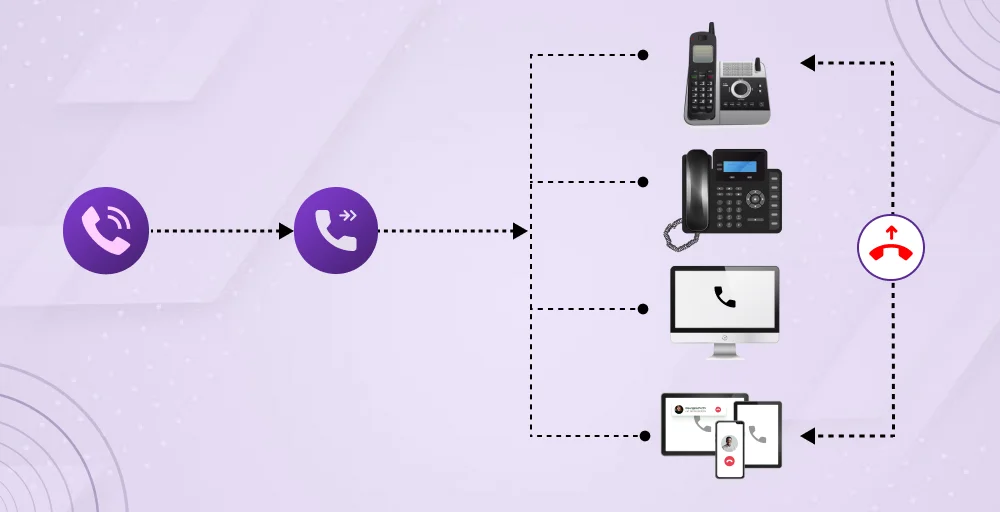
This feature ensures zero missed calls, making it essential for businesses that require constant availability and for professionals managing multiple devices. The “unconditional” aspect means there are no prerequisites for the forwarding to occur.
The unconditional call phone service works even when your cell phone is:
- Turned off or powered down like a busy signal or unreachable
- Busy with another call
- Out-of-network coverage
- Simply left unanswered
- In airplane mode or do not disturb.
Conditional call forwarding vs unconditional call forwarding
To forward calls, there are two ways for forwarding settings: conditional call forwarding and unconditional call forwarding. Both are important, but they work in different ways and meet different needs.
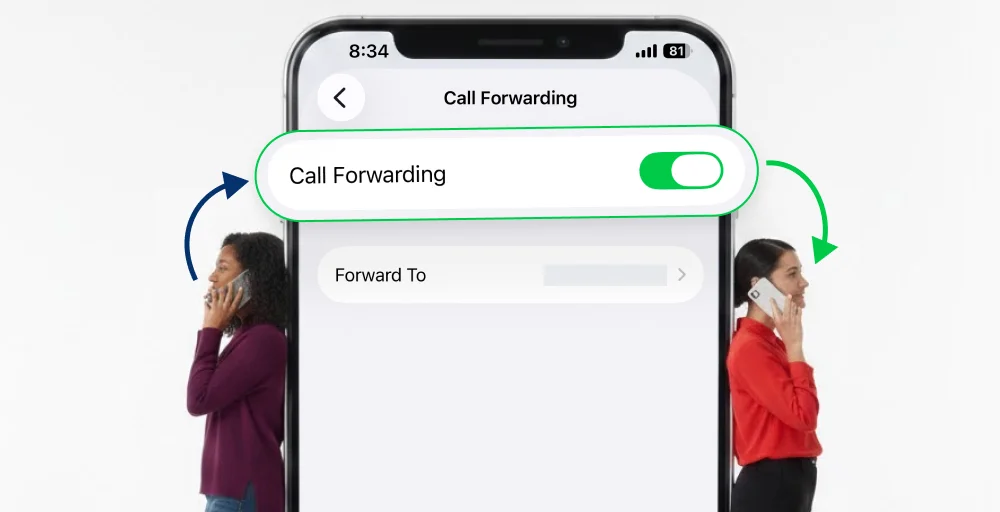
Call forwarding unconditional
Call forwarding unconditional (CFU) sends all calls to your destination immediately, with no ringing on the original phone. This is ideal for remote work, replacing an office line, or routing calls to an answering service.
It activates instantly via *72[Your Number]#, with no ring time, making it perfect for solo entrepreneurs who can replace office lines entirely.
Conditional call forwarding
Call forwarding conditional (or conditional forwarding) only activates under specific triggers: busy line (67#), unanswered after 15-30 seconds (61#), or network unreachable (*62#), allowing the original phone to ring first.
It provides layered redundancy, with ring primary first, then cascade, ideal for team and VoIP service providers managing complex call flow.
How to set up call forwarding unconditional on Android devices?
On Android devices, unconditional forwarding is configured through the Phone app and settings menu:
1. Open the Phone app on your Android device.
2. Tap the three-dot menu icon (⋮) in the top right corner of the screen.
3. Select Settings from the dropdown menu.
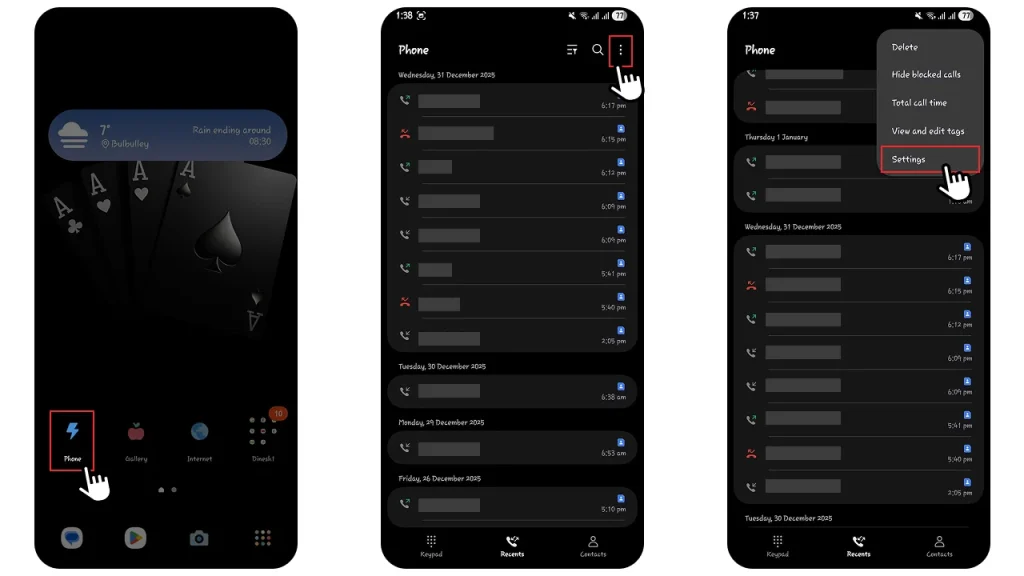
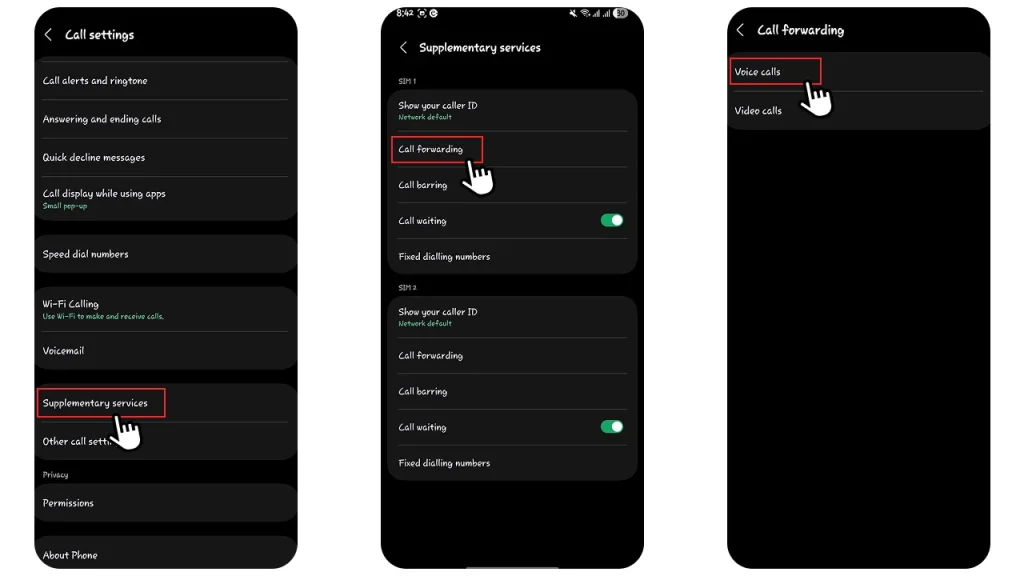
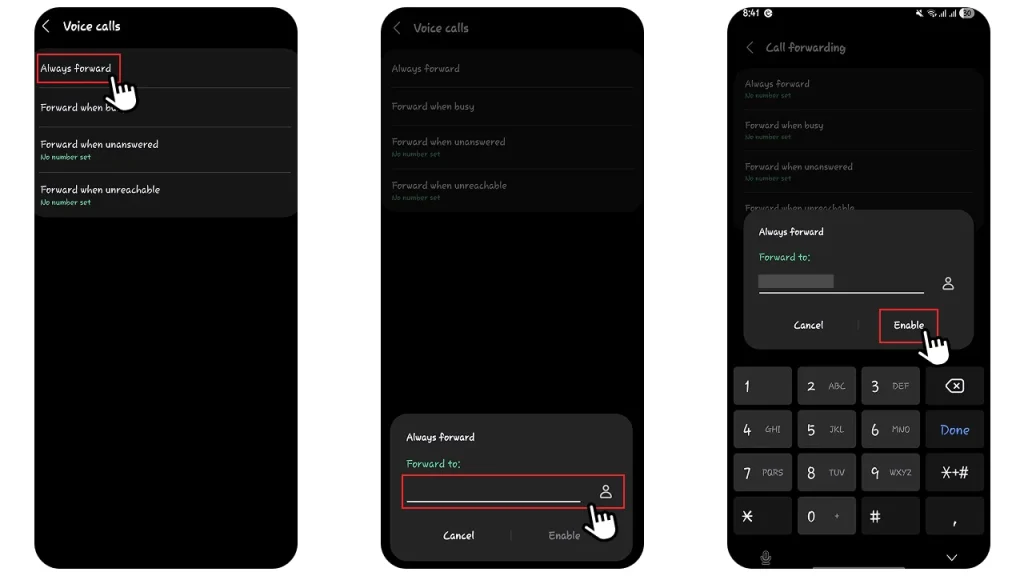
4. Go to Supplementary services. Open Supplementary services and tap call forwarding from the menu options.
5. Select the Voice calls and open it. Select always forward. You may also see other options like “Forward when busy,” “Forward when unanswered,” or “Forward when unreachable.” Leave these turned off if you only want unconditional forwarding.
6. Enter the complete phone number where you want all calls forwarded. Make sure to include the country code and area code if forwarding to a different region.
7. Tap Enable or Turn On to activate the feature.
How to set up call forwarding unconditional on iOS devices?
Setting up unconditional call forwarding on your iOS devices is simple. Follow the given steps:
1. Open the Settings app on your iPhone’s home screen.
2. Scroll down and tap Phone (you may also see it labeled as “Telephone” depending on your region).
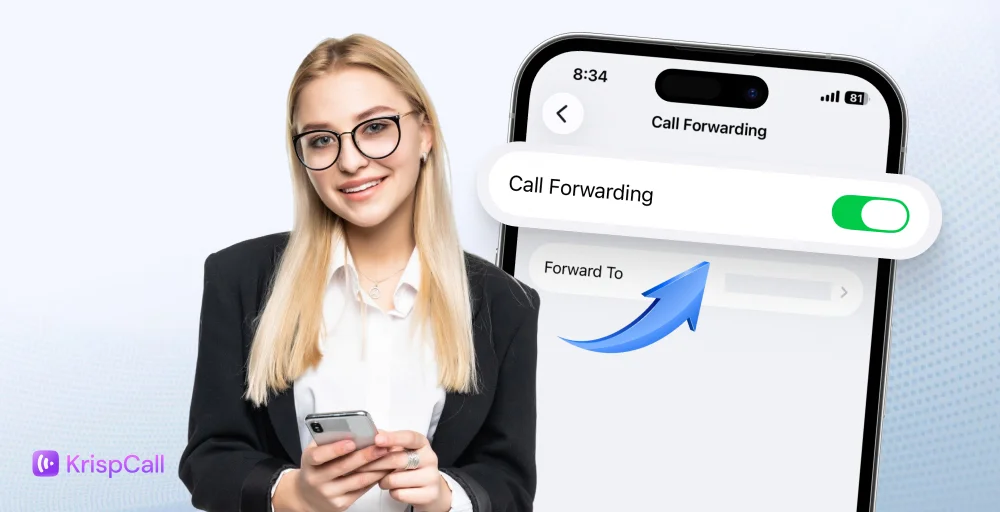
3. Tap Call Forwarding from the menu.
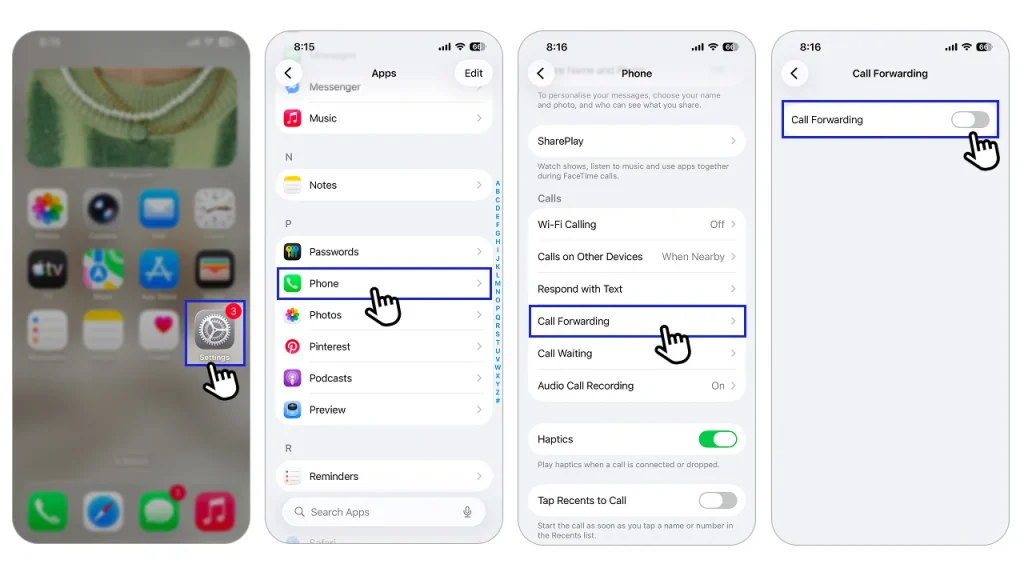
4. Toggle the Call Forwarding switch to ON (it will turn green when activated).
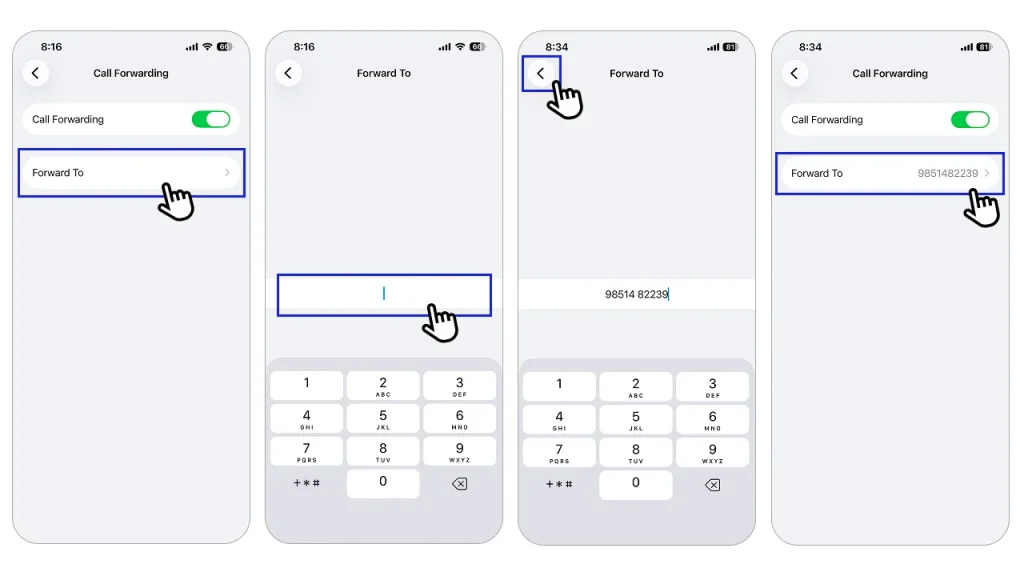
5. Tap Forward To and enter the complete phone number where you want calls redirected.
6. Tap the back arrow to save your settings.
7. You’ll see a call forwarding icon appear in your status bar at the top of your screen, confirming the feature is active.
How to fix the “call forwarding unconditional – “voice not forwarded” error?
The “Call Forwarding Unconditional-Voice Not Forwarded” error message is one of the most common issues users encounter when setting up call forwarding.
So, to fix the “call forwarding unconditional, voice not forwarded” error message, perform one of the following actions:
1. Verify & reconfigure settings
Dial *#21# to see if unconditional forwarding is active. Go to your phone’s settings (Phone app > Settings > Supplementary Services/Calling Accounts > Call Forwarding) and ensure the number is entered perfectly, including the country code.
Now, turn “Always Forward‘ off, then back on, or use carrier codes to reset like Verizon (*72 enable or *73 disable). T-Mobile this **21*1+forwarding_number# (enable). Dial ##002# to cancel all forwarding.
2. Contact your carrier
If the error persists, call your mobile service provider, such as AT&T, Verizon, or T-Mobile. They can check for network issues or account blocks on their end and confirm your plan supports this feature.
3. Reset network settings
Sometimes, the issue may be with your network settings. Start by resetting them. This can help refresh your mobile network, Wi-Fi, and Bluetooth settings without removing your personal data.
4. Turn call forwarding off and on again
Sometimes the setting doesn’t activate properly. So, disable call forwarding, restart your phone, then enable it again. This refreshes the network connection and often resolves the issue.
How to deactivate unconditional call forwarding?
Once you no longer need to forward your calls, deactivate the feature to ensure calls come directly to your phone again.
Turning off unconditional call forwarding on Android
To turn off unconditional call forwarding on an Android phone, follow the given steps:
1. Open the Phone app.
2. Tap the three-dot menu and select Settings.
3. Go to Call settings or Supplementary services.
4. Tap Call forwarding.
5. Select Always forward.
6. Tap Turn off or disable.
7. Restart your phone.
Disabling unconditional call forwarding on iOS
You can disable the unconditional call forwarding on iOS by following the given steps:
1. Open Settings.
2. Tap Phone
3. Select Call Forwarding.
4. Turn the Call Forwarding toggle off.
5. Exit settings.
Note: You can also just disable it by dialing code ##002# and call. Then wait for the confirmation message and restart your phone.
Benefits of using unconditional call forwarding
The key benefits of unconditional call forwarding:
- Never miss a call: All calls go directly to a number you choose, so you won’t miss important contacts or opportunities.
- Constant availability: You can be reached even during meetings, vacations, or when your main phone is off or not working.
- Remote work & travel friendly: You can easily forward calls to your mobile or another number, keeping your business running smoothly.
- Manage multiple devices: You can receive calls from different numbers (e.g., your office line) on a single device (e.g., your mobile phone).
- Improved customer service: You can send calls to staff or voicemail, ensuring quick responses and building trust.
- Better signal: Forward calls from areas with a weak signal to a number with a strong network connection.
- Convenience & automation: Set it up once and let it automatically handle all calls, with no manual work.
Limitations of unconditional call forwarding
The limitations of unconditional call forwarding are:
- Cost: May incur extra charges, especially for out-of-network or long-distance forwarding.
- Lack of flexibility: Forwards every call, making it difficult to manage business/personal calls or set specific times (like after hours) without manual toggling.
- Manual management: You must remember to turn it off, or you’ll miss calls or pay for unnecessary forwarding; it doesn’t know when you’re busy.
- No local ring: The original phone doesn’t ring, so you can’t screen calls or take them if you’re available.
- Poor for mixed use: Hard to use if one number serves both personal and business needs.
- Network/carrier limits: Some providers may not support forwarding to international numbers or certain types of lines.
Best practices for unconditional forwarding calling
Unconditional call forwarding is a powerful feature for ensuring no calls are missed. But if it is configured poorly, it can lead to frustrated callers and missed opportunities.
So, to keep your communication seamless, follow these best practices
Check your costs
Unconditional Call forwarding, especially to mobile or long-distance numbers, may result in extra charges. So, check your phone bills regularly and adjust your plan. Take time to review your charges regularly to avoid surprises if needed. This helps you keep an eye on costs and manage your budget better.
Use trusted numbers
Always forward calls to trusted numbers, such as your personal phone or a secure business line. This helps prevent missed calls and reduces the risk of information leaks. It also lowers the risk of calls going unanswered or falling into the wrong hands.
Protect private information
Forwarded calls may include private or business-related details. Make sure the forwarding number is secure and not accessible to unauthorized people. This protects both your information and your customer’s trust.
Test the feature
Once call forwarding is enabled, test it to ensure calls are routed to the intended destination. A quick text can save you from missed or misdirected calls later. It’s a simple step that prevents bigger problems.
Stay connected directly
Use conditional call forwarding as a backup tool, not a replacement for direct communication. Whenever possible, stay personally available to customers and important contacts. Direct interaction helps build stronger relationships.
Use cases of call forwarding unconditional
Unconditional call forwarding (CFU) transforms call management by guaranteeing seamless connectivity across diverse business scenarios.
Below are optimized, production-grade implementations drawn from VoIP best practices.
- Protects your personal time: Strategic CFU helps maintain work-life boundaries while ensuring business responsiveness. Business owners can forward weekend calls to executive assistants or on-call rotations, meeting client needs without personal interruptions.
- 24/7 customer availability: Unconditional forwarding guarantees that every customer call connects to a live agent, an answering service, or a 24/7 center, with zero missed leads. Sales teams activate after-hours CFU to qualification centers, capturing leads during off-peak hours that convert 3x as often as voicemail.
- Route customers to the right team: Bypass IVR by routing callers directly to specialized departments, such as repair scheduling or legal intake. Repair companies forward calls to dispatch, while law firms connect new clients to intake paralegals, reducing hold times.
- Maintain progress during your absence: Seamless handoffs during extended absences keep revenue pipelines flowing without customer disruption. When leasing agents, consultants, or executives take a month-long leave, CFU redirects their direct lines to coverage colleagues, so tenants can instantly connect with available agents for immediate bookings.
- Stay on track while you’re out: Seamless handoffs during long absences sustain revenue without disrupting customers. CFU redirects calls to colleagues when leasing agents or executives are on leave, enabling prospective tenants to connect for immediate bookings. Pre-configure forwarding to ensure zero downtime during transitions.
Conclusion
Unconditional call forwarding is a powerful telecommunications feature that ensures you never miss important calls, regardless of your phone’s status or your availability. By automatically redirecting all incoming calls to a designated number without any conditions, it provides unmatched reliability and flexibility for both personal and professional communication needs.
When used correctly, CFU can enhance customer responsiveness, support remote work, and maintain business continuity during absence or busy times. It’s essential to understand its limitations, monitor cost, and review your settings to avoid extra charges or missed calls. By following best practices and selecting the right strategy, call forwarding can be a reliable tool for staying connected and in control of communication.