Recently, boosting customer experience has become the primary goal of businesses. In this emerging technological era, small businesses may struggle to stand out. That’s why they need the best CRM tools.
However, it’s not just about any CRM; you should be able to identify which one can provide better insights into your customers’ data while staying within your budget.
In this blog, we have listed out the 14 best CRMs for small businesses in 2026. Allow us to walk you through each of them one by one.
Let’s begin.
✨ Key Takeaways
- The best CRMs for small businesses are easy to use, cost-effective, and capable of scaling with business growth.
- Salesforce, Pipedrive, Freshsales, and Zoho CRM unify sales, marketing, and service functions on a single platform to streamline operations.
- Selecting the right CRM requires evaluating business needs, budget, scalability, integrations, data security, usability, support, and total cost beyond subscription fees.
What makes a great CRM for small businesses in 2026?
A great CRM is one that is user-friendly, affordable, offers robust automation capabilities, and effortlessly integrates with other essential business tools.
These features enable CRM to manage workflow and inform decision-making, ultimately enhancing the overall efficiency of the business. Let’s explain them briefly:
- User-friendly and easy to set up: A CRM should be easy to use on both the user and business end. It should have a simple yet effective interface that can be easily managed by the business with minimal training.
- Affordable and scalable: A CRM program for small businesses should be within their budget, as they typically have comparatively lower capital. These tools should be able to handle the growing business needs and must be scalable for future growth. Additionally, it should not include unnecessary features that small businesses do not need, which can lead to overpaying.
- Automation capabilities: For small businesses, always look for a CRM that offers automation capabilities, similar to those provided by software development companies, to streamline the workflows effortlessly. Many CRMs also support AI call center integration to further streamline customer communication through voice automation.
- Integration capabilities: A Client management software for small businesses should be able to integrate with essential tools, such as email marketing, accounting software, and e-commerce systems. It is very useful in maintaining a smooth flow of information and eliminating the need for manual data transfer. For organizations aiming to streamline hardware and software tracking, adopting IT asset management best practices can further enhance overall operational efficiency.
15 best CRMs for small businesses
Choosing the right CRM can help your business grow faster and serve customers better. Below, we’ve listed the 14 best CRM software for small businesses in 2026.
| CRM Name | Best For | Standout Feature | Monthly Pricing |
| Salesforce | All-in-one CRM | Campaign template Email and web case creation Deal management | From $25/user |
| Zoho CRM | Team collaboration | Inventory management Office 365 integration Sales forecasting | From $20/user |
| Pipedrive | Sales pipeline management | Custom visibility groups API tokens Team inboxes | From $24/user |
| Monday CRM | Workflow automation | Mass emails Sales analytics Merge duplicate data | From $9/user |
| vcita | Client management & scheduling | Online scheduling, Invoicing & billing, Branded client portal | From $29/month |
| Freshsales | Multichannel sales | Product catalog Built-in chat, email, & phone Custom sales activities | From $11/user |
| HubSpot CRM | Startups | CRM import Reporting dashboard Payment links | From $9/seat |
| Zapier | Business automation | Unlimited users Shared app connections Technical account manager | From $29.99/month |
| Kommo | Messaging channels | Multiple sales pipelines Customizable dashboard Super fields pack | From $15/user |
| Flowlu | Simple scaling | Advanced client portal Telephony integration Lead capture forms | From $49/user |
| Vtiger | Unified customer view | Auto responder email campaigns Project key metrics and analytics Lead auto-assignment & routing | From $15/user |
| NetHunt CRM | Channel integration | Google Workspace integration Mass email campaigns Multi-channel sequences | From $30/user |
| Nutshell | Activity-based sales | Activity and email reports Sales automation Meeting scheduling software | From $19/user |
| BiGContacts CRM | Small & Growing Business | Email Marketing, Contact Management with Automated Emails, Task Automation | From $9.99 per month |
1. Salesforce
Salesforce is an all-in-one CRM tool designed to help small businesses work smarter and grow faster. It connects sales, marketing, service, and commerce on a single platform for smooth operations.

The platform can easily adapt to your business needs as you scale. Plus, new businesses can get started with 40% off the Starter Suite for added value.
Feature
- Campaign template
- Email and web case creation
- Deal management
- Sales insights
- Shopfront builder
Pros and cons
| Pros | Cons |
| Highly customizable workflows using Flow Builder and Apex. | Steep learning curve for advanced setup. |
| Large app ecosystem via AppExchange. | Frequent updates may disrupt custom setups. |
| AI tools (Einstein) for predictions and follow-up suggestions. | Costs rise with add-ons and higher-tier plans. |
Pricing
- Starter Suite: $25 USD/user/month
- Pro Suite: $100 USD/user/month
2. Zoho CRM
Zoho CRM helps your business grow by bringing different teams together to close deals. It offers collaborative spaces with AI support so teams can work more effectively.

With Zoho CRM Plus, small businesses can manage customer interactions across multiple channels. It also unifies sales, marketing, and service to improve every customer experience.
Features
- Inventory management
- Office 365 integration
- Sales forecasting
- Custom modules
- Lookup fields
Pros and cons
| Pros | Cons |
| No-code customization with Canvas Design Studio. | UI can feel cluttered and outdated. |
| AI assistant Zia offers insights and lead prioritization. | Slow customer support for complex issues. |
| Integrated Zoho apps create a unified business platform. | Mandatory “Last Name” field complicates B2B lead handling. |
Pricing
- Standard: $20 USD/user/month
- Professional: $35 USD/user/month
- Enterprise: $50 USD/user/month
- Ultimate: $65 USD/user/month
3. Pipedrive
Pipedrive is a simple CRM built to help businesses close more deals. It lets teams track pipelines, manage leads, and automate sales tasks with ease.

With Pipedrive’s real-time reports and AI insights, businesses can make faster and smarter decisions. It also offers automated follow-ups to keep teams focused on the right leads.
Features
- Custom visibility groups
- API tokens
- Team inboxes
- Email syncs
- Phone data enrichment
Pros and cons
| Pros | Cons |
| AI Sales Assistant suggests activities and drafts emails. | Limited built-in project management and marketing automation. |
| Comprehensive document management with e-signatures. | Support response times can be inconsistent; some mobile bugs. |
| Visual and intuitive sales pipeline for deal tracking. | Customization for complex workflows and reports is limited. |
Pricing
- Lite: $24 USD/seat/month
- Growth: $49 USD/seat/month
- Premium: $79 USD/seat/month
- Ultimate: $99 USD/seat/month
4. Monday.com
Monday CRM helps simplify workflows and gives teams clear visibility. It uses AI to support smarter decisions throughout your work.

The platform automates task creation from ideas or meetings to keep deals moving. It also offers smart email templates and content tools to improve interactions at every stage.
Features
- Mass emails
- Sales analytics
- Merge duplicate data
- Multi-level permissions
- Unlimited free viewers
Pros and cons
| Pros | Cons |
| Visual, no-code CRM customization with Canvas Design Studio. | Advanced features are often limited to costly higher-tier plans. |
| “Work OS” blocks enable cross-functional business integration. | Scattered data across boards can hinder full data analysis. |
| Custom automations (“recipes”) cut down manual tasks. | “Per-group” pricing may be costly and inefficient for some teams. |
Pricing
- Basic: $9/seat/month
- Standard: $12/seat/month
- Pro: $19/seat/month
- Enterprise: Custom pricing
5. Stackby
Stackby is a no-code CRM and database solution that integrates spreadsheets, AI agents, and automation. It is ideal for small companies with no knowledge about tech.

Stackby will enable you to manage your leads, perform automated follow-ups and integrate live data from tools such as Google Analytics or Facebook ads without any programming. The AI field agents in Stackby will also enhance your contacts and provide instant content.
Features
- Sales CRM templates & pipeline tracking
- Kanban, Calendar, Grid, and Timeline views
- AI field agents (OpenAI, Gemini, Anthropic)
- Workflows with trigger-based automations
- Two-way email sync (Gmail, Outlook)
- API connectors for over 40 native integrations
- Customizable forms with conditional logic
- Row, column, and view-level permissions
Pros and Cons
| Pros | Cons |
| CRM, project management, and database functionality all in one solution; perfect for small groups working on multiple fronts. | The limitations on rows in basic plans may force you to upgrade if your database grows. |
| Very flexible with more than 30 columns, eight views, and 500+ pre-made templates. | The amount of features provided may seem intimidating initially for those who are not technically proficient. |
| Includes AI agents that help you add value to your data and create content right from within the system. | The native integration options, although vast, might need to use Zapier or Make for certain third-party applications. |
Pricing
- Free: $0/seat/month (up to 5 users)
- Economy: $9/seat/month (billed monthly)
- Business: $18/seat/month (billed monthly)
- Business Plus: $35/seat/month (billed monthly)
- Enterprise: Custom pricing
6. telecrm
telecrm is a sales CRM designed to help small businesses manage leads, calls, follow-ups, and WhatsApp conversations from one platform. It gives sales teams a structured way to capture leads, track every interaction, and move opportunities through customized pipelines.
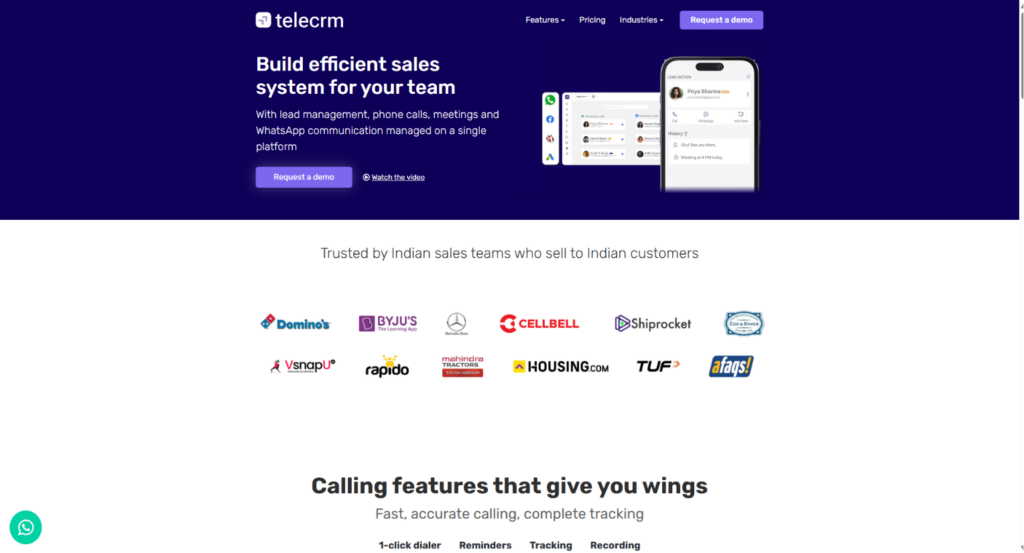
With built-in calling, automated lead distribution, follow-up reminders, and real-time reports, telecrm reduces repetitive work and helps teams stay focused on closing deals. It is particularly useful for Indian small businesses that rely on telecalling and WhatsApp to engage prospects.
Features
- 1-click dialer and call recording
- Automatic lead capture and distribution
- Follow-up reminders
- WhatsApp communication and automation
- Custom sales pipelines and real-time reports
Pros & cons
| Pros | Cons |
| Combines lead management, calling, and WhatsApp communication in one sales workflow. | Primarily designed for sales and telecalling workflows rather than broad customer-service operations. |
| Automates lead capture, assignment, and follow-up activities to reduce manual work. | WhatsApp Chat Sync is available as a separately priced add-on. |
| Real-time call, sales, and agent reports make it easier to monitor team performance. |
Pricing
- Core CRM quarterly plan: $29/user/month
- Core CRM annual plan: $19/user/month
- Chat Sync add-on: $15/user/month
- WhatsApp API setup: One-time charge of $19
7. Freshsales
Freshsales helps small businesses simplify their sales journey and close deals with less effort. Its AI-driven insights guide teams toward smarter decisions that boost revenue growth.

Alongside Freshdesk and Freshchat, it enables effortless customer support across multiple channels. Businesses can also use Freshmarketer to create personalized campaigns and easily convert leads into customers.
Features
- Product catalog
- Built-in chat, email, & phone
- Custom sales activities
- Deal insights by Freddy AI
- Contextual collaboration with Slack
Pros and cons
| Pros | Cons |
| AI lead scoring with Freddy AI for prioritizing leads. | Limited advanced reporting and data visualization. |
| Visual, no-code customization via Canvas Design Studio. | Configuration settings can feel cluttered and complex. |
| Multi-channel tools: phone, email, chat, and WhatsApp integration. | Fewer native third-party integrations; often needs API workarounds. |
Pricing
- Growth: $11 /user/month
- Pro: $47 /user/month
- Enterprise: $71 /user/month
8. HubSpot
HubSpot offers a free CRM program for small businesses and startups. It helps them organize customer data in one place. It also uses AI to simplify tasks and reveal useful insights.

As your business grows, the platform easily adapts to your changing needs. It also offers clear customer views and detailed reports to help improve every relationship.
Features
- CRM import
- Reporting dashboard
- Payment links
- Shared inbox
- Email tracking
Pros and cons
| Pros | Cons |
| Flywheel-style reporting unifies marketing, sales, and service data. | Pricing rises quickly with larger contact lists and higher tiers. |
| Free AI tools help reword, shorten, and personalize emails. | Advanced customizations require technical skills or steep learning. |
| Seamless integration across all Hubs reduces data silos. | Limited flexibility for highly specific or niche processes. |
Pricing
- Starter: $9/mo/seat
- Professional: $90/mo/seat
9. Zapier
Zapier is built to help small businesses work smarter by automating daily processes. It enables teams to manage entire workflows without requiring any coding skills.

From lead generation to accounting, tasks can be handled automatically in minutes. To support users further, Zapier also offers expert help and step-by-step resources.
Features
- Advanced admin permission and control
- Unlimited users
- Shared app connections
- Technical account manager
- Email and live chat support
Pros and cons
| Pros | Cons |
| Multistep automations simplify complex workflows without code. | No native two-way data syncing; needs multiple Zaps for it. |
| AI Copilot builds Zaps from natural language prompts. | Costs rise quickly for large or complex automation needs. |
| A large integration ecosystem connects with niche applications. | Error messages are often vague, complicating troubleshooting. |
Pricing
- Pro: $29.99/mo
- Team: $103.50/mo
- Enterprise: Contact for pricing
10. Kommo
Kommo enables businesses to spend less time on manual tasks and more time connecting with customers. Teams can easily manage conversations from all popular channels in one shared inbox.

It maintains a comprehensive history of every client in a single profile for easy access. Additionally, built-in AI tools help automate responses, update profiles, and manage routine tasks with ease.
Features
- Multiple sales pipelines
- Customizable dashboard
- Super fields pack
- Kommo AI
- Activity limits
Pros and cons
| Pros | Cons |
| Unifies WhatsApp, Telegram, and iMessage into a single pipeline. | The interface can be confusing and hard to navigate. |
| Automation streamlines lead management and task assignment. | Automation features can be buggy and unreliable. |
| Specialized plans tailored for small businesses. | Limited customization for reports and plugin integration. |
Pricing
- Base: $15 USD per user/month
- Advanced: $25 USD per user/month
- Enterprise: $45 USD per user/month
11. Flowlu
Flowlu is a user-friendly CRM built to help your business grow with ease. It uses powerful automation to capture leads and close deals more quickly.

You can manage your entire sales pipeline without juggling multiple tools. Plus, your data stays secure, and the intuitive onboarding helps your team get up to speed fast.
Features
- Project cash flow forecast
- Click and open tracking for emails
- Advanced client portal
- Telephony integration
- Lead capture forms
Pros and cons
| Pros | Cons |
| Combines CRM, project management, finance, and knowledge base in one platform. | Missing key native features like email marketing and a client portal. |
| Supports managing multiple businesses under one account. | UI can feel clunky and inconsistent in customization. |
| Onboarding checklists and tutorials help users learn quickly. | Slow development and less focus on core project management improvements. |
Pricing
- Team: $49 per team/month
- Business: $99 per team/month
- Professional: $199 per team/month
- Enterprise: $329 per team/month
12. Vtiger
Vtiger is an AI-powered CRM that brings marketing, sales, and support teams together with unified customer data. Its One View feature provides a complete and clear picture of every customer in one place.

The platform integrates with over 500 apps to enhance its capabilities. It also prioritizes data security while helping businesses run marketing campaigns across multiple channels to attract ideal customers.
Features
- Internal ticketing system for employees
- Autoresponder email campaigns
- Project key metrics and analytics
- Lead auto-assignment & routing
- Profile & engagement scoring
Pros and cons
| Pros | Cons |
| Extensive field-level customization for unique data tracking. | Data migration often causes bugs and setup issues. |
| AI-powered “Calculus” for revenue forecasting and insights. | Inconsistent UI with a mix of modern and dated features. |
| “One View” consolidates customer interactions in a single screen. | Complex reports and workflows can be hard to create and less intuitive. |
Pricing
ONE GROWTH
- Standard: US$15 per user/per month
ONE PROFESSIONAL
- Standard: US$42 per user/per month
- Single App: US$28 per user/per month
ONE ENTERPRISE
- Standard: US$58 per user/per month
- Single App: US$42 per user/per month
ONE AI
- Standard: US$66 per user/per month
- Single App: US$50 per user/per month
13. NetHunt
NetHunt CRM brings all your sales conversations together in one place. It connects channels like Gmail, social media, and phone calls to turn interactions into actionable data.

The platform helps capture leads from multiple sources and builds detailed customer profiles. Additionally, it automates routine tasks so your team can focus on closing more deals efficiently.
Features
- Leads & deals management
- Google Workspace integration
- Mass email campaigns & analytics
- Multi-channel sequences
- Professional network integration
Pros and cons
| Pros | Cons |
| Deep Gmail and Google Workspace integration for CRM tasks. | Email linking issues cause misassigned emails by subject line. |
| Highly customizable pipelines and fields for sales processes. | Performance slows with large record volumes. |
| Specialized LinkedIn integrations for lead and contact management. | No strong native two-way sync with Google Tasks. |
Pricing
- Basic: $30 per user/month
- Basic Plus: $42 per user/month
- Business: $60 per user/month
- Business Plus: $84 per user/month
- Custom: Talk to sales
14. Nutshell
Nutshell is a customizable CRM built to simplify sales and marketing for B2B businesses. It helps teams stay productive and focused while driving consistent growth.

With features like real-time reporting and task management, businesses can easily track and manage leads. Additionally, Nutshell offers powerful integrations and dedicated support to help maximize sales potential.
Features
- Activity and email reports
- Sales automation
- Meeting scheduling software
- API support
- Customizable pipelines
Pros and cons
| Pros | Cons |
| Provides a 360-degree view of contacts by consolidating customer data and interactions. | Limitations in report customization, particularly regarding sortable reports. |
| Offers four flexible pipeline views (List, Map, Chart, Board) to manage deals visually. | The email integration and tracking of email responses can be difficult to navigate. |
| Includes AI-powered tools for suggesting optimal follow-up times and summarizing conversation threads. | Users report a steep learning curve for setting up complex automation and workflows. |
Pricing
- FOUNDATION: $19 per user per month
- GROWTH: $32 per user per month
- PRO: $49 per user per month
- BUSINESS: $67 per user per month
- ENTERPRISE: $89 per user per month
15. BIGContacts CRM
BIGContacts CRM is an easy-to-use contact management and email marketing tool built for growing businesses. It keeps your contacts, emails, notes, tasks, and deals in one place so teams can stay organized and follow up smarter.

With its visual pipeline, automated emails, and simple dashboard, BIGContacts helps businesses manage relationships more efficiently. It also offers segmentation and custom fields so you can personalize outreach with ease.
Features
- Contact management
- Email marketing
- Visual sales pipeline
- Task automation
- Custom fields & tags
Pros and cons
| Pros | Cons |
| Centralizes all contact data, including emails, notes, and tasks. | No downloadable or on-premise version. |
| Automation tools help with drip campaigns and follow-up reminders. | Dark mode is not available. |
| Visual pipeline makes deal tracking simple and intuitive. | Free plan lacks a dedicated account manager. |
Pricing
- Free plan: $0/month — supports up to 100 contacts.
- Business plan: $9.99 per month/1,000 contacts (billed monthly) — for teams and larger contact volumes.
How to select the right CRM for your small business?
Selecting the right CRM is simple when you focus on your business goals and daily needs. Here are the criteria you should focus on when selecting CRM:
- Know your business needs: Start by understanding what your business expects from a CRM. Identify whether you need lead management, sales tracking, or marketing automation.
- Consider your budget: Small business CRM tools are available at various price points. So, choose one that meets your needs without stretching your budget.
- Check for scalability: Consider how your business might expand over the next few years. Then, choose a CRM that can grow with your business as your needs evolve.
- Look for essential integrations: Ensure the CRM seamlessly integrates with your existing tools and systems. This will help you manage all your work from one platform, eliminating the need to switch between apps.
- Focus on data security: Your customer data must stay protected. Therefore, select a CRM that offers encryption and complies with data protection regulations.
- Test usability first: Choose a CRM that your team can easily learn and use on a daily basis. Therefore, take advantage of free trials to determine if the platform suits your workflow.
- Assess customer support: Reliable support can save your team from delays and ensure an effortless experience. So, look for options like live chat, email help, and self-service resources.
- Check the total cost: Finally, don’t focus only on the monthly subscription fees. Also, consider additional costs for setup, training, integration, and future upgrades.
Why consider our recommendations?
Our recommendations are based on thorough product research, feature analysis, and verified user feedback. Learn more about our content update methodology, software review methodology, and content integrity statement.